1. Pengenalan
This manual provides comprehensive instructions for the installation, operation, maintenance, and troubleshooting of your NIVIAN Professional WiFi SuperHD Surveillance Camera Kit. This system is designed to provide reliable and efficient security monitoring for your home or business.
Please read this manual carefully before using the product to ensure proper setup and optimal performance. Keep this manual for future reference.
2. Produk Lebihview
The NIVIAN CCTV Kit is a professional 2K SuperHD WiFi surveillance system featuring 6 IP cameras and a 10-channel Network Video Recorder (NVR) with a pre-installed 1TB hard drive. Key features include:
- 2K SuperHD Image Resolution: Menyediakan foo video yang jelas dan terperincitage (3MP).
- Pengesanan Manusia AI: Intelligent motion detection to reduce false alarms.
- Audio Dua hala: Mikrofon dan pembesar suara terbina dalam untuk komunikasi masa nyata.
- Dual Night Vision: Infrared mode for discreet monitoring and white LED mode for full-color night vision activated by motion.
- WiFi-6 Long Range Connectivity: Stable wireless connection up to 250 meters with repeater function.
- Kamera Kalis Cuaca IP66: Logam tahan lasak casing suitable for outdoor use.
- Rakaman Profesional: Continuous or event-based recording to the included 1TB hard drive.
- Output HDMI: Connect to a monitor or TV for live viewing.
- EseeCloud App: Remote access and control from mobile devices.
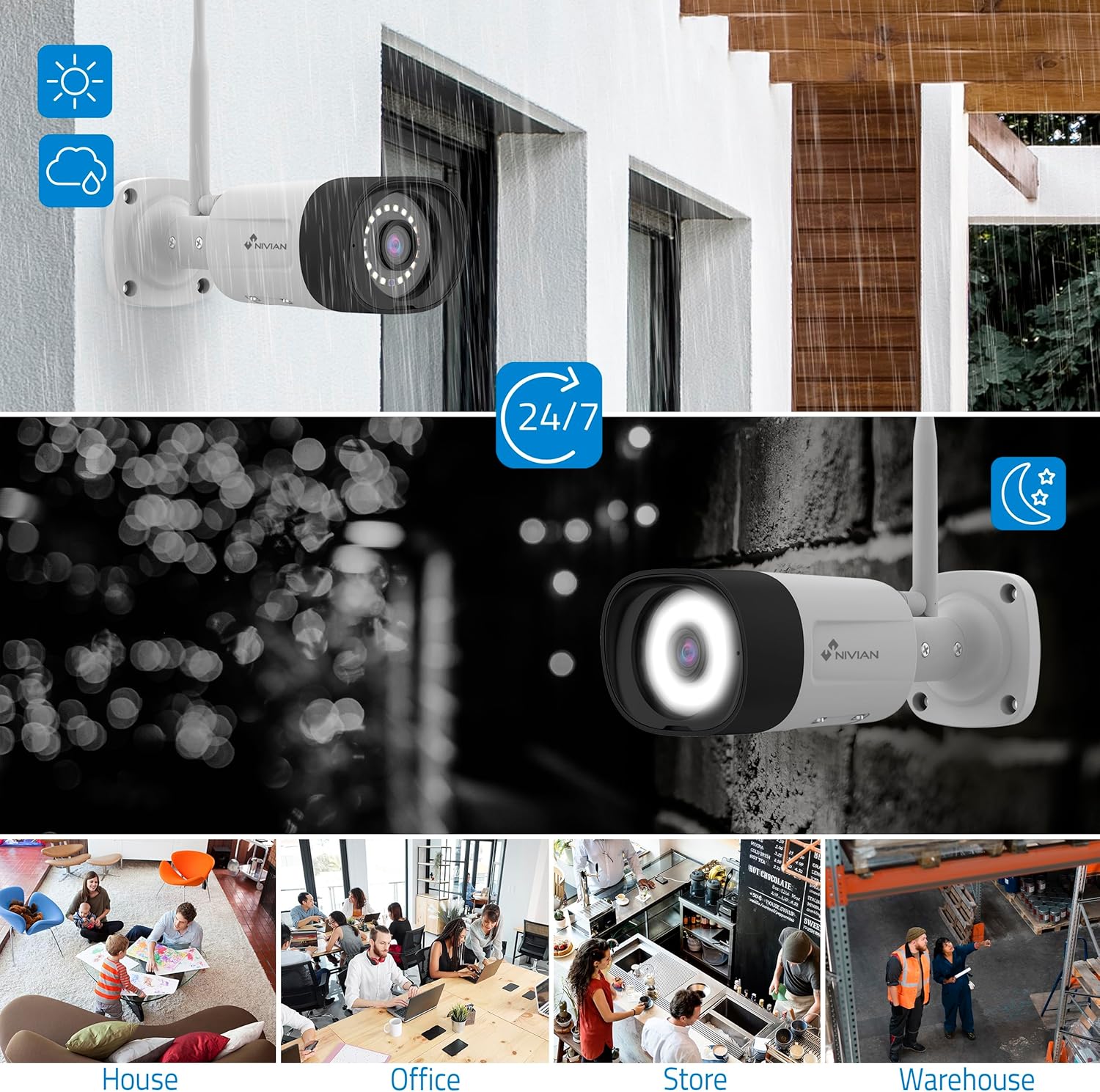
Image: NIVIAN CCTV Camera with day and night vision capabilities, showing weatherproof design and application in various environments like house, office, store, and warehouse.

Image: Comparison of 1080p Full HD video quality versus 2K Super HD video quality, demonstrating enhanced detail with 2K resolution.
3. Kandungan Pakej
Sahkan bahawa semua item terdapat dalam pakej anda:
- 1x 10-Channel NVR (Network Video Recorder) with 1TB Hard Drive
- 6x NIVIAN 2K SuperHD WiFi IP Cameras
- Penyesuai Kuasa untuk NVR dan Kamera
- Tetikus USB
- Kabel Ethernet
- Memasang Skru dan Palam
- Panduan Mula Pantas (rujuk manual ini untuk arahan terperinci)
4. Persediaan
4.1. NVR Installation
- Sambungkan NVR:
- Connect the NVR to a power outlet using the provided power adapter.
- Connect the NVR to a monitor or TV via the HDMI port for local viewing.
- Sambungkan tetikus USB ke port USB NVR.
- For internet access, connect the NVR to your router using the Ethernet cable.
- Hidupkan kuasa: Turn on the NVR. Follow the on-screen prompts for initial setup, including language selection and network configuration.
4.2. Pemasangan Kamera
- Lokasi Pemasangan: Pilih lokasi yang sesuai untuk kamera anda, pastikan ia mempunyai medan yang jelas view and are within range of the NVR's WiFi signal. The IP66 rating allows for outdoor installation.
- Kuasakan Kamera: Connect each camera to a power outlet using its dedicated power adapter.
- Pairing (Automatic): The cameras are pre-paired with the NVR. Once powered on, they should automatically connect to the NVR's WiFi network. You will see the camera feeds appear on the connected monitor.
- Signal Repetition Function: If a camera is too far from the NVR, you can use another camera as a repeater to extend the WiFi range up to 250m. Refer to the NVR's on-screen menu for configuring this feature.

Image: Diagram illustrating various connection options for the NIVIAN CCTV system, including direct WiFi-6 connection to NVR, HDMI output to a monitor, and NVR connection to a router via LAN for remote access via Eseecloud app. Also shows signal repetition function.
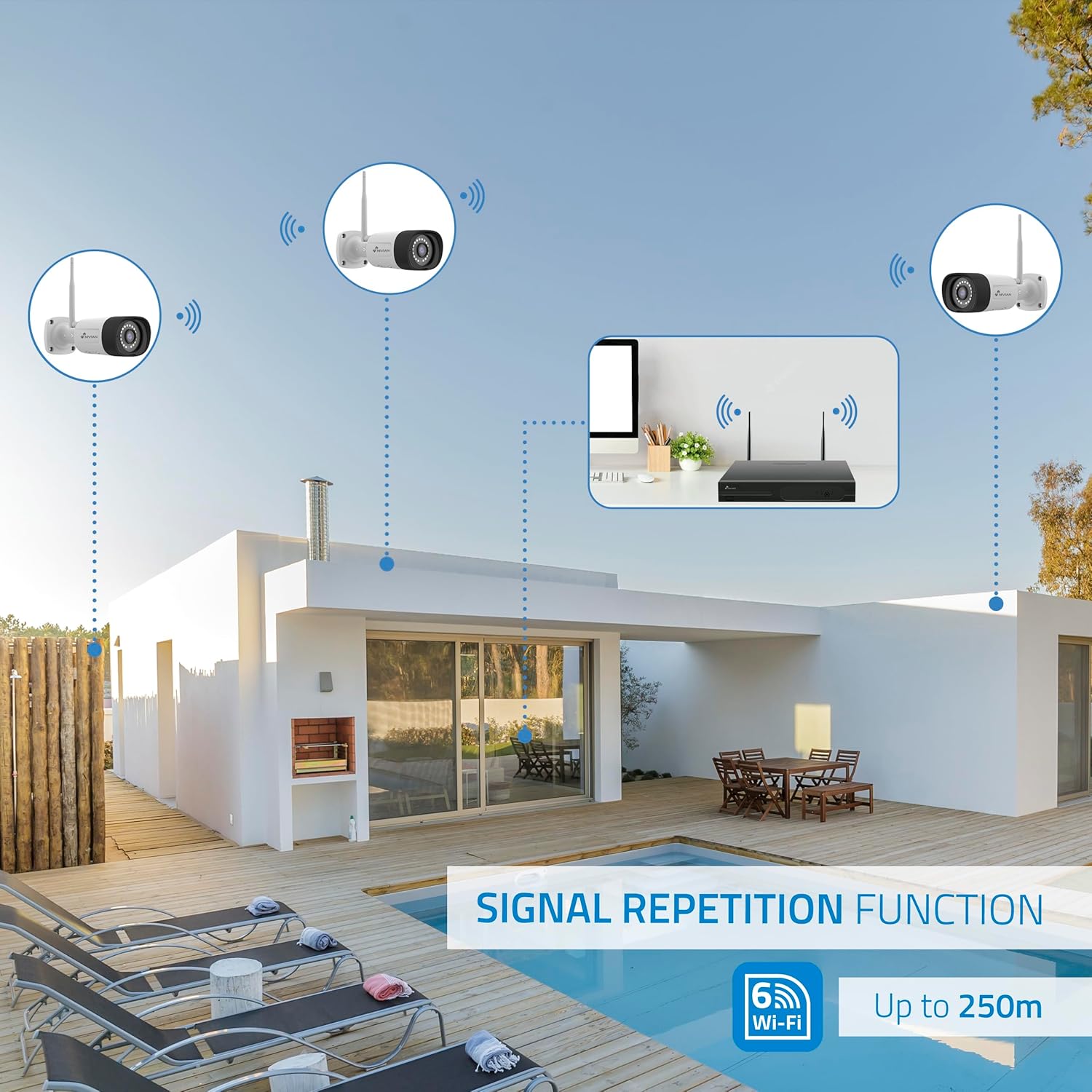
Image: Diagram showing the signal repetition function of the NIVIAN WiFi CCTV system, where cameras can extend the WiFi range up to 250 meters from the NVR.
4.3. EseeCloud App Setup
- Muat turun Aplikasi: Download the "EseeCloud" app from your mobile device's app store (available for iOS, Android).
- Daftar Akaun: Buka aplikasi dan daftar akaun baharu atau log masuk jika anda sudah mempunyai akaun.
- Tambah Peranti: Follow the in-app instructions to add your NVR system. This typically involves scanning a QR code displayed on the NVR's monitor or entering the device ID manually.
- Jauh Viewing: Setelah ditambah, anda boleh view live feeds, access recordings, and configure settings remotely.

Image: Smartphone screen displaying the EseeCloud app interface for managing the security system, showing live camera feeds and control options, with NIVIAN cameras and a laptop in the background.
5. Arahan Operasi
5.1. Hidup View
Access live camera feeds through the NVR connected to a monitor or via the EseeCloud mobile app. The NVR interface allows you to switch between single-camera view dan grid berbilang kamera view.
5.2. Rakaman
- Rakaman Berterusan: The system is configured for continuous recording by default to the 1TB hard drive.
- Rakaman Pengesanan Gerak: Configure cameras to record only when motion is detected. This can be scheduled via the NVR settings or EseeCloud app.
- H.265+ Codec: The system uses H.265+ video compression to optimize storage space while maintaining video quality.
5.3. Main balik
Akses foo yang dirakamtage through the NVR's playback menu or the EseeCloud app. You can search recordings by date, time, and event type (e.g., motion detection).
5.4. AI Human Detection
The cameras feature advanced AI human detection to differentiate human movement from other objects, significantly reducing false alarms. When human motion is detected, the system can trigger recordings, send notifications, and activate the white LED night vision for color footage.

Image: NIVIAN camera detecting a person at night, with the white LED light activated for color night vision, and a mobile notification indicating motion detection.
5.5. Audio Dua Hala
Use the EseeCloud app to utilize the two-way audio feature. This allows you to listen to audio from the camera's location and speak through the camera's built-in speaker.
5.6. Mod Penglihatan Malam
- Mod Inframerah (IR): Provides black and white video in low-light conditions for discreet surveillance.
- White LED Mode: When motion is detected in low light, the camera's white LEDs activate, providing full-color video and acting as a deterrent.
6. Penyelenggaraan
- Pembersihan Kamera: Bersihkan kanta kamera secara berkala dengan kain lembutamp cloth to ensure clear image quality. Do not use harsh chemicals.
- Kemas kini Firmware: Check for firmware updates for the NVR and cameras through the EseeCloud app or NVR settings. Keep your system updated for optimal performance and security.
- Pengurusan Cakera Keras: The 1TB hard drive will automatically overwrite the oldest recordings when full. If you need to preserve specific footage, back it up to an external device.
- Pemeriksaan Bekalan Kuasa: Pastikan semua penyesuai kuasa disambungkan dengan selamat dan bebas daripada kerosakan.
7. Penyelesaian masalah
7.1. No Camera Feed
- Semak Kuasa: Ensure the camera is powered on and its adapter is working.
- Isyarat WiFi: Verify the camera is within the NVR's WiFi range. Use the signal repetition function if necessary.
- Pasangkan Semula Kamera: If issues persist, try re-pairing the camera with the NVR through the NVR's menu.
7.2. Kualiti Imej Lemah
- Kanta Bersih: Bersihkan kanta kamera daripada sebarang kotoran atau kesan.
- Pencahayaan: Ensure adequate lighting for optimal image quality, especially at night.
- Gangguan WiFi: Reduce potential WiFi interference by moving the camera or NVR, or by using the signal repetition function.
7.3. Remote Access Issues (EseeCloud App)
- Sambungan Internet: Ensure both your NVR and mobile device have a stable internet connection.
- NVR Network Settings: Verify the NVR is correctly connected to your router and has internet access.
- Versi aplikasi: Ensure your EseeCloud app is updated to the latest version.
7.4. Hard Drive Full / Recording Issues
- Semak Storan: Verify the hard drive status in the NVR settings.
- Jadual Rakaman: Pastikan jadual rakaman dikonfigurasikan dengan betul.
- Kesihatan Cakera Keras: If issues persist, the hard drive may need to be checked or replaced.
8. Spesifikasi
| Jenama | NIVIAN |
| Nombor Model | NV-KIT830W-8CAM |
| Dimensi Produk (L x W x H) | 23 x 12 x 8 cm; 6.2 kilogram |
| Teknologi Ketersambungan | Wireless (WiFi-6) |
| Resolusi Rakaman Video | 2K (3MP) |
| Bilangan Saluran | 10 (NVR) |
| Bilangan Kamera | 6 |
| Kapasiti Storan | 1 TB Hard Drive (included) |
| Ciri Kamera | IP Cameras SuperHD with PTZ, Night Vision, AI Human Detection, Two-Way Audio |
| Kadar Bingkai | 15 fps, 24 fps, 30 fps |
| Peranti Serasi | Television (via HDMI) |
| Jenis Palam Kuasa | Lekap di dinding |
| Negara Asal | China |
9. Waranti dan Sokongan
NIVIAN offers technical support to all customers. If you have any questions, suggestions, or encounter any issues with your WiFi surveillance camera kit, please do not hesitate to contact us.
You can reach us through Amazon messages or via any official NIVIAN brand channel. Please refer to your purchase documentation for specific warranty terms and contact details.


