Produk Selesaiview
The 1Mii RT5066Pro is a versatile 3-in-1 wireless audio transmitter and receiver kit designed to transmit audio wirelessly to active speakers, subwoofers, soundbars, amplifiers, or home theater systems. It supports multiple input and output options and features automatic pairing for ease of use.
Ciri-ciri Utama
- 3-in-1 Transmitter and 2 Receivers: The kit includes one transmitter and two receiver units, all housed in durable metal shells. They support optical, coaxial, and 3.5mm (RCA) input and output connections.
- Julat Wayarles Lanjutan: Utilizes 2.4GHz technology with antennas, providing a wireless range of up to 320 feet (100m) outdoors and 100-165 feet (30-50m) indoors.
- High-Fidelity Audio with Low Latency: Delivers high-quality audio with a delay of less than 20ms, ensuring clear, stable, noise-free, and synchronized sound.
- Cable-Free Solution: Offers a convenient way to connect audio sources to speakers wirelessly, reducing cable clutter.
- Keserasian Luas: Equipped with Optical, Coaxial, and 3.5mm AUX jacks for connection to various home stereo systems, active speakers, subwoofers, and power amppenyelamat.
- Nota Penting: The RT5066Pro is an audio transmitter only and does not function as an amplifier. It must be connected to powered speakers, subwoofers, or power amplifiers, not passive speakers. The wireless range can be affected by environmental factors such as routers, walls, and metal objects.

This image displays the 1Mii RT5066Pro kit, featuring one transmitter unit and two receiver units, all in black with external antennas. The transmitter unit shows input ports for Optical, Coaxial, and 3.5mm audio, along with a DC 5V power input.
Kandungan Pakej
Sila sahkan bahawa semua item berikut disertakan dalam pakej anda:
- 1 x 3-in-1 2.4Ghz Wireless Audio Transmitter (RT5066Pro)
- 2 x 2.4Ghz Wireless Audio Receivers (RT5066Pro)
- 3 x 3.5mm AUX audio cables
- 3 x Optical audio cables
- 3 x Type-C charging cables
- 3 x 3.5mm to RCA audio cables
- 3 x Penyesuai Kuasa USB

This image shows the complete contents of the 1Mii RT5066Pro package, laid out neatly. It includes the main transmitter and two receiver units, three USB power adapters, three USB-C charging cables, three 3.5mm to 3.5mm audio cables, three RCA to 3.5mm audio cables, and three optical audio cables.
Arahan Persediaan
Langkah 1: Sambungan Kuasa
Connect each transmitter and receiver unit to a power source using the provided Type-C charging cables and USB power adapters. The devices will automatically power on once connected.
Step 2: Connect the Transmitter to Your Audio Source
Connect the transmitter to your audio source (e.g., TV, PC, AV Receiver) using one of the provided audio cables (Optical, Coaxial, or 3.5mm AUX). Ensure the input port on the transmitter matches the output port on your audio source.
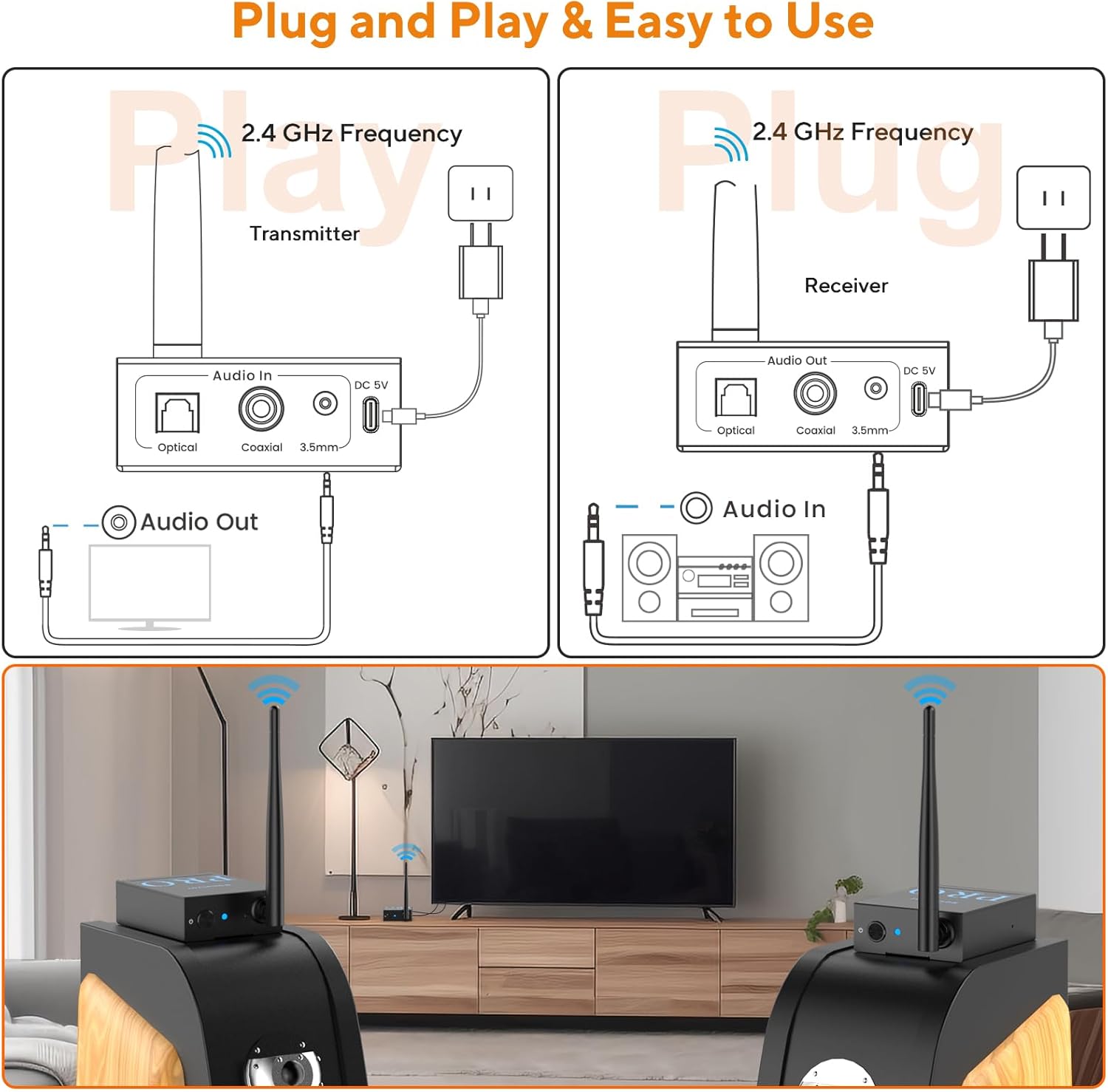
This diagram illustrates the connection for the transmitter unit. It shows the transmitter connected to a power outlet via its DC 5V port and to an audio output device (like a TV) via its "Audio In" port, which supports Optical, Coaxial, and 3.5mm inputs.
Step 3: Connect the Receivers to Your Audio Output Devices
Connect each receiver unit to your powered audio output device (e.g., active speaker, subwoofer, power amplifier) using the appropriate audio cable (Optical, Coaxial, or 3.5mm AUX/RCA). Ensure the output port on the receiver matches the input port on your audio device.

This diagram illustrates the connection for a receiver unit. It shows the receiver connected to a power outlet via its DC 5V port and to an audio input device (like a speaker or amplifier) via its "Audio Out" port, which supports Optical, Coaxial, and 3.5mm outputs.
Step 4: Automatic Pairing
Once both the transmitter and receivers are powered on, they will automatically connect to each other. A solid blue LED on both devices indicates a successful connection.

This image depicts a living room setup where a TV is connected to the 1Mii RT5066Pro transmitter. Two receiver units are wirelessly connected to the transmitter, each feeding audio to a separate powered speaker. The diagram highlights the 2.4GHz wireless frequency and the low latency of less than 20ms.
Arahan Operasi
After successful setup, the 1Mii RT5066Pro system will transmit audio from your source to the connected audio devices wirelessly.
Penghantaran Audio
The system operates on a 2.4GHz frequency, providing a stable wireless connection. Audio is transmitted with a delay of less than 20ms, ensuring synchronization between your source and output devices.
Julat Tanpa Wayar
The wireless range is approximately 320 feet (100m) outdoors and 100-165 feet (30-50m) indoors. For optimal performance, minimize obstacles between the transmitter and receivers.
Berbilang Penerima
The kit includes two receivers, allowing you to connect two separate powered speakers or subwoofers simultaneously to receive the same audio signal from the transmitter.

This image depicts the transmitter and two receiver units placed in a large, open hall, emphasizing the extended wireless range capability of the system, with a stated range of up to 320ft x 2 (100M x 2) and three gain antennas.
Penyelenggaraan
To ensure the longevity and optimal performance of your 1Mii RT5066Pro, follow these general maintenance guidelines:
- Keep the devices in a dry environment, away from moisture and extreme temperatures.
- Clean the units with a soft, dry cloth. Avoid using harsh chemicals or abrasive cleaners.
- Pastikan pengudaraan yang betul di sekeliling unit untuk mengelakkan terlalu panas.
- Handle cables and connectors gently to avoid damage.
Menyelesaikan masalah
No Sound or Noise when using Optical Cable with TV
If you experience noise or no sound when connecting your TV via an optical cable, adjust your TV's audio output settings as follows:
- Navigate to your TV's "Settings" menu.
- Select "Sound" or "Audio Output".
- Look for "Expert Settings" or "Digital Output Audio Format".
- Change the "Digital Output Audio Format" from "Auto" or "Dolby" to "PCM" or "Stereo".
This video demonstrates how to troubleshoot noise or no sound issues when connecting the 1Mii RT5066Pro to a TV using an optical cable. It shows navigating through TV settings to change the digital audio output format to PCM.
No Audio Output from Speakers
Ensure that the receivers are connected to dikuasakan speakers, subwoofers, or power amplifiers. This device is not an amplifier and cannot power passive speakers.
Intermittent Connection or Reduced Range
Wireless range can be affected by routers, walls, metal objects, and other obstacles. Try repositioning the transmitter and receivers to minimize interference and ensure a clear line of sight if possible.
Devices Not Pairing Automatically
If the devices do not pair automatically (indicated by a solid blue LED), try powering them off and on again. Ensure all units are within range of each other and that there are no strong sources of interference nearby.
Spesifikasi
| Ciri | Perincian |
|---|---|
| Dimensi Produk | 2.36 x 0.9 x 3.15 inci |
| Berat Barang | 15.9 auns (450 Gram) |
| Nombor Model | RT5066Pro |
| Jenama | 1Mii |
| Teknologi Ketersambungan | Auxiliary, Coaxial, Optical |
| Ciri Khas | Automatic pairing, Long distance, Music Streaming, RCA/Optical/3.5mmAUX |
| Peranti Serasi | Amplifier, Personal Computer, Speaker, Television |
| Jenis Penyambung | 3.5mm Jack, Optical, Coaxial |
| Mod Keluaran Audio | Stereo |
| Konfigurasi Saluran Bunyi Sekeliling | 2.0 |
| warna | Hitam |
Waranti dan Sokongan
For warranty information or technical support regarding your 1Mii RT5066Pro, please contact 1Mii customer service. Refer to the product packaging or the official 1Mii webtapak untuk butiran hubungan terkini dan sumber sokongan.


