1. Pengenalan
This manual provides essential information for the installation, operation, and maintenance of the Genuine Lenovo Motherboard, part number 5B20U54553. This motherboard is designed for Lenovo IdeaCentre Gaming 5-14IOB6 and Creator 5-14IOB6 desktop computers. Please read these instructions carefully before proceeding with installation to ensure proper function and to prevent damage to the component or your system.
2. Maklumat Keselamatan
Sentiasa patuhi langkah berjaga-jaga keselamatan berikut semasa mengendalikan komponen komputer:
- Pencegahan Nyahcas Elektrostatik (ESD): Always wear an anti-static wrist strap or frequently touch a grounded metal object (like the computer chassis) before handling the motherboard. ESD can severely damage electronic components.
- Pemutusan Kuasa: Ensure the computer is completely powered off and disconnected from the main power outlet before opening the chassis or installing any components.
- Tangani dengan Berhati-hati: Hold the motherboard by its edges. Avoid touching components, pins, or circuit traces directly.
- Pengudaraan: Ensure adequate ventilation around the computer to prevent overheating.
- Pemasangan Profesional: Jika anda tidak pasti tentang mana-mana langkah, dapatkan bantuan daripada juruteknik yang berkelayakan.
3. Kandungan Pakej
Sahkan bahawa pakej anda mengandungi item berikut:
- Lenovo IdeaCentre Gaming 5-14IOB6 / Creator 5-14IOB6 Motherboard (Part No. 5B20U54553)
- Note: Additional accessories such as SATA cables, I/O shields, or driver CDs may not be included with a replacement part and might need to be reused from your original system or purchased separately.
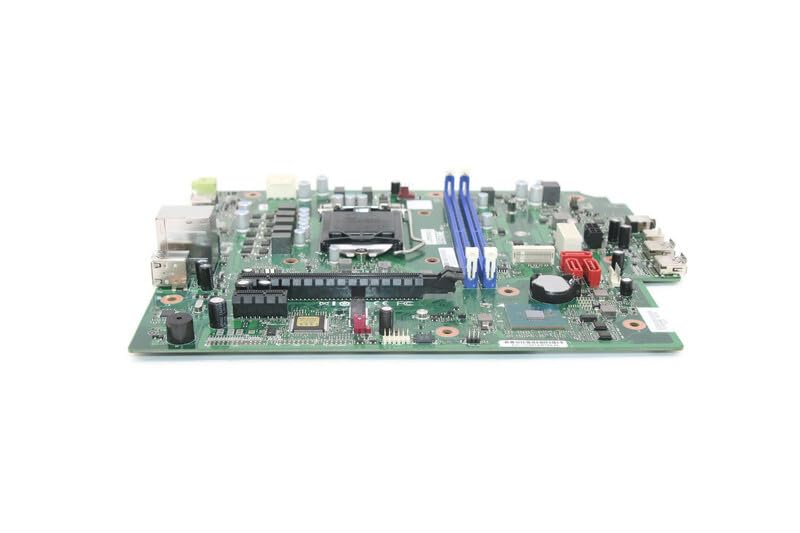
Image 1: Genuine Lenovo IdeaCentre Gaming 5-14IOB6 Motherboard (Part No. 5B20U54553). This image displays the motherboard with various ports, slots, and components visible, including the CPU socket, RAM slots, and PCIe slots.
4. Persediaan dan Pemasangan
Follow these steps for proper installation of the motherboard:
- Sediakan Ruang Kerja Anda: Ensure a clean, well-lit, and static-free environment. Gather necessary tools such as a Phillips head screwdriver, anti-static wrist strap, and thermal paste (if reusing CPU).
- Matikan dan Putuskan Sambungan: Shut down your computer, unplug the power cord, and disconnect all peripheral cables.
- Buka Casis: Keluarkan panel sisi sarung komputer anda untuk mengakses komponen dalaman.
- Remove Old Motherboard (if applicable): Disconnect all cables connected to the old motherboard (power, SATA, front panel, USB, audio, etc.). Unscrew the motherboard from the standoffs and carefully remove it. Remove CPU, RAM, and any expansion cards from the old motherboard if they are to be transferred.
- Install CPU and Cooler: If not pre-installed, carefully open the CPU socket lever, align the CPU with the socket (matching the triangle/arrow indicators), gently place it in, and close the lever. Apply thermal paste and install the CPU cooler.
- Pasang RAM: Open the clips on the RAM slots, align the RAM modules with the notches, and press firmly until the clips snap into place.
- Pasang Papan Induk Baharu: Carefully place the new motherboard into the chassis, aligning it with the standoffs. Secure it with screws.
- Sambungkan Kabel: Reconnect all necessary cables:
- Main Power (24-pin ATX): Connect the large power connector from the power supply.
- CPU Power (4/8-pin EPS): Connect the smaller power connector near the CPU.
- Kabel SATA: Connect storage drives (HDD/SSD) to the SATA ports.
- Penyambung Panel Depan: Connect power button, reset button, HDD LED, power LED, and front USB/audio headers. Refer to your chassis manual for specific pin layouts if needed.
- Tajuk Peminat: Connect case fans and CPU fan to the appropriate headers.
- Kad Pengembangan: Install any graphics cards or other PCIe cards into their respective slots and secure them.
- Tutup Casis: Once all components are connected and secured, replace the side panel(s).
- But Permulaan: Reconnect the power cord and peripherals. Power on the computer. The system should boot to the BIOS/UEFI or operating system.
5. Mengendalikan Motherboard
The motherboard functions as the central hub of your computer, facilitating communication between all components. Once installed correctly, its operation is largely automatic, managed by the BIOS/UEFI firmware and the operating system.
- Tetapan BIOS/UEFI: To access the BIOS/UEFI setup, press the designated key (often Del, F2, F10, atau F12) during startup. Here you can configure boot order, system time, hardware settings, and monitor system status.
- Pemasangan Pemandu: Ensure all necessary drivers for the motherboard's chipsets, integrated graphics (if applicable), network, and audio are installed. These are typically provided by Lenovo or can be downloaded from their official support webtapak.
- Kemas Kini Sistem: Pastikan sistem pengendalian dan pemacu anda dikemas kini untuk memastikan prestasi dan keselamatan yang optimum.
6. Penyelenggaraan
Proper maintenance helps prolong the life of your motherboard and overall system:
- Penyingkiran habuk: Regularly clean the interior of your computer case to prevent dust buildup on components, which can impede airflow and cause overheating. Use compressed air or a soft brush.
- Pemantauan Suhu: Use software tools to monitor CPU and chipset temperatures. Ensure they remain within safe operating limits.
- Kemas kini Firmware: Semak sokongan Lenovo secara berkala website for BIOS/UEFI updates. Only update if necessary and follow the instructions precisely.
- Pengurusan Kabel: Pastikan kabel disalurkan dengan kemas untuk meningkatkan aliran udara dan mengelakkan gangguan.
7. Penyelesaian masalah
Jika anda menghadapi masalah selepas pemasangan, pertimbangkan perkara berikut:
- Tiada Kuasa: Double-check all power connections (24-pin ATX, 4/8-pin EPS). Ensure the power supply is switched on and the wall outlet is functional.
- Tiada Paparan: Verify that the monitor is connected to the correct graphics output (either integrated or dedicated GPU). Reseat the graphics card and RAM modules.
- System Not Booting / POST Errors: Listen for beep codes (if your system has a speaker) or check for diagnostic LEDs on the motherboard. Consult the Lenovo documentation for beep code meanings. Reseat RAM, CPU, and expansion cards.
- Isu persisian: If USB ports or other peripherals are not working, check their connections and ensure drivers are installed.
- Operating System Problems: If the OS fails to load, try booting into safe mode or using recovery options. A fresh installation of the operating system might be necessary after a motherboard replacement.
8. Spesifikasi
Key specifications for the Lenovo IdeaCentre Gaming 5-14IOB6 Motherboard (Part No. 5B20U54553):
| Ciri | Perincian |
|---|---|
| Pengeluar | Lenovo |
| Nama Model | IdeaCentre Gaming 5-14IOB6 |
| Nombor Bahagian | 5B20U54553 |
| Soket CPU | BGA437 |
| Peranti Serasi | Komputer Peribadi |
| Teknologi Memori RAM | DDR4 |
| Slot Memori Tersedia | 2 |
| Jenis Chipset | Intel B75 Express |
| Platform | Windows 10 |
| Berat Barang | 3 paun |
9. Waranti dan Sokongan
This motherboard is a genuine replacement part for Lenovo systems. For warranty information, please refer to the terms and conditions provided by your seller or the original Lenovo product warranty documentation for your IdeaCentre Gaming 5-14IOB6 or Creator 5-14IOB6 system.
For technical support, driver downloads, and further documentation, please visit the official Lenovo support website and search for your specific system model (IdeaCentre Gaming 5-14IOB6 or Creator 5-14IOB6) or the motherboard part number (5B20U54553).
Sokongan Lenovo Webtapak: https://support.lenovo.com


