1. Pengenalan
This manual provides comprehensive instructions for the installation, operation, and maintenance of the Alarm.com ADC-AC-ET25 Keypad Reader. Designed for Smarter Access Control, this reader integrates multiple credential technologies to enhance security and flexibility for businesses.
Ciri-ciri Utama:
- Multiple Technologies: Supports Proximity, NFC, and Bluetooth Low Energy (BLE) credentials in a single device.
- Mobile Credentials: Enables the use of smartphones to unlock doors, reducing reliance on physical badges.
- OSDP Auto-Detect & Secure Channel: Ensures secure communication and automatic detection of OSDP devices.
- Kebolehtingkatan Perisian Tegar: Supports remote firmware updates for continuous improvement and security enhancements.
- Credential Support: Compatible with I-FARE DESFire EV1 & EV2, and LEAF credentials for secure, open interoperability. Also supports FSK and ASK legacy proximity credentials for seamless transitions.
- Tamper Pengesanan: Features accelerometer-based tamper detection for enhanced security.
- Visual & Audible Indicators: Equipped with a tri-state LED light bar (red, green, amber) and an audible beeper for status feedback.
- Pemasangan Serbaguna: Sesuai untuk kedua-dua persekitaran dalaman dan luaran.
2. Maklumat Keselamatan
Please read all safety instructions carefully before installing or operating the device. Failure to follow these instructions may result in damage to the device, property, or personal injury.
- Ensure all electrical connections are made by a qualified professional and comply with local electrical codes.
- Putuskan sambungan kuasa sebelum melakukan sebarang pemasangan atau penyelenggaraan.
- Do not expose the device to extreme temperatures, humidity, or direct water immersion beyond its specified environmental ratings.
- Avoid placing the device near strong electromagnetic fields, which may interfere with its operation.
- Jangan cuba membuka atau membaiki peranti ini sendiri. Rujuk semua servis kepada kakitangan yang berkelayakan.
3. Kandungan Pakej
Sahkan bahawa semua item terdapat dalam pakej sebelum meneruskan pemasangan:
- Alarm.com ADC-AC-ET25 Keypad Reader
- Perkakasan Pemasangan (skru, sauh)
- Templat Pemasangan (jika berkenaan)
- Panduan Mula Pantas (rujuk manual ini untuk butiran penuh)
4. Produk Lebihview
The ADC-AC-ET25 Keypad Reader is a robust access control device featuring a numeric keypad and multi-technology credential reading capabilities. Its design allows for seamless integration into various security systems.
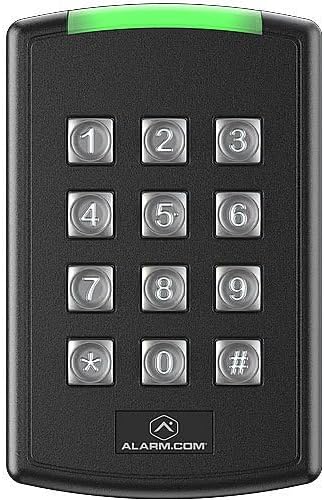
Rajah 4.1: Depan view of the Alarm.com ADC-AC-ET25 Keypad Reader. The device is black with a prominent numeric keypad (0-9, *, #) in the center. A green LED light bar is visible at the top, indicating operational status. The "ALARM.COM" logo is located at the bottom.
Komponen:
- Pad kekunci: Numeric keys (0-9), asterisk (*), and hash (#) for PIN entry.
- Bar Lampu LED: Tri-state (red, green, amber) indicator for status feedback.
- Credential Reader Area: Integrated area for Proximity, NFC, and BLE mobile credential scanning.
- Tamper Sensor: Accelerometer-based sensor to detect unauthorized removal or tampering.
5. Persediaan dan Pemasangan
The ADC-AC-ET25 Keypad Reader is designed for flexible installation in both indoor and outdoor environments. Proper installation is crucial for optimal performance and security.
5.1. Senarai Semak Pra-Pemasangan:
- Verify the mounting surface is suitable and secure.
- Ensure proper wiring and power supply are available at the installation site.
- Confirm compatibility with your existing access control panel (supports OSDP).
5.2. Pemasangan:
- Choose a suitable mounting location, considering accessibility and environmental factors.
- Use the provided mounting template to mark drilling points on the wall.
- Tebuk lubang dan masukkan sauh jika perlu.
- Secure the reader's backplate to the wall using the provided screws.
5.3. Pendawaian:
Connect the reader to your access control panel according to the wiring diagram provided with your panel and the reader's specific wiring instructions (typically found on the back of the reader or in a dedicated wiring guide). The reader supports OSDP Auto-Detect and Secure Channel for enhanced communication security.
5.4. Naikkan kuasa:
Once wiring is complete and verified, apply power to the access control system. The reader's LED light bar will indicate its power-up sequence and operational status.
6. Arahan Operasi
The ADC-AC-ET25 Keypad Reader offers multiple methods for access, providing flexibility for users.
6.1. Using Credentials:
- Proximity/NFC Cards/Fobs: Present your compatible card or fob within close proximity to the reader's front surface. The reader will emit an audible beep and the LED will change color (typically green) upon successful read.
- Bluetooth Low Energy (BLE) Mobile Credentials: Ensure your smartphone has the Alarm.com mobile access app installed and BLE is enabled. Approach the reader with your phone. The app will communicate with the reader to grant access.
6.2. Using the Keypad (PIN Entry):
- Enter your assigned Personal Identification Number (PIN) using the numeric keypad.
- Press the hash (#) key to confirm your entry.
- Upon successful PIN entry, the reader will provide an audible and visual confirmation (e.g., green LED).
6.3. LED Indicator Meanings:
- hijau: Access granted, successful credential read, or system ready.
- merah: Access denied, error, or system fault.
- Amber: Standby, processing, or specific system status (refer to your access control system documentation for detailed amber indications).
7. Penyelenggaraan
Regular maintenance ensures the longevity and optimal performance of your ADC-AC-ET25 Keypad Reader.
- Pembersihan: Gunakan yang lembut, damp cloth to clean the exterior of the reader. Do not use abrasive cleaners, solvents, or excessive moisture.
- Kemas kini Firmware: The reader supports remote firmware upgradability. Your access control system administrator will manage these updates to ensure the device has the latest features and security patches.
- Pemeriksaan: Periksa pembaca secara berkala untuk sebarang tanda kerosakan fizikal atau sambungan yang longgar.
8. Penyelesaian masalah
This section addresses common issues you might encounter with the ADC-AC-ET25 Keypad Reader.
- Reader is unresponsive (no lights, no sound):
- Check power supply to the reader and access control panel.
- Sahkan sambungan pendawaian adalah selamat dan betul.
- Credential not granting access (red LED):
- Ensure the credential is valid and active in the access control system.
- Confirm the credential type is supported by the reader (Proximity, NFC, BLE).
- Try presenting the credential again, ensuring proper alignment.
- Keypad entry not working:
- Verify the PIN is correct and active.
- Ensure the hash (#) key is pressed after entering the PIN.
- Tamper alarm triggered:
- Check if the reader has been dislodged or moved from its mounting.
- Securely re-mount the reader if necessary.
For persistent issues, contact your system administrator or technical support.
9. Spesifikasi
| Atribut | Perincian |
|---|---|
| Nombor Model | ADC-AC-ET10 |
| Pengeluar | Alarm.com |
| Dimensi (L x W x H) | 8.38 x 1.78 x 12.95 cm |
| Teknologi yang Disokong | Proximity, NFC, Bluetooth Low Energy (BLE) |
| Sokongan Tauliah | I-FARE DESFire EV1 & EV2, LEAF, FSK, ASK |
| Protokol Komunikasi | OSDP (Open Supervised Device Protocol) with Secure Channel |
| Penunjuk | Tri-state LED (Red, Green, Amber), Audible Beeper |
| Tamper Pengesanan | Accelerometer-based |
| Persekitaran Pemasangan | Dalaman dan Luaran |
| Negara Asal | Kanada |
10. Maklumat Waranti
Specific warranty terms and conditions for the Alarm.com ADC-AC-ET25 Keypad Reader are typically provided at the point of purchase or by the manufacturer. Please refer to the documentation included with your purchase or contact your seller/installer for detailed warranty information. Keep your proof of purchase for warranty claims.
11. Sokongan Pelanggan
For technical assistance, troubleshooting beyond this manual, or service inquiries, please contact your authorized Alarm.com dealer or the seller from whom you purchased the product. Provide your product model number (ADC-AC-ET10) and a detailed description of the issue when seeking support.
Pengeluar: Alarm.com


