1. Pengenalan
This manual provides detailed instructions for the installation, operation, and maintenance of your Leadfan 10.1 Inch Android 11 Car Stereo. This system is designed to upgrade the in-car entertainment and navigation experience for compatible Lexus IS series vehicles. Please read this manual thoroughly before installation and use to ensure proper function and safety.

Image 1.1: Leadfan 10.1 Inch Android 11 Car Stereo for Lexus IS250, IS300, IS350 (2006-2012).
2. Produk Lebihview dan Ciri Utama
The Leadfan Android 11 Car Stereo offers a comprehensive upgrade to your vehicle's infotainment system. Key features include:
- Sistem pengendalian: Android 11 with 4-Core CPU, 2GB RAM, and 32GB ROM.
- paparan: 10.1-inch IPS touchscreen with 1024x600 resolution.
- Ketersambungan: Wireless Apple CarPlay, Android Auto, wired/wireless Mirror Link, Bluetooth 5.1, Wi-Fi hotspot.
- Navigasi: Built-in GPS module with preloaded offline map data, supporting online navigation apps.
- Audio: FM Radio, 10-band EQ, DSP for enhanced sound.
- Sokongan Kamera: belakang view camera input with 170° viewsudut ing.
- Kawalan: Steering Wheel Control (SWC) compatibility, voice control.
- Berbilang tugas: Split-screen function for simultaneous application use.
- Pelabuhan Tambahan: 2 USB ports, AUX audio and video input, external microphone jack.
3. Keserasian
This car stereo is specifically designed for the following Lexus IS series models:
- Lexus IS250, IS300, IS350 (2006-2012) without original factory screen.
- Lexus IS250, IS300, IS350 (2006-mid 2009) with original factory screen.
Nota Penting: Unit ini ialah TIDAK compatible with Lexus IS models from mid-2009 to 2012 that have an original factory screen, factory premium audio systems, or a white climate control frame.

Image 3.1: Visual guide for Lexus IS series compatibility, showing installable and non-installable configurations.
4. Kandungan Pakej
Sila sahkan bahawa semua item yang disenaraikan di bawah disertakan dalam pakej anda:
- 10.1 inch IPS Touchscreen Android Radio Headunit
- Radio Kit Frame for Lexus IS250 IS300 IS350 (2006-2012)
- Back-up Camera
- Membalikkan Kabel Input Kamera
- Antena GPS
- WiFi & Bluetooth Signal Booster Cable
- Plug and Play Power Harness
- CanBus Decoder
- Mikrofon Luaran
- Manual Pengguna
- Kabel USB (x2)
- RCA kabel
- Installation Kit (brackets)
- OBD Cable (optional, if included)

Image 4.1: Contents of the product package and main unit dimensions.
5. Panduan Pemasangan (Persediaan)
Professional installation is recommended. Ensure the vehicle's battery is disconnected before beginning installation. Refer to your vehicle's service manual for specific dashboard disassembly instructions.
5.1 Langkah Pemasangan Umum:
- Keluarkan radio kereta asal dan trim papan pemuka dengan berhati-hati.
- Connect the provided power harness to the car's wiring and the new head unit.
- Connect the GPS antenna, Wi-Fi/Bluetooth antenna, and any other necessary cables (USB, RCA, external microphone).
- If installing the backup camera, route the camera cable to the rear of the vehicle and connect it to the head unit's reverse input. Ensure the camera's power is connected to the vehicle's reverse light circuit.
- Mount the new head unit into the dashboard using the provided installation kit.
- Reconnect the vehicle's battery and test all functions before reassembling the dashboard trim.

Image 5.1: Comparison of wiring complexity between the Leadfan unit and traditional aftermarket radios.

Imej 5.2: Cthample of the integrated installation effect of the Leadfan unit compared to a universal model.
6. Arahan Operasi
6.1 Persediaan Awal
Upon first power-on, the system may guide you through initial setup steps, including language selection, time zone, and Wi-Fi connection. Follow the on-screen prompts.
6.2 CarPlay Wayarles & Android Auto
Connect your smartphone wirelessly via Bluetooth and Wi-Fi, or via USB cable, to access Apple CarPlay or Android Auto. This allows for seamless integration of phone functions like navigation, music, calls, and messages directly on the stereo display. Voice control is supported for hands-free operation.
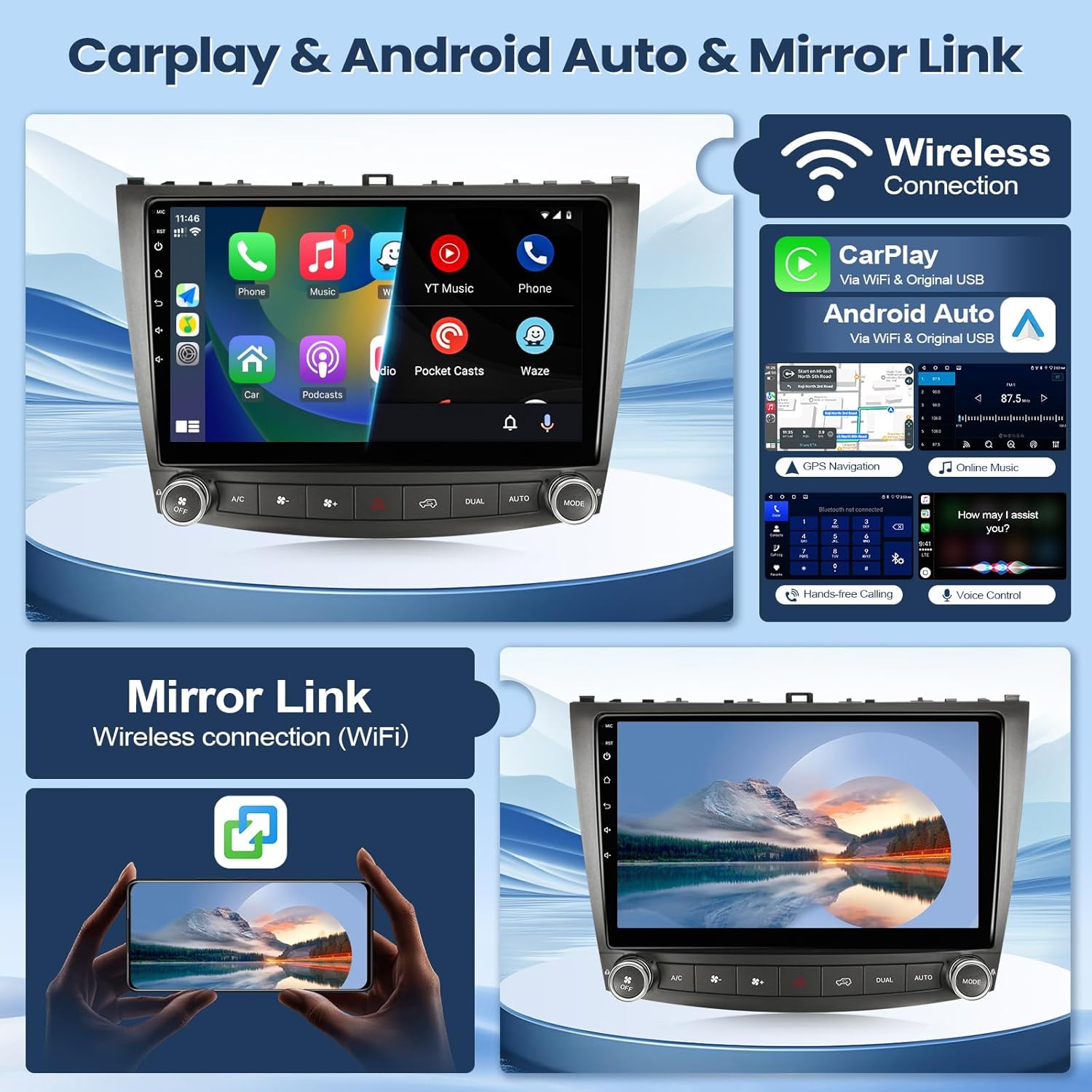
Imej 6.1: Selesaiview of Wireless CarPlay, Android Auto, and Mirror Link functionalities.
6.3 GPS Navigation & Wi-Fi
The unit features a built-in GPS module with preloaded offline maps. You can also connect to a Wi-Fi hotspot (e.g., from your smartphone) to download online navigation applications and other apps from the Play Store.

Image 6.2: Display of GPS navigation and available Wi-Fi connectivity options.
6.4 Bluetooth 5.1
Pair your mobile phone via Bluetooth for hands-free calling and audio streaming. The system supports answering/making calls directly from the unit, with clear audio through the built-in or external microphone.
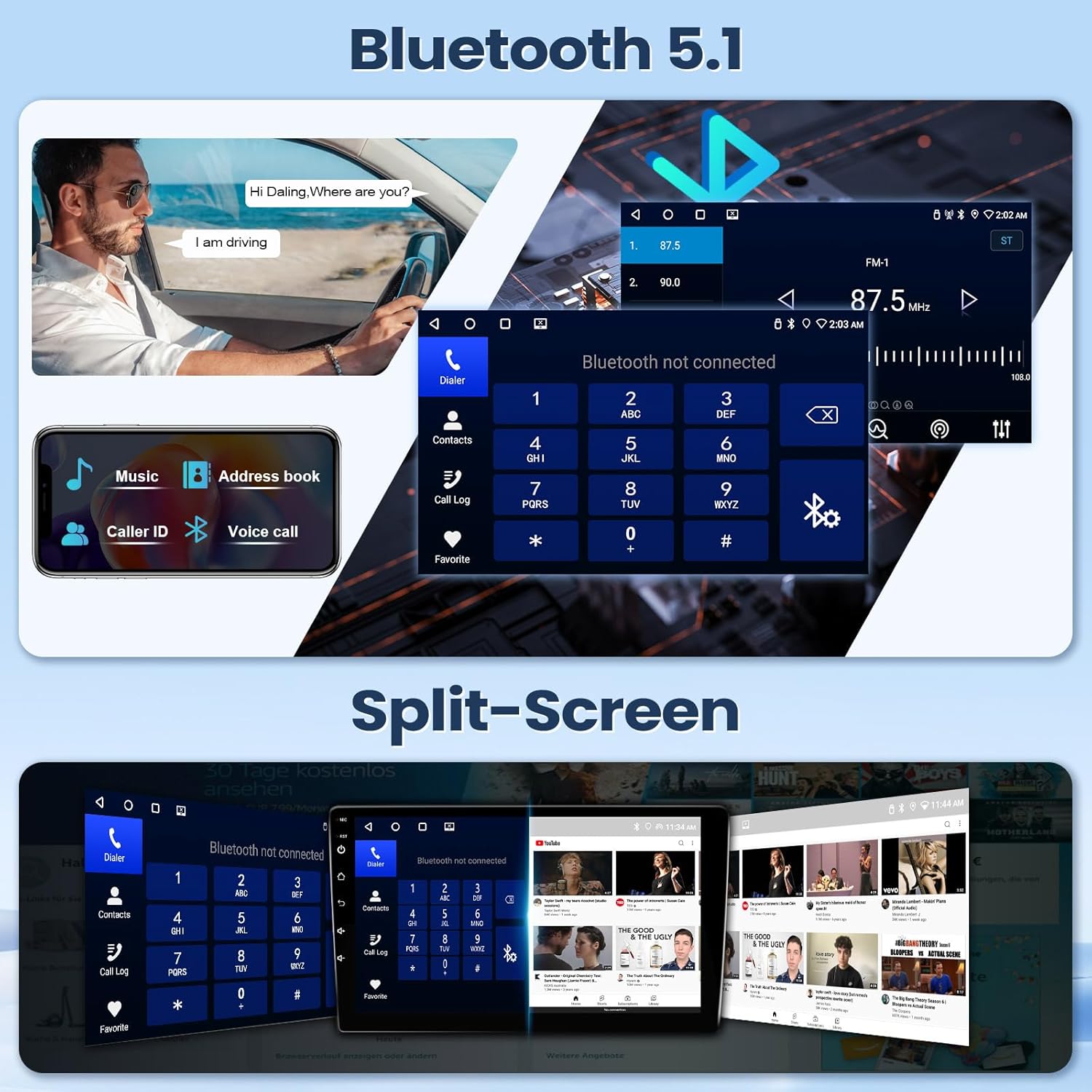
Image 6.3: Bluetooth 5.1 interface for calls and music, alongside the split-screen feature.
6.5 Radio FM
Access FM radio stations with automatic and manual search functions. Save your favorite stations for quick access.

Image 6.4: Audio equalization (EQ) and Digital Sound Processor (DSP) settings, and the FM radio interface.
6.6 Fungsi Skrin Pisah
Gunakan ciri skrin pisah untuk menjalankan dua aplikasi secara serentak, seperti navigasi di satu sisi dan main balik muzik di sisi yang lain.
6.7 Reverse Camera Input
When the vehicle is shifted into reverse, the system automatically displays the feed from the connected backup camera, providing a wide viewing angle for safer maneuvering.
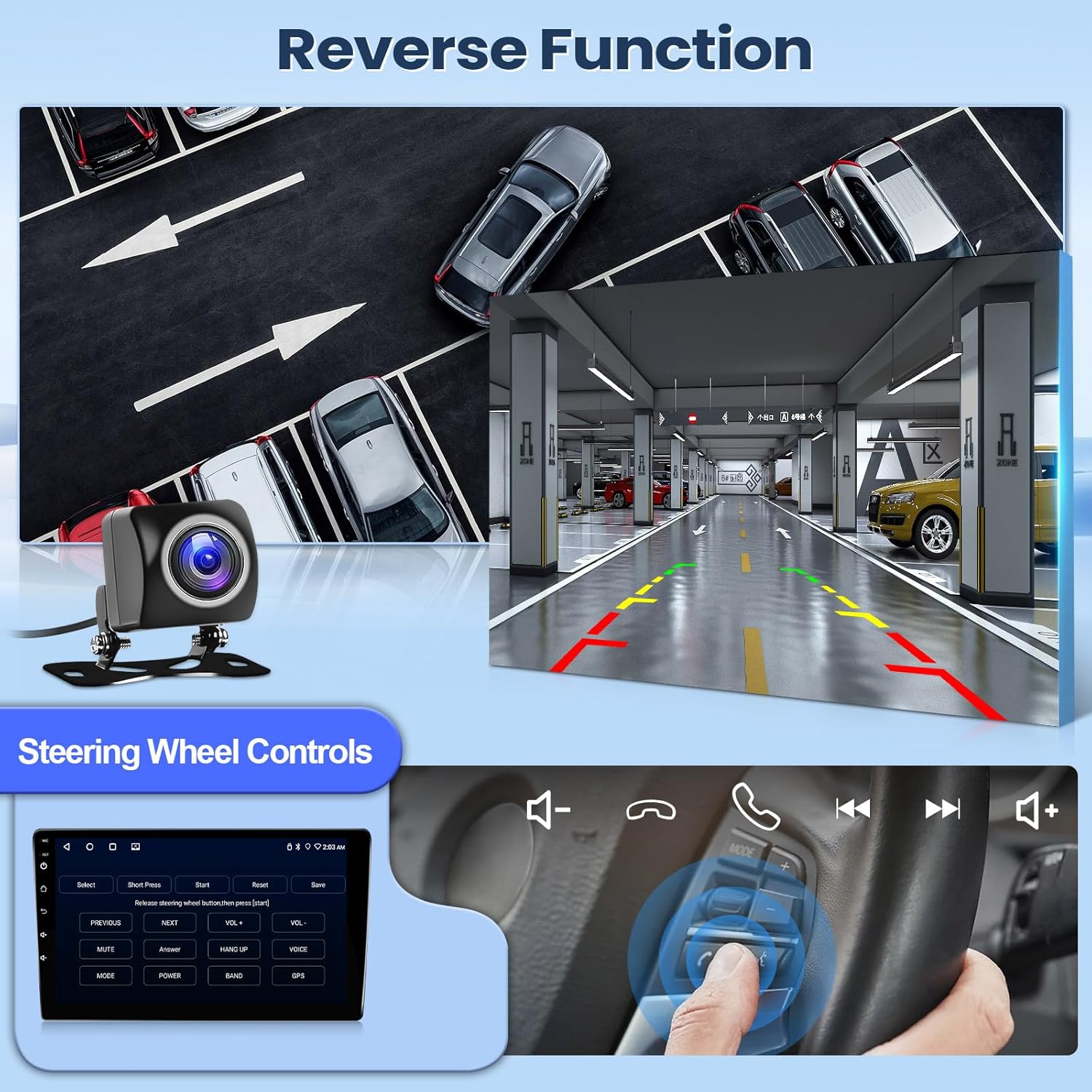
Image 6.5: Demonstration of the reverse camera display and steering wheel control functionality.
6.8 Kawalan Roda Stereng (SWC)
The unit supports integration with your vehicle's existing steering wheel controls, allowing you to manage audio, calls, and other functions without taking your hands off the wheel.
7. Penyelenggaraan
Untuk memastikan jangka hayat dan prestasi optimum stereo kereta anda, ikut garis panduan penyelenggaraan ini:
- Pembersihan: Use a soft, dry cloth to clean the screen and unit. For stubborn smudges, lightly dampen kain dengan air atau pembersih selamat skrin. Elakkan bahan yang melelas atau bahan kimia yang keras.
- Suhu: Elakkan daripada mendedahkan unit kepada suhu yang melampau untuk tempoh yang lama.
- Kemas Kini Perisian: Semak dan pasang kemas kini perisian yang tersedia secara berkala untuk meningkatkan prestasi dan menambah ciri baharu.
- Sambungan Kabel: Pastikan semua kabel disambungkan dengan selamat. Sambungan yang longgar boleh menyebabkan masalah terputus-putus.
8. Penyelesaian masalah
If you encounter issues with your Leadfan car stereo, refer to the following common troubleshooting steps:
- Tiada Kuasa: Check all power connections and fuses. Ensure the vehicle's battery is charged.
- Tiada Bunyi: Verify speaker connections. Check volume levels and audio settings (EQ, balance, fader). Ensure the correct audio source is selected.
- Skrin sentuh Tidak Responsif: Try restarting the unit. If the issue persists, a factory reset might be necessary (note: this will erase user data).
- GPS Tidak Berfungsi: Pastikan antena GPS dipasang dengan betul dan mempunyai jelas view dari langit. Semak tetapan GPS dalam unit.
- Isu Sambungan Bluetooth: Ensure Bluetooth is enabled on both the stereo and your phone. Delete previous pairings and try reconnecting.
- CarPlay/Android Auto Tidak Bersambung: Verify your phone's compatibility and ensure the app is updated. Try both wired and wireless connections. Check USB cable integrity if using a wired connection.
- Kamera Sandaran Tidak Dipaparkan: Check the camera's power and video signal connections. Ensure the reverse trigger wire is correctly connected to the vehicle's reverse light circuit.
Jika langkah ini tidak menyelesaikan isu ini, sila hubungi sokongan pelanggan untuk mendapatkan bantuan lanjut.
9. Spesifikasi
| Dimensi Produk | 11.02 x 4.45 x 14.68 inci |
| Berat Barang | 3.96 paun (1.8 Kilogram) |
| Nombor Model | 2+32G CarPlay for Lexus 2006-2012 |
| Sistem Operasi | Android 11 |
| CPU | 4-Teras |
| RAM | 2GB |
| ROM | 32GB |
| Saiz Skrin | 10.1 inches (Visible screen diagonal: 9" / 23 cm) |
| Resolusi Skrin | 1024x600 IPS HD Touch Screen |
| Teknologi Ketersambungan | Wired (Original USB Cable), Wireless (Bluetooth & Wi-Fi) |
| Versi Bluetooth | 5.1 |
| Ciri Khas | Apple CarPlay, Android Auto, Mirrorlink, GPS Module, IP68 AHD backup camera, Steering Wheel Control, Hands-Free Calling, Voice Control, Split-screen, FM, DSP, RDS, AUX, EQ, RAC Audio/Video Output, CanBus, 2 USB ports, External Mic Jack |
| Mod Keluaran Audio | Stereo |
| Pengekodan Video | H.264, H.265/HEVC, MPEG-4, etc. |
10. Waranti dan Sokongan
Leadfan provides professional technical support and high-quality customer service for this product. We offer lifetime technical support.
If you have any questions regarding installation, wiring, operation, or any other aspect of your Leadfan car stereo, please contact customer service or technical support through your purchase platform. Look for the "sold by Leedfan" link and click "ask a question" to reach our support team.


