pengenalan
Thank you for choosing the hOmeLabs 25 Pint Wi-Fi Dehumidifier. This manual provides essential information for the safe operation, maintenance, and troubleshooting of your new appliance. Designed for efficient moisture removal in spaces up to 3,500 sq ft, this dehumidifier features Wi-Fi smart control, quiet operation, and flexible drainage options to enhance your indoor environment.
Arahan Keselamatan Penting
Please read all instructions carefully before using the dehumidifier. Failure to follow these instructions may result in electric shock, fire, or serious injury.
- Always plug the dehumidifier into a grounded electrical outlet.
- Jangan kendalikan unit jika kord kuasa atau palam rosak.
- Pastikan unit diletakkan di atas permukaan yang rata dan stabil untuk mengelakkannya daripada terbalik.
- Jangan sekat saluran masuk atau alur keluar udara. Kekalkan sekurang-kurangnya 8 inci kelegaan di sekeliling unit.
- Cabut plag penyahlembap sebelum membersihkan, mengalihkan atau melakukan sebarang penyelenggaraan.
- Jangan gunakan unit ini di kawasan yang menyimpan cecair atau gas mudah terbakar.
- Perkakas ini adalah untuk kegunaan kediaman sahaja.
- Jauhkan kanak-kanak dan haiwan peliharaan dari unit semasa operasi.
Produk Selesaiview
Familiarize yourself with the components of your hOmeLabs dehumidifier.

The hOmeLabs 25 Pint Wi-Fi Dehumidifier shown alongside its blue and white product packaging, highlighting its compact design and brand.

An illustration showing the dimensions of the dehumidifier: 19.6 inches high, 12.2 inches wide, and 8.2 inches deep, emphasizing its compact form factor.

A close-up of the dehumidifier's control panel, displaying buttons for Wi-Fi, fan speed, timer, comfort mode, and indicators for tank full and filter status.

The dehumidifier positioned in a gym setting next to a yoga mat, illustrating its compact design and emphasizing its ultra-quiet operation at 47 dB.
Komponen Utama:
- Panel Kawalan: Digital display and buttons for settings.
- Saluran Masuk/Saluran Udara: Where air enters and exits the unit.
- Tangki Air: Removable bucket for collected moisture.
- Saluran Pembuangan Berterusan: Port for connecting a drain hose for continuous operation.
- Caster Wheels & Handle: Untuk mudah dibawa.
- Penapis yang boleh dibasuh: Located at the back for air purification.
Arahan Persediaan
- Membongkar: Keluarkan dehumidifier dengan berhati-hati daripada pembungkusnya. Simpan bahan pembungkusan untuk penyimpanan atau pengangkutan masa hadapan.
- penempatan: Place the unit upright on a firm, level surface in the area where dehumidification is desired. Ensure there is at least 8 inches (20 cm) of space around all sides of the unit for proper airflow. Avoid placing it near heat sources or in direct sunlight.
- Sambungan Kuasa: Plug the power cord into a grounded 110-120V/60Hz electrical outlet. The unit will beep once, and the display will light up.
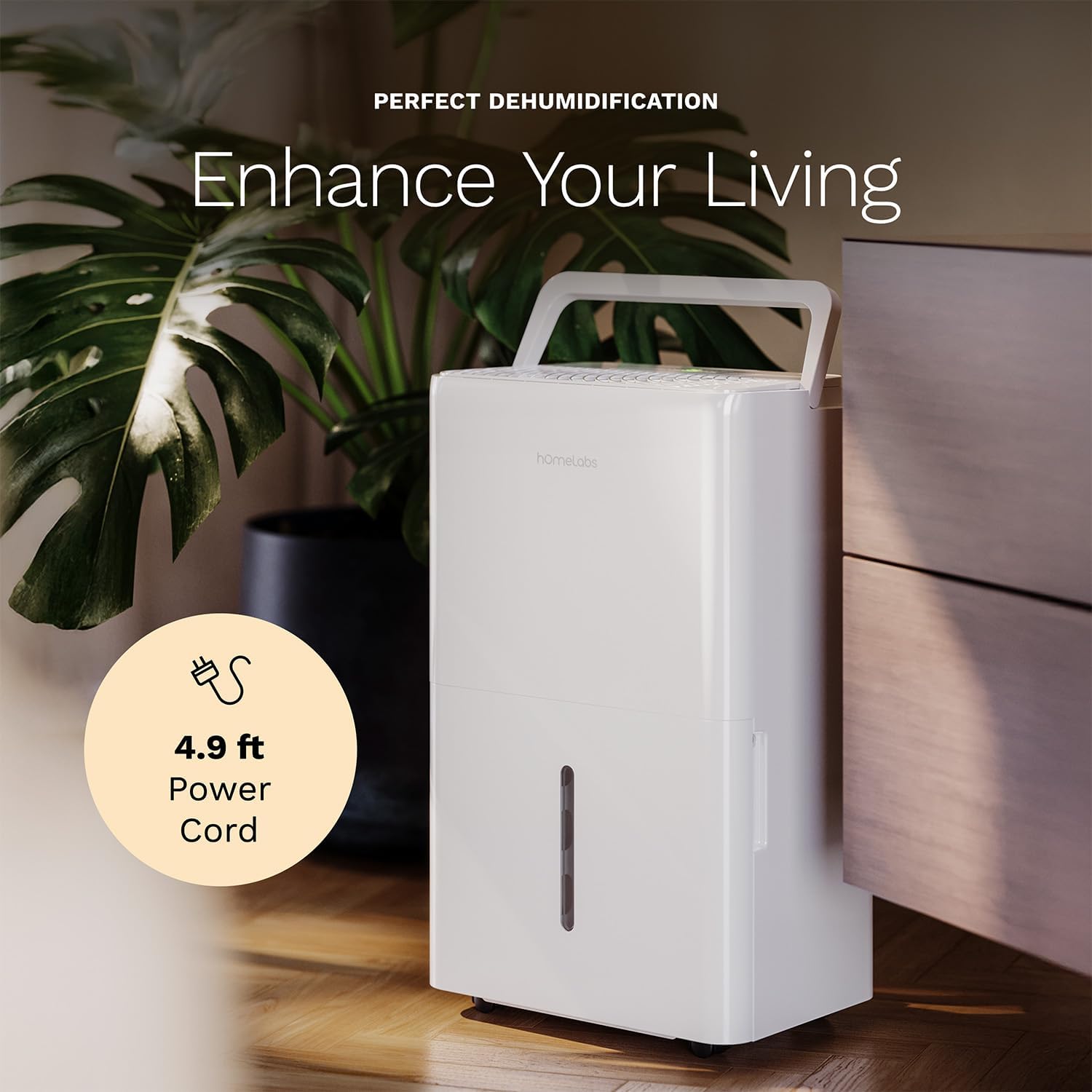
The dehumidifier positioned in a room, highlighting its 4.9 ft power cord for flexible placement.
- Drainage Option (Optional):

An image illustrating the two drainage options: using the built-in tank (manual emptying) or connecting a gravity drain hose for continuous drainage.
- Saliran Manual: The unit will collect water in the internal tank. When the tank is full, the unit will automatically shut off and indicate "Tank Full". Empty the tank as described in the Maintenance section.
- Saliran Berterusan: For continuous operation without emptying the tank, attach the included drain hose to the continuous drain outlet. Ensure the hose is sloped downwards to a suitable drain (e.g., floor drain, large bucket) to allow gravity drainage.
Arahan Operasi
Fungsi Panel Kawalan:
- Butang Kuasa: Tekan untuk menghidupkan atau MATI unit.
- Butang Tetapan Kelembapan (+/-): Adjust the desired humidity level from 35% to 85% relative humidity (RH) in 5% increments.
- Butang Kelajuan Kipas: Cycle through High, Medium, and Low fan speeds.
- Butang Pemasa: Set a timer for automatic ON/OFF operation (1-24 hours).
- Comfort Mode Button: Activates a preset humidity level for optimal comfort.
- Butang Wi-Fi: Activates Wi-Fi pairing mode.
Wi-Fi Smart Control:
Your dehumidifier can be controlled remotely via Wi-Fi using a smartphone app, Google Assistant, or Alexa.

The dehumidifier shown with icons indicating compatibility with Google Home and Alexa, along with a smartphone icon representing app control for remote operation.
- Muat turun Aplikasi: Download the hOmeLabs app from your smartphone's app store (iOS or Android).
- Berpasangan: Follow the in-app instructions to pair your dehumidifier with your home Wi-Fi network. This typically involves pressing and holding the Wi-Fi button on the control panel until the indicator light flashes.
- Kawalan Jauh: Once paired, you can adjust settings, monitor humidity levels, and set schedules from anywhere using your smartphone.
Penyelenggaraan
Penyelenggaraan tetap memastikan prestasi optimum dan memanjangkan jangka hayat penyahlembap anda.
Mengosongkan Tangki Air:
- When the water tank is full, the "Tank Full" indicator will illuminate, and the unit will stop operating.
- Tarik keluar tangki air dari bahagian hadapan unit dengan berhati-hati.
- Kosongkan air yang terkumpul ke dalam singki atau longkang.
- Luncurkan tangki kosong kembali ke dalam unit sehingga ia berbunyi klik pada tempatnya. Unit akan menyambung semula operasi.
Membersihkan Penapis Udara:
The "Filter" indicator light will illuminate after 250 hours of operation, reminding you to clean the filter. Clean the filter every two weeks or more frequently depending on usage and air quality.
- Matikan penyahlembap dan cabut plagnya dari salur keluar kuasa.
- Keluarkan penapis udara dari bahagian belakang unit.
- Basuh penapis dengan air suam dan sabun. Bilas sebersih-bersihnya.
- Biarkan penapis kering sepenuhnya sebelum dipasang semula. Jangan gunakan pengering atau haba langsung.
- Once the filter is reinstalled, press and hold the "Filter" button for 3 seconds to reset the filter timer.
Pembersihan Am:
- Lap bahagian luar unit dengan lembut, damp kain.
- Jangan gunakan bahan kimia, bahan pengikis atau pelarut yang keras.
- Bersihkan tangki air dengan kerap untuk mengelakkan pertumbuhan acuan dan cendawan.
Menyelesaikan masalah
Rujuk bahagian ini untuk isu biasa dan penyelesaiannya.
| Masalah | Kemungkinan Punca | Penyelesaian |
|---|---|---|
| Dehumidifier tidak dihidupkan. | No power; Power cord not plugged in; Tank full. | Check power supply; Plug in power cord securely; Empty water tank. |
| Unit berjalan tetapi tidak mengumpul air. | Tetapan kelembapan terlalu tinggi; Suhu bilik terlalu rendah; Penapis udara tersumbat. | Lower desired humidity setting; Ensure room temperature is above 41°F (5°C); Clean air filter. |
| Unit bising. | Unit tidak rata; Penapis udara tersumbat; Kipas tersumbat. | Letakkan di atas permukaan yang rata; Bersihkan penapis udara; Periksa halangan di kawasan kipas. |
| Isu sambungan Wi-Fi. | Kata laluan Wi-Fi salah; Penghala terlalu jauh; Isu aplikasi. | Verify Wi-Fi password; Move unit closer to router; Restart app/unit. |
Spesifikasi
| Ciri | Perincian |
|---|---|
| Jenama | hOmeLabs |
| Nama Model | hOmelabs - Dehumidifier - 25 Pint - WIFI (HME0088) |
| Kapasiti Dehumidifikasi | 25 Pints per Day (at 80°F, 60%RH) / MAX 64 Pints (at 95°F, 90%RH) |
| Kawasan Liputan | Sehingga 3,500 Kaki Persegi |
| Isipadu Tangki | 1 gelen |
| Dimensi Produk (D x W x H) | 8.2"D x 12.2"W x 19.6"H |
| Berat Barang | 27.1 paun |
| Mod Operasi | Automatik |
| Ciri Khas | Adjustable Humidity Control, Automatic Defrost, Automatic Moisture Removal, Automatic Shutoff, Bucket Storage, Digital Display, Portable, Quiet Operation, Removable Tank, Timer, Washable Filter, Wi-Fi Enabled |
| Kecekapan Tenaga | Energy Star Most Efficient 2024 Certified |
Waranti dan Sokongan
Your hOmeLabs 25 Pint Wi-Fi Dehumidifier comes with a standard manufacturer's warranty. For detailed warranty information, please refer to the official warranty document provided with your purchase or visit the hOmeLabs webtapak.
Dokumen Waranti: Muat turun Waranti (PDF)
For technical support, troubleshooting assistance, or to inquire about replacement parts, please contact hOmeLabs customer service. Contact information can typically be found on the hOmeLabs webtapak atau dalam pembungkusan produk anda.


