pengenalan
The Memorex MX-BCD20 is a versatile portable stereo system designed to provide high-quality audio playback from multiple sources. It features a top-loading CD player, AM/FM radio, and an auxiliary input for connecting external devices. Its compact design and flexible power options make it suitable for use at home or on the go.
Maklumat Keselamatan Penting
Please read all instructions carefully before operating this unit. Keep this manual for future reference.
- Jangan dedahkan unit ini kepada hujan atau lembapan.
- Jangan sekat sebarang bukaan pengudaraan.
- Ensure proper power supply (AC adapter or 6 'C' batteries).
- Do not open the unit's casing; merujuk semua perkhidmatan kepada kakitangan yang berkelayakan.
- Elakkan meletakkan unit berhampiran sumber haba atau di bawah cahaya matahari langsung.
- Bersihkan hanya dengan kain kering.
Kandungan Pakej
- Memorex MX-BCD20 Portable CD Player
- Penyesuai Kuasa AC
- Manual Arahan (dokumen ini)
Produk Selesaiview
Familiarize yourself with the various parts and controls of your Memorex Portable CD Player.
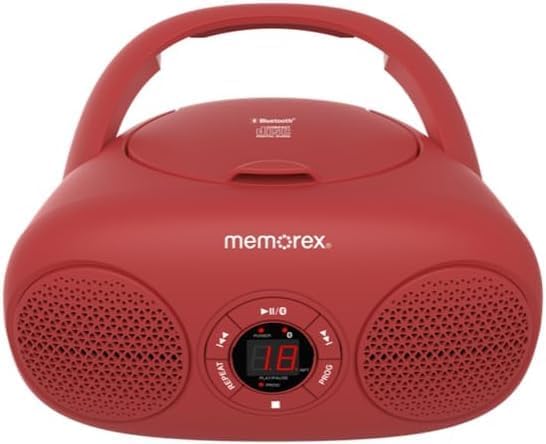
Rajah 1: Depan view of the Memorex MX-BCD20 Portable CD Player, showing the main controls and speakers.

Rajah 2: Belakang view illustrating the battery compartment and a side view highlighting the tuning dial and function switch.
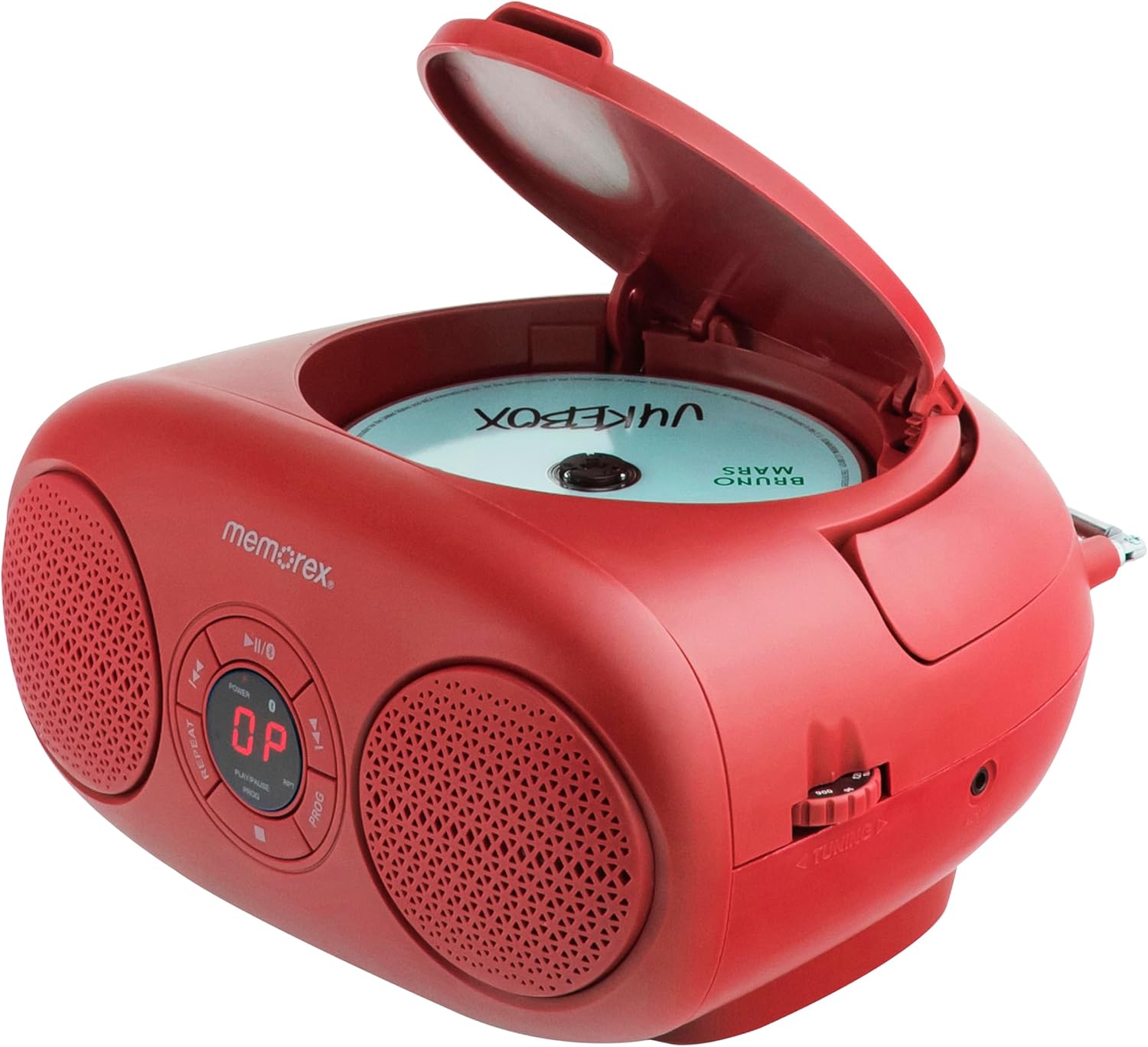
Rajah 3: Atas view with the CD compartment lid open, ready for disc insertion.
Kawalan dan Penunjuk:
- Butang kuasa: Menghidupkan/Mematikan unit.
- PLAY/PAUSE Button (►/▮▮): Memulakan atau menjeda main balik CD.
- STOP Button (■): Menghentikan main balik CD.
- SKIP/SEARCH Buttons (◀◀ / ►►): Skips tracks or searches within a track on CD.
- REPEAT Button (RPT): Repeats current track or all tracks on CD.
- PROGRAM Button (PROG): Programs CD tracks for custom playback.
- VOLUME Dial: Melaraskan tahap output audio.
- Suis FUNGSI: Selects between CD, AM, FM, or AUX modes.
- TUNING Dial: Tunes AM/FM radio frequencies.
- Paparan led: Shows CD track number or radio frequency.
- Antena Teleskopik: Untuk penerimaan radio FM.
- Jack Input AUX: Untuk menyambungkan peranti audio luaran.
- AC Input Jack: Untuk menyambungkan penyesuai kuasa AC.
- Petak Bateri: Holds 6 'C' batteries for portable use.
Persediaan
Mengkuasakan Unit:
The Memorex MX-BCD20 can be powered by either the included AC adapter or 6 'C' batteries (not included).
Kuasa AC:
- Insert the small end of the AC power adapter into the AC input jack on the back of the unit.
- Plug the other end of the AC power adapter into a standard AC wall outlet (120V ~ 60Hz).
Kuasa Bateri:
- Buka penutup petak bateri yang terletak di bahagian bawah unit.
- Insert 6 'C' size batteries (not included), ensuring correct polarity (+/-) as indicated inside the compartment.
- Tutup penutup petak bateri dengan selamat.
Note: When the unit is connected to AC power, battery power is automatically disconnected. Remove batteries if the unit will not be used for an extended period.
Persediaan Antena:
For optimal FM radio reception, fully extend the telescopic antenna. For AM reception, the unit has a built-in antenna, so no adjustment is needed, but you may need to rotate the unit for better signal.

Figure 4: The unit with its telescopic antenna extended for improved FM radio reception.
Arahan Operasi
Operasi Am:
- Tekan ke KUASA butang untuk menghidupkan unit.
- Laraskan JILID dial to your desired listening level.
- Gunakan FUNGSI switch to select your desired mode: CD, AM, FM, or AUX.
Main balik CD:
- Tetapkan FUNGSI switch to "CD".
- Open the CD compartment lid by gently lifting it.
- Place a CD (or CD-R/RW) onto the center spindle with the label side facing up.
- Close the CD compartment lid firmly until it clicks. The LED display will show the total number of tracks.
- Tekan ke MAIN/JEDA (►/▮▮) button to begin playback. The current track number will be displayed.
- Untuk menjeda main balik, tekan MAIN/JEDA (►/▮▮) again. Press it once more to resume.
- Untuk menghentikan main balik, tekan BERHENTI (■) button.
Melangkau Trek:
- Semasa main semula, tekan Langkau / CARI (►►) to skip to the next track.
- Tekan Langkau / CARI (◀◀) to skip to the beginning of the current track. Press it twice to skip to the previous track.
Searching Within a Track:
- Semasa main semula, tekan dan tahan Langkau / CARI (►►) to fast-forward through the current track.
- Tekan dan tahan Langkau / CARI (◀◀) to fast-reverse through the current track.
- Lepaskan butang untuk menyambung main semula biasa.
Ulang Main semula:
- Tekan ke ULIKAN (RPT) button once during playback to repeat the current track. "REPEAT 1" will appear on the display.
- Tekan ke ULIKAN (RPT) button a second time to repeat all tracks on the CD. "REPEAT ALL" will appear.
- Tekan ke ULIKAN (RPT) button a third time to cancel repeat playback.
Main Semula Program:
You can program up to 20 tracks to play in a specific order.
- Dalam mod STOP, tekan butang PROGRAM (PROG) button. "PROG" will flash on the display.
- Gunakan Langkau / CARI (◀◀ / ►►) buttons to select the first track you wish to program.
- Tekan PROGRAM (PROG) again to confirm the selection. The display will show the program number (e.g., "01" for the first programmed track).
- Ulangi langkah 2 dan 3 untuk menambah lebih banyak trek pada program anda.
- Selepas memprogram semua trek yang dikehendaki, tekan butang MAIN/JEDA (►/▮▮) button to start programmed playback.
- To clear the program, open the CD compartment lid or press the BERHENTI (■) button twice.
Operasi Radio:
- Tetapkan FUNGSI switch to "AM" or "FM".
- For FM reception, extend the telescopic antenna fully.
- Putar MENALA dial to select your desired radio station. The frequency will be shown on the LED display.
- Laraskan JILID dial as needed.
Tip: For better AM reception, try rotating the entire unit. For FM, adjust the position and extension of the telescopic antenna.
Input Tambahan (AUX):
You can connect an external audio device (e.g., smartphone, MP3 player) to the unit using a 3.5mm audio cable (not included).
- Tetapkan FUNGSI switch to "AUX".
- Connect one end of a 3.5mm audio cable to the AUX input jack on the unit.
- Sambungkan hujung kabel yang lain ke bicu fon kepala atau output audio peranti luaran anda.
- Start playback on your external device. The audio will be routed through the Memorex unit's speakers.
- Adjust the volume using both the unit's JILID dial and your external device's volume control.
Penyelenggaraan
- Pembersihan: Lap unit dengan kain lembut dan kering. Jangan gunakan pembersih atau pelarut yang melelas.
- Penjagaan CD: Kendalikan CD dengan tepinya. Pastikan ia bersih dan bebas daripada calar. Simpan dalam bekasnya apabila tidak digunakan.
- Storan: If storing the unit for a long period, remove the batteries to prevent leakage.
Menyelesaikan masalah
| Masalah | Kemungkinan Punca | Penyelesaian |
|---|---|---|
| Tiada kuasa | Penyesuai AC tidak disambungkan dengan betul; Bateri habis atau tidak dimasukkan dengan betul. | Periksa sambungan AC; Gantikan bateri atau pastikan polariti yang betul. |
| CD tidak dimainkan | CD inserted incorrectly; CD is dirty or scratched; CD compartment lid not closed. | Re-insert CD label side up; Clean CD with a soft cloth; Close lid firmly. |
| Penerimaan radio yang lemah | Antena tidak dilanjutkan (FM); Kedudukan unit (AM). | Fully extend FM antenna; Rotate unit for better AM signal. |
| Tiada bunyi daripada AUX | AUX cable not connected; External device volume too low. | Ensure AUX cable is securely connected; Increase volume on external device. |
Spesifikasi
- model: MX-BCD20
- Sumber Kuasa: AC 120V ~ 60Hz or 6 x 'C' Batteries (DC 9V)
- Keserasian CD: CD, CD-R / RW
- Frekuensi Radio: AM/FM
- Input Bantu: Bicu Stereo 3.5mm
- Dimensi (L x W x H): 10 x 10 x 6 inci (lebih kurang)
- Berat: 2.14 paun (lebih kurang)
Waranti dan Sokongan
Memorex products are designed for reliability and performance. For warranty information or technical support, please refer to the contact details provided on the product packaging or visit the official Memorex webtapak. Simpan resit pembelian anda sebagai bukti pembelian untuk tuntutan waranti.


