1. Produk Lebihview
The Reebok LS Edition Smartwatch is designed to integrate seamlessly into your daily routine, offering advanced features for activity monitoring and connectivity. Its clean, minimalist design ensures both functionality and style.
1.1 Kandungan Pakej
- Reebok LS Edition Smartwatch (Pink)
- Kabel Pengecasan
- Tali boleh laras
- Manual Pengguna (dokumen ini)
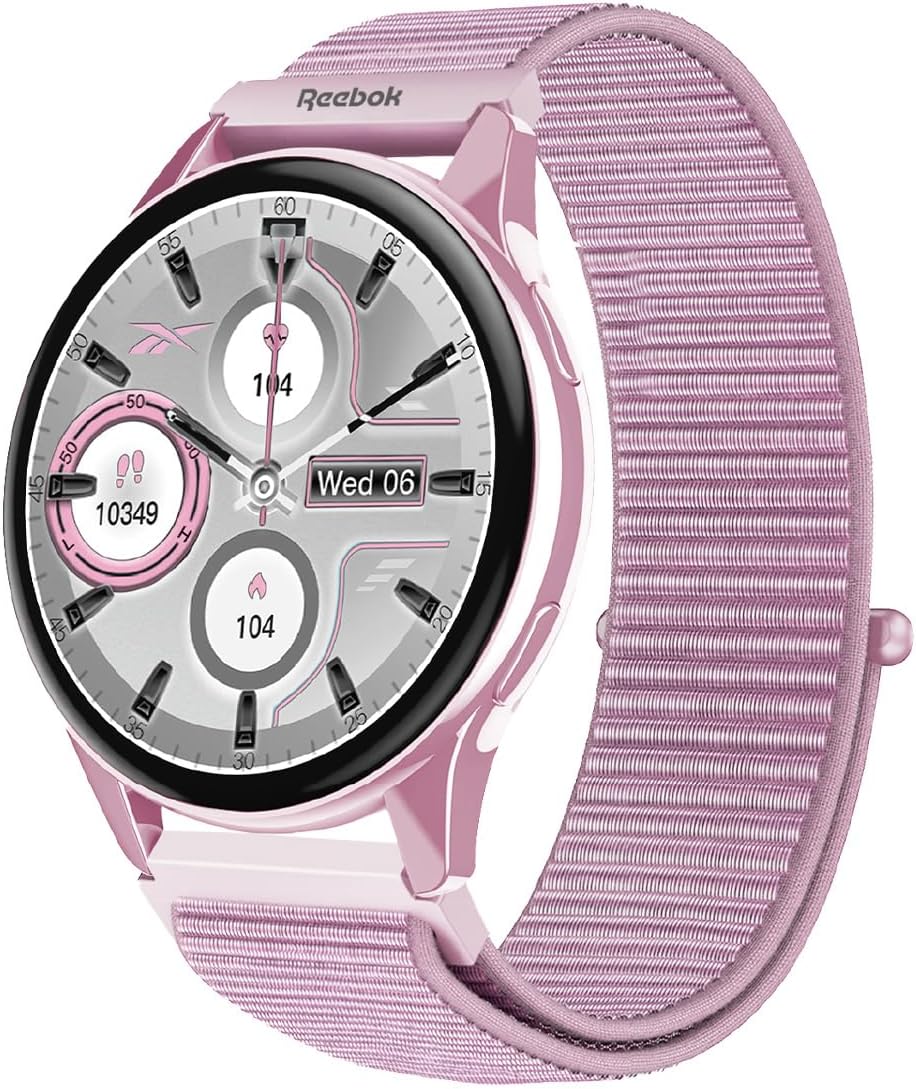
Rajah 1.1: Depan view of the Reebok LS Edition Smartwatch with its pink case and strap.
2. Persediaan
2.1 Pengecasan Awal
- Connect the charging cable to the smartwatch's charging port.
- Palamkan hujung kabel pengecas yang satu lagi ke dalam penyesuai kuasa USB (tidak disertakan) atau port USB komputer.
- Allow the smartwatch to charge completely before first use. A full charge typically takes approximately 2 hours. The screen will indicate charging status.
2.2 Menghidupkan/Mematikan
- Untuk Menghidupkan: Press and hold the side button until the Reebok logo appears on the screen.
- Untuk Mematikan: Press and hold the side button, then select "Power Off" from the options displayed on the screen.
2.3 Berpasangan dengan Telefon Pintar
To unlock the full functionality of your Reebok Smartwatch, pair it with your smartphone via Bluetooth.
- Pastikan jam tangan pintar anda dihidupkan dan dicas sepenuhnya.
- Download and install the official Reebok Smartwatch application on your smartphone (available on iOS App Store and Google Play Store).
- Dayakan Bluetooth pada telefon pintar anda.
- Open the Reebok Smartwatch application and follow the on-screen instructions to search for and connect to your device.
- Confirm the pairing code displayed on both your smartwatch and smartphone.
3. Arahan Operasi
3.1 Navigasi Asas
- Skrin sentuh: Swipe left, right, up, or down to navigate through menus and widgets. Tap to select an item.
- Butang Sisi: Press once to return to the watch face or access the app menu. Press and hold for power options or to activate voice assistant (if supported).

Rajah 3.1: Sisi view of the Reebok LS Edition Smartwatch, highlighting the side button for navigation and power control.
3.2 Pemberitahuan
Once paired with your smartphone, the smartwatch will display notifications for calls, messages, and other applications. Swipe down from the watch face to view pemberitahuan terkini.
3.3 Pengesanan Aktiviti
The smartwatch features an integrated sensor for tracking various activities. Access the activity tracking menu to view:
- Kiraan langkah
- Jarak yang dilalui
- Kalori dibakar
- Heart rate (if applicable, based on integrated sensor)
For detailed insights and historical data, refer to the Reebok Smartwatch application on your smartphone.
3.4 Menyesuaikan Muka Jam
Personalize your smartwatch by changing the watch face. Press and hold the watch face, then swipe left or right to browse available options. Tap to select a new watch face.
4. Penyelenggaraan
4.1 Membersihkan Jam Tangan Pintar Anda
- Wipe the screen and case with a soft, lint-free cloth.
- Untuk tanda degil, sedikit dampen kain dengan air. Elakkan menggunakan bahan kimia yang keras atau bahan yang melelas.
- Pastikan sesentuh pengecasan bersih dan kering sebelum mengecas.
4.2 Penjagaan Bateri
- Avoid exposing the smartwatch to extreme temperatures.
- Do not allow the battery to fully discharge frequently, as this can reduce its lifespan.
- Cas peranti secara berkala, walaupun tidak digunakan secara berterusan.
4.3 Penggantian Tali
The adjustable strap can be replaced. Refer to the quick release pins on the underside of the strap to detach and attach new compatible straps. Ensure the new strap is securely fastened before wearing.
5. Penyelesaian masalah
| Isu | Penyelesaian yang Mungkin |
|---|---|
| Smartwatch does not power on. | Ensure the device is fully charged. Connect to the charger for at least 30 minutes. |
| Tidak boleh berpasangan dengan telefon pintar. |
|
| Pemberitahuan tidak diterima. |
|
| Penjejakan aktiviti yang tidak tepat. |
|
6. Spesifikasi Teknikal
| Ciri | Perincian |
|---|---|
| Nombor Model | RBK-SBLS-P |
| Jenama | Reebok |
| warna | Merah jambu |
| Jenis Paparan | AMOLED |
| bentuk | Bulat |
| Jenis Bahan | plastik |
| Sistem Operasi | Pakai OS 2.0 |
| Teknologi Ketersambungan | Bluetooth |
| Standard Komunikasi Tanpa Wayar | Bluetooth |
| GPS | Tiada GPS |
| Ciri Khas | Notifications, Integrated Sensor |
| Kapasiti Penyimpanan Memori | 63.98 MB |
| Kapasiti Bateri | 149.99 mAh |
| Dimensi Produk | 1.6 x 4.5 x 17cm; 70g |
| Peranti Serasi | Telefon Pintar, Tablet |
7. Waranti dan Sokongan
This Reebok Smartwatch comes with a standard manufacturer's warranty. For specific warranty terms and conditions, please refer to the warranty card included in your product packaging or visit the official Reebok webtapak.
For technical support, troubleshooting assistance, or further inquiries, please contact Reebok customer service through their official webtapak atau maklumat hubungan yang diberikan dalam dokumentasi produk anda.
Sumber Dalam Talian:
- Reebok Official Store on Amazon
- Refer to the Reebok Smartwatch application for FAQs and additional support.


