1. Pengenalan
This manual provides comprehensive instructions for the VILTROX DC-X3 6-inch Camera Video Field Monitor. It covers product features, setup procedures, operational guidelines, maintenance tips, and troubleshooting steps to ensure safe and efficient use of your device. Please read this manual thoroughly before operating the monitor.
Produk Selesaiview
The VILTROX DC-X3 is a professional 6-inch Full HD 1920x1080 touch screen monitor designed for camera and video applications. It features a high brightness of 2000 Nits for clear visibility in various lighting conditions, 4K HDMI and 3G-SDI loop in/out ports, and advanced monitoring tools such as 3D LUT, RGB Parade, Focus Peaking, and Full Waveform.

Figure 1.1: VILTROX DC-X3 Monitor with included accessories including sun hood, battery, mount, and cables.
2. Langkah-langkah Keselamatan
- Jangan dedahkan monitor kepada hujan atau kelembapan untuk mengelakkan kebakaran atau renjatan elektrik.
- Elakkan meletakkan monitor di bawah cahaya matahari langsung atau berhampiran sumber haba.
- Gunakan hanya penyesuai kuasa dan aksesori yang dinyatakan.
- Do not disassemble or modify the monitor. Refer all servicing to qualified personnel.
- Bersihkan skrin dengan kain lembut dan kering. Elakkan menggunakan pembersih cecair.
3. Komponen dan Ciri Produk
Kandungan Pakej
- VILTROX DC-X3 Monitor
- Hud Matahari
- Battery (NP-F series compatible)
- Gunung Sepatu Panas
- Kabel HDMI
- Kabel USB-C
- Manual Pengguna

Rajah 3.1: Belakang view of the DC-X3, highlighting the NP-F battery plate and SDI input/output ports.
Ciri-ciri Utama
- Ultra-Bright Display: 2000 Nits brightness for clear visibility in strong light.
- Full HD IPS Screen: 6-inch FHD 1080P IPS display with true-to-life colors and wide viewsudut-sudut.
- Peak Focus Accuracy: Assists in achieving sharp, high-quality images.
- Comprehensive Monitoring Tools: Includes Waveform, 3D LUT, RGB Parade, Focus Peaking, Zebras, Vectorscope, Brightness Histogram, Mirror Image, Image Freeze, Pixel to Pixel, Monochrome, Safe Mark, Volume Bar, False Colors, Exposure, Zoom, Scanning Mode, Custom 3D LUT, and Mark Ratio.
- 4K HDMI / 3G-SDI Loop In & Out: Supports 4K 30Hz HDMI signals and 1080p 60Hz 3G-SDI signals.
- Pemantauan Audio: 3.5mm headphone jack for simultaneous audio monitoring.
- Pelbagai Pilihan Kuasa: Supports DC IN (12-18V/2A), Type-C (≥9V/3A), and NP-F series lithium batteries.
- Sistem Penyejukan yang Cekap: Integrated fan for heat dissipation.
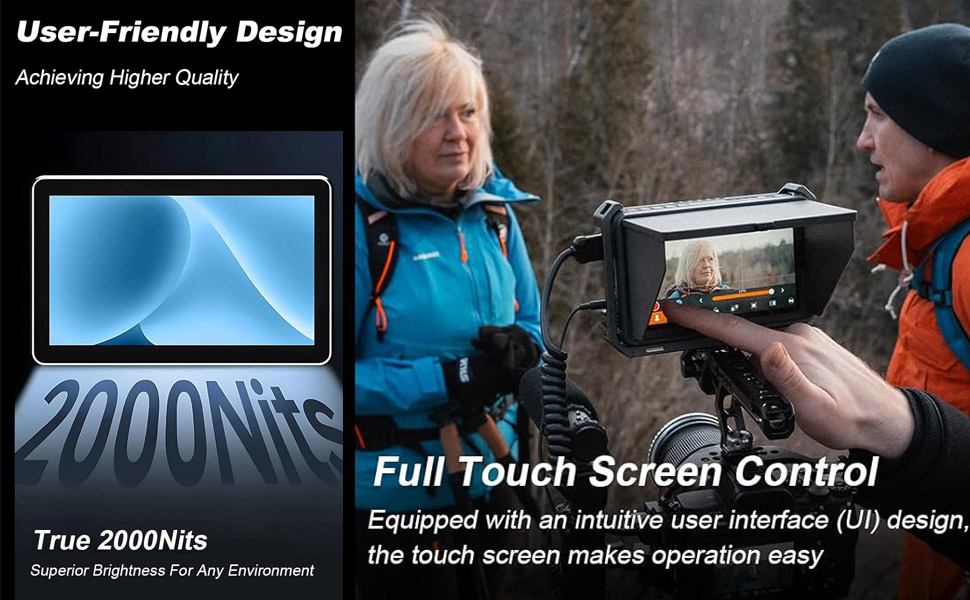
Figure 3.2: Display of various professional auxiliary tools available on the DC-X3 monitor, including focus peaking, waveform, and 3D LUT.
4. Panduan Persediaan
4.1 Menguasakan Monitor
The DC-X3 monitor can be powered by three methods:
- Bateri NP-F: Insert a fully charged NP-F series lithium battery into the battery plate on the rear of the monitor. Ensure it clicks into place securely.
- Penyesuai Kuasa DC: Connect a 12-18V/2A DC power adapter to the DC IN port on the side of the monitor.
- Kuasa USB-C: Connect a USB-C power source (≥9V/3A) to the Type-C port.

Figure 4.1: Illustration of the DC-X3's multiple power supply options (DC IN, Type-C, NP-F battery) and its efficient cooling system.
4.2 Memasang Monitor
Attach the included hot shoe mount to the 1/4"-20 screw hole on the bottom or side of the monitor. Secure the mount to your camera's hot shoe or a compatible rig.

Figure 4.2: The DC-X3 monitor mounted on a camera setup, demonstrating its integration and the attached sun hood.
4.3 Menghubungkan Sumber Video
The DC-X3 supports both HDMI and SDI video inputs.
- Sambungan HDMI: Connect an HDMI cable from your camera's HDMI OUT port to the HDMI IN port on the monitor. For looping out, connect another HDMI cable from the HDMI OUT port to an external display.
- SDI Connection: Connect an SDI cable from your camera's SDI OUT port to the SDI IN port on the monitor. For looping out, connect another SDI cable from the SDI OUT port to an external display.

Rajah 4.3: Jarak dekat view of the HDMI and SDI input/output interfaces on the DC-X3 monitor, illustrating connectivity options.
4.4 Attaching the Sun Hood
Slide the sun hood onto the monitor's frame until it securely fits. This helps reduce glare in bright outdoor conditions.

Rajah 4.4: Sisi view of the DC-X3 monitor with the sun hood attached, demonstrating its protective function against glare.
5. Arahan Operasi
5.1 Hidupkan/Mati Kuasa
Press and hold the power button located on the side of the monitor to turn it on or off.
5.2 Operasi Skrin Sentuh
The DC-X3 features a full touch screen for intuitive control. Tap icons to select functions, swipe to navigate menus, and pinch-to-zoom for image inspection.
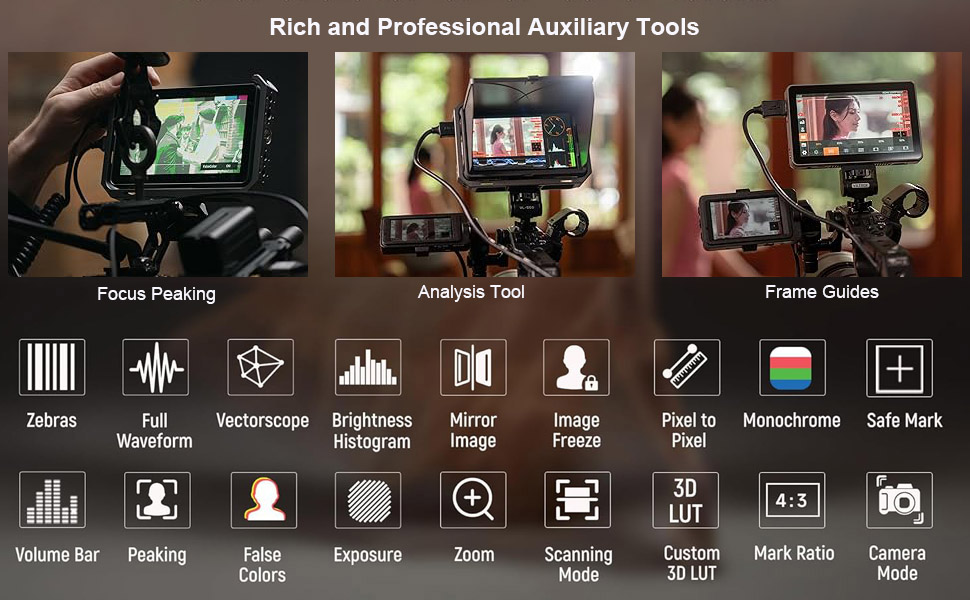
Figure 5.1: The DC-X3's user-friendly design and full touch screen control, illustrating ease of operation.
5.3 Menu Navigasi
Access the main menu by tapping the screen. Navigate through settings such as display, audio, and auxiliary functions. Use the function buttons (F1-F4) on the top of the monitor for quick access to frequently used features, which can be customized in the settings.
5.4 Using Monitoring Tools
The DC-X3 offers a variety of professional monitoring tools:
- Fokus Puncak: Highlights in-focus areas with a selectable color.
- Bentuk gelombang: Displays the luminance and chrominance levels of your video signal.
- LUT 3D: Apply custom or pre-loaded Look-Up Tables for real-time color grading.
- RGB Parade: Shows the individual red, green, and blue channel levels.
- Zebras: Indicates overexposed areas.
- Vectorscope: Displays color saturation and hue.
- Histogram Kecerahan: Shows the distribution of brightness levels.
5.5 Pemantauan Audio
Connect headphones to the 3.5mm audio jack to monitor the embedded audio from your HDMI or SDI input.
6. Penyelenggaraan
6.1 Membersihkan Monitor
- Skrin: Use a soft, lint-free cloth specifically designed for electronics screens. Gently wipe the screen to remove dust and fingerprints. Do not use liquid cleaners, alcohol, or abrasive materials.
- Badan: Wipe the monitor body with a soft, dry cloth.
6.2 Penyimpanan
When not in use, store the monitor in a cool, dry place, away from direct sunlight and extreme temperatures. Use the provided carrying case for protection during transport.

Figure 6.1: The VILTROX DC-X3 monitor and its accessories, including the carrying case, as packaged.
7. Penyelesaian masalah
| Masalah | Kemungkinan Punca | Penyelesaian |
|---|---|---|
| Monitor tidak dihidupkan. | Low or dead battery; power cable not connected; power button not held long enough. | Charge or replace battery; ensure power cable is securely connected; press and hold power button for 3 seconds. |
| Tiada isyarat video. | Incorrect input selected; cable loose or damaged; camera output settings incorrect. | Check input source (HDMI/SDI) in menu; ensure cables are securely connected; verify camera's video output settings (resolution, frame rate). |
| Screen is too dim or too bright. | Brightness settings incorrect. | Adjust brightness in the display settings menu. |
| Skrin sentuh tidak bertindak balas. | Gangguan perisian sementara; skrin kotor. | Restart the monitor; clean the screen with a soft cloth. |
| No audio from headphone jack. | Volume too low; audio source not enabled on camera; headphone issue. | Increase volume in monitor settings; ensure camera is outputting audio via HDMI/SDI; test with different headphones. |
8. Spesifikasi
| Ciri | Perincian |
|---|---|
| Model | XH-DC-X3 |
| Saiz Paparan | 6 inci |
| Resolusi | 1920x1080 (HD Penuh) |
| Kecerahan | 2000 Nit |
| Nisbah Kontras | 1000:1 |
| Viewsudut | 160° (IPS) |
| Port Input | HDMI IN (4K 30Hz), SDI IN (3G-SDI 1080p 60Hz) |
| Port Output | HDMI OUT, SDI OUT |
| Output Audio | Bicu Fon Kepala 3.5mm |
| Bekalan Kuasa | DC 12-18V/2A, Type-C ≥9V/3A, NP-F Battery |
| Dimensi Produk | 2 x 10 x 6 inci |
| Berat Barang | 2.5 paun |
9. Waranti dan Sokongan
VILTROX products typically come with a limited warranty. Please refer to the warranty card included in your product packaging for specific terms and conditions, including warranty period and coverage details. For technical support, service, or warranty claims, please contact VILTROX customer service through their official webtapak atau maklumat hubungan yang diberikan dalam dokumentasi produk anda.
Pengeluar: VILTROX
Webtapak: www.viltrox.com (Nota: Ini ialah pemegang tempat URL, please refer to your product's official documentation for the correct support contact.)


