pengenalan
Thank you for choosing the Orbit 62061N Single-Outlet Hose Watering Timer. This manual provides detailed instructions for setting up, operating, and maintaining your new watering timer. Designed for ease of use, this timer helps you manage your garden's watering schedule efficiently, conserving water and ensuring your plants thrive.
Key features include a large, easy-to-read LCD screen, an intuitive dial for programming, and a rain delay function to prevent overwatering.

Image: The Orbit 62061N Single-Outlet Hose Watering Timer, showcasing its green and grey design with a clear LCD screen and programming dial.
Persediaan
1. Pemasangan Bateri
The Orbit 62061N timer requires two (2) AA alkaline batteries (not included). Ensure you use new alkaline batteries for optimal performance and longevity. Do not mix old and new batteries, or different types of batteries (e.g., alkaline with carbon-zinc or rechargeable).
- Cari petak bateri di belakang pemasa.
- Luncurkan penutup bateri.
- Insert two AA alkaline batteries, observing the correct polarity (+/-) as indicated inside the compartment.
- Gantikan penutup bateri dengan selamat.

Imej: Bahagian belakang view of the Orbit 62061N timer, highlighting the battery compartment and important usage warnings.
2. Attaching to Faucet
The timer features a swivel coupling for easy and secure attachment to your outdoor faucet.
- Pastikan paip dimatikan.
- Thread the swivel coupling of the timer onto your outdoor faucet. Hand-tighten only; do not overtighten.
- Attach your garden hose to the outlet at the bottom of the timer.
- Slowly turn on your faucet.
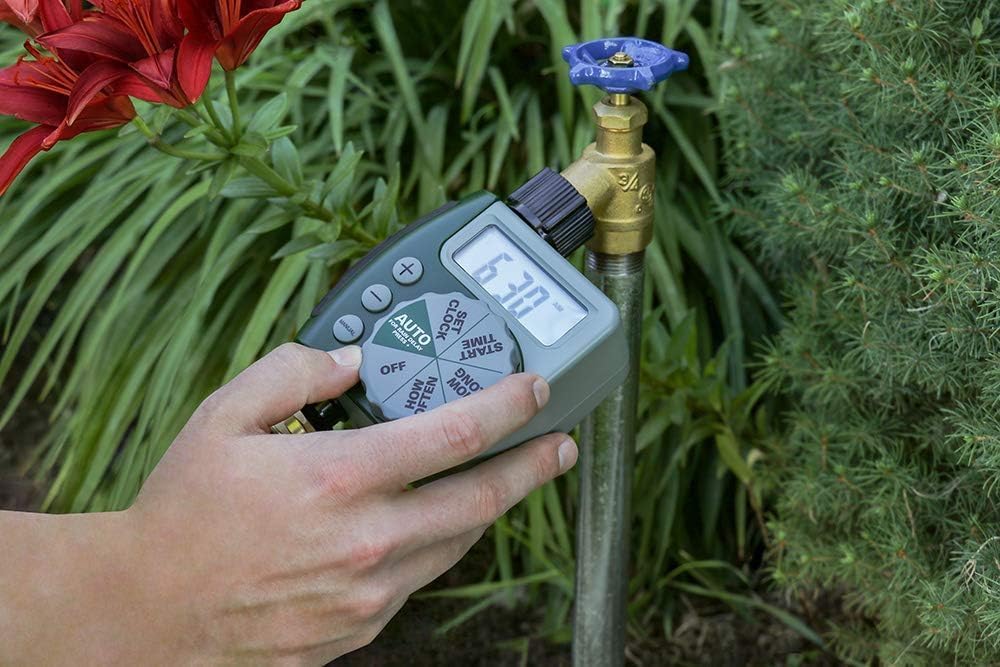
Image: A hand demonstrating the attachment of the Orbit 62061N timer to an outdoor garden faucet.

Imej: Dari dekat view of the Orbit 62061N timer's swivel coupling, designed for easy and secure hose attachment.
Arahan Operasi
The Orbit 62061N timer features a large, intuitive dial and an LCD screen for easy programming.

Imej: A terperinci view of the Orbit 62061N timer's large digital display and intuitive programming dial.
1. Menetapkan Jam
- Putar dail ke TETAPKAN JAM.
- Gunakan + dan - buttons to set the current time. The time will advance in 15-minute increments.
- Tekan ke MANUAL button to switch between AM and PM.
2. Setting Watering Programs
The timer allows you to set a start time, duration, and frequency for your watering cycles.
a. Set Start Time
- Putar dail ke MASA MULA.
- Gunakan + dan - buttons to select your desired watering start time.
b. How Long (Watering Duration)
- Putar dail ke BERAPA LAMA.
- Gunakan + dan - buttons to set the watering duration from 1 to 240 minutes (4 hours).

Image: The Orbit 62061N timer attached to a faucet, illustrating its capability for timed watering cycles.
c. How Often (Watering Frequency)
- Putar dail ke BERAPA KERAP.
- Gunakan + dan - buttons to select the watering frequency. Options include every 6 hours, every 12 hours, or once every 1 to 7 days.

Image: The Orbit 62061N timer displaying its watering interval settings, allowing for flexible scheduling.
3. Mod Auto
After setting your desired watering program, turn the dial to AUTO. The timer will now operate according to your programmed schedule.
4. Penyiraman Manual
To manually water without interrupting your programmed schedule:
- Putar dail ke MANUAL.
- Gunakan + dan - butang untuk menetapkan tempoh penyiraman manual yang diingini.
- The timer will begin watering immediately for the set duration. Once complete, it will return to your programmed schedule.
5. Rain Delay
The rain delay feature allows you to pause your watering schedule for a set period, conserving water after rainfall.
- While the dial is in the AUTO kedudukan, tekan dan tahan + butang selama 3 saat.
- The display will show '24h', indicating a 24-hour rain delay.
- Tekan ke + button again to cycle through 48-hour and 72-hour delay options.
- Pemasa akan menyambung semula jadual yang diprogramkan secara automatik selepas tempoh kelewatan yang dipilih.
- To cancel a rain delay, press and hold the + button until the display returns to the current time.

Image: The Orbit 62061N timer attached to a faucet, displaying the rain delay function, which helps save water by skipping cycles after rain.
6. Mematikan Pemasa
Untuk mematikan semua program penyiraman, putar dail ke DIMATIKANIni akan menghentikan semua kitaran penyiraman automatik dan manual.
Penyelenggaraan
Penggantian Bateri
When the battery indicator on the LCD screen is low, replace the batteries promptly to ensure continuous operation. Follow the battery installation steps outlined in the Setup section.
Musim sejuk dan Penyimpanan
To prevent damage from freezing temperatures, remove the timer from the faucet and store it indoors in a location where the temperature remains above 32°F (0°C). Remove batteries before long-term storage.
Pembersihan
Periodically check the filter washer located in the swivel coupling for debris. Remove and rinse the filter under running water to clear any blockages. This helps maintain optimal water flow and prevents internal damage.
Menyelesaikan masalah
| Masalah | Kemungkinan Punca | Penyelesaian |
|---|---|---|
| Paparan pemasa kosong atau malap. | Bateri rendah atau mati; pemasangan bateri yang salah. | Replace with new AA alkaline batteries; ensure correct polarity. |
| Timer does not water at scheduled time. | Incorrect program settings; timer is in OFF mode; rain delay is active; low water pressure. | Verify program settings (Start Time, How Long, How Often); ensure dial is on AUTO; check for active rain delay; ensure faucet is fully open and water pressure is adequate. |
| Timer waters continuously. | Timer is in MANUAL mode; internal malfunction. | Turn dial to AUTO or OFF to stop manual watering; if problem persists, contact customer support. |
| Kebocoran air daripada sambungan. | Loose connections; worn washer; damaged threads. | Hand-tighten connections; check and replace rubber washer if worn; ensure threads are not cross-threaded. |
Spesifikasi
- Nombor Model: 62061N
- Jenama: Orbit
- warna: hijau
- Dimensi Produk: 4"D x 2"W x 2"H
- Sumber Kuasa: 2 x Bateri Alkali AA 1.5V (tidak termasuk)
- Tekanan Operasi Maksimum: 100 PSI
- Suhu Operasi: Do not operate at temperatures exceeding 120°F (49°C). Store above 32°F (0°C).
- UPC: 840041572216
- Pengeluar: Orbit
Maklumat Waranti
Orbit products are manufactured with quality materials and workmanship. For specific warranty details and terms, please refer to the warranty information provided with your product packaging or visit the official Orbit webtapak. Simpan resit pembelian anda sebagai bukti pembelian untuk sebarang tuntutan waranti.
Sokongan Pelanggan
If you have any questions, require technical assistance, or need to troubleshoot issues not covered in this manual, please contact Orbit customer support:
- Webtapak: www.orbitonline.com
- telefon: Refer to the Orbit webtapak untuk nombor hubungan serantau.
Please have your model number (62061N) and purchase information ready when contacting support.