1. Pengenalan
Terima kasih kerana membeliasing the Deeyaple G4 60W Gaming Soundbar. This manual provides essential information for setting up, operating, and maintaining your soundbar to ensure optimal performance and longevity. Please read this manual thoroughly before use and retain it for future reference.
2. Maklumat Keselamatan
- Do not expose the soundbar to extreme temperatures, humidity, or direct sunlight.
- Elakkan daripada menjatuhkan atau meletakkan peranti kepada kesan yang kuat.
- Keep the soundbar away from water and other liquids. The IPX5 rating indicates resistance to splashes, but it is not fully submersible.
- Do not attempt to disassemble, repair, or modify the soundbar yourself. Contact qualified service personnel for assistance.
- Gunakan hanya kabel kuasa dan aksesori yang disediakan.
- Pastikan pengudaraan yang betul di sekeliling bar bunyi semasa operasi.
3. Kandungan Pakej
Sila semak pakej untuk item berikut:
- Deeyaple G4 60W Gaming Soundbar
- Kabel Kuasa
- Manual Pengguna (dokumen ini)
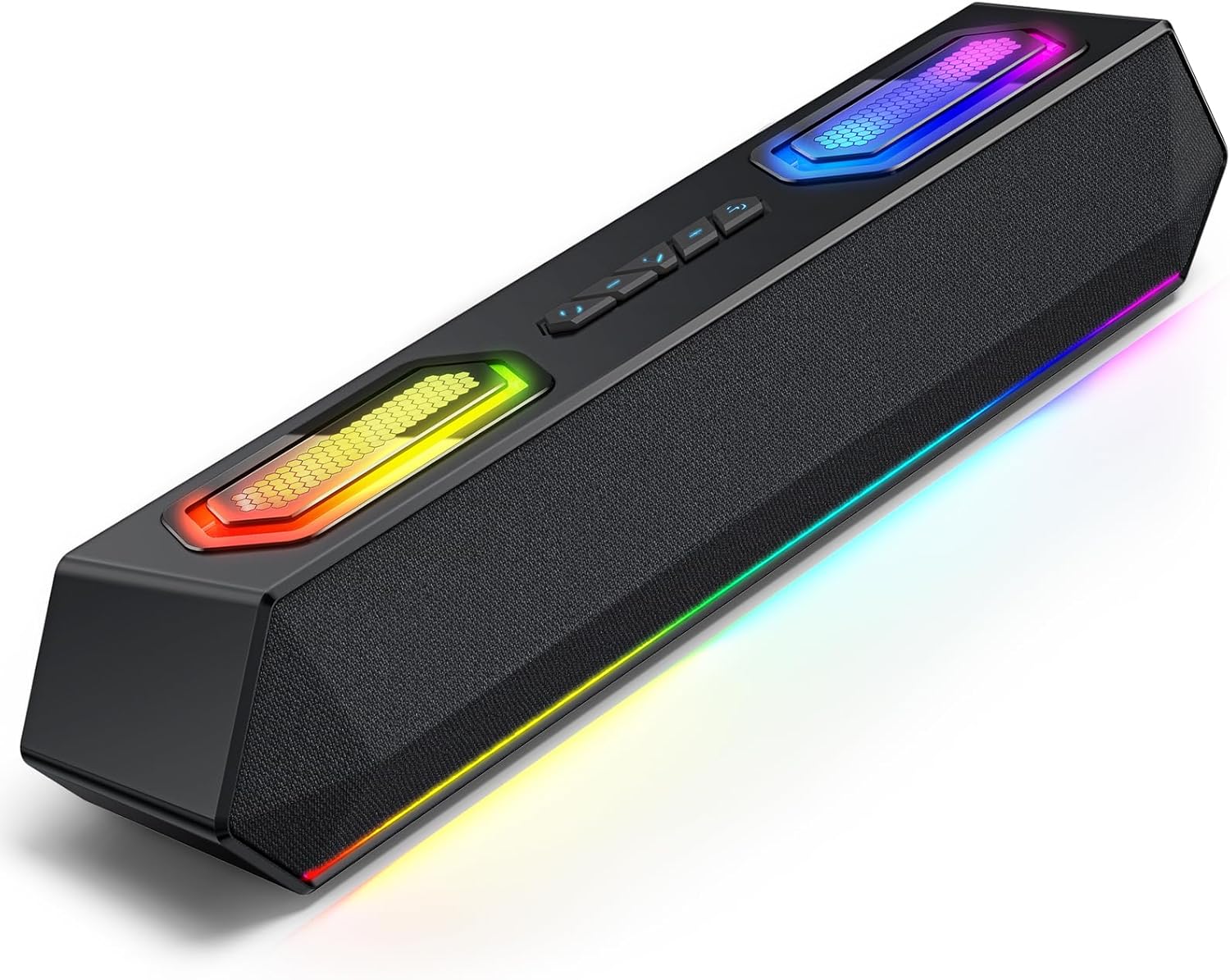
Image: Deeyaple G4 Soundbar, showcasing its design and RGB lighting.
4. Produk Lebihview
Ciri-ciri Utama:
- 60W Dual Speakers: Delivers rich bass, clear mids, and crisp highs.
- Pencahayaan RGB: Dynamic lights that pulse in sync with music, offering multiple atmosphere modes.
- Bluetooth 5.3: Stable wireless connectivity with a 66-foot range.
- Extended 20-Hour Battery: 2500mAh battery for long playback (at 50% volume with lights off).
- IPX5 kalis air: Resistant to splashes and rain.
- Wireless Stereo Pairing (TWS): Connect two soundbars for immersive stereo sound.
- Precision Audio Positioning: Enhanced stereo sound effects for gaming.
Kawalan dan Pelabuhan:
The soundbar features intuitive controls for power, volume, and RGB lighting modes. Connection options include Bluetooth, USB, and 3.5mm AUX.

Imej: Atas view of the Deeyaple G4 Soundbar highlighting the control buttons and RGB lighting panels.

Image: Diagram illustrating the internal speaker components of the 60W soundbar.
5. Persediaan
Menghidupkan:
- Connect the provided power cable to the soundbar's power input.
- Palamkan hujung kabel kuasa yang lain ke dalam salur keluar kuasa yang sesuai.
- Press and hold the power button on the soundbar until the RGB lights illuminate, indicating the device is on.
Menyambung melalui Bluetooth:
- Ensure the soundbar is powered on and in Bluetooth pairing mode (indicated by a flashing blue light, if applicable).
- Pada peranti anda (telefon pintar, tablet, komputer), dayakan Bluetooth dan cari peranti yang tersedia.
- Select "Deeyaple G4" from the list of devices.
- Once connected, the soundbar will indicate a successful pairing (e.g., a solid blue light or an audible prompt).
Video: Demonstrates connecting a soundbar via Bluetooth and other modes. While not the exact Deeyaple G4, the connection process is similar.
Connecting via AUX (3.5mm Audio Cable):
- Connect one end of a 3.5mm AUX audio cable (not included) to the AUX input port on the soundbar.
- Connect the other end of the AUX cable to the audio output jack of your device (e.g., computer, TV, smartphone).
- The soundbar should automatically switch to AUX mode. If not, use the mode button (if available) to select AUX.
Menyambung melalui USB:
- Connect the soundbar to your computer's USB port using a compatible USB cable (not included).
- The soundbar should be recognized as an audio output device by your computer. Select it from your computer's sound settings.
- Some soundbars may also support USB drives for direct music playback. Insert a USB drive into the designated USB port.
Video: Shows a soundbar connecting via USB and demonstrating RGB lighting. This video is for a related product (LENRUE E-1103) but illustrates similar functionality.
6. Arahan Operasi
Kawalan Kelantangan:
- Rotate the main knob on the soundbar to adjust the volume.
- Alternatively, adjust the volume directly from your connected device.
Mod Pencahayaan RGB:
- The soundbar features dynamic RGB lighting. Use the dedicated light effect button (if available) or a short press on the main knob to cycle through different lighting modes.
- Long press the light effect button or main knob to turn the lights on/off.

Image: Visual representation of different RGB pulse light modes available on the soundbar.
Playback Control (Bluetooth/USB Mode):
- Use the Play/Pause button to start or pause audio playback.
- Use the Next Track and Previous Track buttons to skip between songs.
Wireless Stereo Pairing (TWS):
To connect two Deeyaple G4 soundbars for a true stereo experience:
- Ensure both soundbars are powered on and in Bluetooth pairing mode.
- On one soundbar, long press the TWS pairing button (refer to product diagram if available, otherwise assume a dedicated button or combination).
- The soundbars will attempt to connect to each other. Once paired, they will function as a stereo pair.
- Connect your device to one of the paired soundbars via Bluetooth.
7. Penyelenggaraan
- Bersihkan bar bunyi dengan kain lembut dan kering. Jangan gunakan pembersih atau pelarut yang melelas.
- Pastikan port bebas daripada habuk dan serpihan.
- Simpan bar bunyi di tempat yang sejuk dan kering apabila tidak digunakan untuk tempoh yang lama.
8. Penyelesaian masalah
| Masalah | Penyelesaian yang Mungkin |
|---|---|
| Tiada kuasa | Ensure the power cable is securely connected to both the soundbar and the power outlet. Check if the outlet is functional. |
| Tiada bunyi | Check volume levels on both the soundbar and the connected device. Ensure the correct input mode (Bluetooth, AUX, USB) is selected. Verify audio cable connections. |
| Penggandingan Bluetooth gagal | Ensure the soundbar is in pairing mode. Turn off and on Bluetooth on your device. Move closer to the soundbar. Clear previous Bluetooth connections on your device and try again. |
| Herotan bunyi | Reduce the volume on both the soundbar and the connected device. Check audio source quality. Ensure cables are not damaged. |
| Lampu RGB tidak berfungsi | Press the light effect button to cycle through modes or turn them on/off. Ensure the soundbar is powered on. |
9. Spesifikasi
- Nama Model: G4
- Jenis pembesar suara: Pembesar suara mudah alih
- Kuasa Output Maksimum Pembesar Suara: 60 Watt
- Teknologi Ketersambungan: Bluetooth
- Teknologi Komunikasi Tanpa Wayar: Bluetooth 5.3
- Julat Maksimum: 66 Kaki
- Mod Output Audio: Stereo
- Ciri Khas: Kalis Air (IPX5)
- Sumber Kuasa: Corded Electric (Internal 2500mAh battery for portable use)
- Dimensi Produk: 13D x 8W x 41.3H Sentimeter
- Berat Barang: 1.18 kg
- Kaedah Kawalan: App, Touch (Physical buttons/knob)
- Pengeluar: Deeyaple
10. Waranti dan Sokongan
The Deeyaple G4 Soundbar comes with a limited warranty. For detailed warranty information, product support, or technical assistance, please refer to the official Deeyaple webtapak atau hubungi perkhidmatan pelanggan mereka secara langsung. Simpan resit pembelian anda sebagai bukti pembelian.
Untuk bantuan lanjut, sila layari Deeyaple Store on Amazon.


