1. Pengenalan
This manual provides essential information for the safe and effective use of your boAt Aavante Bar Quake 2.1 Channel Soundbar with Wired Subwoofer. Please read this manual thoroughly before operating the device and retain it for future reference. The boAt Aavante Bar Quake is designed to enhance your audio experience with its 200W RMS output and versatile connectivity options.
Ciri-ciri utama termasuk:
- 200W RMS boAt Signature Sound: Delivers powerful and clear audio.
- 2.1 Channel Soundbar with Wired Subwoofer: Provides immersive sound with enhanced bass.
- Multichannel Connectivity: Supports Bluetooth v5.3, AUX, USB, Optical, and HDMI-ARC.
- Mod EQ: Offers tailored audio profiles for Movies, Music, News, and 3D content.
- Kawalan Bes & Treble: Allows for personalized audio adjustments.
2. Maklumat Keselamatan Penting
Untuk memastikan operasi yang selamat dan mengelakkan kerosakan, sila patuhi langkah berjaga-jaga berikut:
- Jangan dedahkan peranti kepada hujan, lembapan atau suhu yang melampau.
- Jangan buka casing. Rujuk semua servis kepada kakitangan yang berkelayakan.
- Pastikan pengudaraan yang betul di sekitar bar bunyi dan subwoofer.
- Gunakan hanya penyesuai kuasa yang dibekalkan dengan unit.
- Jauhkan peranti daripada sumber haba dan cahaya matahari langsung.
- Avoid placing heavy objects on the soundbar or subwoofer.
- Tanggalkan palam kuasa semasa ribut petir atau apabila tidak digunakan untuk tempoh yang lama.
3. Kandungan Pakej
Sahkan bahawa semua item terdapat dalam pakej:
- boAt Aavante Bar Quake Soundbar
- Subwufer Berwayar
- Remote Control (with 2 x 12V Alkaline batteries included)
- Manual Pengguna (dokumen ini)
- Kad Waranti
- Penyesuai Kuasa
4. Produk Lebihview
Familiarize yourself with the components of your boAt Aavante Bar Quake sound system.
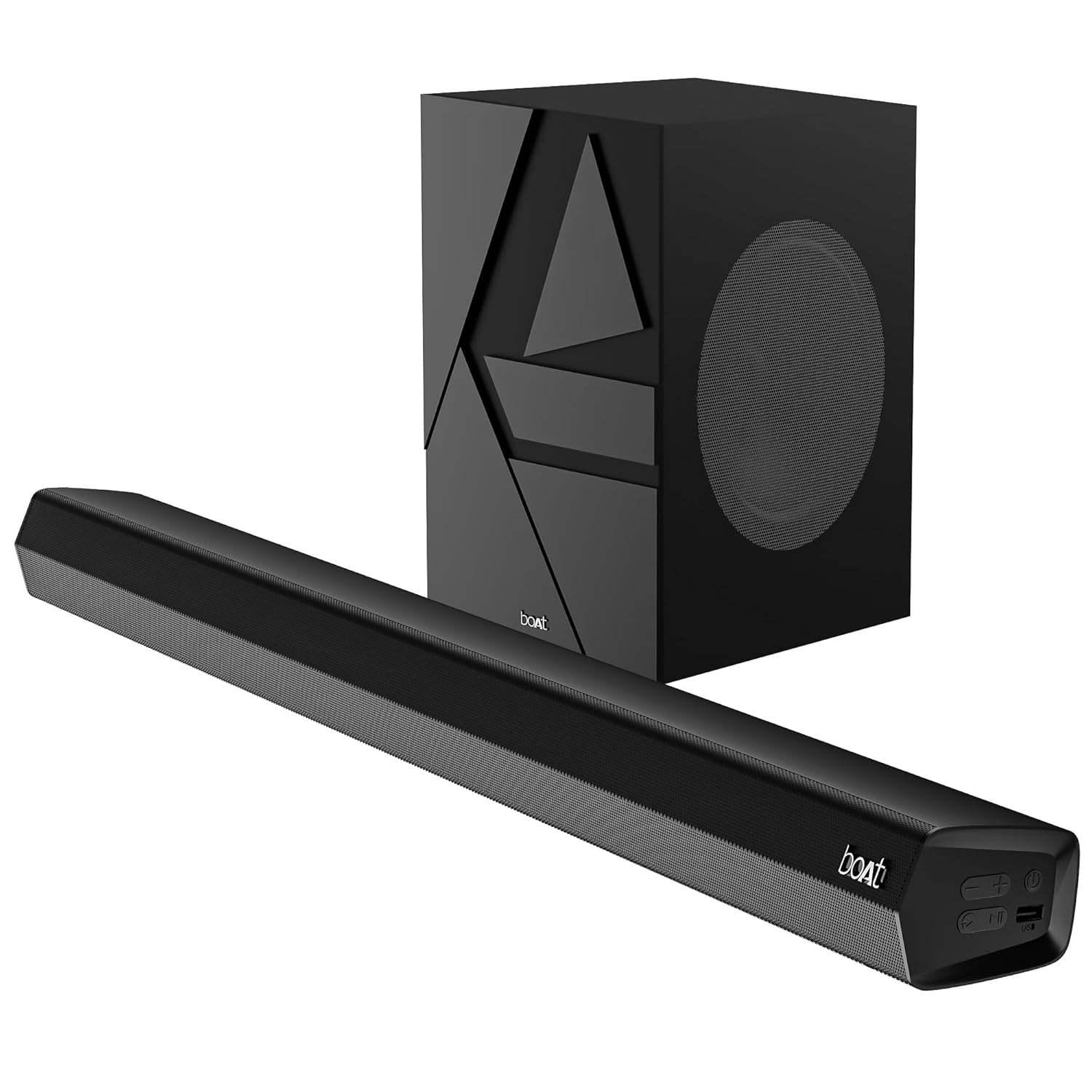
Image 1: The boAt Aavante Bar Quake soundbar and its accompanying wired subwoofer, showcasinreka bentuk dan saiz relatifnya.
4.1 Ciri-ciri Bar Bunyi

Imej 2: Gambar jarak dekat view of the boAt Aavante Bar Quake soundbar, highlighting its sleek design and the '200W RMS boAt Signature Sound' feature.
The soundbar houses the main speakers and control interface. It delivers 200W RMS boAt Signature Sound for a powerful audio experience.
4.2 Subwufer Berwayar

Image 3: An illustration showing the boAt Aavante Bar Quake soundbar and its wired subwoofer integrated into a home entertainment setup, emphasizing the 2.1 channel configuration.
The wired subwoofer provides deep, rich bass, complementing the soundbar for a full-range audio output.
4.3 Port Kesambungan

Imej 4: Perincian view of the rear panel of the boAt Aavante Bar Quake soundbar, clearly showing the various input ports including USB, HDMI (ARC), AUX, and Optical, along with Bluetooth connectivity.
The soundbar features multiple input options for connecting various devices:
- Port USB: Untuk memainkan audio daripada pemacu USB.
- Port HDMI (ARC): For high-quality audio connection to compatible TVs.
- Bluetooth: Untuk penstriman audio tanpa wayar daripada peranti mudah alih.
- Input AUX: Untuk menyambungkan peranti melalui kabel audio 3.5mm.
- Input Optik: For digital audio connection from TVs or other sources.
4.4 Alat Kawalan Jauh

Image 5: The master remote control for the boAt Aavante Bar Quake, illustrating buttons for power, mute, input selection, volume, playback, EQ modes (Music, Movies, News, 3D), and dedicated bass and treble controls.
The included remote control allows full command over the soundbar's functions, including power, volume, input selection, EQ modes, and bass/treble adjustments.
5. Persediaan
5.1 Penempatan
- Bar bunyi: Place the soundbar on a stable, flat surface directly in front of your television, or mount it on the wall below your TV. Ensure there are no obstructions in front of the soundbar.
- subwufer: Letakkan subwoofer di atas lantai, sebaik-baiknya di sudut atau berhampiran dinding, untuk meningkatkan tindak balas bes. Pastikan ia berada dalam jangkauan bar bunyi untuk sambungan berwayar.
5.2 Menyambungkan Subwoofer
Connect the wired subwoofer to the dedicated subwoofer output port on the soundbar using the integrated cable.
5.3 Sambungan Kuasa
- Sambungkan penyesuai kuasa ke port DC IN pada bar bunyi.
- Palamkan hujung satu lagi penyesuai kuasa ke dalam salur keluar dinding.
- Ensure the subwoofer is also connected to a power source if it has a separate power cable (for this model, it's wired to the soundbar).
5.4 Sambungan Audio
Pilih salah satu daripada kaedah berikut untuk menyambungkan sumber audio anda:
- HDMI ARC (Disyorkan): Connect an HDMI cable from the HDMI ARC port on your TV to the HDMI ARC port on the soundbar. This allows audio to be sent from the TV to the soundbar and often enables TV remote control of the soundbar volume.
- Optik: Connect an optical cable from your TV's optical output to the OPTICAL IN port on the soundbar.
- AUX: Connect a 3.5mm audio cable from your device's audio output to the AUX IN port on the soundbar.
- USB: Insert a USB drive into the USB port on the soundbar to play audio files secara langsung.
- Bluetooth: Lihat Bahagian 6.2 untuk arahan pemasangan Bluetooth.
6. Arahan Operasi
6.1 Hidupkan/Mati Kuasa
Tekan ke kuasa butang pada bar bunyi atau alat kawalan jauh untuk menghidupkan atau mematikan unit.
6.2 Berpasangan Bluetooth
- Turn on the soundbar and select Bluetooth mode using the Input button on the remote or soundbar. The LED indicator will flash.
- Dayakan Bluetooth pada peranti mudah alih anda dan cari peranti yang tersedia.
- Select "boAt Aavante Bar Quake" from the list.
- Once paired, the LED indicator will stop flashing and remain solid.
6.3 Memilih Sumber Input
Tekan ke Input button on the remote control or soundbar repeatedly to cycle through the available input sources: Bluetooth, AUX, Optical, HDMI ARC, and USB.
6.4 Kawalan Kelantangan
Gunakan Jilid + dan Isipadu - buttons on the remote control or soundbar to adjust the volume level.
6.5 Mod EQ
The soundbar offers four preset equalizer modes to optimize audio for different content types. Press the corresponding button on the remote control to select:
- Filem: Enhances dialogue and cinematic effects.
- Muzik: Menyediakan pro audio yang seimbangfile untuk main balik muzik.
- Berita: Optimizes vocal clarity for news and spoken content.
- 3D: Mencipta bunyi yang lebih luas dan lebih mengasyikkantage.
6.6 Bass & Treble Controls
Gunakan BASS+ / BASS- dan TREB+ / TREB- buttons on the remote control to fine-tune the bass and treble levels according to your preference.
7. Penyelenggaraan
7.1 Pembersihan
- Lap permukaan bar bunyi dan subwoofer dengan kain lembut dan kering.
- Do not use liquid cleaners, aerosols, or abrasive chemicals, as these may damage the finish.
- Pastikan peranti dicabut plag sebelum dibersihkan.
7.2 Penyimpanan
Jika menyimpan unit ini untuk tempoh yang lama, cabut plagnya dari soket kuasa dan simpan di tempat yang sejuk dan kering, jauh daripada cahaya matahari langsung dan suhu yang melampau.
8. Penyelesaian masalah
| Masalah | Kemungkinan Punca | Penyelesaian |
|---|---|---|
| Tiada kuasa | Kabel kuasa tidak disambungkan; Salur keluar kuasa tidak aktif | Pastikan kabel kuasa disambungkan dengan selamat; Cuba salur keluar kuasa yang berbeza |
| Tiada bunyi | Incorrect input source; Volume too low; Mute activated; Incorrect cable connection | Select correct input source; Increase volume; Deactivate mute; Check audio cable connections |
| Penggandingan Bluetooth gagal | Bar bunyi tidak dalam mod berpasangan; Peranti terlalu jauh; Gangguan | Ensure soundbar is in Bluetooth pairing mode; Move device closer; Avoid interference from other devices |
| Alat kawalan jauh tidak berfungsi | Bateri berkurangan; Halangan antara alat kawalan jauh dan bar bunyi | Replace remote control batteries; Remove any obstructions |
9. Spesifikasi
| Nama Model | Aavante Bar Quake |
| Jenis Pembesar Suara | Bar bunyi |
| Konfigurasi Saluran Bunyi Sekeliling | 2.1 |
| Kuasa Output Maksimum Pembesar Suara | 200 Watt RMS |
| Teknologi Ketersambungan | Bluetooth v5.3, AUX, USB, Optical, HDMI-ARC |
| Respons Kekerapan | 40 Hz |
| Mod Keluaran Audio | Stereo, Movies, Music, News, 3D |
| Kaedah Kawalan | Jauh |
| Jenis Pemasangan | Table & Wall |
| Dimensi Produk | 90.3D x 6.5W x 8.6H Sentimeter |
| Berat Barang | 6.5 kg |
| Komponen yang Disertakan | User Manual, Warranty Card, Soundbar, Wired Subwoofer, Remote Control |
| Sumber Kuasa | Elektrik Berwayar |
| Bateri Diperlukan | Yes (2 x 12V Alkaline for remote, included) |
| Pengeluar | Bayangkan Marketing Limited |
10. Waranti dan Sokongan
10.1 Maklumat Waranti
The boAt Aavante Bar Quake comes with a Waranti terhad 1 tahun from the date of purchase. This warranty covers manufacturing defects. Please retain your purchase receipt and warranty card for any warranty claims.
10.2 Sokongan Pelanggan
For technical assistance, troubleshooting, or warranty claims, please contact boAt customer support. Refer to the contact information provided on your warranty card or visit the official boAt website for the latest support details.


