1. Produk Lebihview
The Nokia G310 5G Smartphone (Model TA-1573) offers lightning-fast 5G connectivity and modern mobile technology. It features a vibrant display for various tasks, a powerful processor for smooth performance, and an advanced camera system for detailed photos. Designed for daily use, it provides a comfortable grip and durable build quality. Enjoy extensive network compatibility, ample storage, a long-lasting battery with quick charging, and a user-friendly interface with regular software updates.
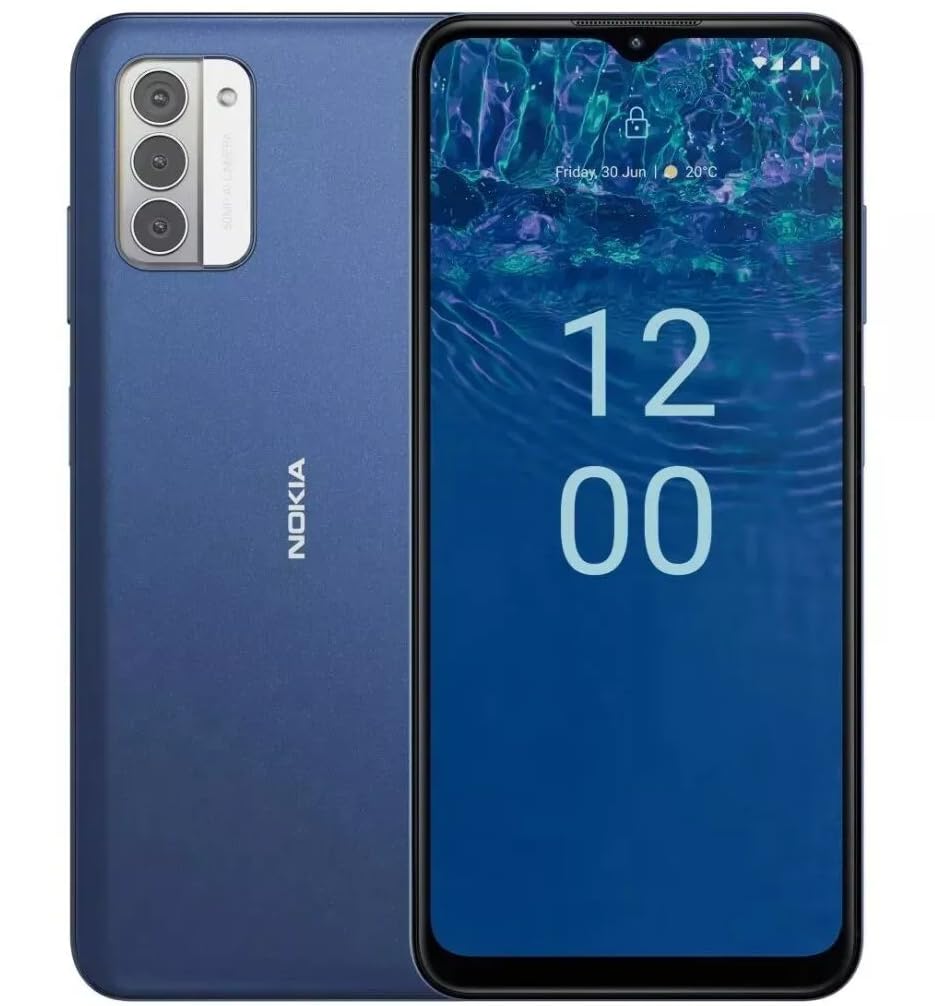
Imej: Belakang view of the Nokia G310 5G Smartphone, showcasing the triple camera module and Nokia branding.
Ciri-ciri Utama
- Kesambungan 5G: Experience ultra-fast mobile data speeds and low latency.
- Paparan Cergas: Large touchscreen display delivers vibrant colors and sharp visuals.
- Prestasi Cekap: Processor handles everyday tasks smoothly, from browsing to gaming.
- Reka bentuk tahan lasak: Sleek and modern smartphone design with durable construction.
2. Bermula
Apa yang ada dalam Kotak
- Telefon Pintar Nokia G310 5G
- Pengecas
SIM and MicroSD Card Installation
Locate the SIM/MicroSD card tray on the side of your device. Use the provided SIM ejector tool to open the tray. Insert your Nano-SIM card(s) and/or MicroSD card into the designated slots. Ensure the cards are correctly oriented. Gently push the tray back into the device until it clicks into place.
Menghidupkan/Mematikan
To power on your Nokia G310, press and hold the Power/Fingerprint Sensor button located on the right side of the device until the Nokia logo appears. To power off, press and hold the Power/Fingerprint Sensor button, then select 'Power off' from the options that appear on the screen.
3. Reka Letak Peranti
Butang dan Port Fizikal
- Butang Kelantangan: Located on the right side, above the Power/Fingerprint Sensor button, for adjusting media and call volume.
- Power/Fingerprint Sensor Button: Located on the right side, used for powering the device on/off, locking/unlocking the screen, and fingerprint authentication.
- Port USB-C: Terletak di bahagian bawah, digunakan untuk pengecasan dan pemindahan data.
- Bicu Audio 3.5 mm: Terletak di bahagian bawah, untuk menyambungkan fon kepala berwayar.
- Penceramah: Terletak di bahagian bawah untuk output audio.
- mikrofon: Bersepadu untuk panggilan dan arahan suara.
Modul Kamera
The rear of the device features a multi-lens camera module, including a main camera, along with a flash for low-light photography. The front-facing camera is discreetly placed within a notch at the top of the display.
4. Arahan Operasi
Navigasi Asas
The Nokia G310 operates on the Android operating system, offering an intuitive touchscreen interface. Swipe up from the bottom of the screen to access the app drawer, swipe down from the top for notifications and quick settings, and use gestures or navigation buttons (configurable in settings) to move between apps and screens.
Ketersambungan
- 5G Cellular Data: The device supports 5G connectivity for ultra-fast mobile data speeds. Ensure your SIM card and plan support 5G.
- Wi-Fi: Sambung ke rangkaian wayarles untuk akses internet. Pergi ke Tetapan > Rangkaian & Internet > Wi-Fi untuk mengurus sambungan.
- Bluetooth: Pair with other Bluetooth-enabled devices like headphones or speakers. Go to Settings > Connected devices > Bluetooth.
- GPS: Utilize built-in GPS for location services and navigation.
5. Penggunaan Kamera
The Nokia G310 features an advanced camera system designed to capture memorable moments. Access the camera app from your home screen or app drawer.
Mengambil Foto
Open the Camera app, frame your shot, and tap the shutter button on the screen to take a picture. The advanced AI camera assists in optimizing settings for various scenes.
Merakam Video
In the Camera app, switch to video mode, then tap the record button to start and stop recording. The phone supports various video resolutions.
Mod Kamera
Explore different camera modes available in the camera app, such as Portrait, Panorama, and Night mode, to enhance your photography experience.
6. Pengurusan Bateri
Mengecas Peranti Anda
The Nokia G310 is equipped with a 5000 Milliamp Hours (5000.0 Battery Power Rating) battery. Connect the provided USB-C charger to the port at the bottom of the device. The phone supports quick charging for reduced downtime.
Mengoptimumkan Hayat Bateri
- Laraskan kecerahan skrin pada tahap yang selesa.
- Dayakan mod Penjimat Bateri apabila bateri lemah.
- Tutup apl yang tidak digunakan yang berjalan di latar belakang.
- Lumpuhkan Wi-Fi, Bluetooth atau GPS apabila tidak digunakan.
7. Spesifikasi Teknikal
| Nombor Model | TA-1573 |
| Sistem Operasi | Android |
| Model CPU | MediaTek Helio P60T |
| Teknologi Selular | 5G |
| Pembawa Tanpa Wayar | Dibuka kunci |
| Kapasiti Penyimpanan Memori | 4 GB |
| Resolusi | 1080 x 2340 |
| Input Antara Muka Manusia | Skrin sentuh |
| Kapasiti Bateri | 5000 Miliamp jam |
| Bicu Audio | 3.5 mm |
| warna | Biru |
| Pengeluar | Nokia |
| Tarikh Mula-mula Tersedia | 31 Januari 2025 |
8. Penyelesaian masalah
If you encounter issues with your Nokia G310, try the following common troubleshooting steps:
- Peranti tidak bertindak balas: Tekan dan tahan butang Kuasa selama kira-kira 10-15 saat untuk memaksa mulakan semula.
- Isu ketersambungan: Toggle Wi-Fi or Bluetooth off and on. Restart your device. Check network settings.
- Aplikasi tidak berfungsi: Clear the app's cache and data in Settings > Apps. If the issue persists, uninstall and reinstall the app.
- Bateri cepat habis: Review battery usage in Settings > Battery to identify power-hungry apps. Adjust screen brightness and enable Battery Saver.
- Storan penuh: Padam yang tidak perlu files, photos, or apps. Transfer media to a computer or cloud storage. Consider using a MicroSD card for additional storage.
9. Penyelenggaraan dan Penjagaan
- Pembersihan: Gunakan kain lembut dan tidak berbulu untuk membersihkan peranti anda. Elakkan bahan kimia yang keras atau bahan yang melelas.
- Kemas Kini Perisian: Regularly check for and install software updates to ensure your device runs optimally and has the latest security features. Go to Settings > System > System update.
- Pengurusan Storan: Semula secara berkalaview your device's storage to free up space and maintain performance.
- Keadaan Persekitaran: Avoid exposing your device to extreme temperatures, direct sunlight, or excessive moisture.
10. Waranti dan Sokongan
For warranty information, please refer to the warranty card included in your product packaging or visit the official Nokia support website. For further assistance, contact Nokia customer support.


