pengenalan
This manual provides comprehensive instructions for the setup, operation, maintenance, and troubleshooting of your COLMI C8 MAX Smartwatch. Please read this manual carefully before using the device to ensure proper functionality and longevity.

Rajah 1: The COLMI C8 MAX Smartwatch in gold with a beige strap, displaying the main watch face with fitness data and time.
1. Persediaan
1.1 Menyahkotak dan Komponen
Selepas membuka bungkusan, pastikan semua komponen ada:
- COLMI C8 MAX Smartwatch
- Replacement Strap (if included in your package)
- Kabel Pengecasan
- Manual Pengguna (dokumen ini)
1.2 Mengecas Peranti
Sebelum penggunaan pertama, cas sepenuhnya jam tangan pintar anda. Sambungkan kabel pengecas magnet ke titik pengecasan di bahagian belakang jam tangan dan pasangkan hujung USB ke penyesuai kuasa USB standard (tidak disertakan).
- Masa pengecasan: Kira-kira 2 jam untuk pengecasan penuh.
- Battery capacity: 250 mAh Lithium Polymer.
1.3 Menghidupkan/Mematikan
- Untuk Menghidupkan: Press and hold the side button until the COLMI logo appears.
- Untuk Mematikan: Dari muka jam tangan, leret ke bawah untuk mengakses tetapan pantas atau navigasi ke 'Tetapan' > 'Sistem' > 'Matikan Kuasa'. Sahkan pilihan anda.
1.4 Pemasangan Apl dan Berpasangan
To unlock the full features of your COLMI C8 MAX Smartwatch, you need to install the companion application on your smartphone or tablet. The watch is compatible with both Android and iOS operating systems.
- Scan the QR code provided in the quick start guide or search for the official COLMI app in your device's app store (Google Play Store for Android, Apple App Store for iOS).
- Muat turun dan pasang aplikasi.
- Buka apl dan ikut arahan pada skrin untuk membuat akaun atau log masuk.
- Dayakan Bluetooth pada telefon pintar/tablet anda.
- Dalam apl, navigasi ke bahagian berpasangan peranti dan pilih "Tambah Peranti" atau serupa.
- The app will search for available devices. Select "COLMI C8 MAX" from the list.
- Confirm the pairing request on both your smartphone and the smartwatch. The watch utilizes Bluetooth 5.3 for stable connectivity.
2. Mengendalikan Jam Pintar
2.1 Paparan dan Navigasi
The COLMI C8 MAX features a 1.93-inch IPS touchscreen with a resolution of 240 x 288 pixels, offering clear visuals and responsive touch control.
- Leret ke atas: Akses pemberitahuan.
- Leret ke Bawah: Akses tetapan pantas (kecerahan, bateri, DND, dsb.).
- Leret Kiri/Kanan: Navigate through widgets and main functions (activity, heart rate, weather, etc.).
- Ketik: Pilih item atau buka aplikasi.
- Tekan Butang Sisi: Kembali ke muka jam tangan atau buka menu aplikasi.
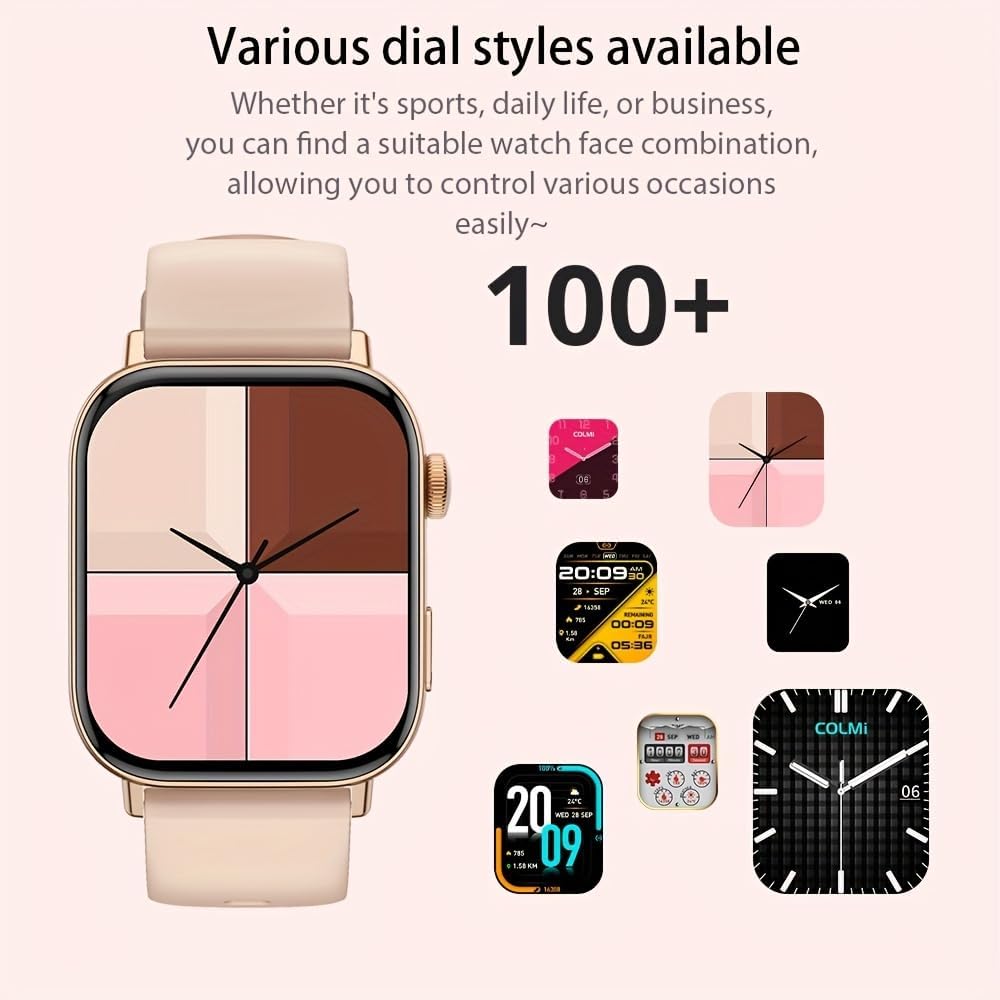
Rajah 2: Pertunjukan jam tangan pintarasing a selection of its over 100 available dial styles, allowing for personalization.
2.2 Core Features and Functions
The COLMI C8 MAX is equipped with a wide range of features to support your daily activities and health monitoring.
- Penjejakan Kecergasan: Monitor steps, distance, calories burned, and active minutes. Includes a pedometer, heart rate monitor, and multi-sport modes (over 100 sports modes available, including walking, running, cycling, football, basketball, table tennis, badminton, mountaineering, rope jumping).

Rajah 3: The smartwatch highlighting its extensive range of over 100 sports tracking modes, suitable for various physical activities.
- Pemantauan Tidur: Mengesan corak dan kualiti tidur.
- Komunikasi:
- Wireless Calling: Make and receive calls directly from your wrist. Access recent calls, dial pad, and contacts.
- Pemberitahuan Mesej: Receive alerts for SMS, WhatsApp, emails, and other social media applications (Facebook, Snapchat, Twitter, Telegram, Instagram, LinkedIn).

Rajah 4: The smartwatch demonstrating its wireless calling feature, showing an incoming call notification on the display.

Rajah 5: The watch's ability to synchronize information and notifications from a connected smartphone, including messages from WhatsApp and other platforms.
- Pembantu Suara AI: Use voice commands to interact with your watch for tasks like making calls, checking weather, or playing music.

Rajah 6: Illustration of the intelligent voice assistant function, showing examples of voice commands and responses on the watch screen.
- Ciri-ciri lain: Calendar, alarm clock, countdown timer, remote camera control, sedentary reminder, menstruation management.
3. Penyelenggaraan
3.1 Rintangan Air (IP68)
The COLMI C8 MAX Smartwatch has an IP68 water resistance rating, meaning it is protected against dust ingress and can withstand immersion in water up to 1.5 meters for 30 minutes. It is suitable for daily use, hand washing, and light rain. However, it is not recommended for hot showers, saunas, or diving, as steam and hot water can compromise the seals.
3.2 Membersihkan Jam Tangan Pintar Anda
Untuk mengekalkan rupa dan kefungsian peranti anda:
- Lap skrin dan badan dengan kain lembut dan tidak berbulu.
- Untuk kotoran degil, sedikit dampen kain dengan air. Elakkan menggunakan bahan kimia yang keras atau bahan yang melelas.
- Bersihkan kenalan pengecas secara berkala untuk memastikan pengecasan yang cekap.
- If the strap gets dirty, clean it according to its material type (e.g., silicone straps can be washed with mild soap and water).
3.3 Pengoptimuman Hayat Bateri
The smartwatch offers a battery life of 5-10 days depending on usage, with an average life of 240 hours. To maximize battery life:
- Kurangkan kecerahan skrin.
- Lumpuhkan pemberitahuan yang tidak perlu.
- Hadkan pemantauan kadar denyutan jantung berterusan jika tidak diperlukan.
- Matikan "Paparan Sentiasa Hidup" jika tersedia.
4. Penyelesaian masalah
If you encounter issues with your COLMI C8 MAX Smartwatch, refer to the following common problems and solutions:
| Masalah | Penyelesaian yang Mungkin |
|---|---|
| Jam tangan tidak boleh dihidupkan. | Pastikan jam tangan dicas sepenuhnya. Sambungkannya ke pengecas selama sekurang-kurangnya 30 minit. |
| Tidak boleh berpasangan dengan telefon pintar. |
|
| Pemberitahuan tidak diterima. |
|
| Data kecergasan yang tidak tepat. |
|
| Skrin tidak bertindak balas. | Restart the watch by pressing and holding the side button until it reboots. |
4.1 Tetapan Semula Kilang
If problems persist, you may need to perform a factory reset. This will erase all data on the watch and restore it to its original settings. Navigate to 'Settings' > 'System' > 'Reset' or 'Factory Reset' on your smartwatch and confirm.
5. Spesifikasi
| Ciri | Perincian |
|---|---|
| Nama Model | C8 Maks |
| Jenama | COLMI |
| Paparan | 1.93-inch IPS Touchscreen, 240 x 288 pixels |
| Kapasiti Bateri | Polimer Litium 250 mAh |
| Hayat Bateri | 5-10 days (typical usage), 240 hours average life |
| Tahan Air | IP68 |
| Ingatan | 128 MB Storage, 640 KB RAM |
| Ketersambungan | Bluetooth 5.3 |
| Keserasian | Android & iOS Smartphones/Tablets |
| Dimensi | 10 x 9 x 6.5 cm |
| Berat badan | 200 g |
| Komponen yang Disertakan | Smartwatch, User Manual |
6. Waranti dan Sokongan
The COLMI C8 MAX Smartwatch comes with a manufacturer's warranty. Please refer to the warranty card included in your product packaging for specific terms and conditions, including warranty duration and coverage details.
For technical support, product inquiries, or warranty claims, please contact COLMI customer service through their official website or the contact information provided in your product documentation. Ensure you have your product model number (C8 Max) and purchase details ready when contacting support.