1. Pengenalan
Thank you for choosing the FLEXISPOT L-Shaped Electric Standing Desk. This manual provides essential information for the safe assembly, operation, and maintenance of your new desk. Please read it thoroughly before use and retain it for future reference.
The FLEXISPOT L-Shaped Electric Standing Desk offers a spacious 63.0" x 55.1" work surface with electric height adjustment, allowing seamless transitions between sitting and standing positions. It features a robust 3-legged frame, a preset controller for personalized height settings, and a versatile orientation to fit various office layouts.
2. Maklumat Keselamatan
Always ensure the desk is properly assembled and anchored to the floor to prevent tipping. Do not exceed the maximum weight capacity of 220 lbs (100 kg) to maintain stability. Be cautious when adjusting the desk height to avoid injury. Keep children and pets away from the desk during operation. Ensure all cables are managed to prevent tripping hazards or damage during height adjustments.
3. Kandungan Pakej
Your FLEXISPOT L-Shaped Electric Standing Desk ships in two separate packages, which may arrive on different days. Please verify all components against the included packing list before beginning assembly. If any parts are missing or damaged, contact FLEXISPOT customer support immediately.
4. Persediaan dan Pemasangan
Assembly of the FLEXISPOT L-Shaped Electric Standing Desk requires careful attention to detail. It is recommended to have two people for certain steps, especially when handling the desktop and flipping the assembled unit. The desk features a flexible design, allowing the wider desktop section to be positioned on either the left or right side to best suit your workspace.
4.1 Membongkar dan Penyediaan
- Carefully unpack all components from both boxes.
- Lay out all parts on a clean, soft surface (e.g., a blanket or carpet) to prevent scratches.
- Identify all components using the provided parts list.
4.2 Pemasangan Bingkai
Follow the detailed instructions in the separate assembly guide provided with your desk. Ensure all screws are tightened securely. The robust industrial-grade steel frame provides stability for your workstation.
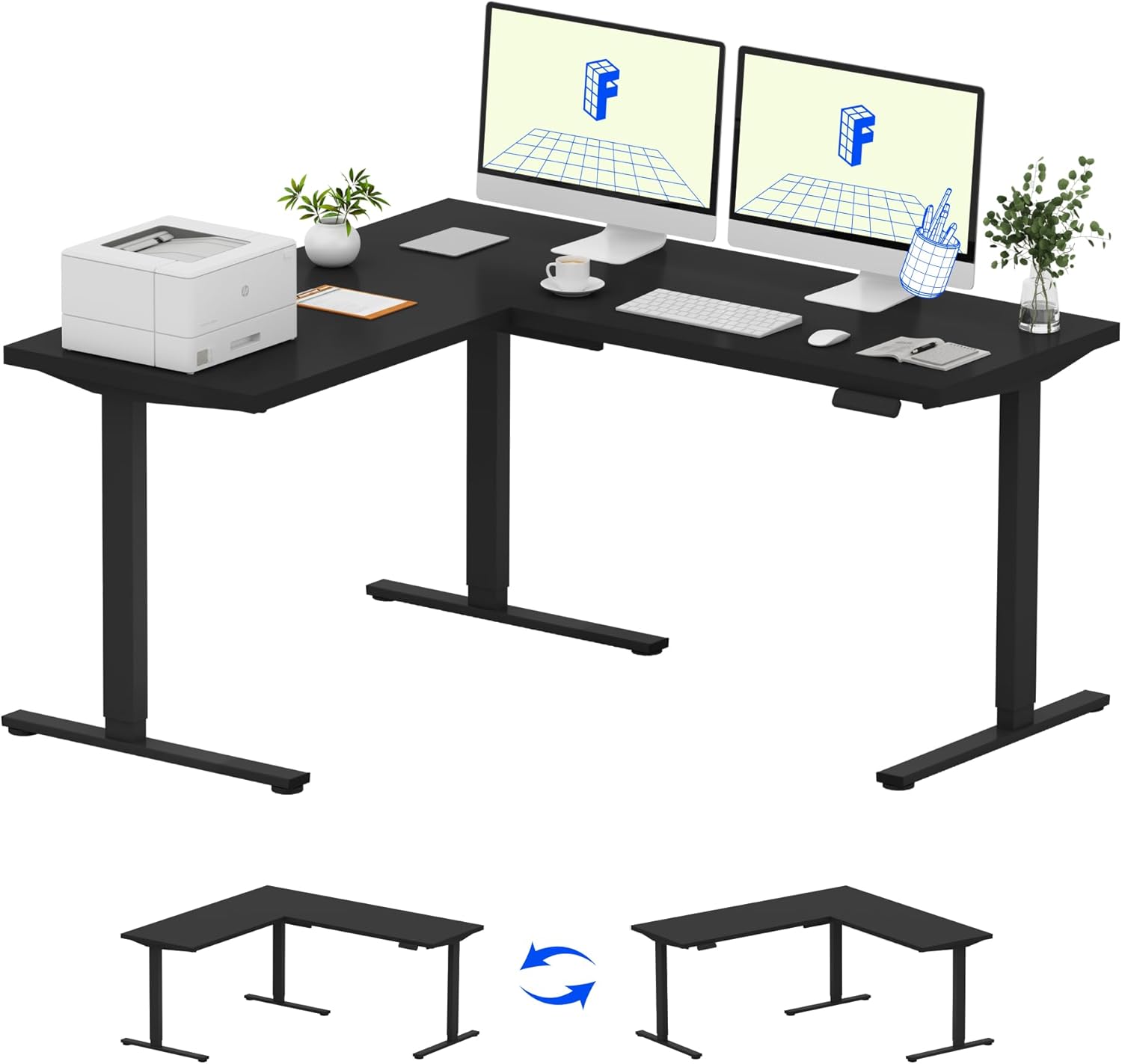
Image: Assembled FLEXISPOT L-Shaped Electric Standing Desk.
4.3 Desktop Attachment and Orientation
The expansive L-shaped desktop can be configured for either a left-hand or right-hand setup. Decide on your preferred orientation before attaching the desktop to the frame. The desktop is crafted from environmentally sourced splice board, measuring 63.0" x 55.1".

Image: Flexible right/left orientation options for the L-shaped desk.
4.4 Pengurusan Kabel
Utilize the included cable management tools to keep your workspace tidy and prevent cables from interfering with the desk's movement.

Image: The desk ships in two packages and has a 220 lbs weight capacity.
5. Arahan Operasi
Your FLEXISPOT L-Shaped Electric Standing Desk is equipped with an intuitive LED control panel for easy height adjustments and memory presets.
5.1 Melaraskan Ketinggian Meja
- Gunakan Atas (▲) dan Bawah (▼) buttons on the control panel to manually adjust the desk to your desired height.
- The desk offers a large adjustable range, from a minimum height of 28.3 inches to a maximum height of 45.9 inches.

Image: Large adjustable height range of the desk.
5.2 Menggunakan Pratetap Memori
The LED control panel allows you to save up to four preferred height settings for quick transitions.
- Laraskan meja pada ketinggian yang diingini menggunakan butang Atas/Bawah.
- Tekan ke M button (Memory) followed by one of the numbered preset buttons (1, 2, 3, atau 4) untuk menyimpan ketinggian semasa.
- Untuk mengingat semula ketinggian yang disimpan, hanya tekan butang pratetap bernombor yang sepadan.

Image: Smart LED control panel with memory presets.
5.3 Ciri Anti-Perlanggaran
The desk is equipped with an anti-collision system. If the desk encounters an obstacle during height adjustment, it will automatically stop and rebound slightly to prevent damage or injury.

Image: Anti-collision feature in action.
6. Penyelenggaraan
Penyelenggaraan yang kerap memastikan jangka hayat dan prestasi optimum meja berdiri anda.
- Pembersihan: Lap desktop dan bingkai dengan lembut, damp kain. Elakkan bahan kimia yang keras atau pembersih kasar yang boleh merosakkan kemasan.
- Pemeriksaan: Periksa semua skru dan bolt secara berkala untuk memastikan ia ketat. Ketatkan semula jika perlu.
- Pengurusan Kabel: Ensure power cords and other cables are not pinched or tangled, especially during height adjustments.
- Kapasiti Berat: Do not exceed the maximum weight capacity of 220 lbs to prevent strain on the motor and frame.
7. Penyelesaian masalah
If you encounter issues with your FLEXISPOT L-Shaped Electric Standing Desk, refer to the following common troubleshooting steps:
- Meja Tidak Bergerak:
- Periksa sama ada kord kuasa dipasang dengan kukuh pada kedua-dua meja dan soket kuasa yang berfungsi.
- Pastikan tiada objek yang menghalang pergerakan meja.
- Try resetting the desk by unplugging it for 30 seconds and then plugging it back in.
- Uneven Movement/Wobbling:
- Sahkan bahawa semua skru pemasangan telah diketatkan.
- Ensure the desk is on a level surface. Adjust the leveling feet if necessary.
- Confirm that the weight distribution on the desktop is balanced and within the maximum capacity.
- Panel Kawalan Tidak Menjawab:
- Lakukan kitaran kuasa (cabut dan pasang semula).
- Check for any visible damage to the control panel or its cable.
If these steps do not resolve the issue, please contact FLEXISPOT customer support.
8. Spesifikasi
| Jenama | FLEXISPOT |
| Model | B0DV54QLX4 |
| Dimensi Produk | 55.1"D x 63"W x 45.9"H |
| warna | Bingkai Hitam + Atasan Hitam |
| Gaya | moden |
| Bahan Asas | Keluli Aloi |
| Jenis Bahan Atas | kayu |
| Ketebalan Atas Meja | 1 inci |
| Ketinggian Minimum | 28 Inci |
| Ketinggian Maksimum | 45.9 Inci |
| Cadangan Berat Maksimum | 220 paun |
| Ciri Khas | Corded, Preset Controller, Anti-collision |
| Perhimpunan yang Diperlukan | ya |
| UPC | 840460438384 |
9. Waranti dan Sokongan
9.1 Maklumat Waranti
FLEXISPOT provides the following warranty coverage for your L-Shaped Electric Standing Desk:
- Perlindungan 5 Tahun: Digunakan pada rangka meja dan motor.
- Perlindungan 2 Tahun: Berkenaan dengan panel kawalan dan elektronik.
Please retain your proof of purchase for warranty claims. The warranty covers manufacturing defects under normal use.
9.2 Sokongan Pelanggan
For any questions, assistance with assembly, troubleshooting, or warranty inquiries, please contact FLEXISPOT customer support. You can find contact information on the official FLEXISPOT webtapak atau melalui platform pembelian anda.


