1. Pengenalan
This manual provides essential information for the safe and efficient operation of the DELTA VFD2A8ME21ANNAA Motor Drive. This Variable Frequency Drive (VFD) is designed for controlling the speed and torque of AC induction motors, offering precise control and energy efficiency. Please read this manual thoroughly before installation, operation, or maintenance to ensure proper usage and prevent potential hazards.
2. Maklumat Keselamatan
AMARAN: Kegagalan mematuhi arahan keselamatan ini boleh mengakibatkan kecederaan serius atau kematian.
- Read the user manual completely before attempting any operation or installation.
- Risiko kejutan elektrik: Always wait at least 10 minutes after removing power before servicing the unit. This allows residual voltage untuk melesap.
- Do not connect AC power to the output terminals (U/T1, V/T2, and W/T3). These terminals are for motor connection only.
- Ensure proper grounding of the VFD and the motor.
- Only qualified personnel should perform installation, wiring, and maintenance.
- Sahkan bahawa bekalan voltage matches the VFD's rated input voltage.
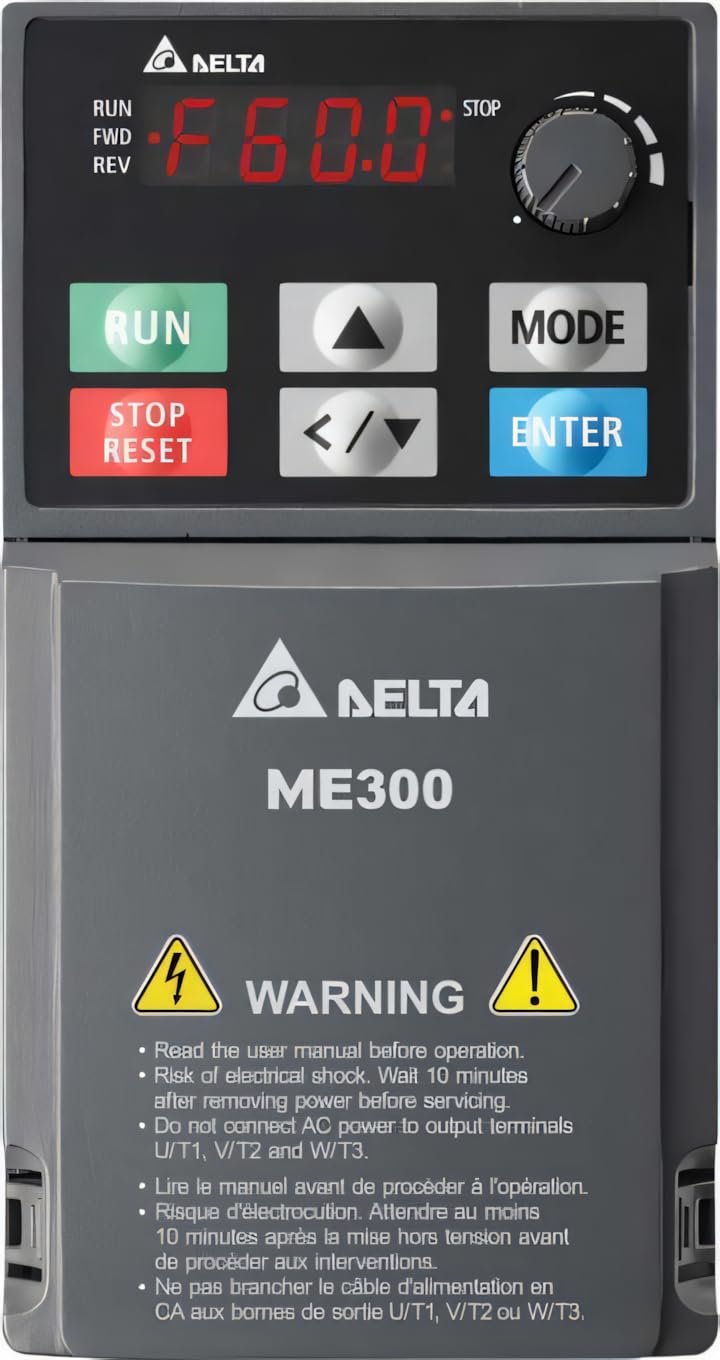
Rajah 1: DELTA ME300 Series VFD showing the control panel with RUN, STOP/RESET, MODE, and ENTER buttons, a frequency display, and a rotary knob. The lower section displays the DELTA ME300 logo and critical safety warnings regarding electrical shock and proper wiring.
3. Persediaan dan Pemasangan
3.1 Membongkar dan Pemeriksaan
Upon receiving the VFD, carefully inspect the packaging for any signs of damage. Open the package and verify that all components are present and undamaged. If any damage is found, contact your supplier immediately.
3.2 Pemasangan
The DELTA VFD2A8ME21ANNAA is designed for chassis mounting. Ensure the mounting surface is stable and capable of supporting the VFD's weight (approximately 7 pounds). Allow adequate clearance around the unit for proper ventilation and heat dissipation. Mount the VFD vertically to optimize cooling.
3.3 Pendawaian
All wiring must comply with local and national electrical codes. Use appropriate wire gauges for the VFD's current rating.
- Input Kuasa: Connect the single-phase 230VAC power supply to the designated input terminals.
- Keluaran Motor: Connect the motor to the output terminals U/T1, V/T2, and W/T3. Jangan sambungkan kuasa AC ke terminal ini.
- Pembumian: Ensure the VFD is properly grounded to a reliable earth ground.
- Pendawaian Kawalan: For external control, connect USB or RS-485 interface cables as required. Refer to the detailed wiring diagrams in the full manual for specific connections.
4. Arahan Operasi
4.1 Panel Kawalan Selesaiview
The VFD features an integrated control panel for local operation and parameter setting. Key components include:
- Paparan Digital: Shows operating frequency, parameters, and error codes (e.g., "F60.0" for 60.0 Hz).
- RUN Button (Green): Memulakan operasi motor.
- STOP/RESET Button (Red): Stops motor operation and resets fault conditions.
- Butang MOD: Used to switch between display modes and enter parameter setting menus.
- Butang ENTER: Confirms parameter selections or values.
- Anak Panah Atas/Bawah (▲/▼): Navigate through menus and adjust parameter values.
- Left/Right Arrows (</>): Shift cursor position during parameter editing.
- Tombol Putar: Adjusts frequency or parameter values quickly.
4.2 Operasi Asas
- Hidupkan kuasa: Apply 230VAC power to the VFD. The display will illuminate.
- Tetapkan Kekerapan: Use the Up/Down arrows or the rotary knob to set the desired output frequency.
- Mulakan Motor: Tekan ke LARI button. The motor will accelerate to the set frequency.
- Berhenti Motor: Tekan ke BERHENTI / RESET butang. Motor akan memecut dan berhenti.
For advanced operation, including parameter programming and external control, refer to the detailed programming guide in the complete user manual.
5. Penyelenggaraan
Regular maintenance ensures the longevity and reliable operation of your VFD. Always disconnect power and wait 10 minutes before performing any maintenance.
- Pembersihan: Periodically clean the VFD's exterior and ventilation openings to prevent dust accumulation, which can hinder cooling. Use a soft, dry cloth. Do not use liquid cleaners.
- Pemeriksaan: Periksa sambungan pendawaian secara berkala untuk memastikan ia ketat dan terdapat tanda-tanda haus atau kerosakan. Periksa sebarang bunyi atau bau yang luar biasa semasa operasi.
- Pemeriksaan Kipas: Ensure cooling fans are operating correctly and are free from obstructions.
- Keadaan Persekitaran: Verify that the operating environment remains within the specified temperature range (-20°C to 60°C) and humidity levels.
6. Penyelesaian masalah
This section provides basic troubleshooting steps for common issues. For complex problems or persistent faults, contact technical support.
| Masalah | Kemungkinan Punca | Penyelesaian |
|---|---|---|
| VFD tidak dihidupkan | No input power; Blown fuse; Incorrect wiring | Check power supply; Inspect fuses; Verify wiring connections. |
| Motor tidak berjalan | STOP/RESET button pressed; Fault condition; Incorrect frequency setting | Press RUN; Check for fault codes on display and clear; Adjust frequency. |
| Kesalahan arus lebih | Motor overload; Short circuit in motor wiring; Incorrect VFD parameters | Reduce motor load; Check motor and wiring; Verify motor parameters. |
| Overvoltage kesalahan | Volt masukan tinggitage; Regenerative braking without braking resistor | Semak input voltage; Consider adding a braking resistor if applicable. |
7. Spesifikasi
| Parameter | Nilai |
|---|---|
| Model | VFD2A8ME21ANNAA (ME300 Series) |
| Jenama | DELTA |
| Penarafan Kuasa | 0.5 HP (0.4 kW) |
| Input Voltage | 230VAC, 1 fasa |
| Output Current (Heavy Duty) | 2.8A |
| Output Current (Normal Duty) | 3.2A |
| Kekerapan Output | Sehingga 599 Hz |
| Penilaian Kepungan | IP20 |
| Jenis Pemasangan | Pemasangan Casis |
| Antara muka | USB, RS-485 |
| Suhu Operasi | -20°C hingga 60°C |
| Berat Barang | 7 Paun (lebih kurang 3.18 kg) |
8. Waranti dan Sokongan
8.1 Maklumat Waranti
This DELTA VFD product is covered by a standard manufacturer's warranty against defects in materials and workmanship. The specific terms and duration of the warranty may vary by region and purchase date. Please retain your proof of purchase for warranty claims. For detailed warranty information, refer to the official DELTA weblaman web atau hubungi pengedar sah anda.
8.2 Sokongan Teknikal
For technical assistance, troubleshooting beyond this manual, or service inquiries, please contact DELTA technical support or your local authorized service center. Have your product model number (VFD2A8ME21ANNAA) and serial number ready when contacting support.
You can often find contact information on the official DELTA weblaman web atau melalui pembekal produk anda.


