pengenalan
Welcome to the user manual for your AYANEO Pocket S Android Handheld Gaming Device. This manual provides essential information for setting up, operating, maintaining, and troubleshooting your device to ensure optimal performance and longevity. Please read this manual thoroughly before using your device.
Maklumat Keselamatan
To prevent damage to your device or injury to yourself or others, please observe the following precautions:
- Jangan dedahkan peranti kepada suhu yang melampau, cahaya matahari langsung atau kelembapan yang tinggi.
- Elakkan daripada menjatuhkan atau menyebabkan peranti ini mengalami hentaman yang teruk.
- Gunakan hanya pengecas dan aksesori yang diluluskan.
- Jangan cuba membuka atau membaiki peranti sendiri. Rujuk kepada kakitangan perkhidmatan yang berkelayakan.
- Jauhkan peranti daripada air dan cecair lain.
Komponen Peranti
Familiarize yourself with the various parts of your AYANEO Pocket S.
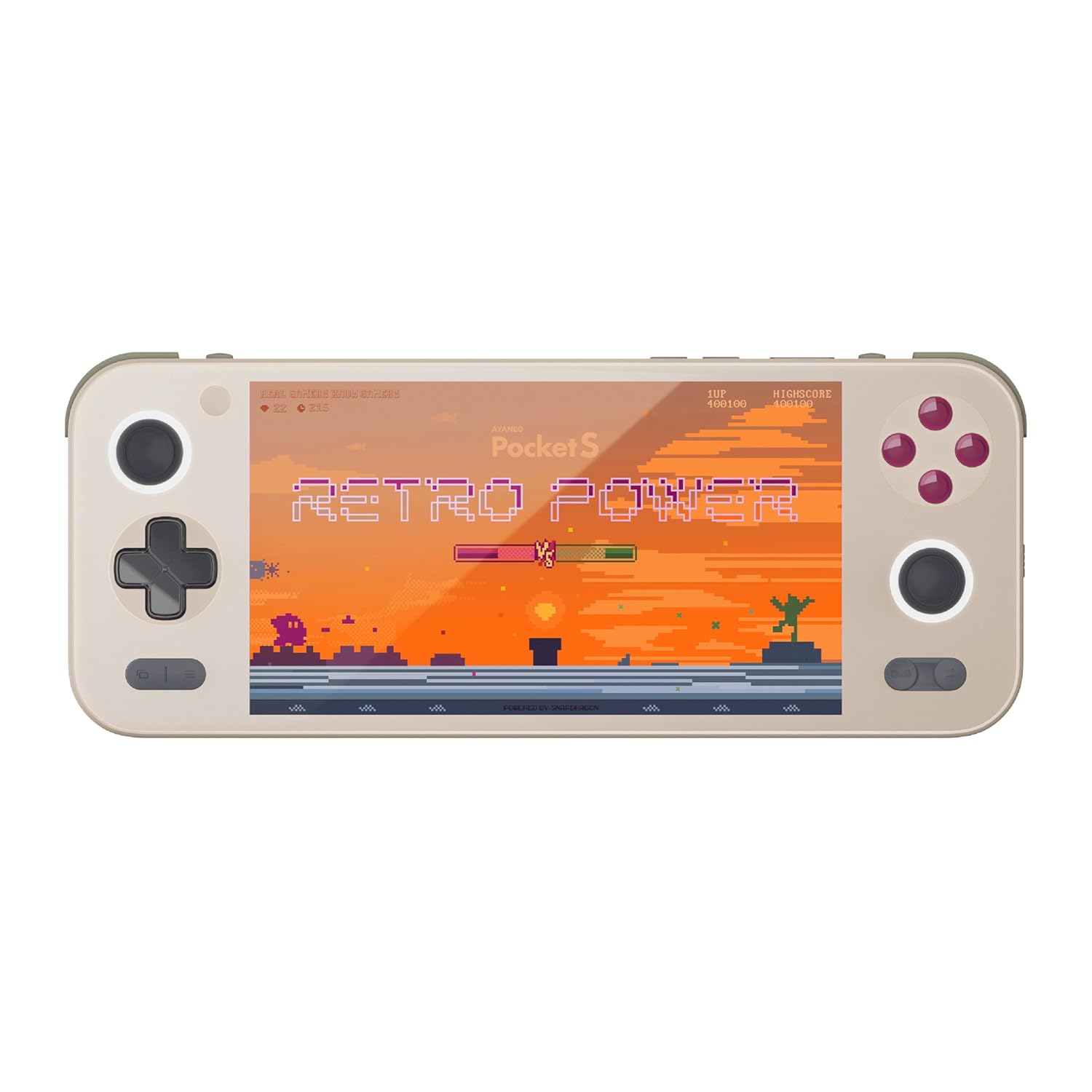
Rajah 1: Depan view of the AYANEO Pocket S, showing the screen, joysticks, D-pad, and action buttons.

Figure 2: Close-up of the Master Controller, highlighting the RGB Hall joysticks, Hall triggers, and crystal-textured keys.

Figure 3: Illustration of the internal VC thermal plate and active cooling system, along with the "Fishbone" biomimetic heat dissipation design on the side.

Figure 4: The AYANEO Pocket S displaying the AYASpace and AYAHOME Launcher interface, showing various game icons.
Ciri-ciri Utama:
- paparan: 6-inch 2K Borderless IPS Screen (490 PPI, 120% sRGB, 85% DCI-P3)
- Pemproses: Snapdragon G3x Gen 2 Gaming Platform
- Memori & Storan: Up to 16GB RAM, up to 1TB Storage (This model: 12GB RAM, 128GB Storage)
- penyejukan: Large VC Heat Sink, Active Cooling System, "Fishbone" Cooling Vents
- Kawalan: Master Controller with RGB Hall Joysticks, Linear Hall Triggers, X-axis Vibration
- Sistem pengendalian: Android 13
Panduan Persediaan
1. Pengecasan Awal
Before first use, fully charge your AYANEO Pocket S. Connect the provided USB-C cable to the device's charging port and the other end to a compatible power adapter. The charging indicator will illuminate.
2. Menghidupkan/Mematikan
- Untuk Menghidupkan: Press and hold the Power button located on the top edge of the device until the AYANEO logo appears on the screen.
- Untuk Mematikan: Press and hold the Power button until the power options menu appears. Select "Power Off" and confirm.
- Untuk Mulakan Semula: Daripada menu pilihan kuasa, pilih "Mulakan semula".
3. Konfigurasi Sistem Awal
Upon first power-on, you will be guided through the initial Android setup process. This includes:
- Memilih bahasa anda.
- Menyambung ke rangkaian Wi-Fi.
- Signing in with your Google account (optional, but recommended for app downloads).
- Setting up screen lock and other security features.
4. Kemas Kini Perisian
It is recommended to check for and install any available system updates after initial setup to ensure you have the latest features and security patches. Navigate to Tetapan > Sistem > Kemas kini sistem.
Mengendalikan Peranti Anda
Navigasi dan Kawalan
The AYANEO Pocket S features both touchscreen input and physical controller input for navigation and gameplay.
- Skrin sentuh: Use familiar Android gestures such as tap, swipe, pinch-to-zoom.
- Kayu bedik: Analog input for movement and camera control in games.
- D-Pad: Digital input for menu navigation and directional controls.
- Butang Tindakan (A/B/X/Y): Primary input for in-game actions.
- Shoulder/Trigger Buttons (L1/L2/R1/R2): Additional input for various game functions.
- Butang Fungsi: Dedicated buttons for system functions, such as Home, Back, and Menu.
Mod Prestasi
The device offers multiple performance modes to optimize for either maximum performance or extended battery life.
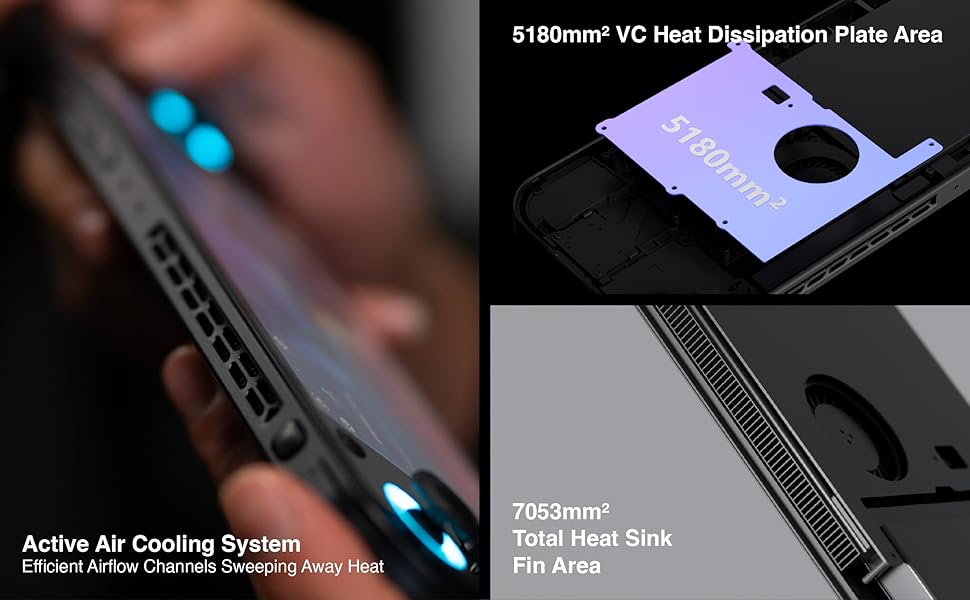
Figure 5: Diagram illustrating the three performance modes: Performance Turbo Mode, Balanced Mode, and Power-Saving Long Battery Life Mode.
- Performance Turbo Mode: Maximizes CPU, GPU, and fan speed for demanding games.
- Mod Seimbang: Provides a good balance between performance and battery life for most games.
- Power-Saving Long Battery Life Mode: Optimizes for extended usage, suitable for less demanding applications or when battery conservation is critical.
You can switch between these modes via the AYASpace application or quick settings menu.
AYASpace and AYAHOME Launcher
The AYASpace application and AYAHOME Launcher provide a customized Android experience for gaming handhelds.
- Game Management: Organize and launch your games.
- Pemetaan Utama: Customize button assignments for mobile games that do not natively support physical controllers.
- Tetapan Sistem: Access performance mode settings, controller calibration, and other device-specific configurations.
Penyelenggaraan
Membersihkan Peranti
- Gunakan kain lembut dan tidak berbulu untuk mengelap skrin dan badan peranti.
- Untuk calitan degil, sedikit dampen kain dengan air atau pembersih skrin.
- Do not use harsh chemicals, abrasive cleaners, or aerosol sprays.
- Ensure all ports are free of dust and debris. Use a soft brush or compressed air if necessary, holding the can upright.
Penjagaan Bateri
- Elakkan menyahcas sepenuhnya bateri dengan kerap.
- Jangan biarkan peranti tidak dicas untuk tempoh yang lama.
- Store the device in a cool, dry place if not used for a long time, with the battery charged to around 50%.
Penyelenggaraan Perisian
- Regularly check for and install system updates.
- Keep your applications updated through the Google Play Store or AYASpace.
- Kosongkan cache secara berkala dan tidak perlu files untuk mengekalkan prestasi sistem.
Menyelesaikan masalah
| Masalah | Kemungkinan Punca | Penyelesaian |
|---|---|---|
| Peranti tidak dihidupkan. | Bateri lemah; Sistem rosak. | Cas peranti selama sekurang-kurangnya 30 minit. Lakukan mula semula secara paksa dengan menekan butang Kuasa selama 10-15 saat. |
| Skrin tidak bertindak balas. | Gangguan perisian; Kerosakan skrin. | Mulakan semula peranti. Jika masalah berterusan, hubungi khidmat pelanggan. |
| Games are lagging or performing poorly. | Incorrect performance mode; Background apps; Overheating. | Switch to Performance Turbo Mode. Close unnecessary background applications. Ensure cooling vents are not blocked. |
| Isu sambungan Wi-Fi. | Incorrect password; Router issue; Device Wi-Fi module error. | Verify Wi-Fi password. Restart your router. Toggle Wi-Fi off and on on the device. |
If you encounter issues not listed here or if the suggested solutions do not resolve the problem, please contact AYANEO customer support.
Spesifikasi
| Ciri | Perincian |
|---|---|
| Model | Poket S |
| Pemproses | Snapdragon G3x Gen 2 Gaming Platform |
| Paparan | 6-inch 2K Borderless IPS Display (2560*1440 resolution, 490 PPI, 120% sRGB, 85% DCI-P3) |
| RAM | 12GB (as per current model) |
| Penyimpanan | 128GB (as per current model) |
| Sistem Operasi | Android 13 |
| Sistem Penyejukan | Large VC Heat Sink, Active Cooling System, "Fishbone" Vents |
| Bateri | 1 bateri Lithium Ion (termasuk) |
| Dimensi | Kira-kira 8.42 x 3.35 x 0.55 inci |
| Berat badan | Kira-kira 1.59 paun (0.72 kg) |
Maklumat Waranti
AYANEO products typically come with a limited manufacturer's warranty. Please refer to the warranty card included in your product packaging or visit the official AYANEO webtapak untuk terma dan syarat jaminan terperinci. Simpan bukti pembelian anda untuk tuntutan waranti.
Note: Protection plans may be available for purchase separately. These plans are offered by third parties and are not part of the standard manufacturer's warranty.
Sokongan Pelanggan
For technical assistance, troubleshooting, or warranty inquiries, please contact AYANEO customer support through their official channels:
- rasmi Webtapak: www.ayaneo.com (Semak bahagian sokongan atau halaman hubungan)
- Sokongan E-mel: Rujuk kepada pegawai webtapak untuk alamat e-mel sokongan terkini.
- Online Community/Forums: AYANEO may host online communities where users can find answers and share experiences.
When contacting support, please have your device model (Pocket S) and serial number ready.


