Memorex MX-PS802 Rechargeable Party Speaker User Manual
Model: MX-PS802
1. Pengenalan
Terima kasih kerana membeliasing the Memorex MX-PS802 Rechargeable Party Speaker. This manual provides essential information for the safe and efficient operation of your device. Please read it thoroughly before use and retain it for future reference.
2. Maklumat Keselamatan
- Jangan dedahkan pembesar suara kepada air, kelembapan atau suhu yang melampau.
- Elakkan meletakkan pembesar suara berhampiran sumber haba atau di bawah cahaya matahari langsung.
- Jangan cuba membuka atau mengubah suai pembesar suara. Rujuk semua servis kepada kakitangan yang berkelayakan.
- Gunakan hanya kabel pengecasan dan penyesuai yang disediakan.
- Jauhkan pembesar suara daripada kanak-kanak dan haiwan peliharaan.
- Pastikan pengudaraan yang betul di sekitar pembesar suara semasa penggunaan.
3. Kandungan Pakej
Sahkan bahawa semua item terdapat dalam pakej anda:
- Memorex MX-PS802 Party Speaker
- Kabel Pengecasan
- Manual Pengguna (dokumen ini)
4. Produk Lebihview
The Memorex MX-PS802 is an 8-inch rechargeable party speaker featuring Bluetooth 5.3, LED flame lighting, TWS pairing, and multiple input options.
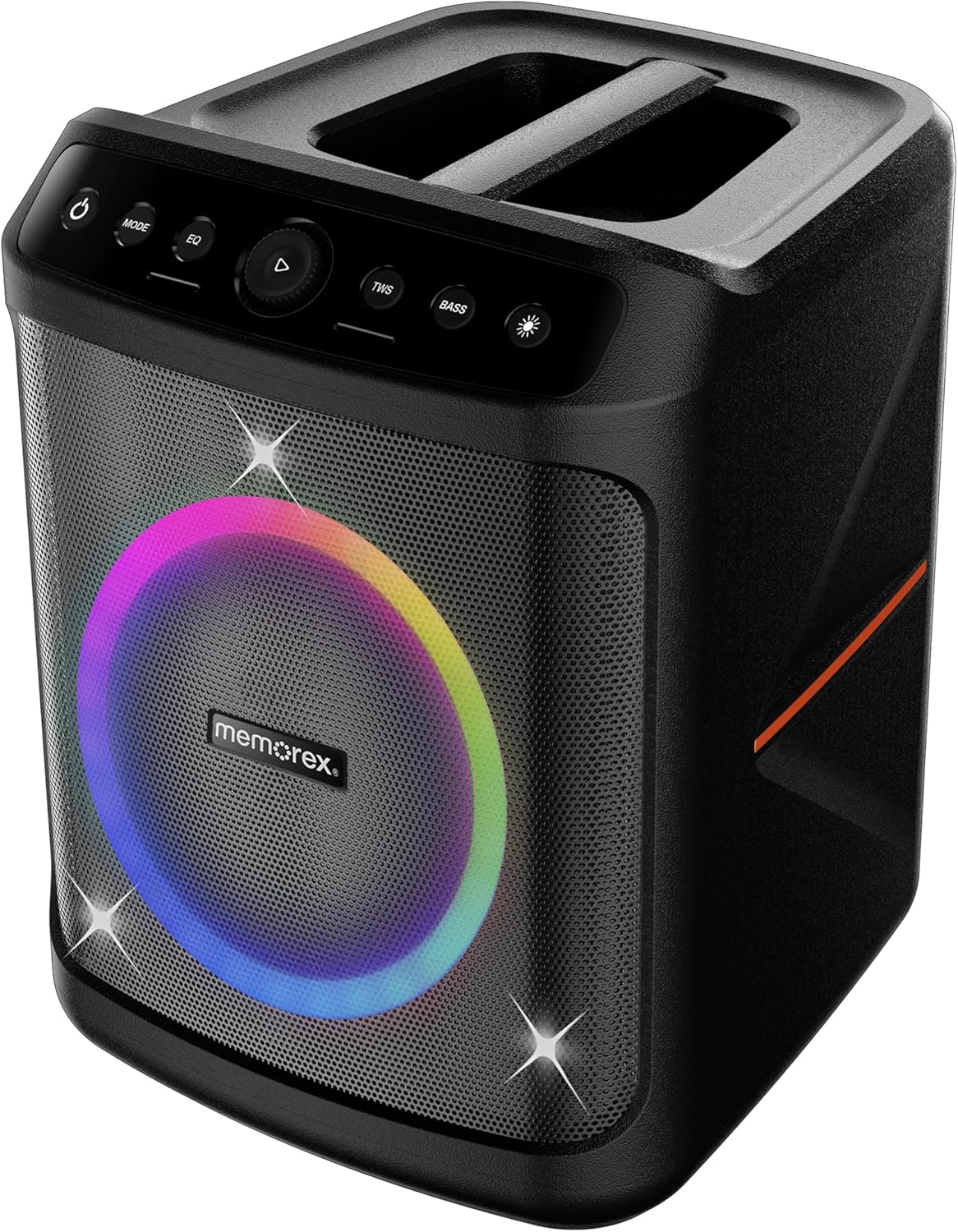
Depan view of the Memorex MX-PS802 speaker, showcasing the illuminated woofer and the top-mounted control panel.
Fungsi Panel Kawalan
- Butang Kuasa (⏻): Tekan dan tahan untuk menghidupkan pembesar suara ON/OFF.
- Butang MOD: Short press to switch between input modes (Bluetooth, USB, SD).
- Butang EQ: Short press to cycle through equalizer presets.
- Play/Pause/Volume Knob (▶): Press to play or pause audio. Rotate to adjust volume.
- Butang TWS: Tekan untuk memulakan pasangan Stereo Tanpa Wayar Sejati.
- Butang BASS: Tekan untuk mengaktifkan atau menyahaktifkan rangsangan bass.
- Butang Mod Cahaya (☀): Press to cycle through LED lighting modes or turn lights ON/OFF.
5. Persediaan
5.1 Mengecas Speaker
- Connect the charging cable to the speaker's charging port.
- Plug the other end of the cable into a suitable power outlet.
- The charging indicator will illuminate. Allow the speaker to fully charge before first use (approximately 3-4 hours).
- Penunjuk akan berubah atau padam setelah pengecasan selesai.
5.2 Menghidupkan/Mematikan
- To power ON, press and hold the Butang Kuasa (⏻) for 2-3 seconds.
- To power OFF, press and hold the Butang Kuasa (⏻) again for 2-3 seconds.
6. Arahan Operasi
6.1 Berpasangan Bluetooth
- Turn on the speaker. It will automatically enter Bluetooth pairing mode, indicated by a flashing LED.
- Pada peranti mudah alih anda, dayakan Bluetooth dan cari peranti yang tersedia.
- Pilih "Memorex MX-PS802"dari senarai.
- Once paired, the speaker will emit a confirmation sound, and the LED will stop flashing.
6.2 Main Semula USB/Kad SD
- Insert a USB flash drive or SD card (with MP3 files) ke dalam port yang sepadan.
- The speaker will automatically switch to USB/SD mode and begin playback. If not, press the MODE butang untuk memilih input yang betul.
- Use the Play/Pause/Volume knob to control playback and volume.
6.3 Penggandingan Stereo Tanpa Wayar Sebenar (TWS)
To pair two MX-PS802 speakers for stereo sound:
- Ensure both MX-PS802 speakers are powered on and in Bluetooth mode, but not connected to any device.
- Pada satu pembesar suara (ini akan menjadi pembesar suara utama), tekan butang TWS button. It will emit a pairing tone.
- The two speakers will automatically connect to each other. A confirmation tone will sound once paired.
- Sekarang, sambungkan peranti mudah alih anda ke pembesar suara utama melalui Bluetooth seperti yang diterangkan dalam bahagian 6.1.
6.4 Input Mikrofon dan Gitar
- Connect a microphone or guitar to the respective input jacks on the speaker.
- Adjust the volume of the connected instrument/microphone using its own controls or the speaker's main volume knob.
6.5 LED Flame Lighting
- Tekan ke Butang Mod Cahaya (☀) to cycle through various LED lighting effects.
- Teruskan menekan untuk mematikan lampu.
6.6 EQ and Bass Boost
- Tekan ke EQ button to select different equalizer presets for optimized sound.
- Tekan ke BASS button to toggle the bass boost feature ON or OFF.
7. Penyelenggaraan
- Pembersihan: Gunakan kain lembut dan kering untuk membersihkan bahagian luar pembesar suara. Jangan gunakan pembersih atau pelarut yang melelas.
- Storan: Store the speaker in a cool, dry place away from direct sunlight when not in use for extended periods.
- Penjagaan Bateri: To prolong battery life, fully charge the speaker before storing it for long periods and recharge it every 3-6 months.
8. Penyelesaian masalah
- Tiada Kuasa: Pastikan pembesar suara dicas. Sambungkan ke sumber kuasa dan cuba lagi.
- Tiada Bunyi: Periksa tahap kelantangan pada pembesar suara dan peranti anda yang disambungkan. Pastikan mod input yang betul dipilih.
- Bluetooth Tidak Bersambung: Ensure the speaker is in pairing mode. Turn off and on Bluetooth on your device. Forget the speaker from your device's Bluetooth list and try pairing again. Ensure no other devices are connected to the speaker.
- Kegagalan Berpasangan TWS: Ensure both speakers are MX-PS802 models and are not connected to any other Bluetooth device before initiating TWS pairing.
- Bunyi Herot: Reduce the volume on both the speaker and your device. Check for interference from other electronic devices.
9. Spesifikasi
| Ciri | Spesifikasi |
|---|---|
| Nama Model | MX-PS802 |
| Jenis Pembesar Suara | Mono (can be paired for Stereo via TWS) |
| Saiz Pembesar Suara | 8 Inci |
| Kuasa Output Maksimum Pembesar Suara | 800 Watts PMPO (80W RMS) |
| Teknologi Komunikasi Tanpa Wayar | Bluetooth 5.3 |
| Sumber Kuasa | Dikuasakan oleh Bateri (Li-ion Boleh Dicas Semula) |
| Dimensi Produk | 11.33 x 10.78 x 16.57 inci |
| Berat Barang | 12.12 paun |
| Komponen yang Disertakan | Penceramah Parti |
10. Waranti dan Sokongan
The Memorex MX-PS802 Party Speaker comes with a Waranti Terhad. Please refer to the warranty card included in your package for specific terms and conditions. For technical support or service inquiries, please contact Memorex customer service through their official webtapak atau maklumat hubungan yang diberikan bersama dokumentasi pembelian anda.


