1. Pengenalan
This manual provides detailed instructions for the safe and efficient operation of your Memorex MX-TT700 7-in-1 Nostalgic Wooden Music Center. Please read this manual thoroughly before using the device and retain it for future reference.
1.1 Produk Selesaiview
The Memorex MX-TT700 is a versatile audio system combining vintage aesthetics with modern functionality. It features a 3-speed turntable, CD/MP3 player, USB playback, Bluetooth streaming, AM/FM radio, and an AUX-in port. It also supports recording audio from various sources directly to a USB drive.
1.2 Apa yang ada di dalam Kotak
- Memorex MX-TT700 Music Center
- Penyesuai AC
- Penyesuai 45 RPM
- Kabel Aux-in
- Instruction Manual (IM)
2. Maklumat Keselamatan Penting
Please observe the following safety precautions to prevent electric shock, fire, or damage to the unit.
- Sumber Kuasa: Gunakan hanya penyesuai AC yang ditentukan. Pastikan voltage sepadan dengan bekalan kuasa tempatan anda.
- Pengudaraan: Jangan halang bukaan pengudaraan. Berikan ruang yang mencukupi di sekeliling unit untuk aliran udara yang betul.
- Air dan Kelembapan: Jangan dedahkan unit kepada hujan, lembapan atau cecair menitis/percikan. Jauhkan objek yang diisi dengan cecair, seperti pasu, dari unit.
- haba: Jangan letakkan unit berhampiran sumber haba seperti radiator, daftar haba, dapur, atau radas lain (termasuk amppenghidup) yang menghasilkan haba.
- Pembersihan: Cabut plag unit daripada soket dinding sebelum membersihkan. Gunakan kain kering sahaja.
- Servis: Jangan cuba servis produk ini sendiri. Rujuk semua perkhidmatan kepada pegawai perkhidmatan yang berkelayakan.
- penempatan: Place the unit on a stable, flat surface. Avoid placing it in direct sunlight or areas with excessive dust or vibration.
3. Produk LebihviewKomponen dan Kawalan
Familiarize yourself with the various parts and controls of your music center.
3.1 Kawalan Panel Hadapan

Imej: Depan view of the Memorex MX-TT700, highlighting the control panel with LCD display, buttons, and knobs.
- Paparan LCD: Menunjukkan mod semasa, maklumat trek, frekuensi radio, dsb.
- Tombol Kuasa/Mod: Turns the unit on/off and selects input mode (Phono, CD, USB, Bluetooth, AM, FM, AUX).
- Tombol Kelantangan: Melaraskan tahap kelantangan induk.
- Port USB: Untuk main balik dan rakaman USB.
- Dulang CD: Untuk memasukkan CD audio.
- Repeat/Random Button: Controls playback modes for CD/USB.
- Butang Langkau/Cari (<< / >>): Navigates tracks/stations.
- Butang Main/Jeda: Mengawal main balik.
- Butang Berhenti: Menghentikan main balik.
- Butang Buka/Tutup: Opens and closes the CD tray.
- Butang Rekod: Initiates recording to USB.
- Program/Memory Button: Programs CD tracks or saves radio presets.
- FM Antenna (Pigtail): For FM radio reception (located at the back).
- Jack masuk AUX: Sambungkan peranti audio luaran.
- Jack fon kepala: Untuk mendengar secara peribadi.
3.2 Komponen Meja Putar
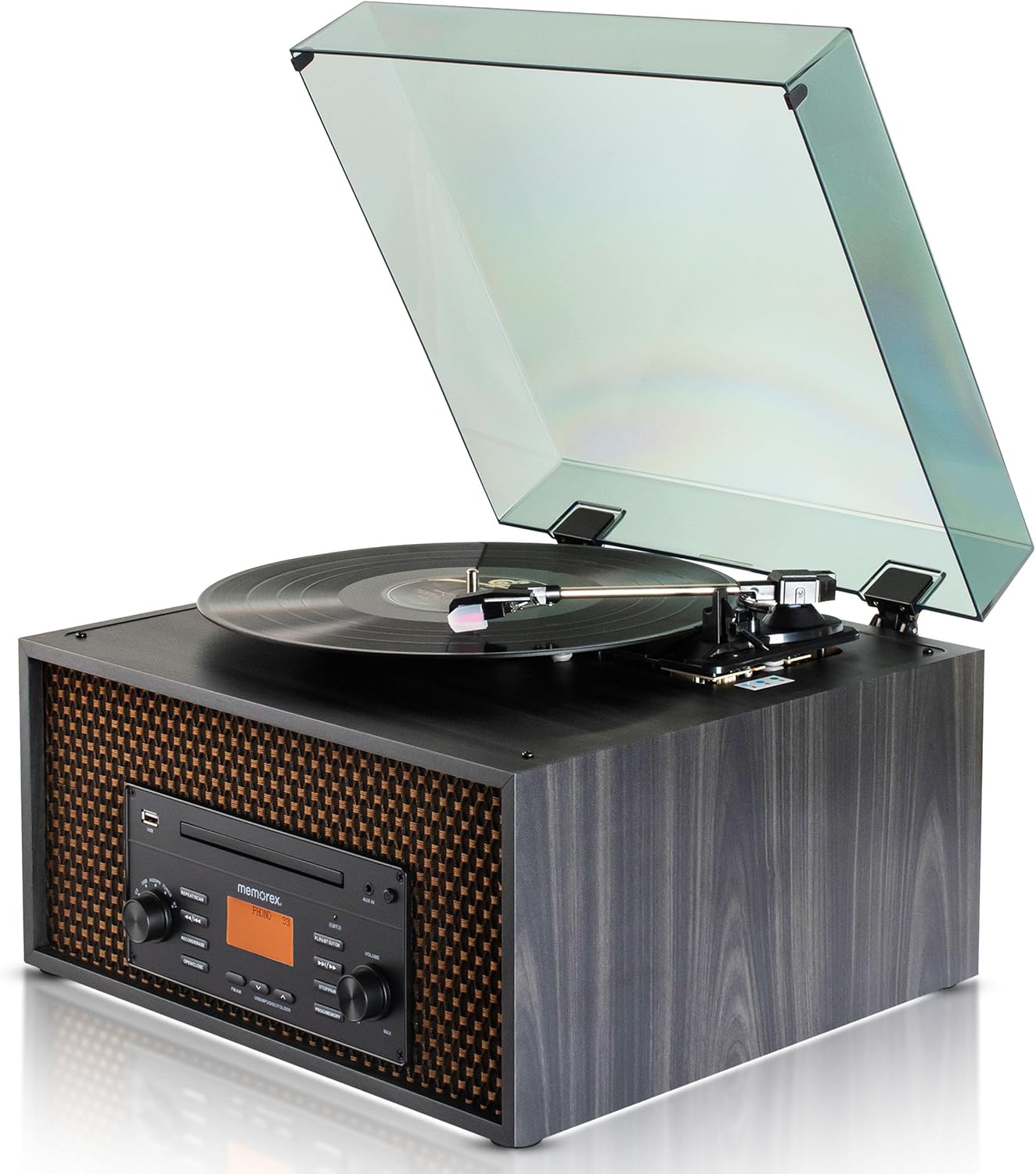
Imej: Atas view of the Memorex MX-TT700, showing the turntable platter, tonearm, stylus, and open dust cover.
- Pinggan Meja Putar: Where records are placed.
- Tonearm: Memegang stylus dan menjejaki alur rakaman.
- Stilus (Jarum): Reads the record grooves.
- Penyesuai 45 RPM: Digunakan untuk memainkan rekod 7 inci dengan lubang tengah yang besar.
- Suis Pemilih Kelajuan: Adjusts turntable speed (33 1/3, 45, 78 RPM).
- Penutup habuk: Protects the turntable from dust.
4. Panduan Persediaan
4.1 Membongkar dan Meletakkan
- Keluarkan unit dengan berhati-hati dari pembungkusannya.
- Place the music center on a flat, stable surface, away from direct sunlight, heat sources, and excessive dust or vibration.
- Pastikan terdapat pengudaraan yang mencukupi di sekitar unit.
- Remove any protective materials from the turntable, including the stylus protector.
4.2 Sambungan Kuasa
- Connect the supplied AC adapter to the DC IN jack on the back of the unit.
- Palamkan penyesuai AC ke salur keluar dinding standard.
4.3 Antenna Connection (FM)
Extend the FM pigtail antenna located at the back of the unit for optimal FM radio reception. Adjust its position if reception is poor.
5. Operasi
Turn the Power/Mode knob to switch on the unit. The LCD display will illuminate. Rotate the knob to select your desired audio source.
5.1 Operasi Meja Putar

Image: Detail of the turntable area, illustrating the 3-speed selector switch (33 1/3, 45, 78 RPM).
- Turn the Power/Mode knob to select "PHONO" mode.
- Angkat penutup habuk.
- Place a record on the turntable platter. If playing a 7-inch record with a large center hole, place the 45 RPM adapter on the spindle first.
- Set the speed selector switch to the correct speed for your record (33 1/3, 45, or 78 RPM).
- Gently lift the tonearm using the cueing lever and position the stylus over the desired track of the record.
- Turunkan tonearm perlahan-lahan ke atas rekod menggunakan tuil isyarat. Rekod akan mula dimainkan.
- Laraskan kelantangan menggunakan tombol Kelantangan.
- To stop playback, lift the tonearm, return it to the tonearm rest, and secure it.
5.2 Main Semula CD/MP3
- Turn the Power/Mode knob to select "CD" mode.
- Press the "OPEN/CLOSE" button to open the CD tray.
- Place a CD (audio CD or MP3 CD) with the label side facing up into the tray.
- Press the "OPEN/CLOSE" button again to close the tray. The unit will read the disc.
- Press the "PLAY/PAUSE" button to start playback.
- Use the "<< / >>" buttons to skip tracks. Press and hold to fast forward/rewind.
- Press the "REPEAT/RANDOM" button to cycle through repeat modes (e.g., repeat one, repeat all, random).
- Press the "STOP" button to stop playback.
5.3 Main Semula USB

Image: The music center with a USB drive inserted, illustrating its capability for USB playback and recording.
- Masukkan pemacu kilat USB ke dalam port USB.
- Turn the Power/Mode knob to select "USB" mode. The unit will automatically detect and begin playing compatible audio files (MP3).
- Use the "<< / >>" buttons to skip tracks. Press and hold to fast forward/rewind.
- Press the "REPEAT/RANDOM" button to cycle through repeat modes.
- Press the "STOP" button to stop playback.
5.4 Penstriman Bluetooth

Image: The music center paired with a smartphone via Bluetooth, demonstrating wireless audio streaming.
- Turn the Power/Mode knob to select "BLUETOOTH" mode. The LCD display will show "BLUETOOTH" and flash, indicating it's in pairing mode.
- Pada peranti anda yang didayakan Bluetooth (telefon pintar, tablet), dayakan Bluetooth dan cari peranti yang tersedia.
- Select "MX-TT700" from the list of devices. Once paired, the display will stop flashing and show "BLUETOOTH".
- Start playing music on your connected device. The audio will stream through the music center.
- Adjust volume on both the music center and your connected device.
5.5 AM/FM Operasi Radio

Image: The music center displaying various FM radio frequencies, indicating its radio capabilities.
- Turn the Power/Mode knob to select "AM" or "FM" mode.
- Use the "<< / >>" buttons to manually tune to a station. Press and hold to auto-scan for the next available station.
- Untuk Menyimpan Pratetap: When on a desired station, press the "PROGRAM/MEMORY" button. The preset number will flash. Use "<< / >>" to select a preset number (1-20), then press "PROGRAM/MEMORY" again to confirm.
- Untuk Mengingat semula Pratetap: In AM or FM mode, press the "PROGRAM/MEMORY" button repeatedly to cycle through saved presets.
- Adjust the FM pigtail antenna for best reception.
5.6 AUX-in Operation
- Connect an external audio device (e.g., smartphone, MP3 player) to the AUX-in jack on the front panel using the supplied 3.5mm aux-in cable.
- Turn the Power/Mode knob to select "AUX" mode.
- Start playing audio on your connected external device.
- Adjust the volume on both the music center and your external device.
5.7 Recording to USB
The MX-TT700 allows you to record audio from the Turntable, CD, or AUX-in directly to a USB flash drive in MP3 format.
- Insert a USB flash drive into the USB port. Ensure it has sufficient free space.
- Select the desired source you wish to record from (PHONO, CD, or AUX).
- Start playback on the source (e.g., begin playing a record, CD, or audio from an AUX-connected device).
- Press the "RECORD" button. The display will indicate recording is in progress.
- To stop recording, press the "RECORD" button again or the "STOP" button. The recorded file akan disimpan pada pemacu USB.
6. Penyelenggaraan
6.1 Membersihkan Unit
- Sentiasa cabut plag unit sebelum membersihkan.
- Gunakan kain lembut dan kering untuk mengelap permukaan luar. Jangan gunakan pembersih yang melelas, lilin atau pelarut.
- Untuk penutup habuk, gunakan kain lembut dan larutan detergen yang lembut.
6.2 Turntable and Stylus Care
- Pastikan penutup habuk ditutup apabila meja putar tidak digunakan untuk mengelakkan pengumpulan habuk.
- Bersihkan stylus secara berkala menggunakan berus lembut, berus perlahan-lahan dari belakang ke hadapan.
- Replace the stylus when you notice a degradation in sound quality or visible wear.
6.3 CD/USB Care
- Pegang CD pada tepinya. Bersihkannya dengan kain lembut dan tidak berbulu, lap dari tengah ke luar.
- Ensure USB drives are free of dust and debris before insertion.
7. Penyelesaian masalah
If you encounter issues with your music center, refer to the following table for common problems and solutions.
| Masalah | Kemungkinan Punca | Penyelesaian |
|---|---|---|
| Tiada kuasa | AC adapter not connected properly; Power outlet not working. | Ensure AC adapter is securely plugged into the unit and a working wall outlet. |
| Tiada bunyi | Kelantangan terlalu rendah; Mod salah dipilih; Fon kepala disambungkan. | Increase volume. Select correct input mode. Disconnect headphones. |
| Meja putar tidak berputar atau dimainkan | Incorrect speed selected; Stylus protector still on; Tonearm not lowered. | Set correct speed. Remove stylus protector. Lower tonearm onto record. |
| CD tidak dimainkan | CD inserted incorrectly; Disc is dirty or scratched; Incorrect mode. | Insert CD label-side up. Clean or replace CD. Select "CD" mode. |
| Penggandingan Bluetooth gagal | Device too far; Bluetooth not enabled on external device; Unit not in pairing mode. | Ensure device is within 30 feet. Enable Bluetooth. Select "BLUETOOTH" mode on unit. |
| Penerimaan radio yang lemah | FM antenna not extended or positioned correctly. | Extend and adjust the FM pigtail antenna for better signal. |
| Rakaman USB tidak berfungsi | USB drive full or incompatible; Source not playing. | Use a compatible USB drive with sufficient space. Ensure source audio is playing. |
8. Spesifikasi
| Model | MX-TT700 |
| Sumber Kuasa | AC Adapter (Input: 100-240V ~ 50/60Hz) |
| Kelajuan Meja Putar | 33 1/3, 45, 78 RPM |
| Versi Bluetooth | (Not specified in JSON, assuming standard) |
| Julat Bluetooth | Sehingga 30 kaki (10 meter) |
| Frekuensi Radio | AM / FM PLL Radio (20 preset stations) |
| Output Speaker | 2 x 2W (Total 4W) |
| Format Rakaman USB | MP3 |
| Dimensi Produk (L x W x H) | 18.47" x 12.26" x 16.51" (46.91 cm x 31.14 cm x 41.94 cm) |
| Berat Barang | 3 paun (1.36 kg) |
| bahan | kayu |
| Komponen yang Disertakan | AC Adapter, 45 RPM Adapter, Aux-in Cable, Instruction Manual |
9. Waranti dan Sokongan
Memorex products are designed for reliability and performance. For warranty information or technical support, please refer to the warranty card included with your product or visit the official Memorex webtapak.
Pengeluar: Memorex
Webtapak: www.memorex.com (Nota: Ini ialah pemegang tempat URL, please refer to your product documentation for the official support webtapak.)


