pengenalan
Terima kasih kerana membeliasing the Memorex MX-SBDA220 32-inch Bluetooth Dolby Atmos Soundbar. This soundbar is designed to enhance your home audio experience with immersive Dolby Atmos sound, delivering powerful and clear audio for movies, music, and gaming. This manual provides essential information for setting up, operating, and maintaining your new soundbar. Please read it thoroughly before use and retain it for future reference.
Arahan Keselamatan Penting
- Read all instructions before operating the soundbar.
- Simpan manual ini untuk rujukan masa hadapan.
- Jangan gunakan alat ini berhampiran air.
- Bersihkan hanya dengan kain kering.
- Jangan sekat sebarang bukaan pengudaraan. Pasang mengikut arahan pengilang.
- Jangan pasang berhampiran mana-mana sumber haba seperti radiator, daftar haba, dapur, atau radas lain (termasuk amppenghidup) yang menghasilkan haba.
- Lindungi kord kuasa daripada berjalan atau tersepit, terutamanya pada palam, bekas kemudahan dan tempat keluar dari radas.
- Hanya gunakan lampiran/aksesori yang ditentukan oleh pengilang.
- Cabut plag radas ini semasa ribut petir atau apabila tidak digunakan untuk jangka masa yang lama.
- Rujuk semua servis kepada kakitangan perkhidmatan yang berkelayakan. Servis diperlukan apabila radas telah rosak dalam apa jua cara, seperti kord bekalan kuasa atau palam rosak, cecair telah tertumpah atau objek jatuh ke dalam radas, radas telah terdedah kepada hujan atau lembapan, tidak beroperasi seperti biasa. , atau telah digugurkan.
Apa yang ada dalam Kotak
Buka bar bunyi anda dengan berhati-hati dan pastikan semua item ada:
- Memorex MX-SBDA220 Soundbar
- Alat Kawalan Jauh
- Kabel Kuasa
- Panduan Mula Pantas

Image: The Memorex MX-SBDA220 soundbar displayed with various connection cables including Optical, HDMI, and USB, alongside the Bluetooth logo, illustrating the multiple connectivity options.
Produk Selesaiview
Depan View
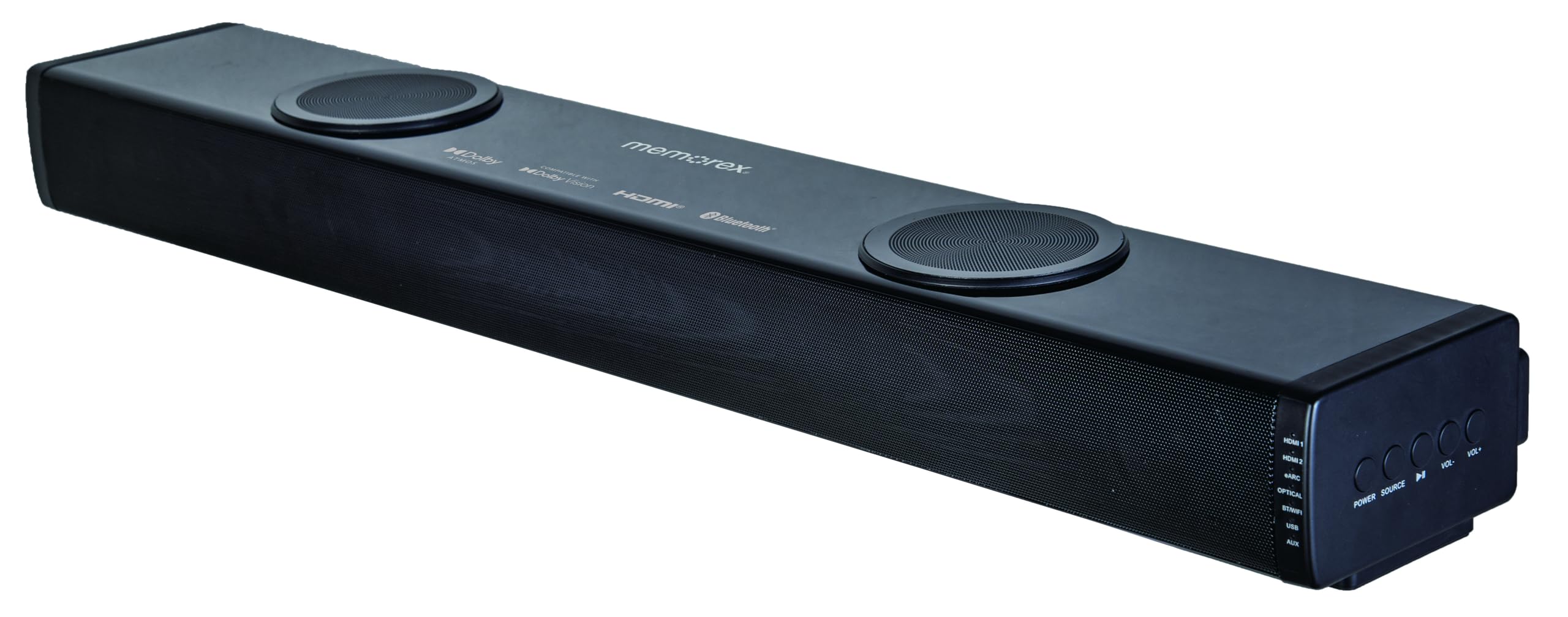
Imej: Bahagian hadapan langsung view of the Memorex MX-SBDA220 soundbar, highlighting its sleek design, front speaker grille, and the two circular top-firing speakers for Dolby Atmos effects.
Kawalan Panel Sisi

Imej: Bersudut view of the Memorex MX-SBDA220 soundbar, revealing the control panel on the right side. Buttons for Power, Source selection, Play/Pause, Volume Down, and Volume Up are visible, along with input indicators.
Alat Kawalan Jauh

Image: The Memorex MX-SBDA220 soundbar shown with its full-function remote control positioned above it. The remote features buttons for power, input selection, sound modes, volume, bass, and treble adjustments.
Panduan Persediaan
1. Penempatan Fizikal
Place the soundbar on a stable, flat surface directly in front of your television. Ensure there are no obstructions blocking the front or top-firing speakers for optimal sound delivery, especially for Dolby Atmos effects.
2. Connecting to Your TV/Devices
The MX-SBDA220 offers multiple connectivity options:
- HDMI ARC (Saluran Pulangan Audio): For the best audio quality and control, connect an HDMI cable from the soundbar's HDMI ARC output to your TV's HDMI ARC input. This allows your TV remote to control the soundbar's volume.
- Input Optik: Connect an optical cable from the soundbar's OPTICAL input to your TV's optical digital audio output.
- HDMI IN (x2): Connect external devices like Blu-ray players or gaming consoles to the soundbar's HDMI IN ports. Then, connect the soundbar's HDMI ARC output to your TV's HDMI ARC input.
- Bluetooth: For wireless audio streaming from smartphones or tablets, select the Bluetooth input on the soundbar and pair your device.
- Pemain USB: Masukkan pemacu USB dengan audio fileke dalam port USB untuk main balik terus.
- Input AUX: Use a 3.5mm audio cable to connect devices with an analog audio output to the soundbar's AUX input.
3. Sambungan Kuasa
Connect the provided power cable to the soundbar's power input and then plug it into a wall outlet. The soundbar will enter standby mode.
Arahan Operasi
Hidupkan/Mati Kuasa
Tekan ke KUASA butang pada bar bunyi atau alat kawalan jauh untuk menghidupkan atau mematikan unit.
Pemilihan Input
Tekan ke SUMBER button on the soundbar or the corresponding input button (HDMI1, HDMI2, eARC, OPT, BT, USB, AUX) on the remote control to switch between audio sources. The LED display will indicate the active input.
Kawalan Kelantangan
Tekan VOL+ or vol- butang pada bar bunyi atau alat kawalan jauh untuk melaraskan kelantangan induk.
Mod Bunyi
The soundbar features 5 optimized sound modes. Press the corresponding button on the remote control to select:
- Filem: Enhances cinematic audio with dynamic range.
- Muzik: Optimizes sound for music playback.
- Malam: Mengurangkan julat dinamik untuk mendengar lebih senyap, sesuai untuk larut malam viewing.
- Suara: Enhances vocal clarity for dialogue-heavy content.
- Permainan: Provides an immersive audio experience for gaming.
Pelarasan Bes dan Treble
Gunakan BASS+ / BASS- dan TREBLE+ / TREBLE- buttons on the remote control to fine-tune the low and high frequencies to your preference.
Berpasangan Bluetooth
- Pilih BT input on the soundbar. The LED display will flash, indicating pairing mode.
- On your mobile device, enable Bluetooth and search for "MX-SBDA220".
- Select the soundbar to pair. Once connected, the LED display will stop flashing.
Main Balik USB
Insert a USB flash drive into the USB port. The soundbar will automatically switch to USB input and begin playing compatible audio files. Use the remote control for playback functions (Play/Pause, Skip Track).
Penjagaan dan Penyelenggaraan
- Pembersihan: Gunakan kain lembut dan kering untuk membersihkan permukaan soundbar. Jangan gunakan pembersih cecair atau semburan aerosol.
- Pengudaraan: Pastikan bukaan pengudaraan tidak disekat untuk mengelakkan terlalu panas.
- Storan: Jika menyimpan bar bunyi untuk tempoh yang lama, cabut plagnya dari salur keluar kuasa dan simpan di tempat yang sejuk dan kering.
- Elakkan Kelembapan: Jauhkan bar bunyi daripada air, hujan dan kelembapan berlebihan.
Panduan Penyelesaian Masalah
| Masalah | Penyelesaian yang Mungkin |
|---|---|
| Tiada kuasa |
|
| Tiada bunyi |
|
| Alat kawalan jauh tidak berfungsi |
|
| Isu berpasangan Bluetooth |
|
Spesifikasi Teknikal
| Ciri | Spesifikasi |
|---|---|
| Nombor Model | MX-SBDA220 |
| Jenis Pembesar Suara | Atmospheric (Dolby Atmos 2.0.2CH) |
| Jumlah Kuasa Keluaran | 100 Watts (20W x 2 front + 30W x 2 top) |
| Teknologi Ketersambungan | Bluetooth 5.0, HDMI (ARC x1, IN x2), Optical, USB, AUX |
| Julat Bluetooth | Sehingga 10 meter (33 kaki) |
| Dimensi Produk (D x W x H) | 5.93" x 8.1" x 37.57" (anggaran) |
| Berat Barang | 2.2 paun |
| Komponen yang Disertakan | Soundbar, Remote Control, Power Cable, Quick Start Guide |
| UPC | 838689000208 |
Maklumat Waranti
Memorex products are manufactured to the highest quality standards. For specific warranty details, including coverage period and terms, please refer to the warranty card included with your product or visit the official Memorex webtapak. Simpan resit pembelian anda sebagai bukti pembelian untuk sebarang tuntutan waranti.
Sokongan Pelanggan
If you encounter any issues or have questions regarding your Memorex MX-SBDA220 Soundbar that are not covered in this manual, please contact Memorex customer support. Contact information can typically be found on the official Memorex weblaman web atau dalam Panduan Permulaan Pantas yang disediakan bersama produk anda.


