pengenalan
Thank you for choosing the Edifier Active Noise Cancelling Headphones ES850NB. These over-ear Bluetooth headphones are designed to provide an immersive audio experience with advanced features such as Hi-Res Audio certification, extended playtime, fast charging, and clear call quality. This manual will guide you through the setup, operation, and maintenance of your new headphones to ensure optimal performance and longevity.
Apa yang ada dalam Kotak
Sila semak kandungan pakej anda untuk memastikan semua item ada:
- Edifier ES850NB Headphones
- Sarung Pengecas Tanpa Wayar
- Manual Pengguna
- Beg Perjalanan
- Kabel Pengecasan Jenis-C
- Arahan Keselamatan Penting

Image: The contents of the Edifier ES850NB package, showing the headphones, charging case, and accompanying accessories.
Produk Selesaiview
Ciri-ciri Utama
- Immersive Hi-Res Audio: Features 40mm titanium-coated drivers and supports LDAC/AAC/SBC codecs for superb Hi-Res Audio and Hi-Res Audio Wireless.
- Upgraded Hybrid Active Noise Cancellation: Blocks up to -45dB of ambient noise with multiple ANC modes (high, medium, wind reduction, ambient sound).
- Extended Battery Life & Fast Charging: Up to 92 hours of playtime (ANC off) or 53 hours (ANC on). A 15-minute charge provides up to 11.5 hours of playback (ANC off).
- Clear Calls & Versatile Connectivity: Built-in mics with AI noise cancellation for crystal-clear calls. Supports Bluetooth 5.4 and wired connection.
- Keselesaan Sepanjang Hari: Designed with skin-friendly leather ear cushions, an ergonomic steel headband, and a lightweight 260g build.
Kawalan dan Penunjuk
The Edifier ES850NB headphones feature intuitive controls located on the earcups for easy management of audio playback, calls, and noise cancellation modes.

Imej: Terperinci view of the headphone controls, including volume up/down, power, play/pause, call management, and ANC mode switch.
- Kelantangan Naik (+): Single press to increase volume. Press and hold for next track.
- Perlahankan suara (-): Single press to decrease volume. Press and hold for previous track.
- Power ON/OFF / Play/Pause: Press and hold for power. Single press for play/pause.
- Pengurusan Panggilan: Single press to answer/end a call. Double press to reject a call.
- Pembantu Suara: Double press to activate voice assistant.
- ANC Modes Switch / Bluetooth Pairing: Single press to cycle through ANC modes. Press and hold to initiate Bluetooth pairing.
Persediaan
Mengecas Fon Kepala
Before first use, fully charge your headphones. Connect the provided Type-C charging cable to the charging port on the headphones and the other end to a USB power source. The indicator light will show charging status. A full charge provides up to 92 hours of playback (ANC off). A quick 15-minute charge can provide up to 11.5 hours of playback (ANC off).
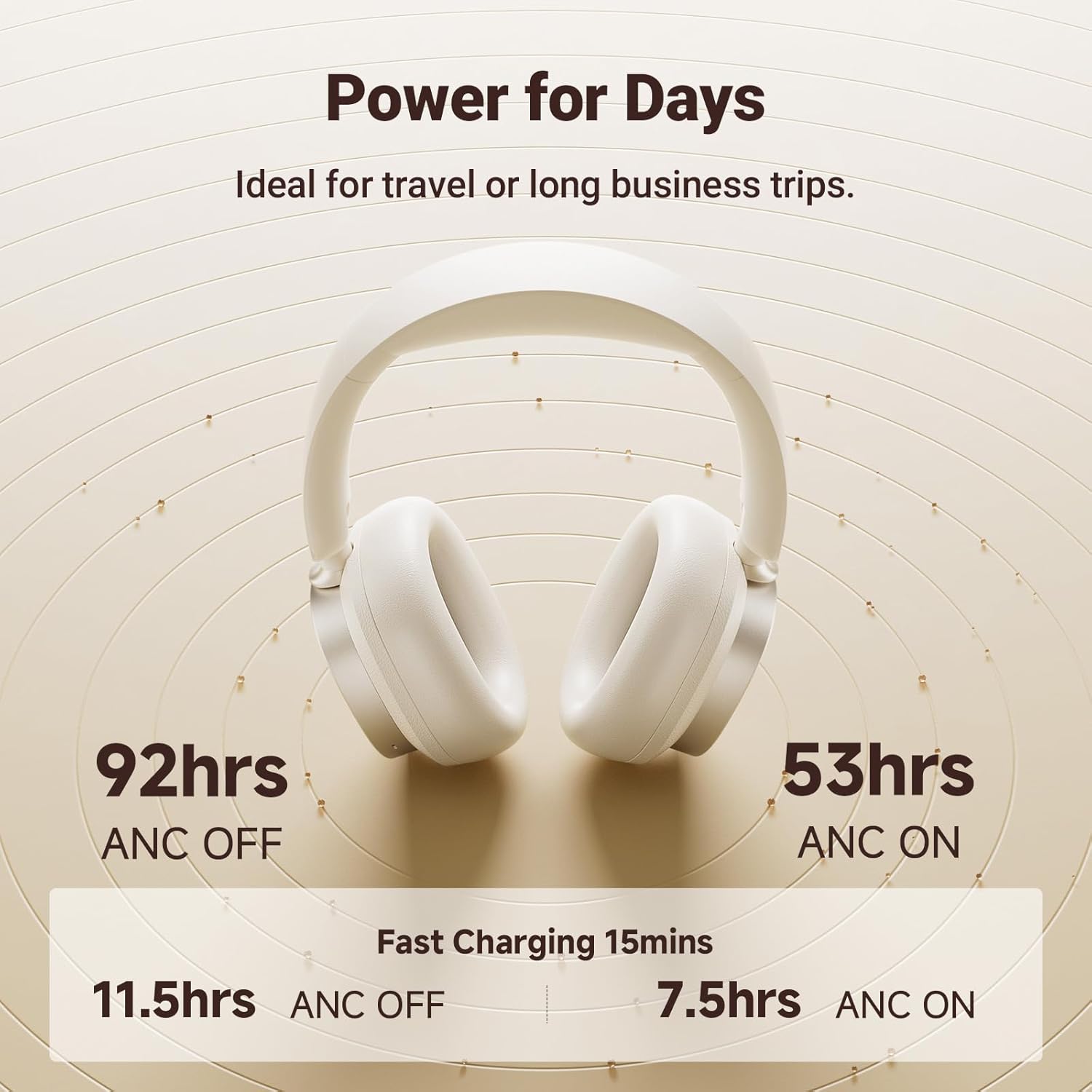
Image: Visual representation of the impressive battery life and fast charging capabilities of the headphones.
Berpasangan Bluetooth
- Pastikan fon kepala dimatikan.
- Press and hold the ANC/Bluetooth pairing button until the indicator light flashes rapidly, indicating pairing mode.
- On your device (smartphone, tablet, computer), enable Bluetooth and search for "Edifier ES850NB" in the list of available devices.
- Select "Edifier ES850NB" to connect. Once connected, the indicator light will turn solid blue or off, depending on the model.
- The headphones support multipoint connection, allowing seamless switching between two paired Bluetooth devices.
Video: An official product video demonstrating the Edifier Active Noise Cancelling Headphones, highlighting features like multipoint Bluetooth connectivity and comfort.
Arahan Operasi
Pembatalan Bising Aktif (ANC)
The ES850NB headphones feature advanced hybrid active noise cancellation. Press the ANC button to cycle through different modes:
- High Noise Cancellation: Ideal for noisy environments like flights, metros, or buses.
- Medium Noise Cancellation: Suitable for offices, coffee shops, or parks.
- Pengurangan Angin: Minimizes wind noise during outdoor activities.
- Bunyi Ambien: Allows you to hear your surroundings while still enjoying audio.

Image: A visual guide to the various Active Noise Cancellation modes and their recommended uses.
Sound Effects and Personalization
Customize your listening experience with three distinct sound effects:
- Mod Muzik: Dioptimumkan untuk mendengar muzik secara umum.
- Mod Permainan: Provides 0.08s low latency for immersive gaming audio.
- Bunyi Ruang: Creates a lifelike, surround-sound audio experience.
These modes can be selected via the Edifier Connect app, which also allows for EQ customization and firmware upgrades.

Image: The headphones emphasizing their Hi-Res Audio capabilities for an immersive sound experience.
Membuat dan Menerima Panggilan
The built-in microphones with AI noise cancellation ensure crystal-clear calls. Use the multi-function button for call management:
- Single press to answer an incoming call.
- Single press to end an active call.
- Double press to reject an incoming call.

Image: Demonstrating the clear hands-free call feature of the headphones.
Wired and Wireless Use
The ES850NB headphones offer both wireless Bluetooth 5.4 connectivity and a wired option for versatile use. Simply connect the included USB-C to USB-A cable for a wired connection to compatible devices.

Image: Comparison showing the flexibility of using the headphones wirelessly via Bluetooth or with a wired connection.
Touch-to-Chat Functionality
For quick conversations without removing your headphones, simply touch and hold the right ear cup. This action will pause your audio and activate ambient sound mode, allowing you to hear your surroundings clearly. Release to resume playback instantly.
Penyelenggaraan
- Pembersihan: Gunakan kain lembut dan kering untuk membersihkan fon kepala. Jangan gunakan pembersih atau pelarut yang melelas.
- Storan: When not in use, store the headphones in the provided travel bag or charging case to protect them from dust and damage.
- Penjagaan Bateri: Untuk memanjangkan hayat bateri, elakkan daripada menyahcas sepenuhnya fon kepala dengan kerap. Mengecasnya dengan kerap, walaupun tidak digunakan untuk tempoh yang lama.
- Suhu: Elakkan daripada mendedahkan fon kepala kepada suhu yang melampau (panas atau sejuk) atau kelembapan yang tinggi.
Menyelesaikan masalah
| Masalah | Kemungkinan Punca | Penyelesaian |
|---|---|---|
| Tiada suara dari fon kepala | Headphones not powered on; Not paired; Volume too low; Device issue. | Ensure headphones are on. Re-pair with device. Increase headphone and device volume. Test with another device. |
| Tidak boleh berpasangan dengan peranti | Headphones not in pairing mode; Device Bluetooth off; Too many paired devices. | Put headphones in pairing mode. Ensure device Bluetooth is on. Clear old Bluetooth connections on device. |
| Kualiti bunyi yang lemah | Out of Bluetooth range; Interference; Low battery. | Move closer to the device. Avoid strong Wi-Fi or other wireless signals. Charge headphones. |
| ANC tidak berkesan | Incorrect ANC mode; Poor fit. | Cycle through ANC modes. Adjust headphones for a snug fit over your ears. |
Spesifikasi
| Ciri | Perincian |
|---|---|
| Model | ES850NB |
| Versi Bluetooth | 5.4 |
| Codec Audio | LDAC, AAC, SBC |
| Julat Bluetooth | Anggaran. 10m |
| Tahap Tekanan Bunyi | 91 ± 3dB (A) |
| Respons Kekerapan | 20Hz-40KHz |
| Hayat Bateri (ANC MATI) | lebih kurang 92 jam |
| Hayat Bateri (ANC HIDUP) | lebih kurang 53 jam |
| Input | 5V=1A |
| Berat Barang | 1.5 paun (lebih kurang 260g) |
| Penempatan Telinga | Atas Telinga |
| Kawalan Bunyi | Pembatalan Bunyi Aktif |
Waranti dan Sokongan
Edifier products come with a standard manufacturer's warranty. For detailed warranty information, technical support, or service inquiries, please visit the official Edifier webtapak atau hubungi sokongan pelanggan mereka secara langsung.
Edifier Rasmi Webtapak: www.edifier.com


