pengenalan
The Holmes DuoBreeze Dual Purple Blade 13-inch Desk Fan is designed to provide efficient cooling for small spaces. This manual provides essential information for the safe and effective operation, maintenance, and troubleshooting of your fan. Please read these instructions thoroughly before use and retain them for future reference.
Ciri-ciri Produk
- Dual Blade Design: Features an innovative dual blade system for enhanced air circulation and powerful, consistent cooling.
- Clean Breeze Technology: Equipped with a removable front grill for easy cleaning of the grill, blades, and interior, promoting improved air quality.
- Kepala Tilt Boleh Laras: Customize airflow direction with a 45-degree adjustable tilt head.
- Ayunan Sudut Lebar: Provides a broader distribution of air with 60-degree automatic oscillation.
- Tiga Tetapan Kelajuan: Select from low, medium, or high fan speeds using intuitive control buttons.
- Pemasa 8 Jam: Set the fan to automatically turn off after 2, 4, or 8 hours for convenience and energy savings.
- Reka Bentuk Penjimatan Ruang: Compact size ideal for desks, tabletops, and areas with limited space.
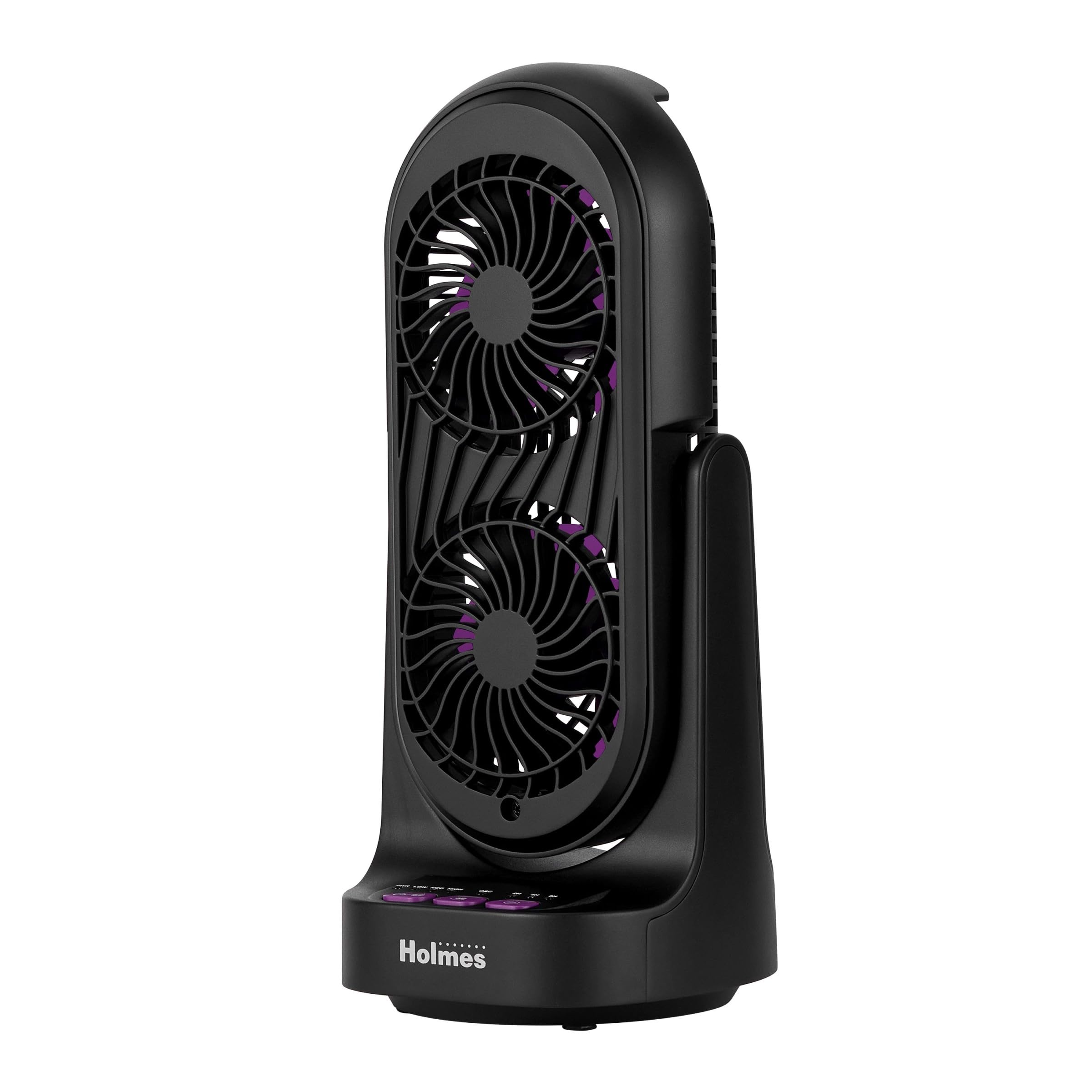
Rajah 1: Depan dan sisi view of the Holmes DuoBreeze Desk Fan, highlighting its compact dimensions of 13.4 inches in height and 5.9 inches in width/depth.
Video 1: Produk rasmi tamatview demonstrating the Holmes DuoBreeze Dual Purple Blade 13-inch Desk Fan's features, including dual blade design for maximum airflow, 45-degree adjustable head tilt, 60-degree automatic oscillation, 3 speed settings, 2/4/8 hour timer, and removable grill for easy cleaning.
Maklumat Keselamatan
Apabila menggunakan peralatan elektrik, langkah berjaga-jaga keselamatan asas hendaklah sentiasa diikuti untuk mengurangkan risiko kebakaran, renjatan elektrik dan kecederaan kepada orang, termasuk yang berikut:
- Baca semua arahan sebelum menggunakan kipas ini.
- Use this fan only as described in this manual. Other uses not recommended may cause fire, electric shock, or injury to persons.
- To protect against electrical shock, do not place fan in window, immerse unit, plug or cord in water or spray with liquids.
- Pengawasan rapi diperlukan apabila sebarang perkakas digunakan oleh atau berhampiran kanak-kanak.
- Cabut plag dari soket apabila tidak digunakan, apabila memindahkan kipas dari satu lokasi ke lokasi lain, dan sebelum membersihkan.
- Jangan kendalikan sebarang perkakas dengan kord atau palam yang rosak, atau selepas perkakas tidak berfungsi atau terjatuh atau rosak dalam apa jua cara.
- Jangan biarkan kord tergantung di tepi meja atau kaunter, atau menyentuh permukaan panas.
- Jangan beroperasi dengan kehadiran asap meletup dan/atau mudah terbakar.
- Jangan letakkan kipas atau bahagian lain di dekat api terbuka, alat memasak atau alat pemanas lain.
- Do not operate fan with a damaged guard or any rotating part.
- Elakkan sentuhan dengan bahagian yang bergerak.
- Untuk memutuskan sambungan, genggam palam dan tarik dari alur keluar dinding. Jangan sekali-kali menarik kord.
- Sentiasa gunakan pada permukaan yang kering dan rata.
Kandungan Pakej
- Holmes DuoBreeze Dual Purple Blade 13-inch Desk Fan (Model: 32510555)
- Manual Pengguna
- Kord Kuasa (dipasang)
Persediaan
The Holmes DuoBreeze Desk Fan requires minimal assembly. Follow these steps to prepare your fan for use:
- Tanggalkan kipas dari pembungkusannya dengan berhati-hati.
- Letakkan kipas pada permukaan yang stabil dan rata.
- Ensure the power cord is easily accessible to a standard electrical outlet.
- Before plugging in, ensure the fan is in the desired position and the tilt head is adjusted as needed.
Arahan Operasi
Familiarize yourself with the control panel located on the base of the fan:
- Butang kuasa (PWR): Tekan untuk menghidupkan atau mematikan kipas.
- Speed Buttons (RENDAH, MED, TINGGI): Press to cycle through the three fan speed settings: Low, Medium, and High.
- Butang Ayunan (OSC): Press to activate or deactivate the 60-degree automatic oscillation feature.
- Timer Buttons (2H, 4H, 8H): Press to set the fan to automatically turn off after 2, 4, or 8 hours. Multiple presses will cycle through the available timer options.
Melaraskan Kecondongan: The fan head can be manually tilted up to 45 degrees to direct airflow precisely where needed. Gently push or pull the fan head to adjust its angle.
Penyelenggaraan
Regular cleaning helps maintain the fan's performance and air quality.
- Sebelum Pembersihan: Always unplug the fan from the electrical outlet.
- Membersihkan Bahagian Luar: Gunakan yang lembut, damp kain untuk mengelap permukaan luar kipas. Jangan gunakan pembersih atau pelarut yang melelas.
- Cleaning the Blades and Interior (Clean Breeze Technology):
- The front grill is removable for easy access to the blades and interior. Refer to the product diagram for grill removal instructions (typically involves unscrewing or unlatching clips).
- Carefully wipe the fan blades and interior surfaces with a soft, dry cloth or a slightly damp kain.
- Ensure all parts are completely dry before reattaching the front grill and plugging the fan back in.
- Storan: When not in use, store the fan in a cool, dry place, preferably in its original packaging to protect it from dust.
Menyelesaikan masalah
If your fan is not operating correctly, consult the following troubleshooting guide:
| Masalah | Kemungkinan Punca | Penyelesaian |
|---|---|---|
| Kipas tidak dihidupkan. | Tiada bekalan kuasa. | Pastikan kipas dipasang dengan selamat pada salur keluar elektrik yang berfungsi. Periksa pemutus litar. |
| Aliran udara lemah atau tiada. | Fan blades are dirty or obstructed. | Unplug the fan and clean the blades and grill as described in the Maintenance section. Ensure no objects are blocking the air intake or output. |
| Bunyi kipas luar biasa. | Bahagian atau serpihan yang longgar di dalam. | Unplug the fan and inspect for any loose components or foreign objects. Clean thoroughly. If noise persists, contact customer support. |
| Ayunan tidak berfungsi. | Oscillation feature is not activated. | Press the OSC button to activate oscillation. Ensure the fan is on a flat surface. |
Spesifikasi
| Spesifikasi | Perincian |
|---|---|
| Jenama | HOLMES |
| Nama Model | Holmes 13" DuoBreeze CleanBreeze Desk Fan with Purple Blades |
| Nombor Model Item | 32510555 |
| warna | Hitam/Ungu |
| Dimensi Produk | 5.9"D x 5.9"W x 13.42"H |
| Berat Barang | 2.2 paun |
| Sumber Kuasa | Elektrik Bertali |
| Voltage | 120.0 V |
| Bilangan Tahap Kuasa | 3 |
| Ciri Khas | Adjustable Tilt, Oscillating |
| Tahap Kebisingan | 50 Desibel |
| Kapasiti Aliran Udara | 900 Kaki Kubik Seminit |
| Kaedah Kawalan | Butang Tekan |
| Penggunaan Dalaman/Luar | Dalaman |
| Perhimpunan Diperlukan | ya |
| Spesifikasi Met | ETL |
Waranti dan Sokongan
This Holmes DuoBreeze Dual Purple Blade 13-inch Desk Fan is backed by a Waranti terhad 1 tahun. This warranty covers defects in material or workmanship under normal use.
For warranty claims, technical support, or general inquiries, please contact Holmes customer service. Keep your purchase receipt as proof of purchase for warranty validation.
Hubungan Perkhidmatan Pelanggan: Please refer to the contact information provided on the product packaging or the official Holmes webtapak untuk mendapatkan butiran sokongan yang paling terkini.


