1. Pengenalan
Thank you for choosing the Youshiko XL YC9446 Weather Station. This device is designed to provide you with accurate and comprehensive weather information for both indoor and outdoor environments. It features a radio-controlled clock for precise time synchronization, a multi-colour display, and various sensors to monitor temperature, humidity, and barometric pressure. This manual will guide you through the setup, operation, and maintenance of your new weather station.

Figure 1.1: Youshiko XL YC9446 Weather Station main display unit and wireless outdoor sensor.
2. Kandungan Pakej
Sila semak kandungan pakej untuk memastikan semua item ada:
- 1 x Youshiko XL YC9446 Main Display Unit
- 1 x Penderia Luar Wayarles
- 1 x Bekalan Kuasa UK
- 1 x Manual Pengguna (dokumen ini)

Gambar 2.1: Lebihview of the weather station display and sensor, highlighting key features and dimensions.
3. Persediaan
3.1 Mengkuasakan Unit Utama
- Connect the provided UK power supply to the DC 5V 1.2A input port on the back of the main display unit.
- Plug the power supply into a wall outlet. The display will light up.
- For continuous display operation, the power supply must be used. The unit also supports optional AA batteries (not included) for backup power.
3.2 Installing Batteries in the Wireless Sensor
- Buka petak bateri di bahagian belakang sensor luar wayarles.
- Insert 2 x AA batteries (not included) into the compartment, observing the correct polarity (+/-).
- Tutup petak bateri dengan selamat.
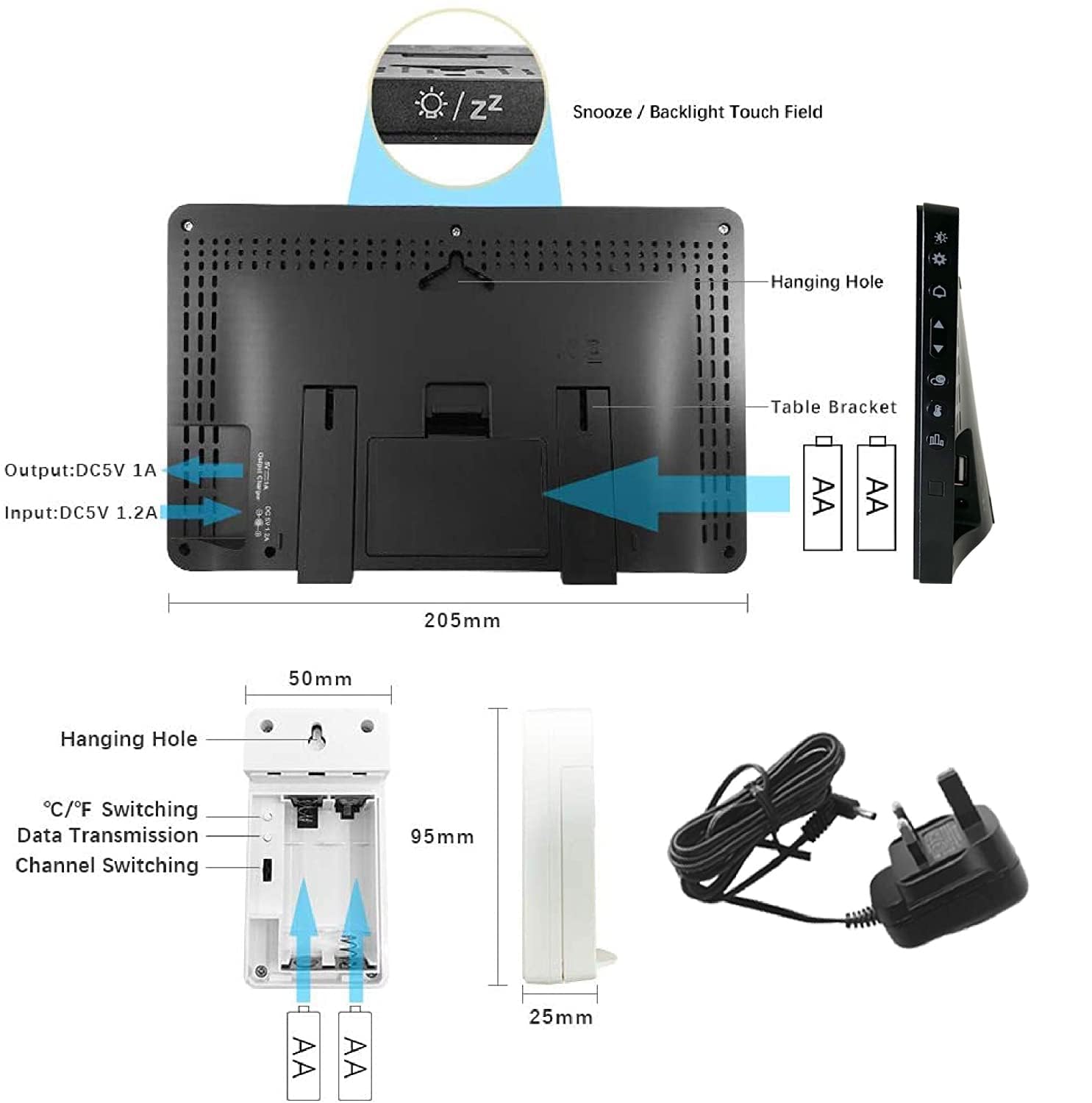
Rajah 3.1: Belakang view of the main unit and wireless sensor, illustrating battery installation and power connection points.
3.3 Pairing the Wireless Sensor
The main unit and wireless sensor should automatically pair once both are powered on. If the outdoor temperature/humidity is not displayed, or if you are setting up additional sensors:
- Ensure the sensor is within the 60m transmission range of the main unit.
- Press and hold the 'CHANNEL' button on the main unit to initiate a search for the sensor.
- On the wireless sensor, you may need to press the 'TX' button inside the battery compartment to send a signal.
- The outdoor readings should appear on the main display. The unit supports up to 3 wireless sensors (additional sensors sold separately).
3.4 Radio Controlled Clock (RCC) Synchronization
The weather station features an automatic radio-controlled clock. For users in the UK and Ireland, the unit will attempt to synchronize with the MSF signal from Cumbria. For other European regions, it will attempt to synchronize with the DCF-77 signal from Mainflingen, Germany.
- Upon initial power-up, the unit will automatically search for the radio signal. This process may take several minutes or even hours depending on signal strength and location.
- During synchronization, the display may temporarily go dark. This is normal.
- Ensure the unit is placed away from electronic devices that may cause interference.
- The clock automatically adjusts for Spring/Autumn time changes and performs daily checks for accuracy.

Figure 3.2: Information on MSF (UK & Ireland) and DCF-77 (rest of EU) radio control systems for time synchronization.
4. Arahan Operasi
4.1 Paparan Terlaluview
The multi-colour display provides a wealth of information at a glance:
- Bacaan Dalaman: Temperature (°C/°F) and humidity with comfort level indicator.
- Bacaan Luar: Temperature (°C/°F) and humidity.
- Ramalan cuaca: Animated icons indicating sunny, partially cloudy, cloudy, rainy, stormy, or snowfall conditions. The forecast function learns over time based on changes in temperature, humidity, and barometric pressure.
- Masa & Tarikh: Radio-controlled time (12/24h format), calendar, and weekday.
- Tekanan Barometrik: Current pressure readings and historical trend.
- Waktu Matahari Terbit/Tenggelam: Displays local sunrise and sunset times (based on London for UK version). Note that these times update periodically, not daily.
- Fasa Bulan: Petunjuk fasa bulan semasa.
4.2 Melaraskan Kecerahan Paparan
The display features multiple brightness modes to suit your preference and environment.
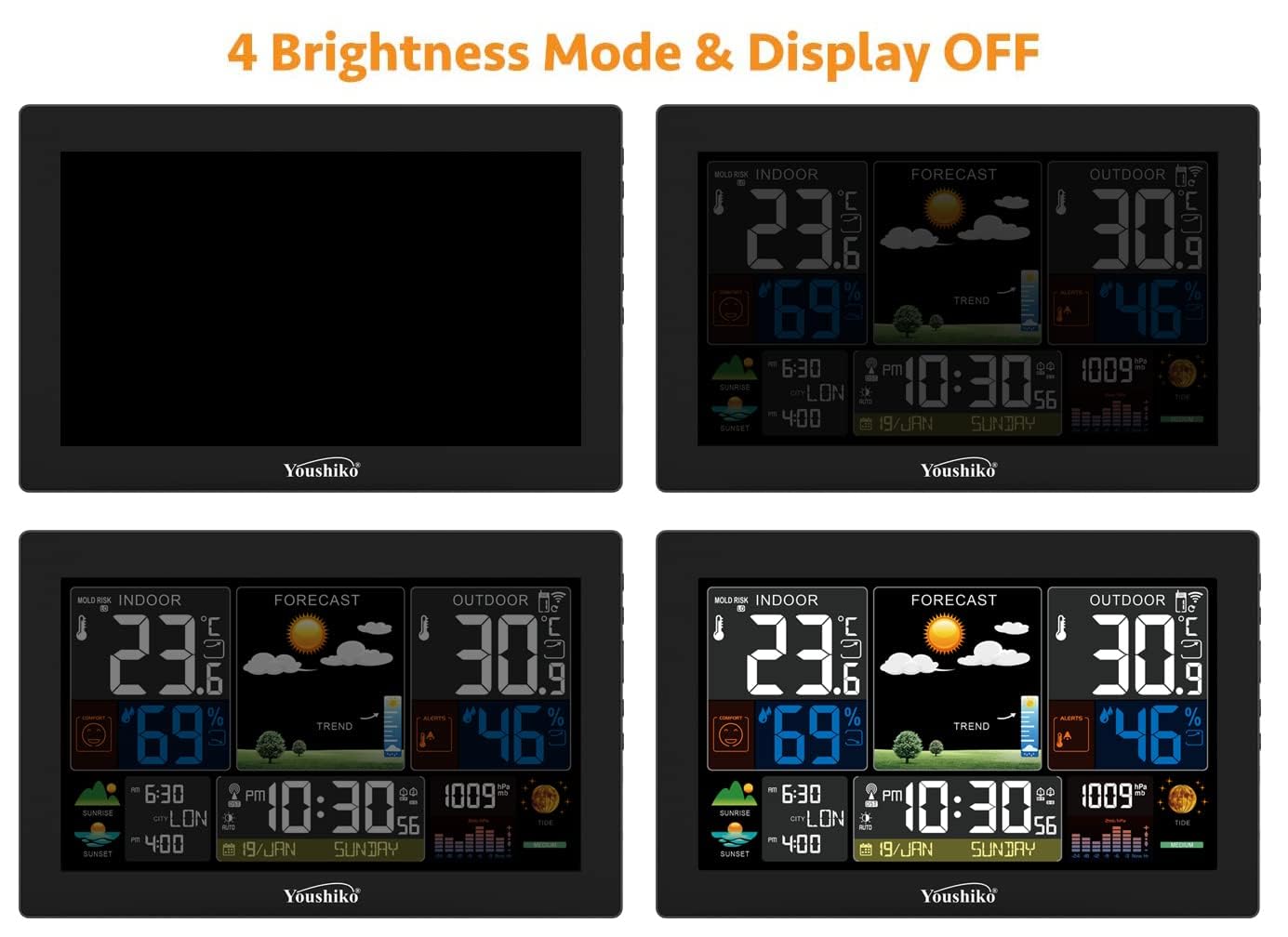
Figure 4.1: The weather station display offers four brightness modes and a display-off option.
4.3 Port Pengecasan USB
The main display unit includes a USB port (Output: DC5V 1A) on its side, allowing you to charge your smartphone, tablet, or other USB-powered devices directly from the weather station.

Figure 4.2: The integrated USB socket allows convenient charging of your devices.
4.4 Alerts and Indicators
- Indoor Comfort Level: Indicated by a smiley face icon, showing comfort based on indoor temperature and humidity (3 levels).
- Outdoor Temperature Alert: You can set high and low temperature thresholds for the outdoor sensor. If the outdoor temperature exceeds these limits, an alert icon will flash, and the unit will beep five times per minute.
- Ice Pre-Alert Function: A buzzer alarm will sound when the outdoor temperature drops to between -1°C and +1°C (30.2°F to 37.1°F), indicating potential icy conditions.
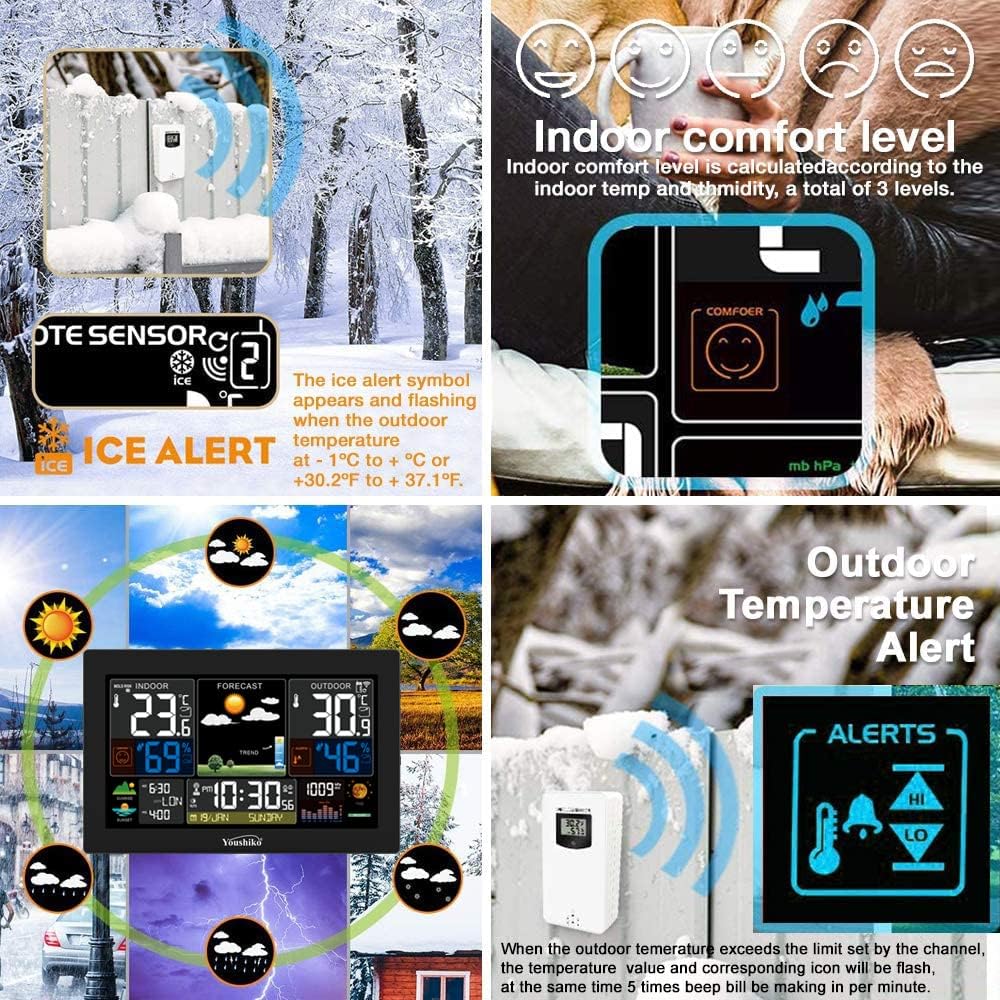
Figure 4.3: Visual representations of the Ice Alert, Indoor Comfort Level, and Outdoor Temperature Alert features.
5. Penyelenggaraan
- Pembersihan: Lap unit paparan dan penderia dengan lembut, damp kain. Jangan gunakan pembersih atau pelarut yang melelas.
- Penggantian Bateri: Replace batteries in the wireless sensor when the low battery indicator appears on the main display. Ensure to use fresh AA batteries.
- Peletakan Sensor: For accurate outdoor readings, place the wireless sensor in a shaded, well-ventilated area, protected from direct sunlight and precipitation. Ensure it is within the 60m transmission range of the main unit.
- Storan: If storing the unit for an extended period, remove all batteries from both the main unit (if installed) and the wireless sensor to prevent leakage.
6. Penyelesaian masalah
| Masalah | Kemungkinan Punca | Penyelesaian |
|---|---|---|
| Tiada bacaan suhu/kelembapan luar. | Sensor not paired, out of range, or low battery. | Ensure sensor batteries are fresh. Move sensor closer to the main unit. Press 'CHANNEL' button on main unit to re-scan, and 'TX' button on sensor to re-transmit. |
| Masa tidak betul atau tidak dikemas kini. | Poor radio signal reception (MSF/DCF-77). | Place the main unit near a window, away from electronic interference. Allow sufficient time for synchronization (can take several hours). |
| Ramalan cuaca nampaknya tidak tepat. | The unit is in its learning phase. | The weather station requires a period of 7-14 days to learn local barometric pressure patterns for accurate forecasting. Accuracy will improve over time. |
| Sunrise/Sunset times are not daily updated. | This model updates sunrise/sunset times periodically. | The YC9446 updates sunrise and sunset times every 4 to 9 days depending on location, not daily. This is normal operation for this model. |
| Paparan malap atau dimatikan. | Power supply disconnected or brightness set too low. | Ensure the power supply is securely connected. Adjust brightness using the appropriate button on the unit. If using only batteries, the display may be off to conserve power. |
7. Spesifikasi
- model: YC9446
- Julat Suhu Dalaman: -10°C hingga 50°C (14°F hingga 122°F)
- Julat Suhu Luaran: -40°C hingga 70°C (-40°F hingga 158°F)
- Ketepatan Suhu: ± 1°C
- Julat Kelembapan: 20% hingga 95% RH
- Ketepatan Kelembapan: ± 5%
- Julat Penghantaran Tanpa Wayar: Sehingga 60 meter (kawasan terbuka)
- Kekerapan: 433 MHz
- Bekalan Kuasa (Unit Utama): DC 5V 1.2A (included) or 3 x AA batteries (not included)
- Bekalan Kuasa (Sensor): 2 x bateri AA (tidak termasuk)
- Output USB: DC 5V 1A
- Dimensi (Unit Utama): Approximately 22.5 cm (W) x 14.5 cm (H)
- Dimensi (Sensor): Lebih kurang 4.9 sm (L) x 9.4 sm (T) x 2.5 sm (D)
8. Waranti dan Sokongan
The Youshiko XL YC9446 Weather Station comes with a UK Warranty and dedicated after-sales support. For any technical assistance, troubleshooting not covered in this manual, or warranty claims, please contact Youshiko customer service.
Additionally, purchases are covered by a 30-day return policy. Please refer to your purchase documentation for specific terms and conditions.
For more information on Youshiko products, please visit the official Youshiko store on Amazon: www.amazon.co.uk/youshiko


