pengenalan
Thank you for choosing the SONICAKE Sprint QAM-15 Electric Guitar Amplifier. This portable 15-watt combo amplifier is designed for practice, travel, and small gigs, offering versatile tone control and essential connectivity. This manual provides detailed instructions to help you get the most out of your amplebih hidup.
Ciri-ciri Utama:
- Portable & Lightweight Design (approx. 7.45 lbs, 11.5"x11.5"x4.5")
- Dual-Channel Versatility (Clean and Overdrive)
- Enhanced Connectivity (3.5mm Headphone Output, 3.5mm AUX Input)
- Professional Sound Control (3-Band EQ: Treble, Mid, Bass, Gain, Volume)
- Closed-Back Design for High-Quality Audio Output
Arahan Keselamatan
Please read and understand these safety instructions before operating your amppenyaring. Simpan manual ini untuk rujukan pada masa hadapan.
- Sumber Kuasa: Sambungkan amphanya kepada voltan bekalan kuasa yang dinyatakantage seperti yang ditunjukkan pada unit.
- Pengudaraan: Jangan halang sebarang bukaan pengudaraan. Pastikan aliran udara yang mencukupi di sekeliling amppelapis untuk mengelakkan terlalu panas.
- Air dan Kelembapan: Jangan dedahkan amplifier to rain, moisture, or any liquids. Do not place objects filled with liquids on the amplebih hidup.
- Sumber Haba: Simpan amplifier away from heat sources such as radiators, heat registers, stoves, or other apparatus (including amppenghidup) yang menghasilkan haba.
- Pembersihan: Bersihkan hanya dengan kain kering. Elakkan menggunakan cecair atau pembersih aerosol.
- Servis: Jangan cuba servis produk ini sendiri. Rujuk semua perkhidmatan kepada pegawai perkhidmatan yang berkelayakan.
- Kabel: Lindungi kord kuasa daripada berjalan atau tersepit, terutamanya pada palam, bekas kemudahan dan tempat keluar dari radas.
Produk Selesaiview

Depan view of the SONICAKE Sprint QAM-15 Electric Guitar Amppenguat, pertunjukancasing reka bentuk padat dan panel kawalannya.
Ciri Panel Kawalan:

Terperinci view daripada amplifier's control panel, highlighting each knob and input for user reference.
- MASUKKAN: 1/4" (6.35mm) jack for connecting your electric guitar.
- DAPATKAN: Mengawal jumlah pra-amplification or distortion. Higher settings increase saturation.
- OD (Overdrive) Button: Toggles between the clean channel and the overdrive channel. Press in for overdrive, out for clean.
- VOL (Isipadu): Melaraskan volum keluaran keseluruhan amplebih hidup.
- TRE (Treble): Adjusts the high-frequency response of the amplebih hidup.
- MID (Middle): Adjusts the mid-range frequency response of the amplebih hidup.
- ASAS: Melaraskan tindak balas frekuensi rendah bagi amplebih hidup.
- AUX (Auxiliary) Input: 3.5mm jack for connecting external audio devices (e.g., MP3 player, phone) to play along with backing tracks.
- PHONES (Headphone Output): 3.5mm jack for connecting headphones for silent practice. Mutes the main speaker when in use.
- Suis kuasa: Berpusing amphidup atau mati.
- POWER Indicator LED: Bercahaya apabila amppenyambung dihidupkan.
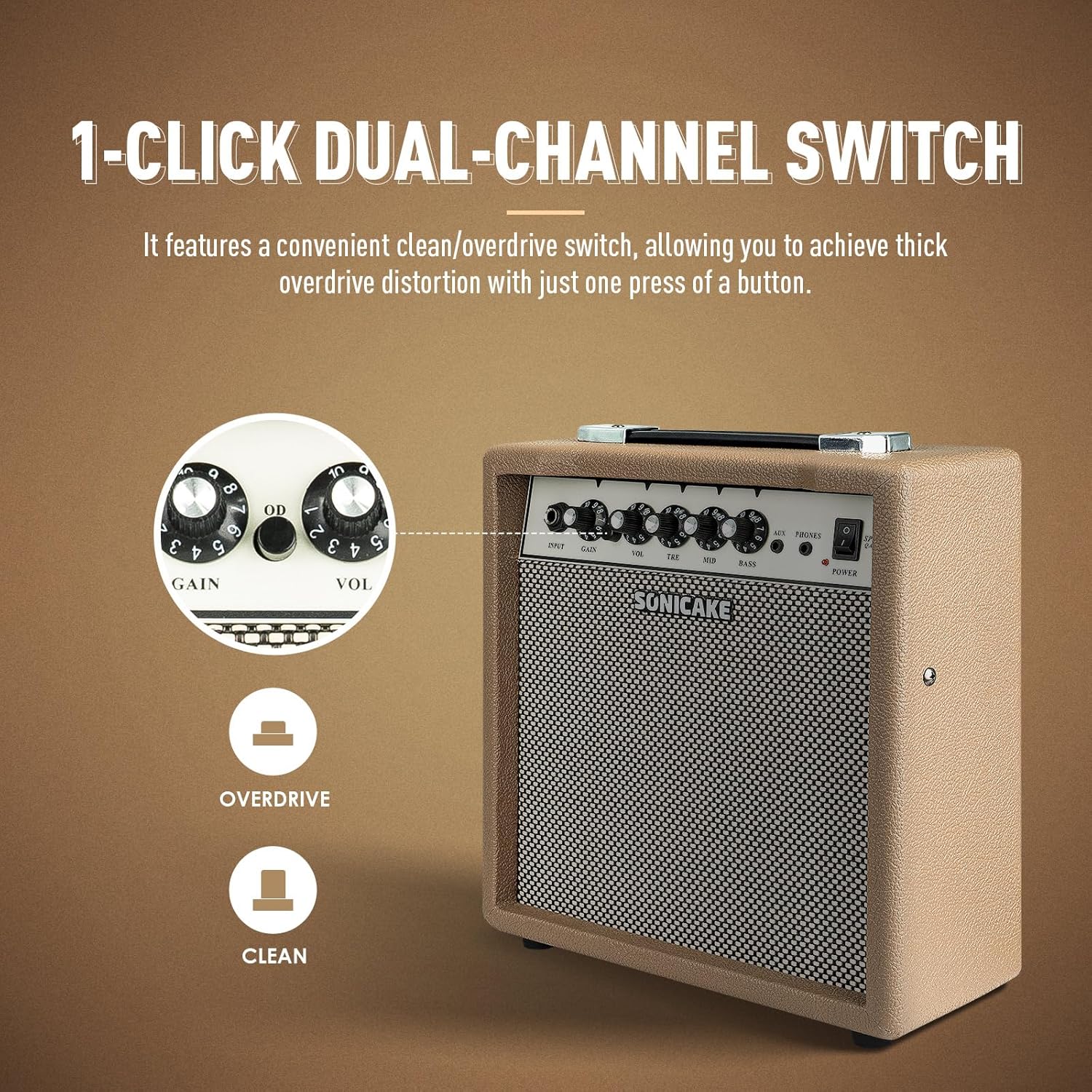
The OD button allows for instant switching between clean and overdrive tones.

The amplifier features dedicated AUX In and Headphone Out jacks for versatile practice options.
Persediaan
- Membongkar: Buang dengan berhati-hati amppenapis daripada pembungkusannya. Periksa sebarang tanda kerosakan.
- penempatan: Letakkan amplifier on a stable, flat surface. Ensure there is adequate space around the unit for ventilation.
- Sambungan Kuasa: Sambungkan kabel kuasa yang disediakan ke amplifier's power input jack and then to a suitable electrical outlet. Ensure the power switch on the amplifier is in the 'OFF' position before connecting to power.
- Sambungan Gitar: Connect your electric guitar to the 'INPUT' jack on the amplifier's front panel using a standard 1/4" (6.35mm) instrument cable.
- Tetapan Awal: Before powering on, set the 'VOL' knob to its minimum position (fully counter-clockwise) and the 'GAIN' knob to a low setting. Set the 'TRE', 'MID', and 'BASS' knobs to their center (12 o'clock) positions.
Arahan Operasi
Operasi asas:
- Hidupkan kuasa: Flip the 'POWER' switch to the 'ON' position. The power indicator LED will illuminate.
- Melaraskan Kelantangan: Slowly turn the 'VOL' knob clockwise to increase the overall output volume to your desired level.
- Matikan: When finished, turn the 'VOL' knob to its minimum position, then flip the 'POWER' switch to the 'OFF' position.
Pemilihan Saluran:
The Sprint QAM-15 features two distinct channels: Clean and Overdrive.
- Saluran Bersih: With the 'OD' button in the 'OUT' position, the amplifier operates in the clean channel, providing a clear, uncolored tone.
- Overdrive Channel: Press the 'OD' button 'IN' to engage the overdrive channel. This adds distortion and sustain to your guitar tone. The 'GAIN' knob becomes more active in this mode.
Tone Control (3-Band EQ):
Use the 'TRE', 'MID', and 'BASS' knobs to shape your amplifier's tone:
- TRE (Treble): Adjusts the brightness and clarity of your sound. Turn clockwise for more sparkle, counter-clockwise for a warmer tone.
- MID (Middle): Controls the presence and punch of your sound. Adjust to cut through a mix or to create a scooped sound.
- ASAS: Adjusts the low-end fullness and depth of your sound. Turn clockwise for a thicker, heavier tone, counter-clockwise for a tighter sound.
Kawalan Keuntungan:
The 'GAIN' knob controls the amount of signal sent to the amplifier's pre-amp stage. Higher gain settings result in more distortion and sustain, particularly noticeable in the overdrive channel. Experiment with the 'GAIN' and 'VOL' knobs to find your desired balance of distortion and overall loudness.
Ketersambungan:
- Input AUX: Connect an external audio device (e.g., smartphone, tablet, MP3 player) to the 'AUX' input using a 3.5mm stereo cable. This allows you to play along with backing tracks or your favorite music through the amplifier's speaker. The volume of the AUX input is controlled by your external device.
- Output Fon Kepala: Connect a pair of headphones to the 'PHONES' output using a 3.5mm stereo plug. This will mute the amplifier's main speaker, allowing for silent practice. The headphone volume is controlled by the amplifier's 'VOL' knob.
Penyelenggaraan
- Pembersihan: Lap secara kerap amplifier's exterior with a soft, dry, lint-free cloth. Do not use abrasive cleaners, solvents, or waxes.
- Storan: Apabila tidak digunakan untuk tempoh yang lama, simpan ampliifier di tempat yang sejuk dan kering, jauh dari cahaya matahari langsung dan suhu yang melampau.
- Pengendalian: Always carry the amplifier using its handle. Avoid dropping or subjecting the unit to strong impacts.
- Pengudaraan: Memastikan amplifier's ventilation openings remain clear of dust and debris.
Menyelesaikan masalah
If you encounter issues with your SONICAKE Sprint QAM-15 amplifier, rujuk kepada masalah dan penyelesaian biasa berikut:
| Masalah | Kemungkinan Punca | Penyelesaian |
|---|---|---|
| Tiada bunyi dari amplebih hidup. |
|
|
| Bunyi herot atau bising. |
|
|
| Input AUX tidak berfungsi. |
|
|
If the problem persists after trying these solutions, please contact SONICAKE customer support or a qualified technician.
Spesifikasi

Dimensions of the SONICAKE Sprint QAM-15 amplebih hidup.
- model: QAM-15
- Output Wattage: 15 Watt
- Berat Barang: Kira-kira 7.94 paun (3.6 kg)
- Dimensi Produk: 4.53 x 11.42 x 11.42 inci (11.5 x 29 x 29 cm)
- Peranti Serasi: Gitar Elektrik
- Jenis Bahan: plastik
- warna: Beige
Waranti dan Sokongan
For detailed warranty information, please refer to the warranty card included with your product or visit the official SONICAKE webtapak. Simpan bukti pembelian anda untuk tuntutan waranti.
For technical support, product registration, or further inquiries, please visit the official SONICAKE weblaman web atau hubungi jabatan khidmat pelanggan mereka melalui maklumat hubungan yang diberikan pada webtapak.


