1. Pengenalan
This manual provides essential information for the proper setup, operation, and maintenance of your ZEISS DTI 6/20 Thermal Imaging Camera. Please read these instructions carefully before using the device to ensure optimal performance and longevity.
2. Apa yang ada di dalam Kotak
Sahkan bahawa semua komponen berikut disertakan dalam pakej anda:
- Kamera pengimejan terma
- Lens (20 mm)
- Tali neoprena
- Carrying case including shoulder strap
- Kabel USB
- Kain pembersih optik
- Bateri litium-ion
- Panduan Cepat
- Nota keselamatan
- Kad jaminan
- dokumen EULA
3. Produk Lebihview
The ZEISS DTI 6/20 is a high-resolution thermal imaging monocular designed for detailed observation in low-light conditions. It features advanced image processing and ergonomic design for ease of use.

Rajah 1: bersudut view of the ZEISS DTI 6/20 Thermal Imaging Camera. This image displays the overall design, including the objective lens, eyepiece, and the ZEISS branding on the side.
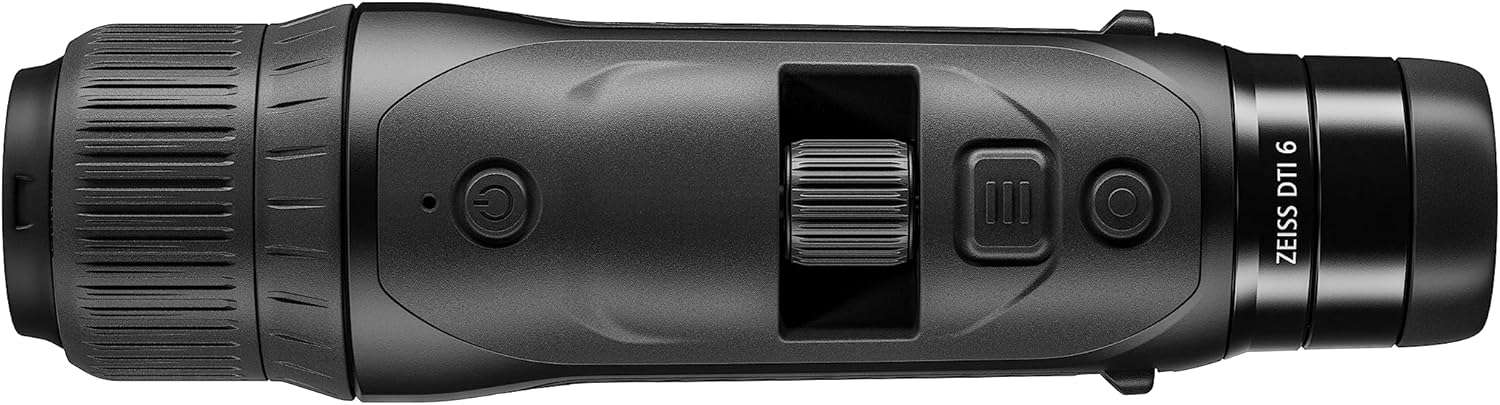
Rajah 2: Atas view of the ZEISS DTI 6/20, highlighting the power button, scroll wheel for magnification control, and other operational buttons. The ergonomic placement of controls is visible.
Ciri-ciri Utama:
- ZSIP Pro Image Technology: Delivers sharp, high-contrast thermal images.
- Paparan Resolusi Tinggi: AMOLED display with 1024x768 resolution, paired with a 640x480 sensor and 12µm pixel pitch.
- Pembesaran: 1.5x optical magnification with up to 10x digital zoom, controlled by a scroll wheel.
- Penyesuaian: 4 preset scene modes and up to 5 user-created layouts. Adjustable zoom settings, display brightness, and color palettes.
- Storan Dalaman: 16GB for capturing images and videos.
- Hayat Bateri: Up to 6.5 hours of continuous operation with a removable lithium-ion battery.
- Reka bentuk ergonomik: Suitable for both left and right-handed users, with controls positioned for natural access even with gloves.
- Kesambungan Apl: Seamless data transfer and live streaming to smartphones via the ZEISS Hunting App using Bluetooth, USB, or WLAN.
4. Persediaan
4.1 Pemasangan Bateri
- Cari petak bateri pada peranti.
- Buka penutup petak.
- Insert the provided lithium-ion battery, ensuring correct polarity.
- Tutup penutup petak bateri dengan selamat.
4.2 Kuasa Awal Hidup
- Press and hold the power button (refer to Figure 2) until the ZEISS logo appears on the display.
- Allow the device to initialize. This may take a few seconds.
- Adjust the diopter on the eyepiece for clear focus according to your vision.
5. Arahan Operasi
5.1 Hidupkan/Mati Kuasa
- Untuk Menghidupkan: Tekan dan tahan butang kuasa.
- Untuk Mematikan: Press and hold the power button until the shutdown sequence initiates.
5.2 Magnification Control
Use the scroll wheel located on the top of the device (refer to Figure 2) to adjust the digital zoom level. Rotate the wheel forward to increase magnification and backward to decrease it.
5.3 Mod Pemandangan
The DTI 6/20 offers 4 preset scene modes optimized for different observation conditions. Access these modes through the device's menu to enhance image clarity based on your environment.
5.4 Penyesuaian
The device allows for extensive personalization:
- User Layouts: Create and save up to 5 custom display layouts.
- Tetapan Paparan: Adjust display brightness to suit ambient light conditions.
- Palet Warna: Select from various color palettes to optimize thermal contrast and target identification.
5.5 App Connectivity (ZEISS Hunting App)
Enhance your experience by connecting the DTI 6/20 to the ZEISS Hunting App on your smartphone.

Rajah 3: A user operating the ZEISS DTI 6/20 thermal imaging camera in an outdoor environment, demonstrating its ergonomic handling and practical application.
- Pemindahan Data: Transfer images and videos from the device's 16GB internal storage to your smartphone via Bluetooth, USB, or WLAN.
- Penstriman Langsung: Stream live thermal footage directly to your smartphone for shared viewing atau rakaman.
- Further Customization: The app provides additional options for device settings and management.
6. Penyelenggaraan
6.1 Pembersihan
- Use the provided optics cleaning cloth to gently wipe the lenses. Avoid abrasive materials.
- Untuk badan peranti, gunakan lembut, damp kain. Jangan gunakan bahan kimia atau pelarut yang keras.
- Pastikan peranti dimatikan sebelum membersihkannya.
6.2 Penjagaan Bateri
- Cas bateri sepenuhnya sebelum penggunaan pertama.
- Store the device and battery in a cool, dry place when not in use for extended periods.
- Elakkan daripada mendedahkan bateri kepada suhu yang melampau.
7. Penyelesaian masalah
7.1 Peranti Tidak Dihidupkan
- Pastikan bateri dipasang dengan betul dan dicas sepenuhnya.
- Try charging the battery for at least 30 minutes before attempting to power on again.
7.2 Image Appears Blurry
- Adjust the diopter on the eyepiece for your vision.
- Ensure the objective lens is clean and free from smudges or debris.
- Check the focus of the thermal image using the manual focus ring if available.
7.3 Connectivity Issues with ZEISS Hunting App
- Ensure Bluetooth or WLAN is enabled on both the device and your smartphone.
- Verify that the ZEISS Hunting App is updated to the latest version.
- Restart both the thermal camera and your smartphone.
8. Spesifikasi
| Ciri | Spesifikasi |
|---|---|
| Dimensi Produk | 9.06 x 2.44 x 2.68 inci |
| Berat Barang | 1.52 paun (24.33 Auns) |
| Nombor Model Item | 527020-9911-000 |
| Jenama | ZEISS |
| Nama Model | DTI 6/20 |
| Penerangan Kanta Cebisan Mata | Plössl |
| Jenis Fokus | Fokus Manual |
| Sumber Kuasa | Dikuasakan Bateri (Litium-ion) |
| Peranti Serasi | Telefon pintar |
| Penerangan Panjang Fokus | 300mm |
| Bidang Dari View | 10 Darjah |
| Nisbah Zum | 3x Optical, up to 10x Digital |
| Resolusi Sensor | 640 x 480 with 12 micron pixel pitch |
| Resolusi Paparan | 1024 x 768 HD AMOLED |
| Storan Dalaman | 16GB |
| Masa Jangka Bateri | 6.5 jam (berterusan) |
9. Waranti dan Sokongan
The ZEISS DTI 6/20 Thermal Imaging Camera is manufactured by ZEISS. For detailed warranty information, please refer to the included warranty card or visit the official ZEISS website. For technical support, service, or inquiries, please contact ZEISS customer service through their official channels.
Pengeluar: ZEISS


