pengenalan
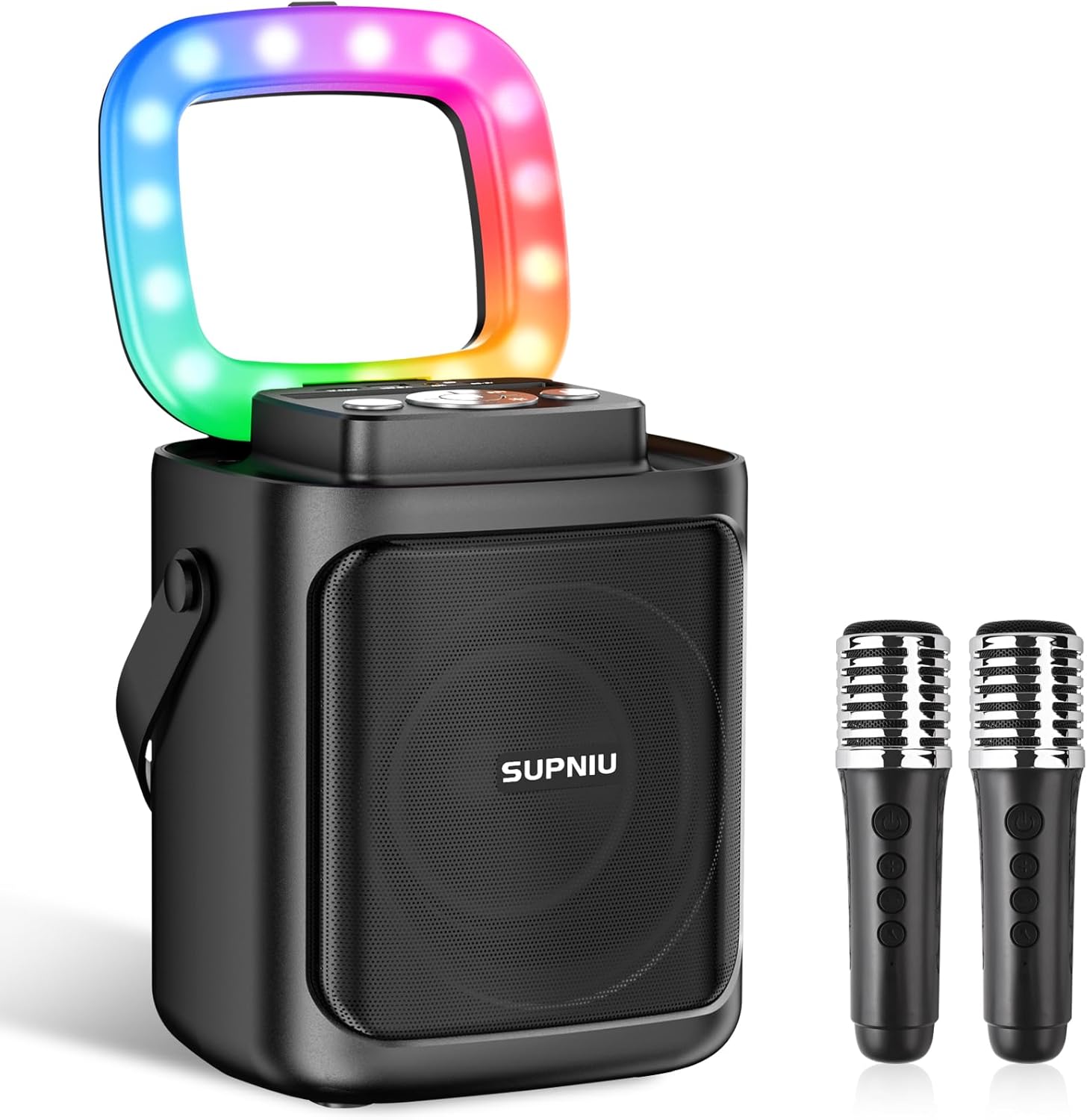
The SUPNIU S50 Portable Karaoke Machine is designed to deliver a clear and powerful audio experience for various occasions. Featuring a 4-inch full-range driver and bass reflex tube, it provides crisp sound and moderate volume. With advanced noise reduction technology and professional audio processors, the sound quality is enhanced for a balanced and three-dimensional output. This portable system includes two wireless microphones, vibrant LED lights, and multiple connectivity options, making it ideal for family gatherings, parties, and outdoor activities.
Apa yang ada dalam Kotak

Image: All components included in the SUPNIU S50 Karaoke Machine package.
- 1 x SUPNIU S50 Bluetooth Party Speaker
- 2 x Mikrofon Tanpa Wayar
- 1 x Kabel AUX
- 1 x Kabel USB Jenis-C
- 1 x Manual Pengguna
Ciri-ciri Produk
Clear & Powerful Sound
Equipped with a 4" Full-Range Driver and Bass Reflex Tube, the S50 delivers crisp, three-dimensional, and balanced sound. Advanced noise reduction technology ensures a clear audio output for an enhanced singing experience.

Imej: Dalaman view highlighting the 4-inch full-range driver for superior sound.
Portable & Lightweight Design
Small in size but powerful in volume, the S50 is highly portable. Its built-in battery provides 6-24 hours of playtime on a full charge, making it perfect for various indoor and outdoor events.

Image: The SUPNIU S50 being carried, emphasizing its portable design and long battery life.
Ketersambungan Serbaguna
Equipped with Bluetooth 5.0 for stable wireless streaming up to 49.2 feet (10m without obstacles). It also supports TF card, USB, and AUX audio input, ensuring compatibility with mobile phones, iPads, tablets, and PCs.

Image: Connectivity options including Bluetooth, TF card, USB, and AUX input.
Dwi Mikrofon Wayarles
Comes with two high-quality wireless microphones that deliver clear, high-definition sound, allowing for free movement and enhanced performance without cable constraints.

Image: The two wireless microphones, emphasizing their anti-whistle and noise reduction capabilities.
Lampu Disko Berwarna-warni
Dazzling LED lights create a fun and romantic karaoke and party atmosphere. The colorful adjustable LED lighting patterns sync with the music, providing a captivating stagkesan e.

Image: The karaoke machine displaying its colorful LED light patterns.
Pasangan Stereo Tanpa Wayar Sejati (TWS)
Pair two S50 units together for expanded sound and a true stereo experience, enhancing music, movie, or game audio.

Image: Two S50 units demonstrating TWS pairing for enhanced stereo sound.
Panduan Persediaan
1. Mengecas Peranti
Before first use, fully charge the karaoke machine using the provided USB Type-C cable. Connect the cable to the "CHARGE Port" on the speaker and a compatible USB power adapter (not included). The LED indicator will show charging status.
2. Menghidupkan/Mematikan
Tekan dan tahan butang Suis Kuasa button on the speaker's control panel to turn the device on or off.
3. Microphone Pairing
The wireless microphones are typically pre-paired with the speaker. If they do not connect automatically:
- Pastikan pembesar suara dihidupkan.
- Turn on each microphone by pressing its power button.
- The microphones should automatically connect to the speaker. If not, try restarting both the speaker and microphones.
4. Sambungan Bluetooth
- Turn on the SUPNIU S50 speaker. It will automatically enter Bluetooth pairing mode.
- On your device (smartphone, tablet, PC), enable Bluetooth and search for "SUPNIU S50" in the list of available devices.
- Select "SUPNIU S50" to connect. A confirmation sound will indicate successful pairing.
5. Other Audio Inputs (TF Card, USB, AUX)
- Kad TF/USB: Masukkan kad TF atau pemacu USB dengan audio MP3 files into the respective "TF Card" or "USB Port" slot. The speaker will automatically switch to the corresponding mode and begin playback.
- Input AUX: Connect an external audio device (e.g., MP3 player, laptop) to the "AUX Port" using the provided AUX cable. The speaker will switch to AUX mode.

Image: Control panel layout for easy setup and operation.
Arahan Operasi
Kawalan Pembesar suara
- Suis kuasa: Tekan dan tahan untuk menghidupkan/mematikan.
- Butang Mod: Short press to switch between Bluetooth, TF Card, USB, and AUX modes.
- Butang Main/Jeda: Tekan pendek untuk memainkan atau menjeda muzik.
- Previous/Next Song Buttons: Short press to skip to the previous or next track. Long press to adjust speaker volume.
- Butang Mod LED: Short press to cycle through different LED light patterns.
- TWS Series Connection Button: Used for True Wireless Stereo pairing (see TWS Pairing section).
- "M" (Microphone Preferential) Button: Prioritizes microphone sound over background music.
Kawalan Mikrofon
- Suis kuasa: Tekan dan tahan untuk menghidupkan/mematikan mikrofon.
- Kelantangan Mikrofon +/-: Adjusts the microphone's volume level.
- Kawalan Echo/Reverb: Some models may have a button to adjust echo or reverb effects.

Image: Wireless microphone controls.
Pasangan TWS (Stereo Tanpa Wayar Sebenar)
To achieve true stereo sound with two SUPNIU S50 speakers:
- Pastikan kedua-dua pembesar suara S50 dihidupkan dan tidak disambungkan ke mana-mana peranti Bluetooth.
- On one speaker (this will be the primary), short press the butang TWS. It will search for another S50 speaker.
- The two speakers will automatically pair with each other. A confirmation sound will indicate successful TWS connection.
- Once TWS is established, connect your device via Bluetooth to the primary speaker. Audio will now play through both speakers in stereo.
Penyelenggaraan
- Pembersihan: Use a soft, dry cloth to clean the speaker and microphones. Do not use abrasive cleaners, alcohol, or solvents.
- Storan: Simpan peranti di tempat yang sejuk dan kering jauh dari cahaya matahari langsung dan suhu yang melampau.
- Penjagaan Bateri: Untuk memanjangkan hayat bateri, elakkan daripada menyahcas sepenuhnya bateri dengan kerap. Cas peranti dengan kerap, walaupun tidak digunakan untuk tempoh yang lama.
- Pendedahan Air: Peranti ini tidak kalis air. Elakkan pendedahan kepada air atau kelembapan yang tinggi.
Menyelesaikan masalah
| Masalah | Kemungkinan Punca | Penyelesaian |
|---|---|---|
| Tiada kuasa/Peranti tidak akan dihidupkan. | Bateri lemah; Butang kuasa tidak ditekan dengan betul. | Cas peranti sepenuhnya. Tekan dan tahan butang kuasa selama beberapa saat. |
| Tiada bunyi dari pembesar suara. | Volume too low; Incorrect mode selected; Device not connected. | Increase speaker volume. Ensure correct input mode (Bluetooth, AUX, TF, USB). Reconnect Bluetooth or check cable connections. |
| Microphones not working/No sound from mics. | Microphones off; Low mic battery; Mic volume too low; Mic not paired. | Turn on microphones. Replace mic batteries (if applicable) or charge. Increase microphone volume. Re-pair microphones with the speaker. |
| Microphone feedback/echo. | Microphone too close to speaker; Microphone volume too high; Room acoustics. | Move microphones further away from the speaker. Reduce microphone volume. Try adjusting the "M" (Microphone Preferential) button. |
| Isu berpasangan Bluetooth. | Speaker not in pairing mode; Device Bluetooth off; Interference. | Ensure speaker is in Bluetooth mode. Turn Bluetooth off and on again on your device. Move closer to the speaker and away from other wireless devices. |
| Gandingan TWS gagal. | Speakers already connected to other devices; Incorrect TWS pairing steps. | Disconnect both speakers from any other Bluetooth devices. Follow TWS pairing instructions carefully. |
Spesifikasi
| Ciri | Perincian |
|---|---|
| Nombor Model | S50 |
| Jenama | SUPNIU |
| Output Wattage | 30 Watt |
| Dimensi Produk | 7.2 x 5.9 x 8.3 inci |
| Berat Barang | 3.45 paun |
| Sumber Kuasa | Battery Powered/DC |
| Kapasiti Bateri | 4000mAh (Speaker), 2 AAA batteries (Microphones - included) |
| Teknologi Ketersambungan | Bluetooth 5.0, TF, USB, AUX |
| bahan | Akrilonitril Butadiena Stirena (ABS) |
| warna | Black-MU |
| Peranti Serasi | DVD Player, Laptop, MP3 Player, Smartphone, Tablet, Television |
| Negara Asal | China |
Waranti & Sokongan
For warranty information and technical support, please refer to the user manual included in your product package or contact SUPNIU customer service directly. Contact details are typically provided on the product packaging or the manufacturer's official webtapak.
Sila simpan bukti pembelian anda untuk sebarang tuntutan waranti.


