pengenalan
The Portronics Iron Beats III is a powerful 200W party speaker designed to deliver an immersive audio experience. It features a wireless UHF karaoke microphone, Bluetooth V5.3 connectivity, versatile input options, dynamic RGB LED lights, and an extended battery life. This manual provides essential information for setting up, operating, and maintaining your speaker.
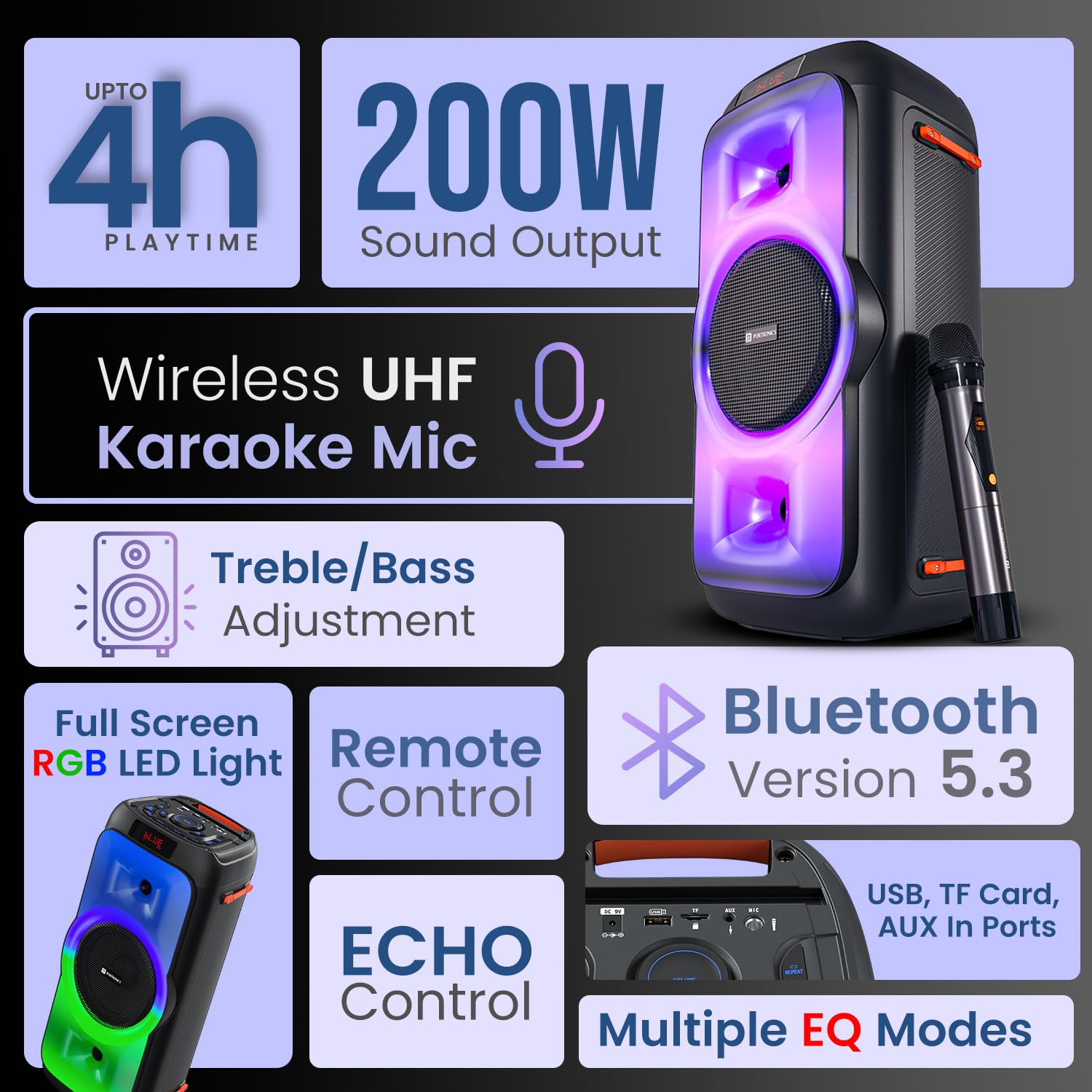
Berakhirview of the Portronics Iron Beats III speaker, showcasing its main features including sound output, connectivity, and lighting.
Persediaan
Unpacking and Initial Charge
- Carefully remove all components from the packaging: Speaker, Power Adapter, Wireless Karaoke Mic, Remote Control, and Documentation.
- Before first use, fully charge the speaker using the provided power adapter. Connect the adapter to the DC 9V input port on the speaker and plug it into a power outlet. The charging indicator will show the charging status.
Menghidupkan/Mematikan
- Untuk menghidupkan, tekan dan tahan KUASA butang pada panel kawalan.
- Untuk mematikan, tekan dan tahan KUASA butang lagi.
Arahan Operasi
Bluetooth Connectivity (V5.3)
- Turn on the speaker. It will automatically enter Bluetooth pairing mode, indicated by a flashing 'BLUE' on the LED display.
- Pada peranti mudah alih anda, dayakan Bluetooth dan cari peranti yang tersedia.
- Select "Portronics Iron Beats III" from the list. Once connected, the speaker will emit a confirmation sound, and 'BLUE' will stop flashing.

The speaker features Bluetooth 5.3 for stable wireless connections and includes a convenient mobile holder space.
Main Semula Kad USB/TF
- Insert a USB drive or TF card into the respective port on the speaker.
- Pembesar suara akan mengesan peranti storan secara automatik dan mula memainkan audio files.
- Gunakan MODE button to switch between input sources if needed.
Input AUX
- Connect an external audio device (e.g., MP3 player, laptop) to the AUX IN port using a 3.5mm audio cable (not included).
- Tekan ke MODE button to select AUX input.
Radio FM
- Tekan ke MODE butang untuk bertukar kepada mod radio FM.
- Tekan ke IMBAS button (often combined with Play/Pause) to automatically scan and save available FM stations.
- Gunakan CH- / CH+ butang untuk menavigasi stesen yang disimpan.
Mikrofon Karaoke Tanpa Wayar
- Ensure the wireless microphone is charged and powered on.
- The microphone will automatically pair with the speaker.
- Adjust the microphone volume using the dedicated MIC VOL control on the speaker.
- Laraskan kesan gema menggunakan ECHO kawalan.

The included wireless UHF karaoke microphone allows for clear vocal performance.
Sound Adjustment (Bass/Treble/EQ)
- Gunakan yang berdedikasi BASS dan TREBLE controls on the speaker to fine-tune the audio output.
- Tekan ke EQ button to cycle through multiple equalizer modes (e.g., Pop, Rock, Jazz, Classic) to match your music genre.

Adjust bass and treble levels for a customized sound experience.
Kawalan Lampu LED
- Tekan ke LED button on the control panel or remote to cycle through different RGB lighting modes or to turn the lights off.

The full-screen RGB LED lights enhance the party atmosphere.
Penggunaan Alat Kawalan Jauh
- The included remote control allows for convenient adjustment of volume, track selection, mode switching, EQ settings, and LED light control from a distance.

The control panel and remote offer comprehensive control over the speaker's functions.
Penyelenggaraan
Pembersihan
- Lap bahagian luar pembesar suara dengan kain lembut dan kering. Jangan gunakan pembersih atau pelarut yang kasar.
- Elakkan mendapatkan kelembapan ke dalam mana-mana bukaan.
Penyimpanan
- Simpan pembesar suara di tempat yang sejuk dan kering jauh dari cahaya matahari langsung dan suhu yang melampau.
- Jika menyimpan untuk tempoh yang lama, cas bateri secara berkala untuk mengekalkan kesihatannya.
Penjagaan Bateri
- Untuk memanjangkan hayat bateri, elakkan daripada menyahcas sepenuhnya pembesar suara dengan kerap.
- Charge the speaker using only the provided power adapter.
Menyelesaikan masalah
| Masalah | Penyelesaian yang Mungkin |
|---|---|
| Tiada kuasa | Ensure the speaker is charged. Connect the power adapter and check if the charging indicator lights up. Press and hold the power button. |
| Tiada bunyi | Check the volume level on both the speaker and your connected device. Ensure the correct input mode (Bluetooth, AUX, USB, TF, FM) is selected. |
| Penggandingan Bluetooth gagal | Ensure the speaker is in pairing mode. Disable and re-enable Bluetooth on your device. Move your device closer to the speaker. Forget the device from your phone's Bluetooth list and try pairing again. |
| Mikrofon tidak berfungsi | Ensure the microphone is powered on and charged. Check the MIC VOL control on the speaker. |
| Alat kawalan jauh tidak berfungsi | Ensure there are no obstructions between the remote and the speaker. Replace the remote control battery (CR5 type). |
Spesifikasi
- Nombor Model: POR-2343
- Kuasa Output: 200 Watt
- Ketersambungan: Bluetooth V5.3
- Input Audio: USB, TF Card, AUX, FM Radio
- mikrofon: Wireless UHF Karaoke Mic
- Jenis Bateri: Polimer Litium
- Masa main: Sehingga 4 Jam (pada kelantangan sederhana)
- Jenis Pemasangan: Lantai Berdiri
- Bahan: Plastik ABS
- Dimensi Produk (LxWxH): 55.1 x 29.7 x 29 cm
- Berat Barang: 4.85 kg
- Komponen yang Disertakan: Speaker, Power Adapter, Karaoke Mic, Remote Control, Documentation
Waranti dan Sokongan
For warranty information, technical support, or service inquiries, please contact Portronics customer support:
- e-mel: help@portronics.com
- telefon: +91 9555-245-245
Please refer to the documentation included in the box for specific warranty terms and conditions.


