1. Pengenalan
The DETONGER DP26 is a portable thermal label printer designed for various labeling needs in home, office, kitchen, school, and small business environments. It utilizes direct thermal technology, eliminating the need for ink or toner, and connects via Bluetooth to Android, iOS, and PC devices for convenient label creation and printing.
2. Maklumat Keselamatan
- Jangan buka atau ubah suai pencetak.
- Keep the printer away from water and high temperatures.
- Use only recommended label paper to ensure optimal performance and prevent damage.
- Elakkan menyentuh kepala cetak sejurus selepas mencetak, kerana ia mungkin panas.
- Store the printer and labels in a cool, dry place.
3. Kandungan Pakej
Selepas membuka pakej, sahkan bahawa semua item ada:
- DETONGER DP26 Label Printer
- Label Roll (included)
- Kabel Pengecas USB
- Manual Pengguna
4. Produk Lebihview
Familiarize yourself with the components of your DP26 label printer.
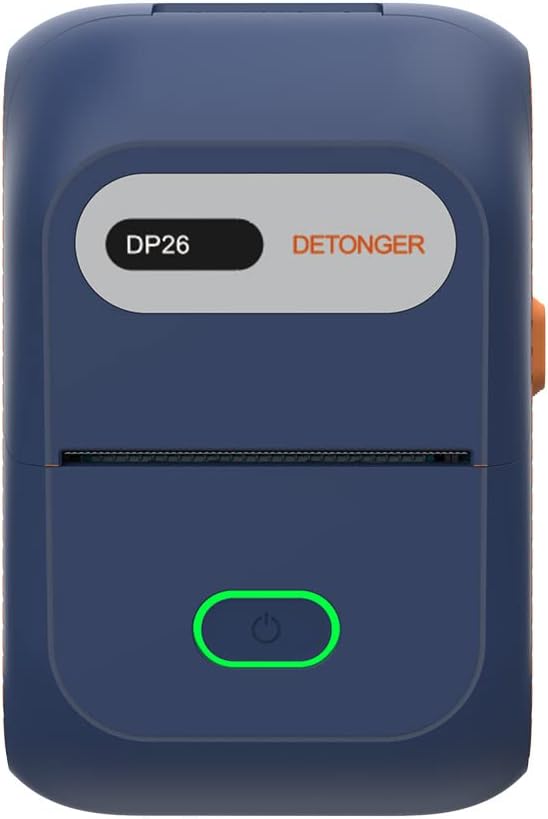
Rajah 4.1: Depan view of the DP26 printer.

Rajah 4.2: Bersudut view highlighting the USB-C port and lid release button.
- Butang Kuasa: Press and hold to turn on/off. Short press to feed labels.
- Slot Keluaran Label: Tempat label bercetak keluar.
- Port USB-C: Untuk mengecas peranti.
- Butang Pelepas Tudung: Press to open the printer cover for label installation.
5. Persediaan
5.1 Mengecas Pencetak
Before initial use, fully charge the printer using the provided USB-C cable. Connect the cable to the printer's USB-C port and a compatible power adapter (not included). The indicator light will show charging status.
5.2 Memuatkan Kertas Label
Proper label loading is crucial for clear printing.
Video 5.1: Demonstrates how to open the printer, install the label roll, and close the lid. It also shows the power and feed button functions.
- Press the lid release button to open the printer cover.
- Insert the label roll into the compartment, ensuring the labels face upwards and the leading edge extends slightly out of the print head area.
- Adjust the sliding baffles to secure the label roll in place.
- Close the printer cover firmly until it clicks.
- Press the power button briefly to feed a label and ensure it is correctly positioned.
5.3 Pemasangan Aplikasi
The DETONGER DP26 printer operates with the "WePrint" application, available for Android and iOS devices.

Figure 5.3: Visual guide for app download and initial setup steps.
- Scan the QR code in the printer's packaging or search for "WePrint" in your device's app store (Google Play Store for Android, Apple App Store for iOS).
- Download and install the "WePrint" application.
- No login, registration, or subscription is required to use the app's features.
5.4 Sambungan Bluetooth
Connect your printer to the "WePrint" app via Bluetooth.
- Ensure the DP26 printer is powered on.
- Dayakan Bluetooth pada peranti mudah alih anda.
- Open the "WePrint" app. The app will automatically search for nearby DETONGER printers.
- Select your printer from the list within the app to establish a connection. Nota: Do not connect via your phone's general Bluetooth settings; connect directly through the "WePrint" app.
6. Arahan Operasi
6.1 Mencipta Label
The "WePrint" app offers extensive customization options for your labels.

Gambar 6.1: Lebihview of the "WePrint" app's features for label design.
- templat: Access a vast array of built-in templates for various scenarios (industrial, home, retail, jewelry, etc.).
- teks: Add text with support for multiple fonts (e.g., Arial, Verdana, Tahoma), sizes, and styles.
- Kod Bar/Kod QR: Generate and print barcodes (e.g., UPC 6901234567892) and QR codes for product information or inventory management.
- Symbols & Icons: Incorporate various symbols and icons to enhance your labels.
- Imej: Add simple images or logos to your labels.
6.2 Label Percetakan
Once your label design is complete, you can print it directly from the app.
Video 6.2: Demonstrates the unboxing, paper loading, Bluetooth connection, and printing process for the DP26 printer.
- Review your label design in the "WePrint" app.
- Tap the "Print" button.
- Adjust print settings such as number of copies, print darkness, and print speed if necessary.
- Confirm printing. The printer will rapidly produce your labels.
6.3 Label Quality
The DP26 printer uses direct thermal technology to produce durable labels.
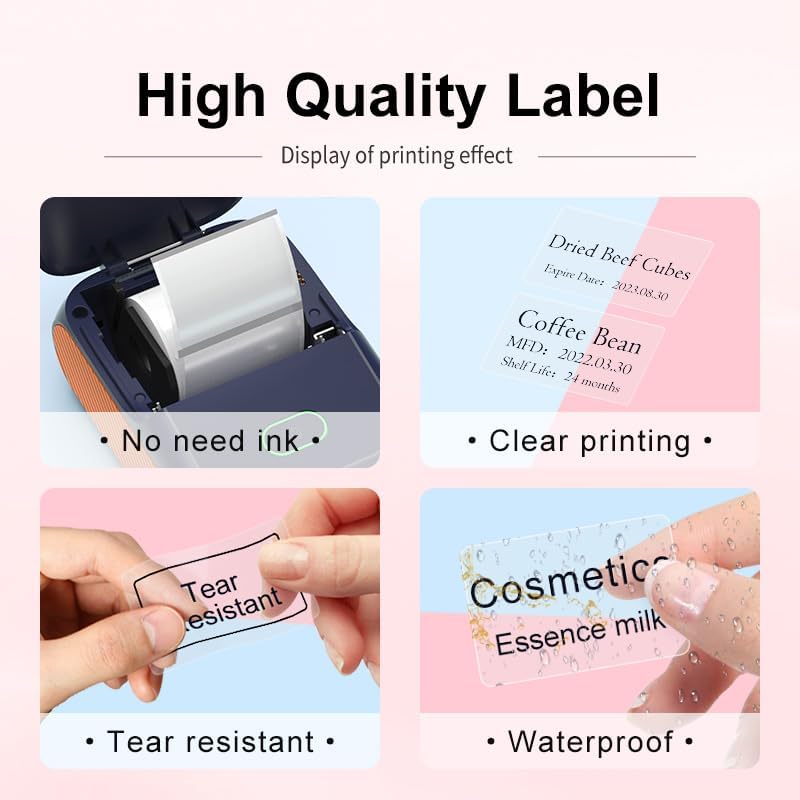
Figure 6.3: Features of the thermal labels, including inkless printing, clarity, tear resistance, and waterproofing.
- Pencetakan tanpa tinta: No ink or toner cartridges are required, reducing operational costs.
- Pencetakan Kosong: Provides 203 DPI print quality for sharp text and graphics.
- Tahan lama: Labels are designed to be scratch-resistant, tear-resistant, and waterproof, suitable for various applications.
7. Penyelenggaraan
7.1 Membersihkan Kepala Cetak
To maintain print quality, clean the print head regularly.
- Matikan pencetak dan cabut kabel kuasa.
- Buka penutup pencetak.
- Lap kepala cetak dengan lembut menggunakan kapasampditambah dengan isopropil alkohol.
- Benarkan kepala cetakan kering sepenuhnya sebelum menutup penutup dan menghidupkan pencetak.
7.2 Penyimpanan
Store the printer in a clean, dry environment away from direct sunlight and extreme temperatures. Remove the label roll if the printer will not be used for an extended period.
8. Penyelesaian masalah
- Pencetak tidak bersambung melalui Bluetooth: Ensure the printer is powered on and fully charged. Connect through the "WePrint" app, not your device's general Bluetooth settings. Restart both the printer and your device.
- Kualiti cetakan yang lemah: Check if the label roll is loaded correctly and the labels are facing the right direction. Clean the print head as described in the maintenance section. Ensure the label paper is compatible.
- Label tidak memberi makan: Open the cover and re-seat the label roll. Ensure no obstructions are in the label path. Press the feed button to advance a label.
- Pencetak tidak dihidupkan: Ensure the printer is fully charged. If the issue persists, contact customer support.
9. Spesifikasi
| Ciri | Spesifikasi |
|---|---|
| Nama Model | DP26 |
| Jenama | DETONGER |
| Teknologi Percetakan | terma |
| Teknologi Ketersambungan | Bluetooth, USB |
| Saiz Media Maksimum | 1.97 x 3.94 inch (50mm x 100mm) |
| Sokongan Lebar Label | 20-50mm (0.78-1.97 inci) |
| Output Pencetak | Monokrom |
| Berat Barang | 10.6 auns (0.3 Kilogram) |
| Dimensi Produk | 5.12"D x 3.23"W x 2.36"H |
| Bateri | 1500 mAh*7.4V rechargeable battery (1 AA battery included for internal component, not user replaceable) |
| Wattage | 11.1 Watt-jam |
10. Maklumat Waranti
The DETONGER DP26 Portable Thermal Label Printer comes with a standard manufacturer's warranty. Please refer to the warranty card included in your package or contact DETONGER customer support for specific details regarding warranty coverage and duration.
11. Sokongan
For further assistance, technical support, or inquiries regarding your DETONGER DP26 printer, please visit the official DETONGER website or contact their customer service department. Contact information can typically be found on the product packaging or the brand's Amazon store page.
Anda boleh melawat DETONGER Store on Amazon untuk mendapatkan maklumat lanjut dan sumber sokongan.


