1. Pengenalan
Thank you for choosing the LAMAX W10.2 Outdoor Action Camera. This manual provides detailed instructions on how to set up, operate, and maintain your camera to ensure optimal performance and longevity. The LAMAX W10.2 is designed for capturing high-quality video and photos in various environments, featuring true 4K/60FPS recording, advanced MAXsmooth 2.0 stabilization, and robust waterproofing.
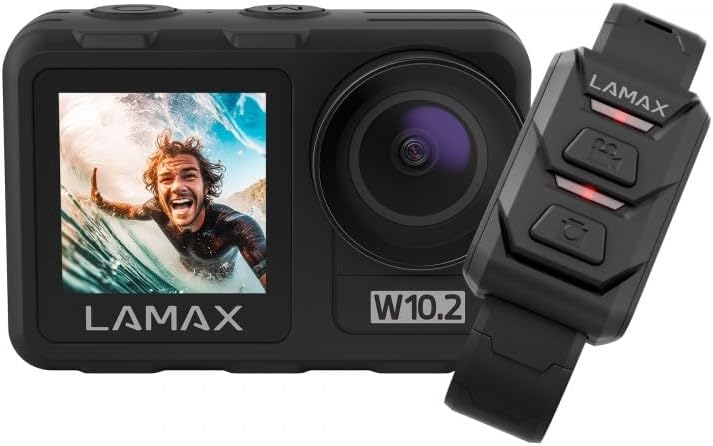
Image 1.1: The LAMAX W10.2 Action Camera shown with its accompanying remote control. The camera features a front display and a main lens, while the remote control has three buttons for easy operation.
2. Apa yang ada di dalam Kotak
Upon unboxing your LAMAX W10.2, please verify that all the following components are included:
- LAMAX W10.2 Action Camera
- Waterproof Housing (for depths up to 40 meters)
- Alat Kawalan Jauh
- Tripod Mini
- Clear Filter (for lens protection)
- Kabel Pengecas USB
- Mounting Accessories (various mounts and adhesive pads)
- Kain Pembersih
- Battery (C batteries required, included)

Imej 2.1: Satu kajian komprehensif view of all items included in the LAMAX W10.2 package, including the camera, waterproof case, remote, various mounts, cables, and cleaning cloth.
3. Produk Lebihview
Familiarize yourself with the key components and features of your LAMAX W10.2 camera:
- Paparan Dwi: Features both a main rear touchscreen and a front display for easy framing and monitoring.
- Touch Control and Buttons: The touchscreen provides intuitive control, while physical buttons offer practical operation, especially underwater.
- Kanta: High-quality lens for capturing sharp images and videos.
- mikrofon: Mikrofon terbina dalam untuk rakaman audio.
- Penceramah: Untuk main balik audio.
- Port USB: Untuk pengecasan dan pemindahan data.
- Port HDMI: Untuk menyambung ke paparan luaran.
- Petak Bateri: Located at the bottom for battery insertion.
- Slot Kad MicroSD: For memory card insertion (card not included).

Imej 3.1: Terperinci view of the LAMAX W10.2 camera highlighting its 2-inch touchscreen, mode setting/display switch, record ON/OFF button, camera and WLAN power button, and tripod thread for direct attachment.
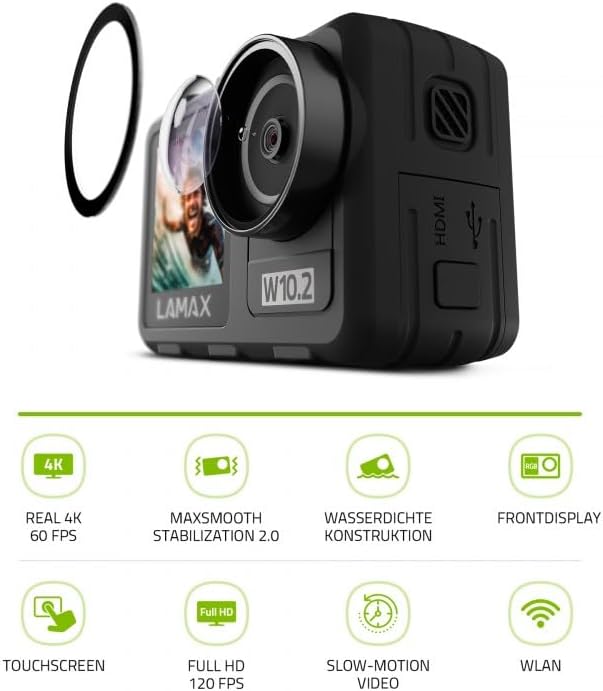
Image 3.2: The LAMAX W10.2 camera accompanied by icons representing its key features: Real 4K 60 FPS, MAXsmooth Stabilization 2.0, Waterproof Construction, Front Display, Touchscreen, Full HD 120 FPS, Slow-Motion Video, and WLAN (Wi-Fi).
4. Persediaan
4.1. Mengecas Bateri
- Buka penutup petak bateri.
- Insert the included battery, ensuring correct polarity.
- Connect the camera to a USB power source using the provided USB cable. The charging indicator light will illuminate.
- Once fully charged, the indicator light will change or turn off.
4.2. Memasukkan Kad MicroSD
A MicroSD card (not included) is required to store videos and photos. Use a Class 10 or higher MicroSD card with a maximum capacity of 128GB.
- Cari slot kad MicroSD di sisi kamera.
- Masukkan kad MicroSD dengan kenalan emas menghadap bahagian belakang kamera sehingga ia klik pada tempatnya.
- Untuk mengalih keluar, tolak kad masuk perlahan-lahan sehingga ia keluar.
4.3. Menghidupkan/Mematikan
- Untuk Menghidupkan: Press and hold the Power button (usually located on the top or side) for a few seconds until the screen illuminates.
- Untuk Mematikan: Press and hold the Power button again until the camera shuts down.
5. Arahan Operasi
5.1. Operasi Asas
- Penukaran Mod: Use the Mode button or touchscreen gestures to switch between video, photo, and playback modes.
- Rakaman/Pengatup: Press the Shutter/Record button (usually on top) to start/stop video recording or take a photo.
- Navigasi: Use the touchscreen or physical navigation buttons to browse menus and settings.
5.2. Rakaman Video
The LAMAX W10.2 supports true 4K video recording at 60 frames per second (FPS) for incredibly detailed footage.
- Tetapan Resolusi: Access video settings to select resolutions such as 4K/60FPS, 2.7K, 1080p, and 720p.
- Pergerakan Perlahan: Capture dynamic slow-motion footage at up to 4x in Full HD (1080p).
- MAXsmooth 2.0 Stabilization: This advanced electronic stabilization ensures smooth, shake-free video, even during intense action. It is automatically enabled for optimal performance.
5.3. Tangkapan Foto
Capture high-resolution still images with various settings:
- Mod Foto: Standard photo, burst mode, time-lapse photo.
- tetapan: Adjust exposure, white balance, and ISO for different lighting conditions.
5.4. Kalis air
The LAMAX W10.2 is designed for aquatic adventures:
- Without Housing: The camera is waterproof up to 12 meters (approximately 40 feet) without the need for additional housing.
- With Included Housing: When placed in the provided waterproof housing, the camera can be submerged up to 40 meters (approximately 130 feet).
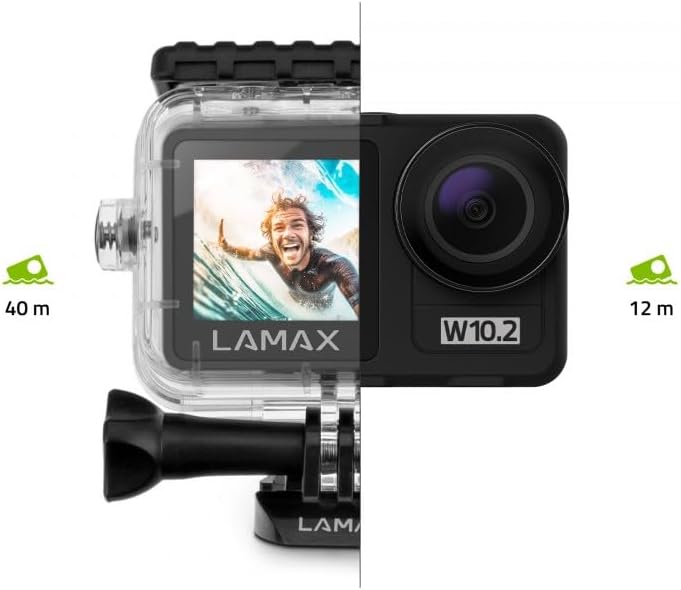
Image 5.1: Visual representation of the LAMAX W10.2's waterproofing capabilities, showing it can go to 12 meters without a case and 40 meters with the included waterproof housing.
5.5. Wi-Fi and Mobile App
Connect your camera to your smartphone via Wi-Fi for remote control, live preview, and easy file pemindahan.
- Download the official LAMAX mobile app from your device's app store.
- Enable Wi-Fi on your camera through the settings menu.
- On your smartphone, connect to the camera's Wi-Fi network (SSID and password will be displayed on the camera screen).
- Open the LAMAX app to control the camera, view footage, and download files secara wayarles.
5.6. Alat Kawalan Jauh
Alat kawalan jauh yang disertakan membolehkan operasi mudah dari jauh.
- Berpasangan: Follow the instructions in the camera's settings menu to pair the remote control.
- Fungsi: Typically, the remote allows you to start/stop recording and take photos without touching the camera.
6. Penyelenggaraan
Proper maintenance ensures the longevity and performance of your LAMAX W10.2 camera.
- Pembersihan: Use the provided cleaning cloth to gently wipe the lens and screen. For stubborn smudges, use a lens cleaning solution designed for optics. Do not use abrasive materials.
- Waterproof Housing Care: After use in water, rinse the waterproof housing with fresh water and allow it to air dry. Inspect the O-ring seal for any debris or damage before each use.
- Storan: Simpan kamera di tempat yang sejuk dan kering jauh dari cahaya matahari langsung dan suhu yang melampau. Tanggalkan bateri jika disimpan untuk tempoh yang lama.
- Penjagaan Bateri: Avoid fully discharging the battery frequently. Charge the battery regularly, even if not in use, to maintain its health.
7. Penyelesaian masalah
If you encounter issues with your LAMAX W10.2, refer to the following common problems and solutions:
| Masalah | Kemungkinan Punca | Penyelesaian |
|---|---|---|
| Kamera tidak dihidupkan. | Low battery; battery incorrectly inserted; camera frozen. | Charge the battery; reinsert battery correctly; perform a hard reset (refer to manual for specific button combination). |
| Video footage goyah. | MAXsmooth 2.0 stabilization is off; extreme vibrations. | Ensure MAXsmooth 2.0 is enabled in settings; use appropriate mounts to minimize vibration. |
| Tidak dapat menyambung ke Wi-Fi. | Wi-Fi tidak didayakan pada kamera; kata laluan yang salah; isu aplikasi. | Enable Wi-Fi on camera; double-check password; restart camera and app. |
| Camera is not waterproof. | Waterproof housing not properly sealed; O-ring damaged or dirty. | Ensure housing is securely latched; clean and inspect O-ring for damage before each use. |
| Ralat kad MicroSD. | Incompatible card; card full; card corrupted. | Use a recommended Class 10 or higher card; format the card (this will erase data); try a different card. |
8. Spesifikasi
Detailed technical specifications for the LAMAX W10.2 Action Camera:
| Ciri | Perincian |
|---|---|
| Jenama | LAMAX |
| Nombor Model | 10.2 |
| Dimensi Produk | 3.2 x 6.4 x 4.2cm; 127g |
| Photosensor Technology | CMOS |
| Resolusi Tangkapan Video | 4K |
| Panjang Fokus Maks | 5.03 milimeter |
| Format Tangkapan Video | MP4 |
| Saiz Skrin | 2 inci |
| Teknologi Ketersambungan | HDMI, Wi-Fi |
| warna | Kelabu Gelap |
| Ciri Khas | Remote Control, Shockproof, Slow Motion, Timer, Touchscreen |
| Jenis Camcorder | Kamera Tindakan |
| Bateri | C batteries required (included) |
| Tarikh Tersedia Pertama | 10 Januari 2025 |
9. Waranti & Sokongan
LAMAX products are designed for reliability and performance. For information regarding warranty coverage, technical support, or service, please refer to the official LAMAX webtapak atau hubungi perkhidmatan pelanggan mereka secara langsung.
- Sokongan dalam talian: Visit the LAMAX official website for FAQs, software updates, and digital manuals.
- Perkhidmatan Pelanggan: Contact details for customer support can typically be found on the LAMAX website's 'Support' or 'Contact Us' section.


