pengenalan
This manual provides comprehensive instructions for the ASHATA 12 Key Programmable Mechanical Gaming Keyboard. This compact, one-handed keypad is designed for versatility, featuring programmable keys, customizable RGB lighting, and hot-swappable mechanical switches. It connects via a Type-C USB interface, ensuring broad compatibility with various operating systems. Please read this manual thoroughly before using the product to ensure proper operation and longevity.

Imej: Atas ke bawah view of the ASHATA 12 Key Mechanical Gaming Keyboard, showcasing its compact design and 12 black keycaps.
Kandungan Pakej
Verify that all items listed below are present in your package. If any items are missing or damaged, please contact customer support.
- 1 x ASHATA 12 Key Mechanical Gaming Keyboard
- 1 x Kabel USB Jenis-C
- 1 x Penarik Papan Kekunci

Image: The included Type-C USB cable and a green keycap puller, essential tools for keyboard maintenance and customization.
Spesifikasi
| Ciri | Perincian |
|---|---|
| Jenama | ASHATA |
| Nombor Model | ASHATA8hggapme4i-12 |
| Nombor Kunci | 12 kunci |
| Jenis Suis | Red Mechanical Switch (Hot-Swappable) |
| Ketersambungan | Type-C Wired USB |
| bahan | Akrilik + ABS |
| OS yang serasi | Linux, OS X, Windows, Raspberry Pi |
| Ciri Khas | Programmable, RGB Lighting, Hot-Swappable |
Arahan Persediaan
Follow these steps to set up your ASHATA 12 Key Mechanical Gaming Keyboard:
- Sambungkan Kabel: Insert the Type-C end of the provided USB cable into the port on the side of the keyboard.
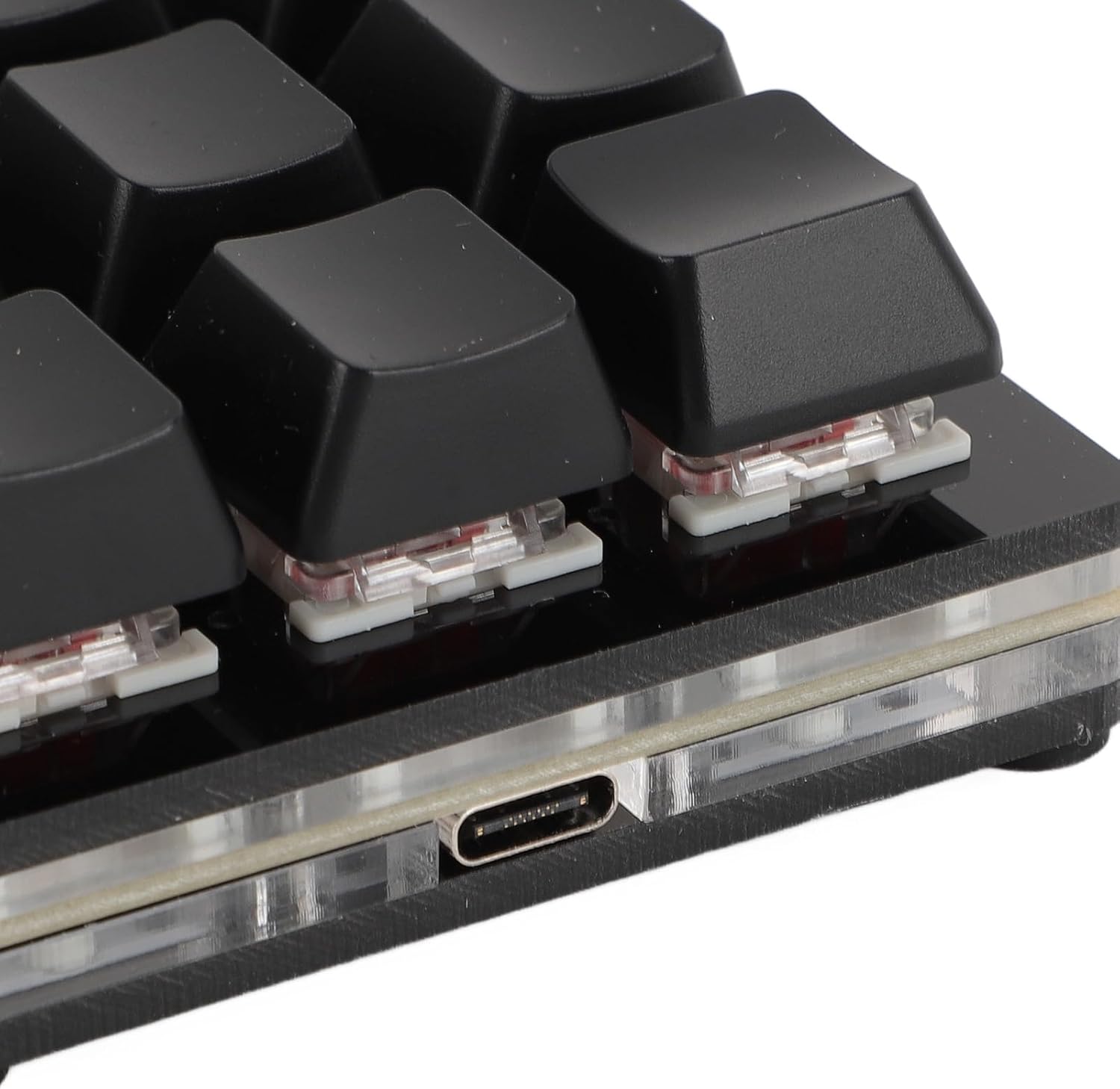
Imej: Jarak dekat view of the Type-C USB port located on the side of the keyboard for connection.
- Sambung ke Komputer: Plug the standard USB-A end of the cable into an available USB port on your computer.

Image: The ASHATA 12 Key Mechanical Gaming Keyboard connected to a laptop, demonstrating its plug-and-play functionality.
- Pemasangan Pemandu: The keyboard is plug-and-play and typically does not require specific driver installations. Your operating system should automatically recognize the device.
- Ujian Permulaan: Open a text editor or a program that accepts keyboard input and press a few keys to confirm basic functionality.
Arahan Operasi
The ASHATA 12 Key Mechanical Gaming Keyboard is designed for customizable input.
Fungsi Utama Selesaiview
This keyboard supports various programmable functions, including:
- Keyboard Function (standard key presses)
- Mouse Function (e.g., click, scroll)
- Multimedia Function (e.g., play/pause, volume)
- String Function (inputting predefined text strings)
- Game Function (specific game commands)
- Macro Definition Function (complex sequences of actions)

Image: An illustrative diagram highlighting the six main programmable functions: Keyboard, Mouse, Multimedia, String, Game, and Macro Definition.
Pencahayaan RGB
The keyboard features customizable RGB lighting. Specific instructions for adjusting lighting modes and turning it off will be available through the programming software.
Suis Boleh Tukar Panas
The hot-swappable design allows you to change mechanical switches without soldering.
- Alih keluar Keycap: Gunakan penarik penutup kekunci yang disediakan untuk mengeluarkan penutup kekunci yang dikehendaki dengan perlahan.
- Alih Keluar Suis: Use a switch puller (not included, but often comes with replacement switches) to carefully extract the mechanical switch from its socket.
- Masukkan Suis Baharu: Align the pins of the new mechanical switch with the holes on the PCB and press firmly until it clicks into place. Ensure pins are not bent.

Imej: Dari dekat view showing a mechanical switch with a red stem and a detached black keycap, illustrating the hot-swappable feature.
- Gantikan Kekunci: Place the keycap onto the new switch.
Pengaturcaraan dan Penyesuaian
To fully utilize the programmable features of your ASHATA keyboard, you will need to use the dedicated programming software. This software allows you to:
- Assign custom functions to each of the 12 keys.
- Cipta dan tetapkan makro untuk urutan perintah yang kompleks.
- Laraskan kesan dan warna pencahayaan RGB.
- Save and load different key layouts/profiles.
Nota: The specific software and download instructions are typically provided by the manufacturer or seller. Please refer to the product listing or manufacturer's website for the download link and detailed software usage guide. The keyboard has a memory function, so settings are saved directly to the device and do not require reconfiguration after initial setup.
Penyelenggaraan dan Penjagaan
Penyelenggaraan yang betul memastikan jangka hayat dan prestasi optimum papan kekunci anda.
- Pembersihan: Use a soft, dry cloth to wipe the surface of the keyboard. For deeper cleaning, remove keycaps using the provided puller and use compressed air to clear debris from between switches. Avoid using harsh chemicals or abrasive materials.
- Storan: Simpan papan kekunci di tempat yang sejuk dan kering jauh dari cahaya matahari langsung dan suhu yang melampau.
- Pengendalian: Avoid dropping the keyboard or exposing it to liquids. Do not attempt to disassemble the keyboard beyond removing keycaps and switches, as this may void the warranty.
Menyelesaikan masalah
Jika anda menghadapi masalah dengan papan kekunci anda, rujuk kepada masalah dan penyelesaian biasa berikut:
- Keyboard not recognized by computer:
- Pastikan kabel USB disambungkan dengan selamat ke kedua-dua papan kekunci dan komputer.
- Cuba sambungkan papan kekunci ke port USB lain pada komputer anda.
- Uji papan kekunci pada komputer lain untuk menolak isu khusus komputer.
- Mulakan semula komputer anda.
- Keys are not responding or typing incorrectly:
- Check for physical obstructions under the keycaps.
- If using custom key assignments, verify your settings in the programming software.
- For hot-swapped switches, ensure the switch is fully seated and its pins are not bent.
- RGB lighting is not working:
- Pastikan papan kekunci disambungkan dan dikuasakan dengan betul.
- Check the RGB settings within the programming software.
Produk Selesaiview Video
Tonton video pendek ini untuk visual overview of the ASHATA 12 Key Mechanical Gaming Keyboard.
Video: A brief demonstration of the ASHATA 12 Key Mechanical Gaming Keyboard's features and functionality.
Waranti dan Sokongan
This product comes with a standard manufacturer's warranty. For detailed warranty information, including terms and conditions, please refer to the documentation included with your purchase or contact the seller directly.
For technical support, troubleshooting assistance, or inquiries about replacement parts, please contact ASHATA customer service through the platform where you purchased the product or visit the official ASHATA webtapak.