1. Pengenalan
Thank you for choosing the Taiahiro Bk6301 Wireless Mechanical Gaming Keyboard and Mouse Combo. This manual provides detailed instructions for setting up, operating, and maintaining your new peripheral devices. This combo offers versatile connectivity options including 2.4G wireless, Bluetooth 5.0, and wired USB-C, ensuring compatibility with various devices.
2. Kandungan Pakej
Sila sahkan bahawa semua item terdapat dalam pakej anda:
- Taiahiro Bk6301 Wireless Mechanical Gaming Keyboard
- Taiahiro Wireless Gaming Mouse
- USB 2.4G Receiver (stored in mouse battery compartment)
- Kabel Pengecas/Data USB-C ke USB-A
- Manual Pengguna
- 1 AA Battery (for mouse, may be pre-installed or included separately)

Image 2.1: Contents of the Taiahiro Bk6301 Keyboard and Mouse Combo package, including the keyboard, mouse, USB receiver, and USB-C cable.
3. Produk Lebihview
3.1 Ciri-ciri Papan Kekunci
- Susun Atur 98-Kekunci: Compact design with a full numeric keypad.
- Suis Biru Mekanikal: Provide tactile and audible feedback for typing.
- Pencahayaan latar RGB: Kesan pencahayaan yang boleh disesuaikan.
- Adjustable Keyboard Stand: Allows for ergonomic positioning.
- Kesambungan Berbilang Mod: Supports 2.4G wireless, Bluetooth 5.0, and wired USB-C.
- Bateri boleh dicas semula: Built-in 2000mAh battery for wireless operation.
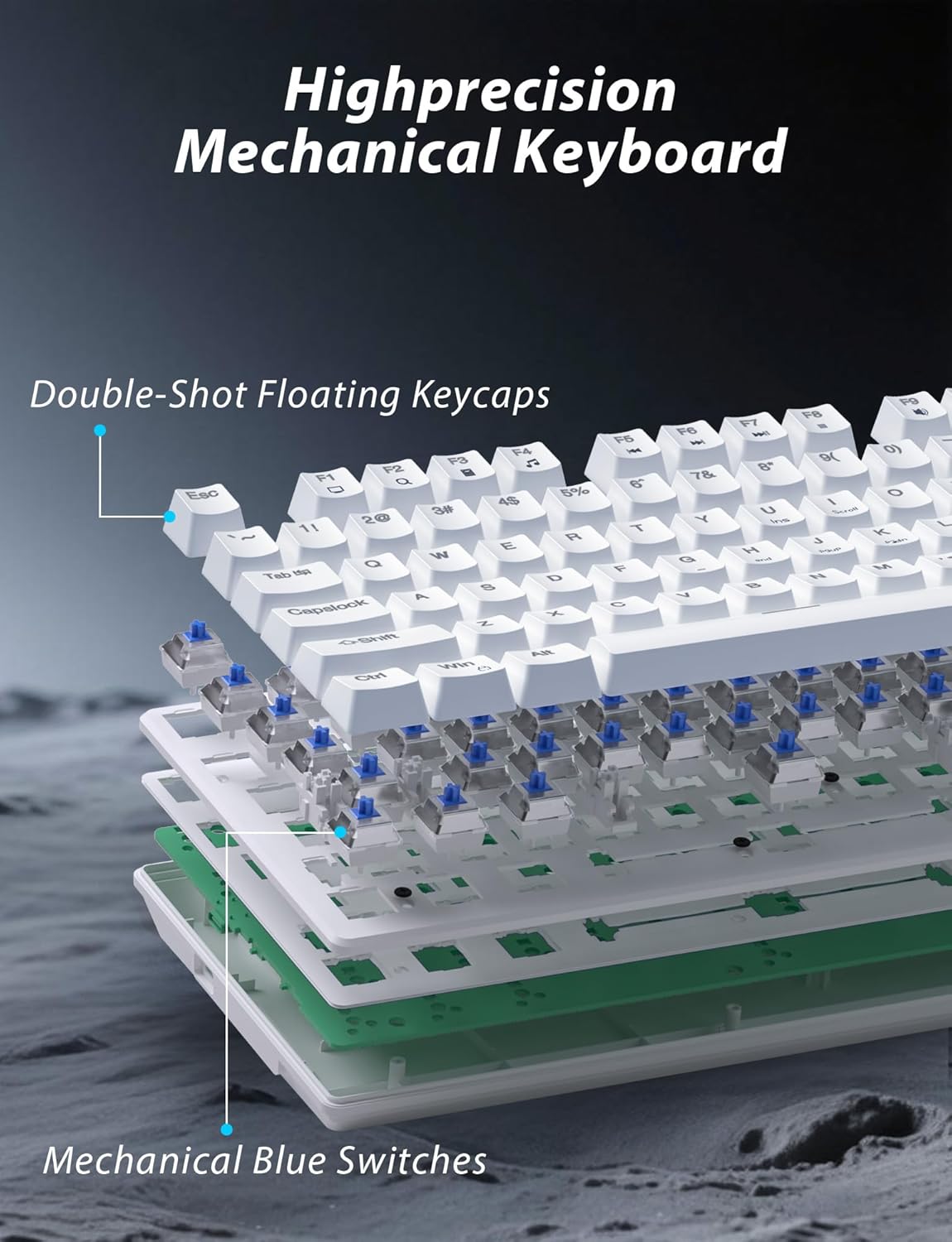
Imej 3.1: Meletup view illustrating the internal structure of the mechanical keyboard, highlighting the double-shot floating keycaps and mechanical blue switches.

Imej 3.2: Sisi view of the keyboard demonstrating its ergonomic design and adjustable stand for comfortable use.
3.2 Ciri-ciri Tetikus
- Reka bentuk ergonomik: Shaped for comfortable grip.
- DPI boleh laras: Four levels (800/1600/2400/3200) for precision control.
- Butang Ke Hadapan/Ke Belakang: Convenient side buttons for navigation.
- Kesambungan Dwi Mod: Supports 2.4G wireless and Bluetooth.

Image 3.3: The wireless gaming mouse, highlighting its ergonomic shape and four adjustable DPI levels.
4. Arahan Persediaan
4.1 Keyboard Connection
The keyboard supports three connection modes: 2.4G wireless, Bluetooth, and wired USB-C.

Image 4.1: The keyboard displaying its three connectivity options: Bluetooth, 2.4GHz wireless, and USB-C wired connection.
Mod Wayarles 2.4G:
- Locate the USB 2.4G receiver, typically stored in the mouse's battery compartment.
- Masukkan penerima USB ke dalam port USB yang tersedia pada komputer anda.
- On the keyboard, slide the mode switch (usually located on the top edge or bottom) to the '2.4G' position.
- Papan kekunci harus disambungkan secara automatik.
Mod Bluetooth:
- Slide the mode switch on the keyboard to the 'BT' (Bluetooth) position.
- The keyboard's indicator light will flash, indicating it is in pairing mode.
- On your device (computer, laptop, smartphone), open Bluetooth settings and search for new devices.
- Select "Taiahiro Bk6301" or a similar name from the list of available devices to pair.
- Setelah dipasangkan, lampu penunjuk akan menjadi pekat.
Wired USB-C Mode:
- Sambungkan kabel USB-C yang disediakan ke port USB-C papan kekunci.
- Sambungkan hujung yang satu lagi (USB-A) ke port USB yang tersedia pada komputer anda.
- The keyboard will function as a wired device and will charge simultaneously.
4.2 Mouse Connection
The mouse supports 2.4G wireless and Bluetooth connectivity.

Image 4.2: The underside of the mouse, illustrating the battery compartment for one AA battery and the storage slot for the tiny USB receiver.
Pemasangan Bateri:
- Buka petak bateri di bahagian bawah tetikus.
- Insert one AA battery, ensuring correct polarity.
- Tutup petak bateri.
Mod Wayarles 2.4G:
- Ensure the USB 2.4G receiver is plugged into your computer.
- Slide the mode switch on the underside of the mouse to the '2.4G' position.
- Tetikus harus bersambung secara automatik.
Mod Bluetooth:
- Slide the mode switch on the underside of the mouse to the 'BT' (Bluetooth) position.
- The mouse will enter pairing mode.
- On your device, open Bluetooth settings and search for new devices.
- Select "Taiahiro Mouse" or a similar name from the list to pair.
5. Arahan Operasi
5.1 Fungsi Papan Kekunci
Kawalan Lampu Latar:
The keyboard features customizable RGB backlighting.
- Tukar Mod Lampu Latar: Tekan Fn + Rumah to cycle through 18 different lighting effects.
- Laraskan Kecerahan: Tekan Fn + ↑ (Up Arrow) or Fn + ↓ (Down Arrow) to adjust between 5 brightness levels.
- Laraskan Kelajuan: Tekan Fn + ← (Left Arrow) or Fn + → (Right Arrow) to adjust between 5 lighting speed levels.

Image 5.1: Keyboard layout highlighting the function key combinations for controlling backlight modes, brightness, and speed.
Fungsi Multimedia:
Access multimedia controls by pressing the Fn key in combination with the designated F-keys (F1-F12).
- Fn+F1: Pemain Media
- Fn+F2: Kelantangan Kurang
- Fn+F3: Kelantangan Naik
- Fn+F4: bisu
- Fn+F5: Berhenti
- Fn+F6: Trek Sebelumnya
- Fn+F7: Main/Jeda
- Fn+F8: Trek Seterusnya
- Fn+F9: E-mel
- Fn+F10: Web pelayar
- Fn+F11: Komputer Saya
- Fn+F12: Kalkulator
5.2 Fungsi Tetikus
Pelarasan DPI:
Tekan ke butang DPI (located behind the scroll wheel) to cycle through the four DPI settings: 800, 1600, 2400, and 3200. Each press changes the sensitivity, allowing you to adjust cursor speed to your preference.
6. Penyelenggaraan
6.1 Pembersihan
- papan kekunci: Use a soft, dry cloth to wipe the surface. For deeper cleaning, use compressed air to remove debris from between keys. Avoid using harsh chemicals or abrasive materials.
- tetikus: Lap permukaan tetikus dengan kain lembut yang sedikitamp cloth. Ensure no liquid enters the internal components.
6.2 Pengurusan Bateri
- papan kekunci: The keyboard has a built-in rechargeable battery. Connect the USB-C cable to a power source (e.g., computer USB port, USB wall adapter) to charge. The indicator light will show charging status.
- tetikus: The mouse uses one AA battery. Replace the battery when the mouse performance degrades or it stops responding. Ensure proper polarity when inserting a new battery.
7. Penyelesaian masalah
If you encounter issues with your Taiahiro keyboard and mouse combo, please refer to the following solutions:
| Masalah | Penyelesaian yang Mungkin |
|---|---|
| Keyboard/Mouse not responding (2.4G) |
|
| Keyboard/Mouse not connecting (Bluetooth) |
|
| Lampu latar papan kekunci tidak berfungsi atau tersekat |
|
| Keys not responding or double-typing |
|
8. Spesifikasi
| Ciri | Perincian |
|---|---|
| Nombor Model | Bk6301 |
| Ketersambungan | Bluetooth 5.0, Tanpa Wayar 2.4G, Berwayar USB-C |
| Jenis Papan Kekunci | Papan Kekunci Permainan Mekanikal |
| Reka Letak Kekunci | 98 Keys (with Numeric Keypad) |
| Jenis Suis | Suis Biru Mekanikal |
| Lampu latar keyboard | RGB (18 modes, 5 brightness, 5 speed levels) |
| Bateri Papan Kekunci | 2000mAh Boleh dicas semula |
| Tahap DPI Tetikus | 800 / 1600 / 2400 / 3200 |
| Bateri tetikus | 1 x Bateri AA |
| Peranti Serasi | Komputer Peribadi, Laptop, Telefon Pintar |
| Berat Barang | 2.72 paun (kombo) |
| Dimensi Pakej | 15 x 5.59 x 3.11 inci |
9. Waranti dan Sokongan
9.1 Maklumat Waranti
Taiahiro products are covered by a limited warranty from the date of purchase. Please refer to the warranty card included in your package or visit the official Taiahiro website for detailed warranty terms and conditions. This warranty typically covers manufacturing defects and material faults under normal use.
9.2 Sokongan Pelanggan
For technical assistance, troubleshooting, or any questions regarding your Taiahiro Bk6301 combo, please contact our customer support team. You can find contact information on the Taiahiro official website or through your purchase platform. When contacting support, please have your product model number (Bk6301) and purchase details ready.


