pengenalan
Thank you for choosing the Micool BT-X Easy On-Ear Headphones. These headphones are designed to provide a comfortable listening experience with high-quality audio and extended battery life. Featuring Bluetooth 5.4 technology and a unique open-ear design, they are perfect for various activities, from sports to daily commutes.
Apa yang ada dalam Kotak
- Micool BT-X Easy On-Ear Headphones (Left & Right)
- Sarung Pengecas Tanpa Wayar
- Kabel Pengecas USB-C
- Manual Pengguna
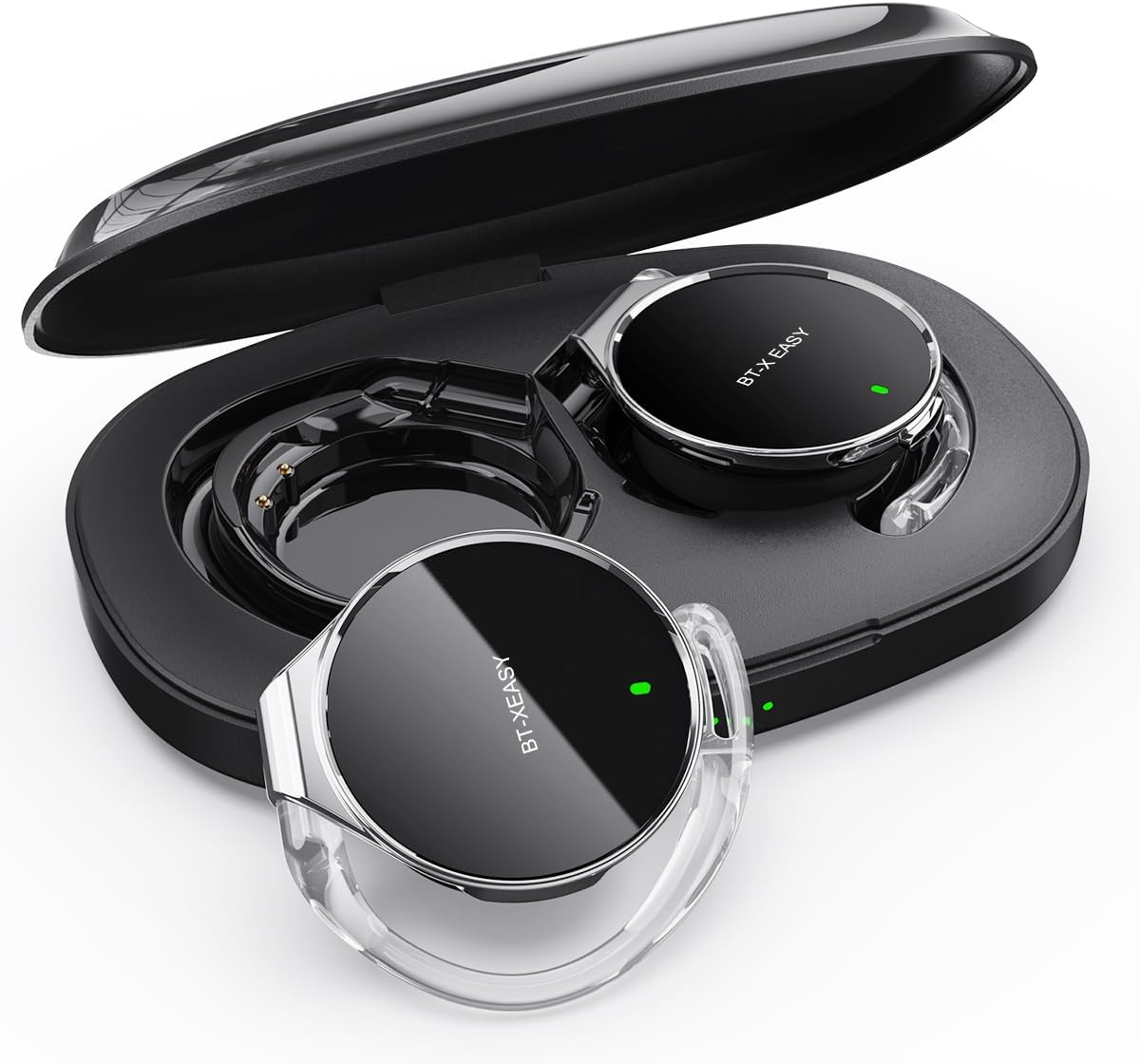
Image: Micool BT-X Easy On-Ear Headphones and their charging case, showing the headphones placed inside the open case.
Ciri-ciri Produk
- HD Stereo Audio: 28mm speakers for rich bass and clear sound.
- Bluetooth 5.4: Fast pairing, stable connection, and reliable use.
- Pengurangan Bunyi: ANC+ENC adaptive noise reduction for clearer calls with 4 microphones.
- Hayat Bateri yang Panjang: Up to 18 hours of music playback on a single charge, and up to 52 hours total with the charging case.
- Sesuai Selesa: Small, lightweight 36mm diameter with sponge earcup design for comfortable wear without ear compression.
- Sambungan berbilang titik: Connect to two devices simultaneously (e.g., phone, laptop, tablet).
- Kawalan Intuitif: Easy control of music and calls via multifunction buttons.
- Tahan Air: Direka untuk menahan percikan dan peluh.

Imej: Jarak dekat view of the headphone highlighting its compact design and touch control area.
Persediaan
1. Pengecasan Awal
Before first use, fully charge the headphones and the charging case. Connect the provided USB-C cable to the charging case and a power source. The 4-stage power indicator lights on the case will show the charging progress (each light represents 25% battery capacity).

Image: The charging case displaying its 4-stage battery indicator lights.
2. Berpasangan dengan Peranti
- Buka bekas pengecas. Fon kepala akan memasuki mod berpasangan secara automatik.
- Pada peranti anda (telefon pintar, tablet, komputer riba), dayakan Bluetooth.
- Cari untuk "BT-XEASY" in the list of available Bluetooth devices and select it to connect.
- Setelah disambungkan, gesaan suara akan mengesahkan gandingan yang berjaya.
3. Multi-point Connection (Optional)
To connect to a second device, disconnect the headphones from the first device's Bluetooth settings. Then, pair with the second device following the steps above. Reconnect to the first device from its Bluetooth settings. The headphones will now be connected to both devices simultaneously.
Arahan Operasi
Memakai Fon Kepala
- Langkah 1: Open the ear-hook at a 30° angle.
- Langkah 2: Rotate the headphone around your ear to the bottom of the ear-hook.
- Langkah 3: Tekan fon kepala dan clamp them tightly to your ear.
- Langkah 4: Adjust the angle to make wearing more comfortable.

Image: Step-by-step visual guide on how to properly wear the on-ear headphones.
Kawalan Sentuh
The BT-X Easy headphones feature intuitive touch controls on each headset for easy management of audio and calls.
| Fungsi | Tindakan |
|---|---|
| Main/Jeda Muzik | Klik x1 |
| Jawab/Tamatkan Panggilan | Klik x1 |
| Tolak Panggilan | Tekan Panjang |
| Mute (in call) | Click x2 (prompt sound will confirm) |
| Trek Seterusnya | Click x2 (Right Headphone) |
| Trek Sebelumnya | Click x2 (Left Headphone) |
| Kelantangan Naik | Hold (Right Headphone) |
| Kelantangan Kurang | Hold (Left Headphone) |

Image: Diagram illustrating the touch control functions on the headphone.
Video Produk Rasmi
Video: An official product video from Micool demonstrating the features and usage of the BT-X Easy On-Ear Headphones. This video provides a visual guide to the product's design, comfort, and functionality, including how to wear them and use the touch controls.
Penyelenggaraan
- Pembersihan: Use a soft, dry cloth to clean the headphones and charging case. Do not use abrasive cleaners or solvents.
- Storan: When not in use, store the headphones in their charging case to protect them and ensure they are charged for next use.
- Penjagaan Bateri: Untuk memanjangkan hayat bateri, elakkan daripada menyahcas sepenuhnya fon kepala dengan kerap. Mengecasnya dengan kerap, walaupun tidak digunakan untuk tempoh yang lama.
- Tahan Air: The headphones are water-resistant, but not waterproof. Avoid submerging them in water or exposing them to heavy rain. Dry them thoroughly if they get wet.
Menyelesaikan masalah
| Masalah | Penyelesaian yang Mungkin |
|---|---|
| Fon kepala tidak berpasangan | Ensure headphones are charged. Turn off and on Bluetooth on your device. Forget "BT-XEASY" from your device's Bluetooth list and re-pair. |
| Tiada suara atau kelantangan rendah | Check device volume and headphone volume. Ensure headphones are properly connected. Try playing different audio sources. |
| Satu fon telinga tidak berfungsi | Place both headphones back in the charging case, close the lid, wait a few seconds, then open and try again. Ensure both are charged. |
| Kes pengecas tidak dicas | Check USB-C cable and power adapter. Ensure proper connection. |
| Sambungan tidak stabil | Move closer to your device. Avoid strong electromagnetic interference. Ensure no other devices are trying to connect simultaneously. |
Spesifikasi
| Ciri | Perincian |
|---|---|
| Nama Model | BT-X easy |
| Teknologi Ketersambungan | Wayarles (Bluetooth 5.4) |
| Jenis Pemacu Audio | Dynamic Driver (28mm speakers) |
| Hayat Bateri (Fon Kepala) | Sehingga 18 jam |
| Jumlah Hayat Bateri (dengan sarung) | Sehingga 52 jam |
| Kawalan Bunyi | Active Noise Cancellation (ANC+ENC for calls) |
| Mikrofon | 4 Mikrofon |
| Tahap Ketahanan Air | Tahan Air |
| bahan | Akrilonitril Butadiena Stirena (ABS) |
| Berat Barang | 5 auns |
| UPC | 775494925862 |
Waranti dan Sokongan
Micool provides 24-hour after-sales service for all purchased items. For any issues or inquiries, please contact Micool customer support through the official brand store or the platform where you purchased the product.
For detailed warranty information, please refer to the warranty card included in your product packaging or visit the official Micool webtapak. Pelan perlindungan juga mungkin tersedia untuk perlindungan lanjutan.
Micool Brand Store: Visit Micool Store on Amazon


