1. Pengenalan
The Lemorele 4K HDMI Switch 3-in-1 Out allows you to connect up to three HDMI source devices to a single HDMI display. This device simplifies your home entertainment or office setup by eliminating the need to constantly swap HDMI cables. It supports 4K resolution at 30Hz, ensuring high-quality video and audio transmission.
2. Kandungan Pakej
Sila sahkan bahawa semua item terdapat dalam pakej anda:
- 1 x Lemorele 3-in-1 HDMI Switch
- 1 x Alat Kawalan Jauh IR
- 1 x USB C Charging Cable (1M)

Image: Contents of the Lemorele 4K HDMI Switch package, including the switch unit, IR remote control, and USB-C charging cable.
3. Ciri-ciri Produk
- 3-in-1 Out HDMI Switch: Connects up to three HDMI sources to one display. Note: This device cannot display multiple sources simultaneously on different monitors.
- Resolusi 4K@30Hz: Supports video resolutions up to 4K at 30Hz, compatible with HDMI 2.0b and HDMI 1.4 standards.
- Manual and Remote Switching: Easily switch between connected HDMI input sources using either the manual button on the device or the included IR remote control.
- Keserasian Universal: Compatible with a wide range of HDMI devices including gaming consoles (PS5, PS4, Xbox 360, Xbox One, Switch), Blu-Ray/DVD players, laptops, and UHD TVs, monitors, or projectors.
- Adaptive Equalization Technology: Supports HDMI transmission distances up to 30 feet (approximately 9 meters) without signal degradation.

Image: A living room setup showing the Lemorele HDMI Switch connected to a large TV displaying 4K@30Hz video content with flawless sync audio.
4. Arahan Persediaan
- Sambungkan Output HDMI: Connect one end of an HDMI cable to the "HDMI OUT" port on the Lemorele HDMI Switch and the other end to the HDMI input port on your display (TV, monitor, or projector).
- Connect HDMI Inputs: Connect your HDMI source devices (e.g., PS5, Xbox, Blu-ray player, laptop) to the "HDMI IN 1", "HDMI IN 2", and "HDMI IN 3" ports on the switch using HDMI cables.
- Sambungan Kuasa: Connect the included USB C charging cable to the power input port on the HDMI Switch and plug the other end into a 5V USB power adapter (not included) or a USB port on your display/source device. The device requires external power for optimal performance.
- Hidupkan Peranti: Ensure all connected HDMI source devices and your display are powered on.
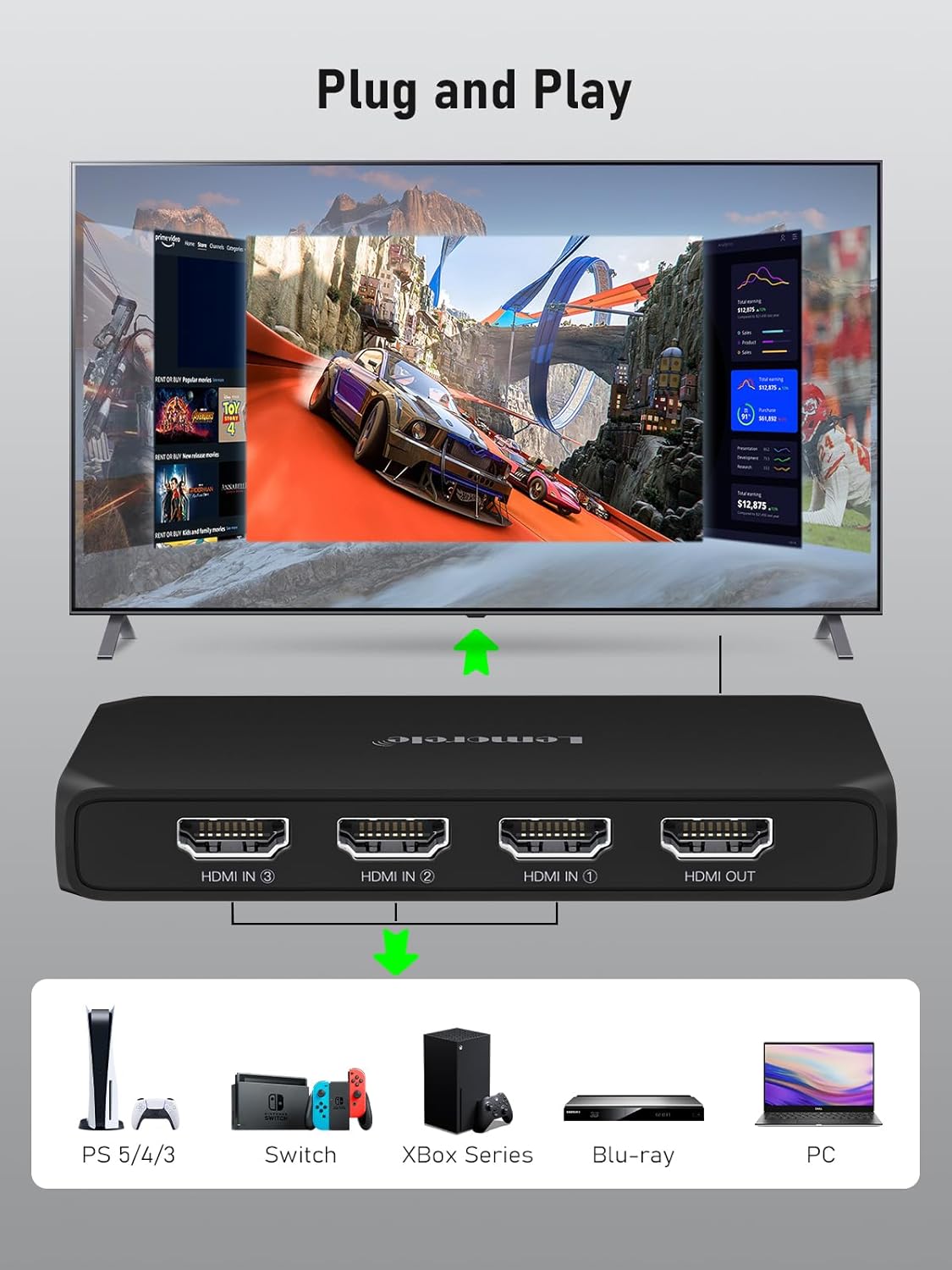
Image: A diagram illustrating the plug-and-play setup of the Lemorele HDMI Switch, showing various input devices (PS5, Switch, Xbox Series, Blu-ray, PC) connecting to the switch, which then connects to a TV.
5. Arahan Operasi
Menukar Sumber Input:
- Butang Manual: Press the "Switch" button located on the top of the device to cycle through the HDMI input sources (Input 1, Input 2, Input 3). The LED indicator will show which input is currently active.
- Kawalan Jauh IR: Use the included IR remote control to directly select the desired input (1, 2, or 3) or press the "Next" button to cycle through inputs. Ensure there is a clear line of sight between the remote and the IR receiver on the switch.
- Penukaran Automatik: The switch may automatically detect and switch to a newly powered-on or active HDMI source. If multiple sources are active, manual selection may be required.

Image: A visual representation of the two methods for switching HDMI inputs: using the IR remote control from a distance and pressing the manual button on the device itself.
6. Gambarajah Sambungan
The diagram below illustrates a typical connection setup for the Lemorele 4K HDMI Switch:

Image: A detailed connection diagram showing three HDMI input devices (e.g., gaming console, laptop, Blu-ray player) connected to the HDMI switch, which then outputs to a single display (TV/monitor).
7. Keserasian
The Lemorele HDMI Switch is designed for broad compatibility with various HDMI-enabled devices:
- Peranti Input: Computer, Xbox 360, Xbox One, PS3, PS4, PS5, Nintendo Switch, Blu-Ray DVD player, DVB Receivers, Laptop, Apple TV, TV Box.
- Peranti Output: UHD TVs, Monitors, Projectors, VR headsets.

Image: A visual chart detailing the universal compatibility of the HDMI switch, listing various input devices like gaming consoles, laptops, and media players, and output devices such as TVs, monitors, and projectors.
8. Spesifikasi Teknikal
| Spesifikasi | Perincian |
|---|---|
| Jenama | Lemorele |
| Model | 3 IN 1 OUT-G99 |
| Bilangan Pelabuhan | 4 (3 Input, 1 Output) |
| Jenis Penyambung | HDMI |
| Resolusi Maks | 4K@30Hz |
| Piawaian HDMI | HDMI 2.0b, HDMI 1.4 compliant |
| Jarak Penghantaran Maks | Sehingga 30 kaki (lebih kurang 9m) |
| Sumber Kuasa | USB C (1M cable included) |
| Kaedah Beralih | Manual Button, IR Remote Control |
| warna | Hitam legam |
| Dimensi Bungkusan | 13 x 10.3 x 3.2cm; 110g |

Image: A table detailing recommended HDMI cable lengths and wire gauges for optimal performance at different resolutions and transmission distances.
9. Penyelesaian masalah
- Tiada Isyarat/Skrin Kosong:
- Pastikan semua kabel HDMI disambungkan dengan selamat ke suis dan peranti anda.
- Verify that the correct input source is selected on the HDMI switch (check the LED indicator).
- Sahkan bahawa paparan anda ditetapkan kepada saluran input HDMI yang betul.
- Try connecting the HDMI source directly to the display to rule out cable or source device issues.
- Ensure the HDMI switch is receiving adequate power via the USB-C cable.
- Alat Kawalan Jauh Tidak Berfungsi:
- Periksa sama ada bateri alat kawalan jauh perlu diganti.
- Pastikan tiada halangan antara alat kawalan jauh dan penerima IR pada suis.
- Point the remote directly at the IR receiver.
- Intermittent Signal/Flickering:
- Use high-quality HDMI cables, especially for 4K resolutions and longer distances. Refer to the cable length guidelines in the specifications.
- Ensure the power supply to the switch is stable.
- Try reducing the resolution of the source device if possible.
- Isu Audio:
- Check audio settings on both your source device and display.
- Ensure the HDMI cables support audio transmission.
Helpful Videos:
UGREEN 4K HDMI Switch 3 in 1 Out
Video: A demonstration of the UGREEN 4K HDMI Switch 3 in 1 Out, showing its features and ease of use. This video provides a general overview of similar HDMI switch functionality.
UGREEN 4K@60Hz HDMI Switch 3 In 1 Out
Video: An official UGREEN video showcasing the 4K@60Hz HDMI Switch 3 In 1 Out, highlighting its performance and switching capabilities. Useful for understanding the operation of a 3-in-1 HDMI switch.
avedio links HDMI Switch 3 in 1 Out Aluminum
Video: A product video for an Avedio Links HDMI Switch 3 in 1 Out, demonstrating its features and how it can be used to manage multiple HDMI sources. Provides practical examples of a 3-in-1 HDMI switch in action.
10. Penyelenggaraan
- Pembersihan: Gunakan kain lembut dan kering untuk membersihkan peranti. Elakkan menggunakan pembersih cecair atau bahan kasar.
- Storan: Simpan peranti di tempat yang sejuk dan kering jauh dari cahaya matahari langsung dan suhu yang melampau.
- Pengendalian: Handle the device and cables with care to prevent damage to ports and connectors.
11. Waranti dan Sokongan
Lemorele products are designed for reliability and performance. For warranty information and technical support, please refer to the contact details provided with your purchase or visit the official Lemorele webtapak.
If you encounter any issues not covered in this manual, please contact Lemorele customer service for assistance.


