1. Pengenalan
This manual provides detailed instructions for setting up, operating, and maintaining your BenQ EW2790U 27-inch 4K monitor. Please read this manual thoroughly before using the monitor to ensure proper functionality and to prevent damage.
2. Maklumat Keselamatan
Sentiasa ikuti langkah berjaga-jaga keselamatan asas ini untuk mengurangkan risiko kebakaran, renjatan elektrik dan kecederaan:
- Jangan dedahkan monitor kepada hujan atau lembapan.
- Jangan buka monitor casing; rujuk servis kepada kakitangan yang berkelayakan.
- Pastikan pengudaraan yang betul di sekeliling monitor.
- Use only the power cord and adapter provided by BenQ.
- Cabut plag monitor semasa ribut petir atau apabila tidak digunakan untuk tempoh yang lama.
3. Kandungan Pakej
Sahkan bahawa semua item terdapat dalam pakej anda:
- BenQ EW2790U 27-inch 4K Monitor
- Kord Kuasa
- Kabel HDMI
- Kabel USB-C
- Panduan Mula Pantas
- Kad Waranti
4. Persediaan
4.1 Memasang Pendirian
- Letakkan monitor menghadap ke bawah pada permukaan yang lembut dan bersih untuk mengelakkan calar.
- Pasangkan tapak penyangga pada leher penyangga dan pasangkannya dengan skru yang disediakan.
- Align the stand assembly with the mounting slot on the back of the monitor and push until it clicks into place.

Figure 4.1: Assembled BenQ EW2790U monitor.
4.2 Menyambung Kabel
Sambungkan kabel yang diperlukan ke monitor dan komputer anda:
- Kuasa: Sambungkan kord kuasa ke input kuasa monitor dan kemudian ke soket kuasa.
- Video:
- HDMI: Connect an HDMI cable from your computer's HDMI output to one of the monitor's HDMI ports (HDMI 1, 2, or 3).
- USB-C: Connect a USB-C cable from your computer's USB-C port to the monitor's USB-C (65W) port for video, data, and power delivery.
- USB Hilir: Connect USB-A devices to the USB-A 3.2 downstream ports on the monitor.
- Audio: Sambungkan fon kepala ke bicu fon kepala jika mahu.

Rajah 4.2: Belakang view of BenQ EW2790U showing connectivity ports.

Rajah 4.3: Terperinci view of BenQ EW2790U input/output ports.
4.3 Adjusting Ergonomics
The EW2790U monitor offers various adjustments for comfortable viewing:
- Pelarasan Ketinggian: Naikkan atau turunkan monitor ke paras mata yang diingini.
- Condong: Laraskan sudut menegak skrin.
- Pusing: Putar skrin secara mendatar.
- Pivot: Putar skrin 90 darjah untuk mod potret.

Figure 4.4: BenQ EW2790U monitor pivot adjustment.
5. Mengendalikan Monitor
5.1 Hidupkan/Mati Kuasa
Press the Power key located on the bottom right of the monitor to turn it on or off.

Figure 5.1: Monitor controls: Scenario hotkey, 5-way controller, and Power key.
5.2 Menu Paparan Pada Skrin (OSD).
Use the 5-way controller on the bottom bezel to navigate the OSD menu and adjust settings such as brightness, contrast, color mode, and input source.
5.3 Scenario Hotkey
The Scenario hotkey allows quick access to custom or preset optimal monitor settings for various uses like work, studying, gaming, or watching movies.
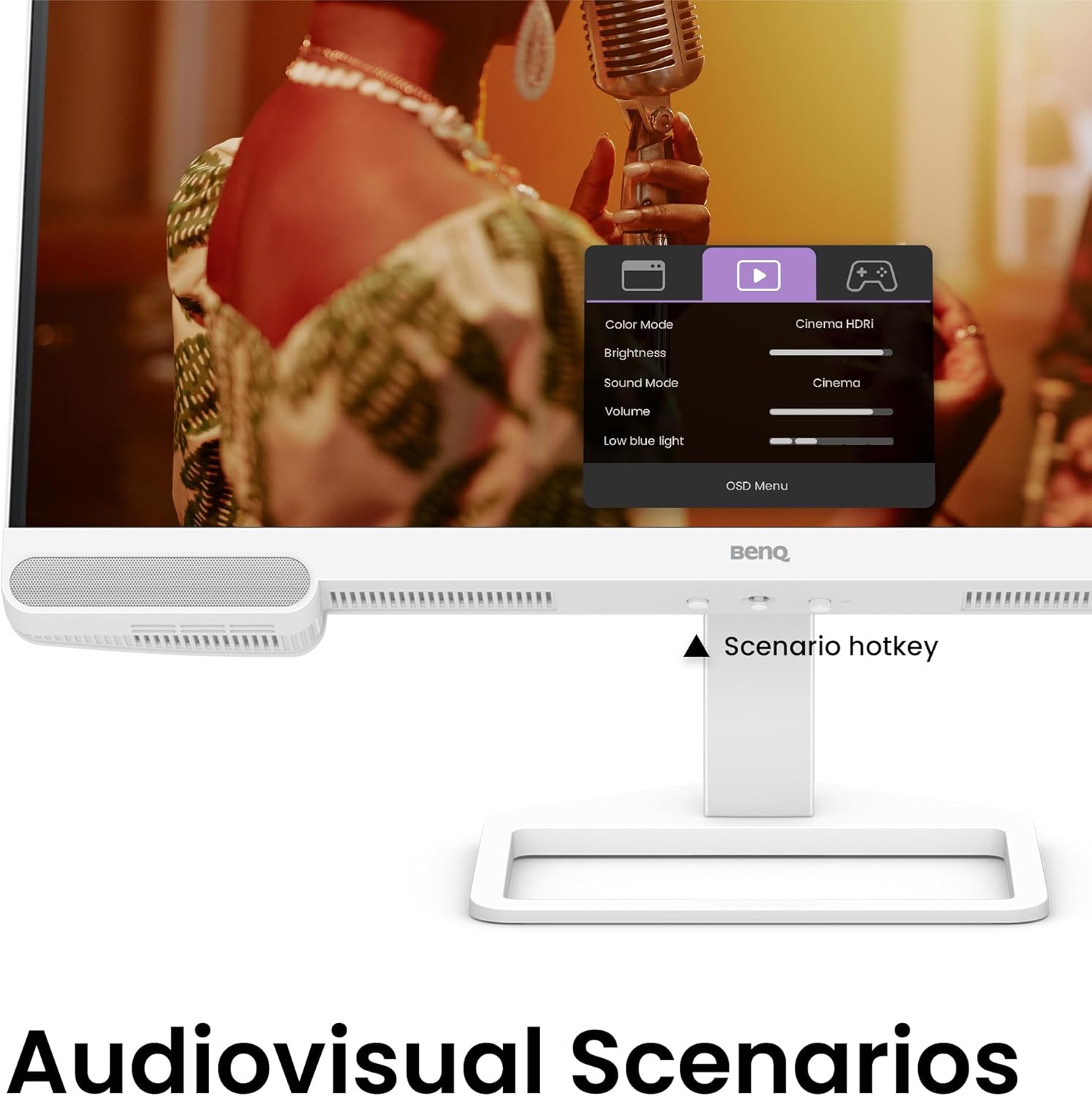
Figure 5.2: OSD menu accessed via Scenario hotkey.
5.4 AI Contrast Technology
The exclusive AI Contrast technology intelligently adjusts the contrast based on the displayed content, optimizing image quality without affecting other areas of the screen.

Figure 5.3: Demonstration of AI Contrast technology.
5.5 Pembesar Suara Terbina dalam
The monitor includes a pair of 5W built-in speakers for audio output. Adjust the volume through the OSD menu or your connected device.

Figure 5.4: BenQ EW2790U built-in 5W speakers.
6. Penyelenggaraan
6.1 Membersihkan Monitor
- Sentiasa cabut plag monitor sebelum membersihkan.
- Gunakan kain lembut yang tidak berbulu dampdisapu dengan air atau pembersih yang lembut dan tidak melelas.
- Jangan sembur pembersih terus ke skrin.
- Avoid using alcohol, ammonia, or abrasive cleaners, as they may damage the screen or casing.
6.2 Penyimpanan
Store the monitor in a cool, dry place away from direct sunlight and extreme temperatures. If storing for an extended period, consider using the original packaging for protection.
7. Penyelesaian masalah
| Masalah | Kemungkinan Punca | Penyelesaian |
|---|---|---|
| Tiada gambar di skrin | Kabel kuasa diputuskan; Kabel video diputuskan; Sumber input salah dipilih. | Ensure power and video cables are securely connected. Press the Scenario hotkey to select the correct input source. |
| Imej kabur atau herot | Resolusi yang salah; Kabel video longgar. | Set the display resolution to 3840x2160. Check video cable connections. |
| Tiada suara dari pembesar suara | Kelantangan terlalu rendah; Diredam; Output audio yang dipilih pada komputer salah. | Adjust volume via OSD menu or computer settings. Ensure monitor is selected as audio output device. |
| AI Contrast not working as expected | Feature disabled; Specific content not optimized. | Check OSD settings to ensure AI Contrast is enabled. Performance may vary with different content. |
8. Spesifikasi
| Ciri | Perincian |
|---|---|
| Saiz Skrin | 27 Inci |
| Resolusi | 3840x2160 (4K UHD) |
| Nisbah Aspek | 16:9 |
| Liputan Warna | 95% P3 |
| AI Contrast Technology | ya |
| Pembesar Suara Terbina dalam | 2 x 5W |
| Ketersambungan | 1x USB Type-C (65W), 3x HDMI (2.0), USB-C 3.2 downstream, USB-A 3.2 downstream, Headphone Jack |
| Reka Bentuk Ergonomik | Pelarasan Ketinggian, Condongkan, Pusing, Pangsi |
| Berat Barang | 21.4 paun |
| Dimensi Produk (LxWxH) | 17 x 8 x 21 inci |
9. Waranti dan Sokongan
Your BenQ EW2790U monitor is covered by a manufacturer's warranty. Please refer to the warranty card included in your package for specific terms and conditions. For technical support, product registration, or service inquiries, please visit the official BenQ webtapak atau hubungi bahagian perkhidmatan pelanggan mereka.
BenQ Rasmi Webtapak: www.benq.com


