1. Pengenalan
The CrossBeats Clip M02 is a versatile wireless microphone system designed for high-quality audio recording. It is suitable for various applications including video recording, vlogging, podcasting, and live streaming. This manual provides detailed instructions to help you set up, operate, and maintain your Clip M02 microphone system.

Figure 1: CrossBeats Clip M02 Wireless Microphone system including two transmitters, a receiver, and charging case.
2. Apa yang ada di dalam Kotak
Sila semak kandungan pakej untuk memastikan semua item ada:
- 2 Wireless Microphone Transmitters
- 1 Receiver (Type-C or Lightning, depending on variant)
- 1 Kes Pengecasan
- 1 Kabel Pengecasan
- 1 Manual Pengguna (dokumen ini)
3. Ciri-ciri Produk
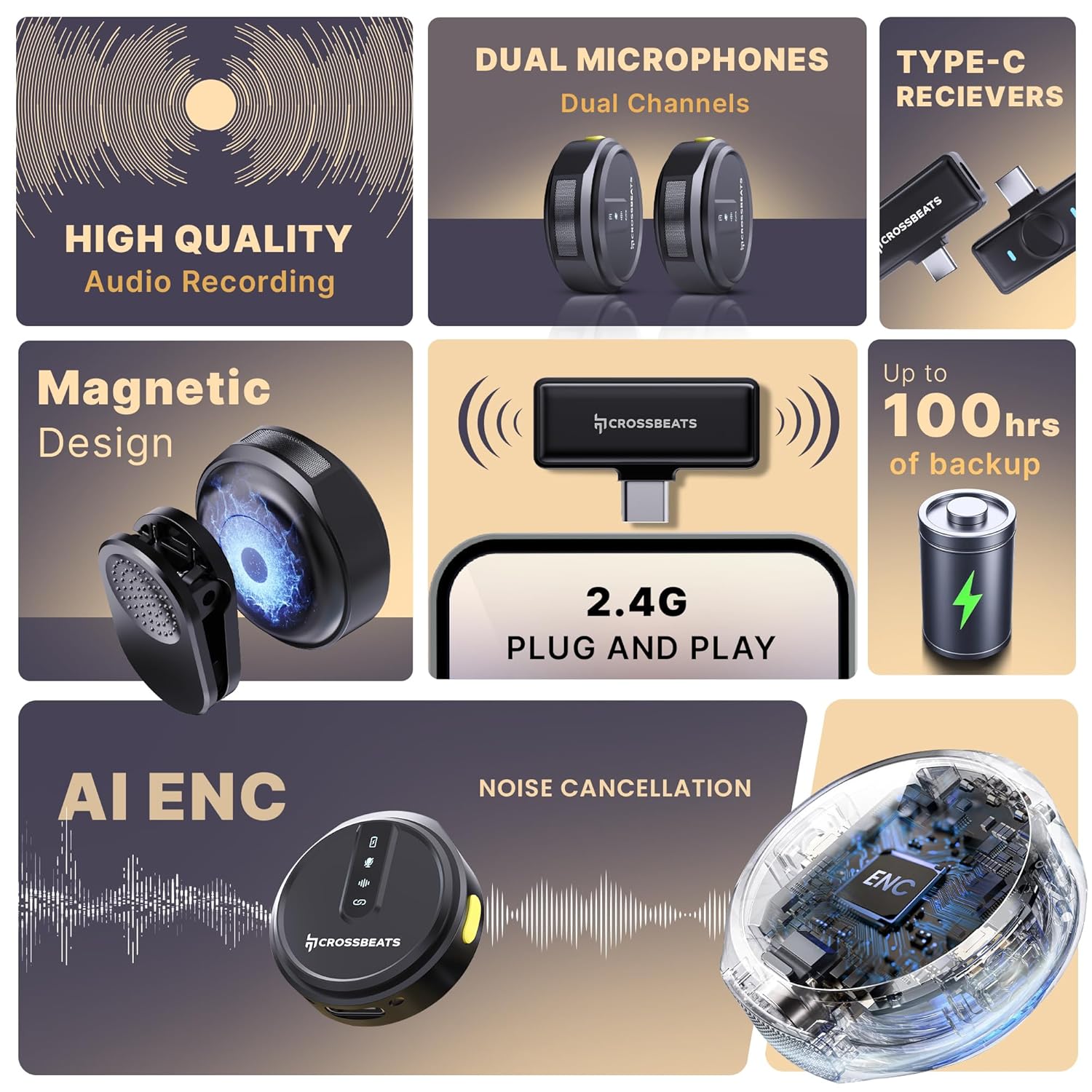
Figure 2: Key features of the CrossBeats Clip M02, highlighting high-quality audio, dual microphones, Type-C receivers, magnetic design, 2.4G plug and play, AI ENC noise cancellation, and up to 100 hours of backup.
- High-Quality Audio Recording: Features ProVocalTM filtration technology, capturing sound at 24-bit depth and a 128dB maximum sound pressure level for clear content.
- 360° Omnidirectional Microphone: Captures surround audio at a sampling rate of 48kHz/24-bit depth. Optimized antenna and noise cancelling design enable stable coverage up to 70 feet indoors or outdoors.
- Plug & Play Wireless Microphone: Offers a Line of Sight (LOS) transmission range of up to 120 meters, making it suitable for various recording scenarios.
- Dual Receivers with AI ENC: Equipped with dual microphones and receivers for seamless dual-channel recording. AI-powered Environmental Noise Cancellation (ENC) with SNR levels below 80dB ensures clear recording by eliminating background noise.
- Hayat Bateri yang Panjang: Provides up to 80+ hours of battery life with the charging case, which includes an indicator for quick recharges. Independent Type-C port charging option is also available.
- Reka bentuk ringan: Each microphone weighs approximately 9 grams, ensuring comfortable wear.
- Multi-App Recording Support: Compatible with various platforms for podcasts, interviews, dan penciptaan kandungan.
- iOS & Android Compatibility: Supports both iOS (Lightning connector) and Android (Type-C connector) devices.

Figure 3: Dual receivers with AI Environmental Noise Cancellation for clear audio.

Figure 4: The CrossBeats Clip M02 system indicating up to 100 hours of recording time.

Figure 5: The lightweight design of the microphone.

Figure 6: Multi-app recording support for the microphone.

Figure 7: Compatibility with Android and iOS devices.
4. Panduan Persediaan
4.1 Mengecas Peranti
- Place the microphone transmitters into the charging case.
- Sambungkan bekas pengecas ke sumber kuasa menggunakan kabel USB-C yang disediakan.
- The charging indicator on the case will show the charging status. Ensure both transmitters are fully charged before first use.
4.2 Menyambungkan Penerima ke Peranti Anda
- Identify the correct receiver for your device (Type-C for Android/some cameras, Lightning for iOS).
- Plug the receiver directly into the charging port of your smartphone, tablet, or compatible camera.
- The receiver's indicator light will illuminate, indicating it is powered on and ready for pairing.
4.3 Memasang Mikrofon
- Ensure the microphone transmitters are charged and powered on.
- The transmitters will automatically attempt to pair with the receiver when both are active.
- A successful connection is indicated by a solid blue light on both the transmitter(s) and the receiver. If the light is blinking, pairing is in progress or has failed.
5. Arahan Operasi
5.1 Hidupkan/Mati Kuasa
- To power on the microphone transmitter, press and hold the power button for a few seconds until the indicator light illuminates.
- Untuk mematikan kuasa, tekan dan tahan butang kuasa sekali lagi sehingga lampu penunjuk padam.
5.2 Merakam Audio
- Once the microphone(s) and receiver are successfully paired, open your preferred recording application (e.g., camera app, voice recorder, social media app) on your connected device.
- The audio input will automatically switch to the Clip M02 microphone.
- Start recording within your application.
5.3 Toggling Noise Cancellation (ENC)
- The Clip M02 features Environmental Noise Cancellation (ENC) to reduce background noise.
- To toggle ENC on or off, press the dedicated ENC button on the microphone transmitter once.
- The indicator light will change to confirm the ENC status (refer to product specific light indicators for details).

Figure 8: Microphone with ENC toggle button.
6. Penyelenggaraan
- Pembersihan: Use a soft, dry cloth to clean the microphone transmitters, receiver, and charging case. Avoid using liquids or abrasive cleaners.
- Storan: Store the device in a cool, dry place, away from direct sunlight and extreme temperatures. Always store the transmitters in the charging case when not in use.
- Penjagaan Bateri: Untuk memanjangkan hayat bateri, elakkan daripada kerap mencas sepenuhnya peranti. Cas peranti secara berkala, walaupun tidak digunakan untuk tempoh yang lama.
7. Penyelesaian masalah
If you encounter issues with your CrossBeats Clip M02, please refer to the following common solutions:
- Microphone not connecting/no signal:
- Ensure both the transmitter(s) and receiver are fully charged.
- Verify the receiver is securely plugged into your device's port.
- Power cycle both the transmitter(s) and the receiver.
- Check if the indicator lights on both devices are solid blue, indicating a successful connection.
- Try connecting the receiver to a different compatible device to rule out device-specific issues.
- Poor audio quality/excessive background noise:
- Ensure the microphone is positioned correctly, close to the sound source.
- Activate the Environmental Noise Cancellation (ENC) feature by pressing the ENC button on the transmitter.
- Reduce the distance between the transmitter and receiver, and ensure there are no major obstructions.
- Avoid using the microphone in extremely noisy environments if possible.
- Bateri tidak dicas:
- Verify the charging cable is securely connected to both the charging case and the power adapter.
- Ensure the power adapter is functional and the power outlet is active.
- Clean the charging contacts on both the transmitters and the charging case.
- Try using a different USB-C charging cable or power adapter.
8. Spesifikasi
| Ciri | Perincian |
|---|---|
| Model | Klip M02 |
| Faktor Bentuk Mikrofon | Lavalier |
| Corak Kutub | Omnidirectional |
| Teknologi Ketersambungan | Tanpa wayar |
| Jenis Penyambung | USB Type-C (and Lightning for iOS variant) |
| Kepekaan Audio | 38 Desibel |
| Nisbah Isyarat-ke-Bunyi | 75 dB |
| Respons Kekerapan | 20 KHz |
| Impedans | 3 Ohm |
| Berat Barang | 90 Gram (jumlah pakej) |
| Dimensi Produk | 6 x 8.2 x 3 Sentimeter |
| Sumber Kuasa | Dikuasakan Bateri |
| Ciri Khas | Battery Indicator Light, Clip, Mute Function, Noise Reduction |
| Peranti Serasi | Camera, Gaming Consoles, Laptop, Tablet, Voice Recorder, Smartphone |
9. Waranti dan Sokongan
The CrossBeats Clip M02 Wireless Microphone comes with a Waranti 12 bulan dari tarikh pembelian, meliputi kecacatan pembuatan.
For technical support, warranty claims, or any inquiries, please contact CrossBeats customer service:
- telefon: +91 8050056565
- e-mel: sokongan@crossbeats.com
- Alamat Pengilang: CrossBeats, SELLBRITE DIGITAL LLP, Ground Floor Brigade Towers 135 Brigade Road Bangalore India - 560025
Sila simpan bukti pembelian anda untuk pengesahan waranti.


