pengenalan
Terima kasih kerana membeliasing the POFOTO Portable DVD Player. This device is designed to provide portable entertainment with its 14.1-inch HD swivel screen, long-lasting battery, and versatile media compatibility. This manual provides essential information for safe operation, setup, and maintenance of your new DVD player.

Image: The POFOTO Portable DVD Player with its screen open, showing a vibrant image.
Maklumat Keselamatan
- Baca semua arahan sebelum menggunakan peranti.
- Jangan dedahkan peranti kepada hujan, lembapan atau suhu yang melampau.
- Elakkan meletakkan peranti berhampiran sumber haba atau di bawah cahaya matahari langsung.
- Use only the provided power adapter and car charger.
- Jangan cuba membuka atau membaiki peranti sendiri. Hubungi sokongan pelanggan untuk mendapatkan bantuan.
- Jauhkan peranti daripada kanak-kanak dan haiwan peliharaan.
Kandungan Pakej
Sahkan bahawa semua item terdapat dalam pakej:
- 14.1'' Portable DVD Player
- Alat Kawalan Jauh
- Penyesuai Kuasa AC
- Pengecas Kereta
- Kabel AV 3-dalam-1
- Panduan Mula Pantas
- Manual Pengguna (dokumen ini)
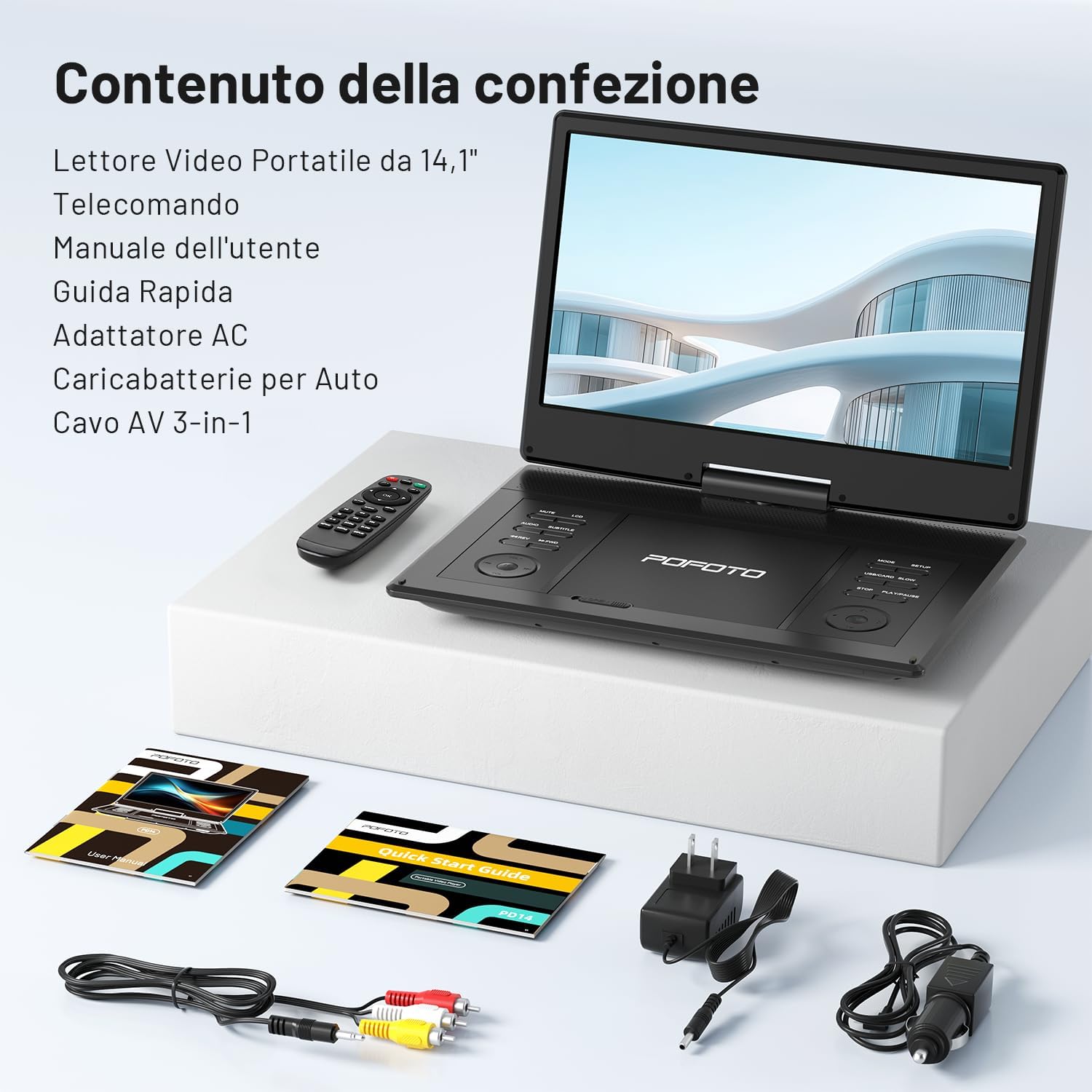
Imej: Semua komponen disertakan dalam pembungkusan produk.
Produk Selesaiview
Komponen dan Kawalan
Familiarize yourself with the various parts and controls of your portable DVD player.

Imej: Terperinci view of the connectivity ports on the side of the DVD player.
- Port USB: For connecting USB flash drives (up to 32GB).
- Slot Kad SD: For inserting SD memory cards (up to 32GB).
- KELUAR AV: Output audio/video untuk menyambung ke TV atau projektor.
- AV DI: Audio/Video input for connecting external devices.
- DC DALAM: Input kuasa untuk penyesuai AC atau pengecas kereta.
- Bicu Fon Kepala (3.5mm): Untuk menyambungkan fon kepala.
- Suis kuasa: To turn the device ON/OFF.
- Butang Kawalan: Play/Pause, Stop, Skip, Volume, Menu, Setup, etc. (located on the player's base).
Persediaan
1. Mengecas Bateri
Before first use, fully charge the internal 4000 mAh lithium polymer battery. Connect the AC power adapter to the DC IN port and a power outlet. The charging indicator will illuminate. A full charge provides up to 6 hours of playback.
- • For car use, connect the car charger to the DC IN port and your vehicle's 12V power outlet.

Image: Illustration of the device's 6-hour battery life.
2. Menghidupkan/Mematikan
Slide the Power Switch to the "ON" position to turn on the device. To turn it off, slide the switch to the "OFF" position.
3. Memasukkan Cakera
Open the disc cover gently. Place a DVD or CD onto the spindle with the label side facing up. Press down lightly until it clicks into place. Close the disc cover firmly.
4. Connecting to a TV or Projector
Use the included 3-in-1 AV cable to connect the DVD player to a larger display. Connect one end of the AV cable to the AV OUT port on the DVD player and the other end to the corresponding AV IN ports (Yellow for Video, Red/White for Audio) on your TV or projector. Select the correct input source on your TV/projector.

Image: The portable DVD player connected to a larger TV screen for shared viewing.
5. Using USB/SD Card
Insert a USB flash drive or SD card (up to 32GB) into the respective port. The player will automatically detect the media and allow you to browse and play supported files.
Arahan Operasi
1. Main Semula Asas
- Main/Jeda: Tekan ke MAIN/JEDA butang untuk memulakan atau menjeda main semula.
- Berhenti: Tekan ke BERHENTI butang untuk menghentikan main balik.
- Langkau: Gunakan PREV / SETERUSNYA butang untuk melangkau antara trek atau bab.
- Maju Pantas/Putar Balik: Pegang PREV / SETERUSNYA buttons to fast forward or rewind.
2. Screen Rotation
The 14.1-inch HD screen can rotate 270 degrees and fold 180 degrees, allowing for multiple viewing angles. Adjust the screen gently to your desired position.

Image: Visual representation of the flexible screen rotation and folding options.
3. Kawalan Kelantangan
Gunakan VOL+ dan vol- buttons on the player or remote control to adjust the volume. The device features dual stereo speakers for immersive sound.

Imej: Meletup view highlighting the dual stereo speakers of the device.
4. Navigasi Menu
Tekan ke MENU button to access the disc menu. Use the arrow buttons and MASUK button on the player or remote to navigate. Press SETUP untuk mengakses tetapan sistem.
5. Last Memory Function
The player features a memory function that resumes playback from where it was last stopped, even after powering off. This ensures continuous viewing without losing your place.

Image: Visual explanation of the continuous playback feature, resuming from the last stopped point.
6. Format yang Disokong
The player is region-free and supports a wide range of disc and digital media formats:
- Disc Formats: CD, DVD, CD-R/RW, DVD±R/RW, SVCD-R/RW, VCD (Note: Blu-ray discs are not supported).
- Video & Image Formats (USB/SD): VOB, AVI, MPEG, MP3, WMA, JPEG.
- Audio Formats (USB/SD): MP3, WMA, OGG, ACC.

Imej: Tamatview of the diverse disc and file formats compatible with the player.
Penyelenggaraan
- Pembersihan: Use a soft, dry cloth to clean the screen and exterior of the player. Do not use liquid cleaners or abrasive materials.
- Penjagaan Cakera: Pegang cakera pada tepinya. Bersihkan cakera dengan kain lembut dan tidak berbulu, lap dari tengah ke luar.
- Storan: Store the player in a cool, dry place away from direct sunlight and extreme temperatures when not in use.
Menyelesaikan masalah
| Masalah | Penyelesaian |
|---|---|
| Tiada kuasa | Ensure the power adapter is securely connected and the power switch is ON. Check if the battery is charged. |
| No disc playback | Check if the disc is inserted correctly and is clean. Ensure the disc format is supported (not Blu-ray). |
| Tiada bunyi | Adjust the volume. Check headphone connection if applicable. Ensure AV cables are correctly connected to TV. |
| Tiada gambar di TV | Verify AV cable connections. Ensure the TV input source is correctly selected. |
| Kad USB/SD tidak dikenali | Ensure the USB drive or SD card is properly inserted and formatted to a compatible file system (e.g., FAT32). Maximum capacity is 32GB. |
Spesifikasi
- Jenama: POFOTO
- model: PD14-Black-DE-14.1
- Saiz Skrin: 14.1 Inci
- Jenis Paparan: LCD
- Resolusi Skrin: 1366x768
- Bateri: Polimer Litium 4000 mAh (main balik sehingga 6 jam)
- Compatible Disc Media: CD, DVD, CD-R/RW, DVD±R/RW, VCD/SVCD (Excludes Blu-ray)
- Compatible Digital Media (USB/SD): AVI, VOB, MPEG, MP3, WMA, OGG, ACC, JPG
- Ketersambungan: USB, SD Card, AV OUT, AV IN, 3.5mm Headphone Jack
- Dimensi: 34 x 23.2 x 4.6 cm
- Berat: 1.44 kg
- Komponen yang Disertakan: Portable DVD Player, Remote Control, AC Adapter, Car Charger, 3-in-1 AV Cable, Quick Start Guide
Waranti dan Sokongan
POFOTO offers professional customer service and technical support for all users. Your product is covered by a Waranti 24 bulan. For any issues or inquiries, please contact our customer service team, available 24 jam sehari.
For support, please refer to the contact information provided in your Quick Start Guide or visit the official POFOTO webtapak.