1. Pengenalan
Thank you for choosing the ATEM POWER 200W Portable Solar Panel. This manual provides essential information for the safe and efficient operation, setup, and maintenance of your solar panel. Please read this manual thoroughly before use and retain it for future reference.
This portable solar panel is designed for outdoor use, providing reliable power for 12V/24V batteries and power stations. Its foldable design and integrated MPPT controller make it ideal for camping, RVs, hiking, and other off-grid applications.
2. Ciri-ciri Utama
- High-Efficiency HPBC Cells: Utilizes advanced HPBC (Hybrid Passivated Back Contact) technology for up to 25.8% conversion efficiency by relocating metal contacts to the back, reducing shading.
- Durable Anti-Cracking Coating: Features a flexible, anti-crack ETFE film that provides exceptional strength, thermal stability, and resistance to physical stress, protecting cells from bending or cracking. The self-cleaning, non-stick surface enhances light transmission.
- Integrated MPPT Charge Controller: Equipped with a 20A MPPT controller for efficient charging of 12V/24V batteries (Lead Acid, AGM, GEL, Calcium, LiFePO4) and activation of sleeping LiFePO4 batteries.
- Pilihan Pengecasan Serbaguna: Includes 5V USB output ports (USB-A and USB-C) for direct charging of smartphones, tablets, and other USB-powered devices.
- Reka Bentuk Mudah Alih dan Boleh Dilipat: Weighs approximately 5.8kg (12.79 lbs) and folds into a compact size (479x422x80mm / 18.86"x16.61"x3.15") with a sturdy carry handle for easy transport and storage.
- Keserasian Luas: Comes with MC4 to multi-connector adapter cables to link with various power stations and devices.
- Perlindungan Keselamatan: Built-in protections against reverse polarity, overcurrent, undervoltage, kelebihantage, dan litar pintas.
3. Komponen Produk
The ATEM POWER 200W Portable Solar Panel package includes the following components:
- Panel Suria Lipat 200W
- Integrated 20A MPPT Solar Charge Controller
- MC4 to Multi-Connector Adapter Cable (various DC plugs, Anderson, XT60)
- Alligator Clips Cable
- Bawa Beg

Image: The ATEM POWER 200W Portable Solar Panel shown folded in its carry bag, alongside the MPPT solar charge controller, multi-connector adapter cable, and alligator clips cable.
4. Arahan Persediaan
4.1 Membuka dan Menetapkan Panel Suria
- Unzip the carry bag and carefully unfold the solar panel sections.
- Position the solar panel in a location with maximum direct sunlight. Ensure no shadows are cast on the panel surface for optimal performance.
- Adjust the angle of the panel towards the sun. For best results, the panel should be perpendicular to the sun's rays.

Image: Illustration showing the solar panel folding and unfolding process, and its compact storage in the carry bag.
4.2 Connecting to a Battery or Power Station
The integrated MPPT controller manages the charging process. Follow these steps to connect your solar panel:
- Connect the solar panel's MC4 connectors to the input of the integrated MPPT controller.
- For Battery Charging: Connect the alligator clips cable to the output terminals of the MPPT controller. Ensure correct polarity (red to positive, black to negative) when connecting the alligator clips to your 12V/24V battery.
- For Power Station Charging: Use the appropriate multi-connector adapter cable (e.g., DC7909, DC5525, XT60, Anderson) to connect the MPPT controller's output to your power station's input port.
- Pastikan semua sambungan selamat sebelum meneruskan.
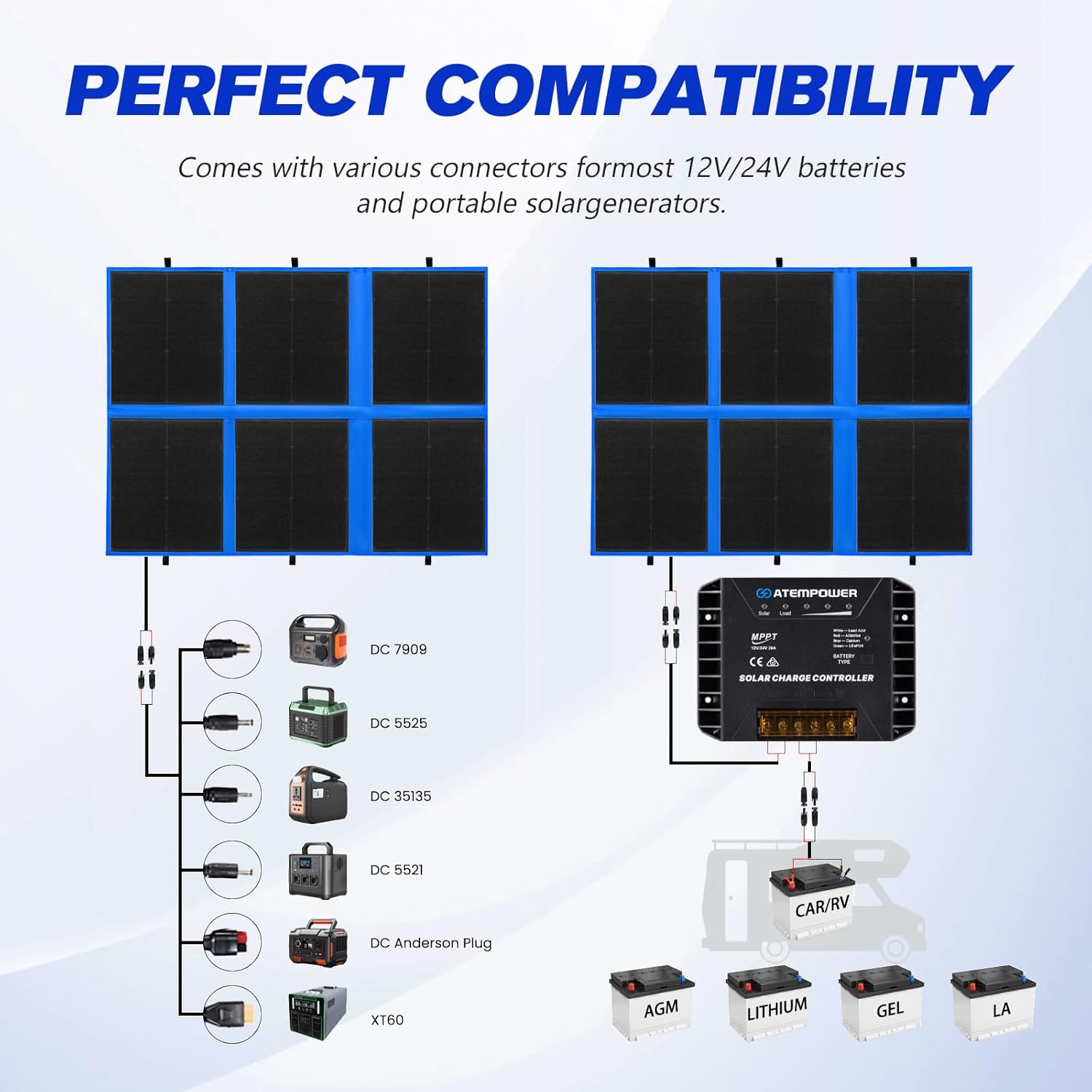
Image: A diagram illustrating the perfect compatibility of the solar panel with various power stations using different DC connectors (DC7909, DC5525, DC35135, DC5521, DC Anderson Plug, XT60) and direct connection to 12V/24V batteries (AGM, Lithium, GEL, LA).

Image: A diagram showing the connection of the solar panel to a 12V/24V battery through the MPPT controller, compatible with LiFePO4, AGM, Lithium, LA, and GEL battery types.
5. Arahan Operasi
5.1 MPPT Controller Operation
The MPPT controller automatically detects 12V or 24V battery systems. It features indicator lights for solar input, load, and battery type.

Imej: Dari dekat view of the MPPT solar charge controller, highlighting the solar connector input, 5V USB-A (18W Max) and Type-C (60W Max) outputs, and the battery type selection button. An illustration shows a smartphone charging via USB-C.
5.2 Selecting Battery Type
To optimize charging for your specific battery, you can select the battery type on the MPPT controller:
- Long press the "Battery Type" button on the controller. The indicator light will flash.
- Press the button repeatedly to cycle through the available battery types:
- White: Lead Acid
- Red: AGM/GEL
- Blue: Calcium
- Green: LiFePO4
- Release the button when the desired battery type's indicator light is selected. The light will remain on, confirming the selection.

Image: A visual guide demonstrating how to select the battery type on the MPPT controller, showing the button and corresponding indicator lights for LiON/Acid, AGM/Gel, Calcium, and LiFePO4 batteries.
5.3 Mengecas Peranti USB
The MPPT controller includes USB-A and USB-C ports for charging small electronic devices directly:
- Connect your USB device (e.g., smartphone, tablet) to the USB-A or USB-C port on the MPPT controller using a compatible cable.
- Ensure the solar panel is exposed to sufficient sunlight for charging to commence.
6. Penyelenggaraan
Penyelenggaraan tetap memastikan jangka hayat dan prestasi optimum panel solar anda.
- Pembersihan: The ETFE coating is designed to be self-cleaning. However, if dirt, dust, or debris accumulates, gently wipe the surface with a soft, damp kain. Elakkan pembersih yang melelas atau bahan kimia yang keras.
- Pemeriksaan: Periodically inspect the solar panel, cables, and connectors for any signs of damage, wear, or corrosion. Ensure all connections are secure.
- Storan: When not in use, fold the solar panel and store it in its carry bag in a cool, dry place away from direct sunlight and extreme temperatures.
- Rintangan Cuaca: The panel is weather-resistant, but prolonged exposure to heavy rain or extreme weather conditions should be avoided when possible.

Image: Water being poured over the solar panel surface, illustrating its weather-resistant ETFE film technology and ease of cleaning.
7. Penyelesaian masalah
If you encounter issues with your ATEM POWER 200W Portable Solar Panel, refer to the following common problems and solutions:
| Masalah | Kemungkinan Punca | Penyelesaian |
|---|---|---|
| No power output from solar panel. |
|
|
| Bateri tidak dicas atau dicas dengan perlahan. |
|
|
| Peranti USB tidak dicas. |
|
|
If the problem persists after attempting these solutions, please contact ATEM POWER customer support for further assistance.
8. Spesifikasi Teknikal
| Parameter | Nilai |
|---|---|
| Model | Panel Suria Lipat 200W |
| Kuasa Maksimum (Pmax) | 200 Watt |
| Jenis Sel | HPBC (Hybrid Passivated Back Contact) |
| Kecekapan | Sehingga 25.8% |
| Litar Terbuka Voltage (Voc) | 23.5V |
| Pengawal MPPT | 20A, 12V/24V Auto-detect |
| Keluaran USB-A | 5V (18W Max) |
| Output USB-C | 5V (60W Max) |
| Dimensi Dilipat | 479 x 422 x 80 mm (18.86" x 16.61" x 3.15") |
| Berat Barang | 5.8 kg (12.79 lbs) |
| Bahan Salutan | ETFE (Anti-Cracking Flexible Film) |
| Komponen yang Disertakan | Solar panel, MPPT controller, MC4 to multi-connector adapter, alligator clips, carry bag |
9. Waranti dan Sokongan
ATEM POWER provides a waranti dua tahun on this 200W Portable Solar Panel, covering defects in materials and workmanship from the date of purchase. This warranty does not cover damage caused by misuse, accident, unauthorized modification, or normal wear and tear.
For warranty claims, technical support, or any questions regarding your product, please contact ATEM POWER customer service through the retailer where you purchased the product or visit the official ATEM POWER webtapak untuk maklumat hubungan.
Sila simpan bukti pembelian anda untuk tujuan waranti.


