1. Pengenalan
This manual provides essential instructions for the setup, operation, and maintenance of your TMY Projector. Please read this manual thoroughly before using the product to ensure proper functionality and to maximize your viewpengalaman dalam. Simpan manual ini untuk rujukan masa hadapan.
2. Produk Lebihview
2.1 Kandungan Pakej
Sahkan bahawa semua item terdapat dalam pakej:
- TMY Projector Unit
- Alat Kawalan Jauh
- Kabel HDMI
- Kord Kuasa
- Kad Waranti
2.2 Ciri-ciri Utama
- Netflix Officially Licensed: Access streaming services directly without external devices.
- 1080P Resolution: Delivers clear and detailed images.
- Electric Focus & Auto Keystone: Automatic image adjustment for optimal clarity and shape.
- Pendirian Boleh Putar 270°: Flexible projection angles, including ceiling projection.
- Upgraded WiFi 6 Connectivity: Ensures stable and fast wireless streaming.
- Dual-Mode Bluetooth 5.2: Connects to external speakers or functions as a standalone Bluetooth speaker.
- Pelbagai Pilihan Kesambungan: HDMI, USB, Phone/PC mirroring.
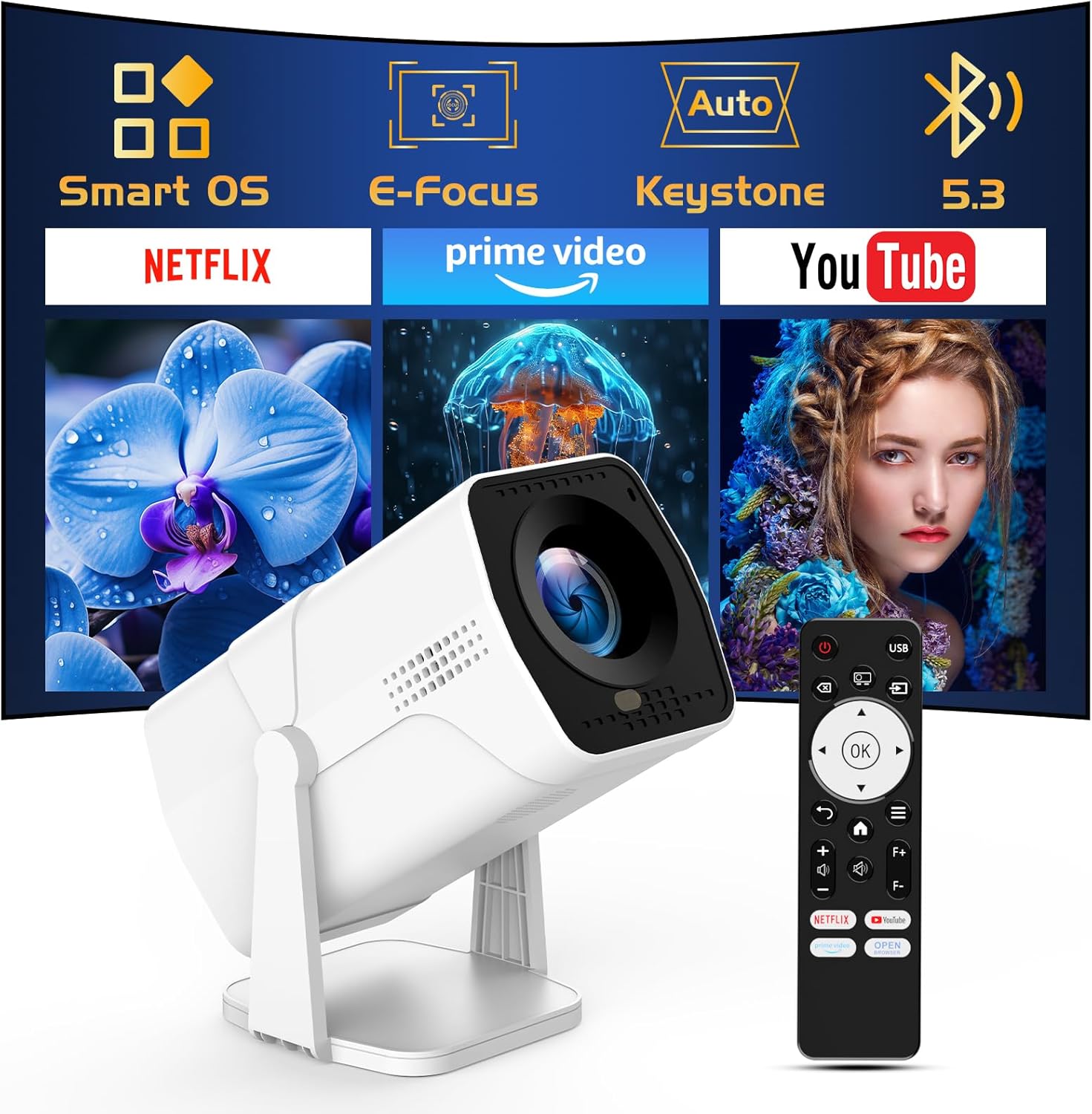
Image: The TMY Projector unit, its remote control, and a projected screen displaying logos for Smart OS, E-Focus, Auto Keystone, Bluetooth 5.3, Netflix, Prime Video, and YouTube.
3. Persediaan
3.1 Penempatan
Position the projector on a stable, flat surface. The 270° rotatable stand allows for versatile placement, including projecting onto walls or ceilings. Ensure adequate ventilation around the projector.

Image: A TMY Projector positioned on a bedside table, projecting an image onto the ceiling, demonstrating its 270° rotatable stand for multi-angle viewing.
3.2 Sambungan Kuasa
- Sambungkan kord kuasa ke port input kuasa projektor.
- Pasangkan hujung kord kuasa yang satu lagi ke soket elektrik standard.
3.3 Penghidupan Awal dan Pelarasan Fokus
- Tekan butang kuasa pada projektor atau alat kawalan jauh untuk menghidupkan peranti.
- Ciri-ciri projektor Fokus Elektrik dan Keystone Auto correction. The image will automatically adjust for clarity and a rectangular shape within approximately 2 seconds.
- If further adjustment is needed, use the remote control to fine-tune the focus.

Image: A TMY Projector projecting a vibrant image onto a screen, with an overlay illustrating the 'FOCUS' function and icons for Auto Keystone and 50%-100% Zoom.
3.4 Sambungan Rangkaian (WiFi)
The projector supports WiFi 6 for a fast and stable internet connection.
- Navigate to the 'Settings' menu using the remote control.
- Pilih 'Rangkaian' atau 'Tetapan WiFi'.
- Choose your desired WiFi network from the list and enter the password.
- Sahkan sambungan.

Image: A TMY Projector wirelessly connected to a tablet, smartphone, and laptop, illustrating its WiFi 6 connectivity for faster streaming with no lagging.
3.5 Sambungan Bluetooth
The projector features Dual-Mode Bluetooth 5.2 for audio connectivity.
- Projector Mode (Output): To connect to external Bluetooth speakers or soundbars: Navigate to 'Bluetooth Settings', enable Bluetooth, and pair with your audio device.
- Speaker Mode (Input): To use the projector's built-in speakers as a standalone Bluetooth speaker: Select 'Speaker Mode' in the Bluetooth settings. Your phone or other device can then connect to the projector to play audio.

Image: A TMY Projector illustrating its two-way Bluetooth 5.2 functionality, showing connections to a soundbar (Projector Mode) and a smartphone (Speaker Mode).
4. Operasi
4.1 Navigating the Smart OS
The projector runs on a smart TV operating system. Use the provided remote control to navigate menus, select applications, and control playback.

Image: The TMY Projector unit with a projected screen showing a grid of built-in smart OS applications, including Netflix, YouTube, Prime Video, TikTok, and others.
4.2 Accessing Built-in Apps
The projector comes with pre-installed and officially licensed applications such as Netflix, Prime Video, and YouTube. Access these directly from the home screen or through the 'App Store' for additional content.

Image: A TMY Projector projecting a screen filled with content from officially licensed apps like Netflix, Prime Video, and YouTube, with the remote control in the foreground.
4.3 Menyambung Peranti Luaran
The projector offers multiple ports for connecting external devices:
- HDMI: Connect TV sticks, TV boxes, PCs/Laptops, or gaming consoles (e.g., PS).
- USB: Mainkan media files directly from USB drives or connect other USB accessories.
- Phone/PC Mirroring: Wirelessly mirror content from your smartphone or PC (refer to the on-screen instructions for specific mirroring protocols).
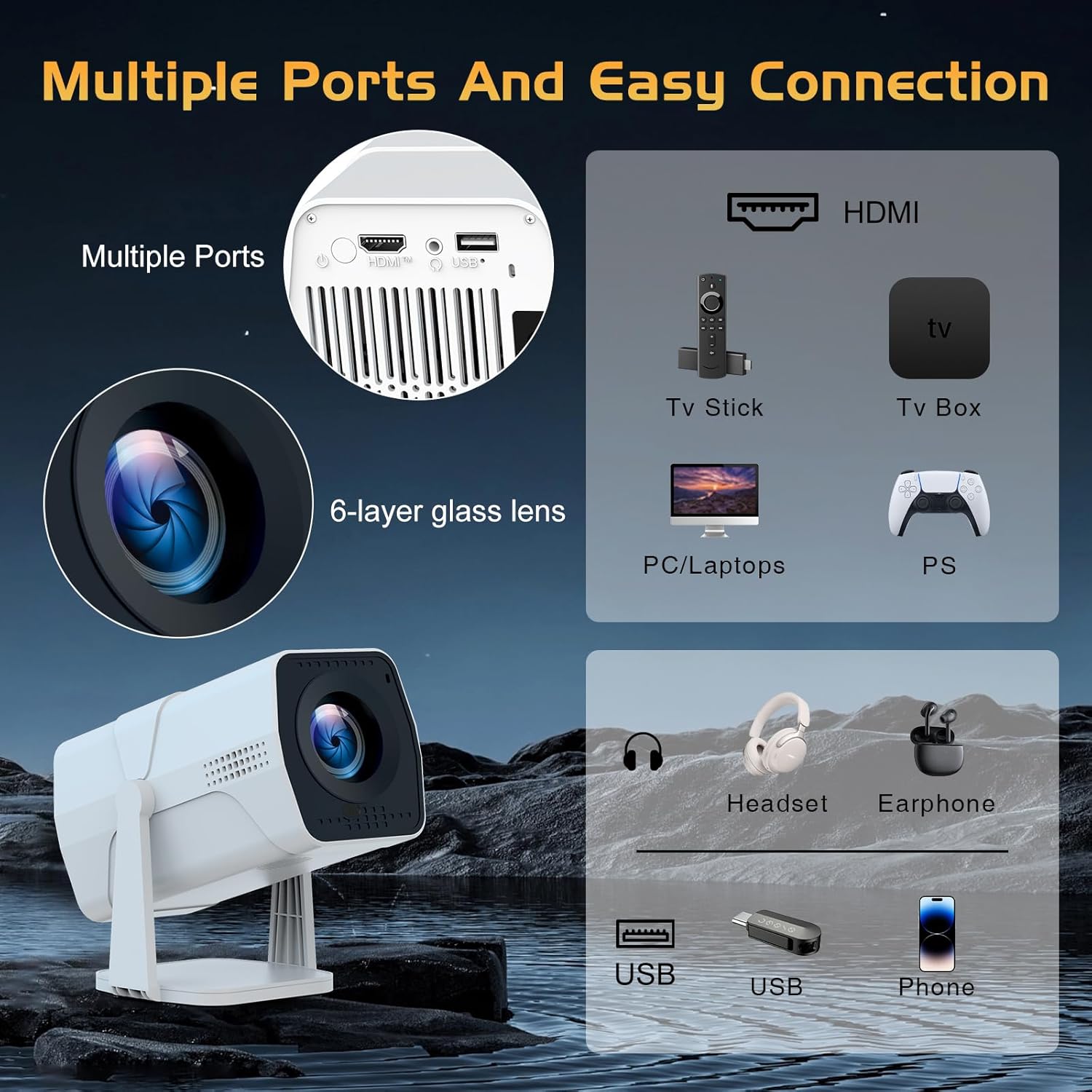
Image: A detailed diagram showing the multiple ports on the TMY Projector (HDMI, USB) and various connection possibilities, including TV sticks, PCs, gaming consoles, headsets, and phones.
4.4 Screen Zoom Function
The projector includes a 50%-100% zoom function, allowing you to adjust the screen size without moving the projector. This feature can be accessed via the remote control or settings menu.
5. Penyelenggaraan
To ensure the longevity and optimal performance of your TMY Projector, follow these maintenance guidelines:
- Membersihkan Lensa: Gunakan kain lembut dan tidak berbulu yang direka khas untuk kanta optik. Elakkan bahan yang kasar atau bahan kimia yang keras.
- Membersihkan Bahagian Luar: Lap bahagian luar projektor dengan kain lembut dan kering. Jangan gunakan pembersih cecair terus pada peranti.
- Pengudaraan: Pastikan bukaan pengudaraan tidak disekat untuk mengelakkan terlalu panas.
- Storan: When not in use for extended periods, store the projector in a cool, dry place, away from direct sunlight and dust.
6. Penyelesaian masalah
If you encounter issues with your TMY Projector, refer to the following common problems and solutions:
- Tiada Kuasa:
- Pastikan kord kuasa disambungkan dengan kukuh pada kedua-dua projektor dan soket elektrik yang berfungsi.
- Periksa sama ada salur keluar kuasa berfungsi.
- No Image / Blurry Image:
- Verify the projector is powered on and the lens cap is removed.
- Allow the automatic focus and keystone correction to complete. If still blurry, manually adjust focus using the remote.
- Ensure the projection surface is suitable and the projector is within the recommended distance.
- If using an external source (HDMI), ensure the correct input source is selected.
- Tiada Bunyi:
- Check the volume level on the projector and any connected external audio devices.
- If using Bluetooth speakers, ensure they are properly paired and connected.
- If using internal speakers, ensure external Bluetooth output is not selected.
- Alat Kawalan Jauh Tidak Menjawab:
- Ensure the batteries are correctly inserted and not depleted.
- Point the remote directly at the projector's IR receiver.
- Isu Sambungan WiFi:
- Ensure your WiFi network is active and within range.
- Semak semula kata laluan WiFi.
- Mulakan semula projektor dan penghala WiFi anda.
- If the connection times out, try moving the projector closer to the router or reducing interference.
7. Spesifikasi
| Ciri | Spesifikasi |
|---|---|
| Jenama | TMY |
| Model | B0DRFF5KMF |
| Berat Barang | 2.79 paun |
| Dimensi Produk | 5.35 x 4.84 x 7.09 inci |
| warna | putih |
| Ciri Khas | Speakers, Electric Focus, Auto Keystone, 270° Rotatable Stand |
| Teknologi Ketersambungan | HDMI, USB, WiFi 6, Bluetooth 5.2 |
| Resolusi Paparan | 1920 x 1080 (1080P Full HD) |
| Penggunaan yang Disyorkan | Dalaman |

Image: A visual comparison showing the TMY Projector's 1080P Full HD image quality, emphasizing that it is recommended for use in dark environments for optimal viewing, contrasted with daytime or light-on conditions.
8. Waranti dan Sokongan
TMY is committed to providing excellent customer service and product support.
- Waranti: Produk ini disertakan dengan jaminan 3 tahun.
- Polisi Pemulangan: Enjoy a 30-day return period.
- Sokongan Teknikal: Lifetime after-sale service and technical support are available.
- Masa Respons: Jangkakan balasan pantas dalam masa 24 jam untuk pertanyaan sokongan.
Untuk bantuan lanjut, sila layari pegawai tersebut TMY Store on Amazon or contact customer support through the provided channels in your warranty card.


