pengenalan
Welcome to your JLab Go Lux ANC Wireless Headphones. This manual provides detailed instructions to help you get the most out of your new headphones, covering setup, operation, maintenance, and troubleshooting.
Apa yang ada dalam Kotak
- JLab Go Lux ANC Wireless Headphones
- Kabel Pengecas USB-C

Image: JLab Go Lux ANC Headphones and included USB-C charging cable.
Produk Selesaiview
Familiarize yourself with the key components and controls of your JLab Go Lux ANC Wireless Headphones.

Imej: Jarak dekat view of the right earcup, highlighting the power button, volume controls, and ANC/Be Aware mode button.
Ciri-ciri Utama:
- Pembatalan Bunyi Aktif Hibrid (ANC): Reduces external distractions by up to 30 dB.
- Be Aware Mode: Membolehkan anda mendengar persekitaran anda sambil mendengar audio.
- Cloud Foam Comfort: Ergonomically shaped Form-Fit Earcups with 1-inch Cloud Foam cushions and adjustable hinges for extended comfort.
- Penyesuaian Aplikasi JLab: Personalize ANC/Be Aware settings, touch controls, and sound preferences.
- Panggilan Crystal Clear: Equipped with noise-canceling microphones for clear communication.
- Berbilang Titik Bluetooth: Sambung ke dua peranti serentak.
- Wireless Share Mode: Share audio wirelessly between two Lux headphones.
- Google Fast Pair & Microsoft Swift Pair: Effortless pairing with Android and Windows devices.
- Google Find My Device: Locate your headphones if misplaced.
- Reka Bentuk Lipat: Rotating earcups for compact storage and portability.
Persediaan
1. Pengecasan Awal
Before first use, fully charge your headphones using the provided USB-C cable. The LED indicator will show charging status.
2. Hidupkan/Mati Kuasa
- Hidupkan kuasa: Tekan dan tahan butang kuasa sehingga penunjuk LED menyala.
- Matikan: Tekan dan tahan butang kuasa sehingga penunjuk LED dimatikan.
3. Berpasangan Bluetooth
- Turn on your JLab Go Lux ANC headphones.
- The headphones will automatically enter pairing mode (LED will flash blue/red).
- On your device (smartphone, laptop, etc.), open Bluetooth settings and select "JLab Go Lux ANC" from the list of available devices.
- Once connected, the LED will turn solid blue.
Google Fast Pair & Microsoft Swift Pair: For supported Android and Windows 10/11 devices, simply turn on your headphones near the device, and a pop-up notification will prompt you to connect with a single click.
4. Penyesuaian Aplikasi JLab
Download the JLab App from the App Store or Google Play Store to unlock full customization options for your headphones.
- Sesuaikan tetapan ANC/Berwaspada.
- Adjust touch controls.
- Fine-tune sound with the equalizer (JLab Signature, Balance, Bass Boost presets available).
- Enable Safe Hearing with volume limits.
- Terima kemas kini perisian.

Image: The JLab App interface on a smartphone, demonstrating sound and noise control customization options.
Arahan Operasi
1. Active Noise Cancelling (ANC) & Be Aware Mode
Toggle between ANC, Be Aware, and ANC Off modes using the dedicated button on the earcup.
- ANC Hibrid: Eliminates external distractions for an immersive audio experience.
- Be Aware Mode: Membenarkan bunyi ambien melalui, memastikan anda sedar tentang persekitaran anda.

Image: A person wearing the headphones, demonstrating the use of ANC or Be Aware mode in a public environment.
2. Fungsi Panggilan
The built-in noise-canceling microphones ensure clear calls.
- Jawab/Tamatkan Panggilan: Tekan butang berbilang fungsi sekali sahaja.
- Tolak Panggilan: Tekan dan tahan butang berbilang fungsi.
- Aktifkan Pembantu Suara: Tekan dua kali butang berbilang fungsi.

Image: A person engaged in a phone call while wearing JLab Go Lux ANC headphones, emphasizing the clear call feature.
3. Main balik Muzik
- Main/Jeda: Tekan butang berbilang fungsi sekali sahaja.
- Kelantangan: Tekan sebentar butang '+'.
- Perlahankan suara: Tekan sebentar butang '-'.
- Lagu Seterusnya: Tekan lama butang '+'.
- Trek Sebelumnya: Tekan lama butang '-'.
4. Berbilang Titik Bluetooth
Connect your headphones to two devices simultaneously. For example, connect to your laptop for work calls and your phone for music. The headphones will intelligently switch between devices.
5. Wireless Share Mode
Share your audio with another pair of JLab Lux headphones. Refer to the JLab App or JLab support for detailed instructions on activating Wireless Share Mode.
6. Google Find My Device
If you misplace your headphones, use the Google Find My Device feature to locate them. Ensure this feature is enabled and configured on your connected Android device.

Image: A person using the Google Find My Device app on a smartphone to locate their JLab headphones.
Keselesaan dan Fit
The JLab Go Lux ANC headphones are designed for comfort during extended use.
- Form-Fit Earcups: Ergonomically shaped to the natural outline of the ear.
- Cloud Foam Cushions: 1-inch thick cushions provide plush comfort.
- Engsel boleh laras: Customize the fit for various head sizes and shapes.

Image: A person wearing JLab Go Lux ANC headphones, showcasing the comfortable Cloud Foam earcups.
Pengecasan dan Hayat Bateri
Your JLab Go Lux ANC headphones offer extended battery life.
- Hayat Bateri: Up to 70+ hours of playtime (40+ hours with ANC on).
- mengecas: Use the included USB-C cable to charge. A full charge typically takes a few hours.
- Penunjuk LED: The LED light on the earcup indicates charging status and battery level.
Penyelenggaraan
- Clean headphones with a soft, damp kain. Elakkan bahan kimia yang keras.
- Simpan di tempat yang sejuk dan kering apabila tidak digunakan.
- Jangan dedahkan kepada suhu atau kelembapan yang melampau.
- The headphones are not water resistant. Avoid contact with liquids.
- The foldable design with rotating earcups allows for compact storage.
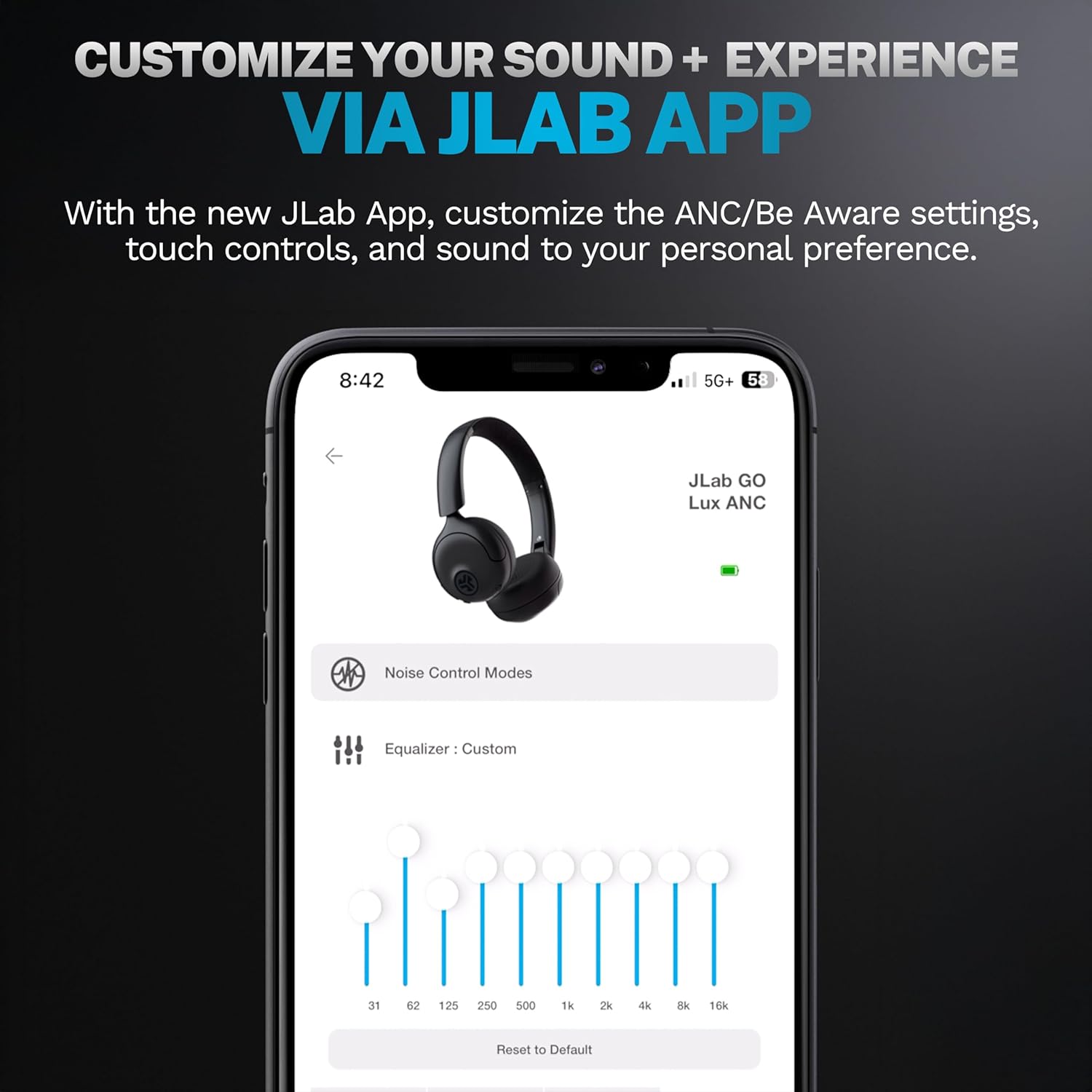
Image: JLab Go Lux ANC headphones in their folded position, demonstrating portability.
Menyelesaikan masalah
| Masalah | Penyelesaian |
|---|---|
| Fon kepala tidak dihidupkan | Ensure headphones are charged. Press and hold the power button for 3-5 seconds. |
| Tidak boleh berpasangan dengan peranti | Make sure Bluetooth is enabled on your device. Ensure headphones are in pairing mode (flashing blue/red LED). Forget the device in your Bluetooth settings and re-pair. |
| Tiada suara atau kelantangan rendah | Periksa tahap kelantangan pada kedua-dua fon kepala dan peranti anda yang disambungkan. Pastikan fon kepala disambungkan dengan betul. |
| ANC tidak berfungsi dengan berkesan | Pastikan mod ANC diaktifkan. Laraskan padanan fon kepala untuk memastikan kedap udara yang baik di sekitar telinga anda. |
| Isu kualiti panggilan | Ensure microphones are not obstructed. Check your device's connection and signal strength. |
Spesifikasi
| Ciri | Perincian |
|---|---|
| Nama Model | HBGOLUXANCMVE20WEB |
| Teknologi Ketersambungan | Wayarles (Bluetooth) |
| Versi Bluetooth | 5.0 |
| Bentuk alat dengar | Di Telinga |
| Ciri Kawalan Bunyi | Hybrid Active Noise Canceling, Be Aware Mode |
| Jenis Pemacu Audio | Pemacu Dinamik (40mm) |
| Respons Kekerapan | 20 Hz - 20 KHz |
| Sensitiviti | 104 dB |
| Hayat Bateri | Up to 70+ hours (40+ hours with ANC) |
| Kaedah Kawalan | Sentuh, Kawalan Apl |
| Berat Barang | 10.6 auns (0.3 Kilogram) |
| Dimensi Produk | 2.95 x 6.1 x 7.48 inci |
| Tahap Ketahanan Air | Bukan Tahan Air |
Waranti dan Sokongan
Your JLab Go Lux ANC Wireless Headphones come with a JLab 2 Year Warranty.
For detailed warranty information, product support, or to contact customer service, please visit the official JLab webtapak atau rujuk kad jaminan yang disertakan dengan produk anda.
Anda juga boleh melawat Kedai JLab di Amazon untuk maklumat lanjut dan aksesori.


