1. Pengenalan
Welcome to the user manual for your new ZZB Android 15 Tablet. This versatile 2-in-1 device is designed to provide a seamless experience for both productivity and entertainment, transforming effortlessly between tablet, laptop, and computer modes with its included accessories. Featuring the latest Android 15 operating system, a vibrant 10.1-inch IPS display, and robust memory specifications, your tablet is ready for a wide range of tasks, from video playback and gaming to multitasking and creative work.
2. Kandungan Pakej
Sila sahkan bahawa semua item yang disenaraikan di bawah disertakan dalam pakej anda. Jika ada item yang hilang atau rosak, sila hubungi sokongan pelanggan.
- 1 x ZZB 10.1-inch Android 15 Tablet
- 1 x Papan Kekunci Bluetooth
- 1 x Tetikus Tanpa Wayar
- 1 x Pen Stylus
- 1 x Foldable Protective Case
- 1 x USB-C Charger Cable
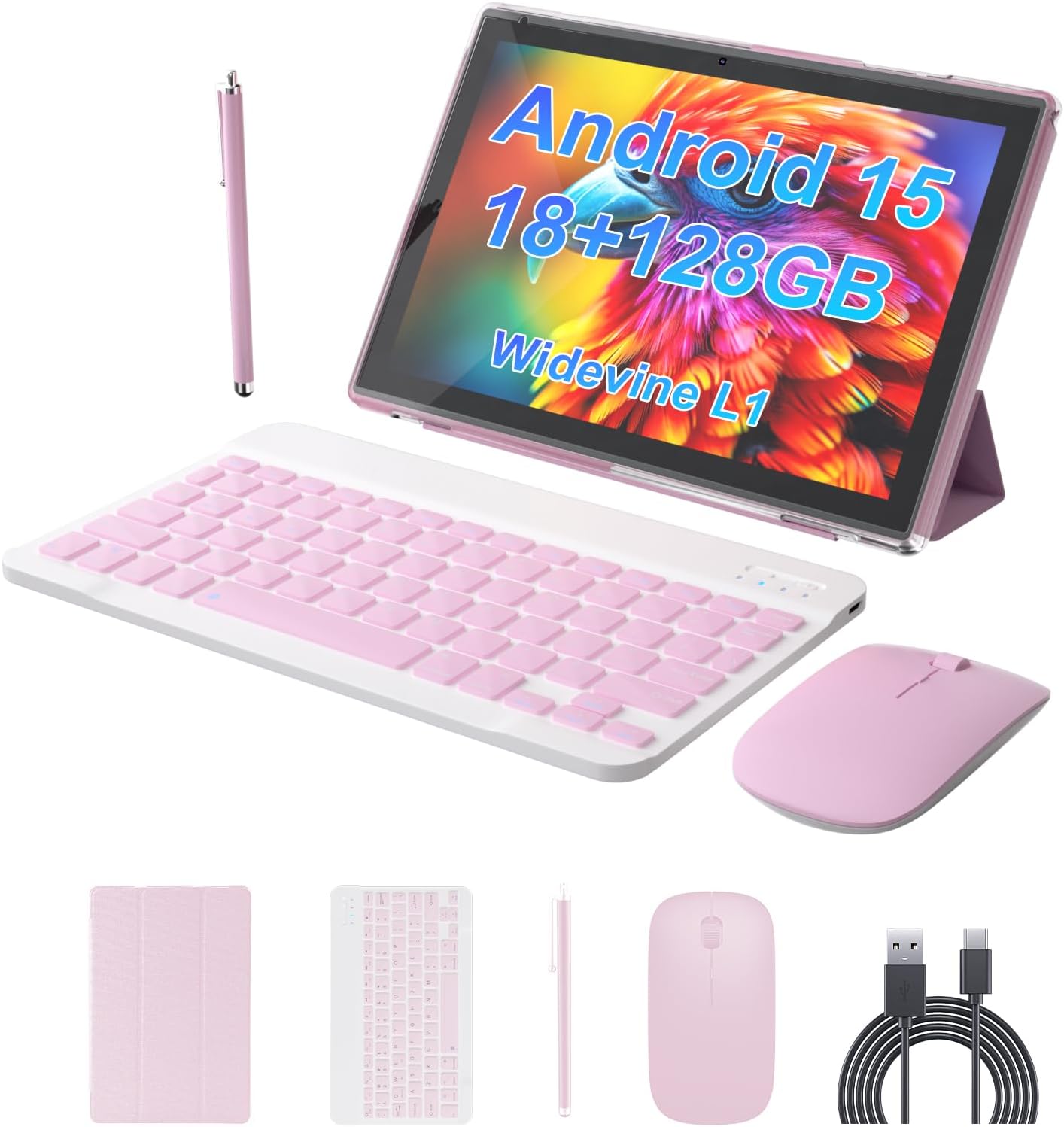
Image 2.1: All components included in the ZZB Android 15 Tablet package.
3. Panduan Persediaan
3.1 Pengecasan Awal
Before first use, fully charge your tablet. Connect the provided USB-C charger cable to the tablet's USB-C port and the other end to a compatible USB-A wall charger (not included). The 6000mAh battery provides up to 8 hours of uninterrupted video playback once fully charged.

Image 3.1: The tablet's charging port and battery capacity details.
3.2 Menghidupkan/Mematikan
- Untuk Menghidupkan: Press and hold the Power button located on the side of the tablet until the ZZB logo appears.
- Untuk Mematikan: Press and hold the Power button until the power options menu appears, then select "Power Off".
- Untuk Mulakan Semula: Tekan dan tahan butang Kuasa sehingga menu pilihan kuasa muncul, kemudian pilih "Mulakan Semula".
3.3 Persediaan Android Awal
Upon first power-on, follow the on-screen prompts to complete the initial Android 15 setup. This includes selecting your language, connecting to a Wi-Fi network, and signing in with your Google account.
3.4 Connecting Accessories (Keyboard & Mouse)
The included keyboard and mouse connect wirelessly via Bluetooth 5.0.
- Dayakan Bluetooth: Pergi ke tetapan > Peranti yang disambungkan > Bluetooth dan hidupkan Bluetooth.
- Papan Kekunci Pasangan: Turn on the keyboard. Press the pairing button (usually on the back or side) until the indicator light flashes. Select the keyboard from the list of available devices on your tablet and follow any on-screen prompts to complete pairing.
- Pasangan Tetikus: Turn on the mouse. Press the pairing button (if available, or it may automatically enter pairing mode). Select the mouse from the list of available devices on your tablet.

Image 3.2: The tablet set up in laptop mode with keyboard and mouse.
4. Arahan Operasi
4.1 Navigasi Asas
The tablet's 10.1-inch IPS touchscreen supports standard Android gestures:
- Ketik: Pilih item atau buka apl.
- Leret: Navigate through home screens, menus, or scroll content.
- Cubit-untuk-Zum: Besarkan atau kecilkan kandungan seperti foto atau web muka surat.
- Tekan lama: Akses menu kontekstual atau alihkan ikon aplikasi.

Image 4.1: The Android 15 OS interface on the tablet.
4.2 Menggunakan Kamera
The tablet is equipped with a 2.0MP front camera and an 8.0MP rear camera.
- Kamera Depan: Sesuai untuk panggilan video dan swafoto.
- Kamera Belakang: Suitable for capturing photos and videos of your surroundings.
Access the camera application from the home screen or app drawer to start capturing moments.

Imej 4.2: Selesaiview of the tablet's dual camera system.
4.3 Pengurusan Storan
Your tablet comes with 128GB of internal storage (ROM) and 18GB of RAM (including 12GB expandable memory). For additional storage, you can expand it up to 2TB using an SD card (sold separately).
- Masukkan Kad SD: Locate the SD card slot on the side of the tablet and gently insert the card until it clicks into place.
- Urus Storan: Pergi ke tetapan > Penyimpanan kepada view usage and manage files.

Image 4.3: Tablet memory and storage capabilities.
4.4 Ketersambungan
- Wi-Fi 6: Supports both 2.4G and 5G Wi-Fi for stable and fast internet connection. Access Wi-Fi settings via tetapan > Rangkaian & internet > Wi-Fi.
- Bluetooth 5.0: For connecting wireless accessories like headphones, speakers, and the included keyboard and mouse. Access Bluetooth settings via tetapan > Peranti yang disambungkan > Bluetooth.

Image 4.4: The tablet in use for study or work.
5. Penyelenggaraan
- Pembersihan: Gunakan kain lembut dan tidak berbulu untuk membersihkan skrin dan badan. Elakkan pembersih atau pelarut yang kasar.
- Penjagaan Bateri: To prolong battery life, avoid extreme temperatures. It is recommended to fully charge the tablet before it completely drains.
- Kemas Kini Perisian: Semak kemas kini sistem secara berkala melalui tetapan > Sistem > Kemas kini sistem untuk memastikan prestasi dan keselamatan yang optimum.
- Pengurusan Storan: Kosongkan secara berkala yang tidak perlu files and apps to maintain smooth operation.
6. Penyelesaian masalah
| Masalah | Penyelesaian yang Mungkin |
|---|---|
| Tablet tidak dihidupkan. | Ensure the tablet is fully charged. Press and hold the Power button for at least 10-15 seconds. |
| Wi-Fi connection is unstable or drops. | Mulakan semula penghala Wi-Fi anda. Lupakan rangkaian pada tablet dan sambung semula. Pastikan anda berada dalam lingkungan isyarat Wi-Fi. |
| Bluetooth accessories (keyboard/mouse) do not connect. | Ensure Bluetooth is enabled on the tablet and the accessories are in pairing mode. Recharge or replace batteries in accessories if applicable. Try unpairing and re-pairing. |
| Tablet berjalan perlahan. | Close unused applications. Clear cache and data for frequently used apps. Restart the tablet. Consider uninstalling unnecessary apps or moving large files ke kad SD. |
| Bateri cepat habis. | Reduce screen brightness. Disable Wi-Fi/Bluetooth when not in use. Close background apps. Limit location services. |
7. Spesifikasi
| Ciri | Perincian |
|---|---|
| Nama Model | YQ10SMAX |
| Sistem Operasi | Android 15 |
| Saiz Skrin | 10.1 Inci |
| Resolusi Skrin | 1280 x 800 pixels (IPS HD) |
| RAM | 18GB (including 12GB expandable memory) |
| Storan Dalaman (ROM) | 128GB |
| Storan Boleh Dikembangkan | Up to 2TB via SD card (sold separately) |
| Kapasiti Bateri | 6000mAh |
| Kamera Depan | 2.0MP |
| Kamera Belakang | 8.0MP |
| Wi-Fi | Wi-Fi 6 (2.4G/5G) |
| Bluetooth | Bluetooth 5.0 |
| Dimensi (LxWxH) | 9.7 x 6.8 x 0.35 inci |
| Berat Barang | 2.75 paun |
| warna | Merah jambu |
8. Waranti dan Sokongan
For warranty information and technical support, please refer to the documentation provided with your purchase or visit the official ZZB website. If you encounter any issues not covered in this manual, please contact ZZB customer service for assistance.


