1. Pengenalan
Thank you for choosing the Ozeino Wireless Gaming Headset (Model OW810). This manual provides comprehensive instructions for setting up, operating, and maintaining your new headset. Designed for an immersive gaming experience, this headset features advanced wireless technology, a convenient flip microphone, and multi-platform compatibility. Please read this manual thoroughly before use to ensure optimal performance and longevity of your device.
Apa yang ada dalam Kotak
- Ozeino Wireless Gaming Headset
- Dongle Wayarles USB
- Type-C Wireless Dongle
- Kabel Pengecas USB
- Kabel Audio 3.5mm
- Manual Pengguna (dokumen ini)

The Ozeino Wireless Gaming Headset, featuring a sleek black and red design, comes with a detachable flip microphone and a USB wireless dongle for seamless connectivity.
2. Ciri-ciri Utama
- Ultra-Low Latency Wireless: Experience seamless audio with less than 30ms delay via 2.4GHz wireless technology.
- Audio Imersif: Enjoy 7.1 surround sound and deep bass for a fully immersive gaming experience.
- Mikrofon Flip-to-Redam: Conveniently mute your microphone by simply flipping it up.
- Bateri Tahan Lama: Sehingga 40 jam masa bermain dengan sekali caj.
- Keserasian Pelbagai Platform: Connects to PC, Laptops, Mac, PS5, PS4, Nintendo Switch, and mobile phones.
- Reka bentuk yang selesa: Over-ear earcups with breathable padding for extended wear.

Satu dalaman view highlighting the advanced 2.4GHz wireless chip, ensuring ultra-low latency of less than 30ms and seamless audio-visual synchronization. The headset is equipped with an 800mAh battery providing up to 40 hours of usage.

Designed for fully immersive gaming, this headset delivers 7.1 surround sound and deep bass, enhancing the audio experience with rich, detailed soundscapes.
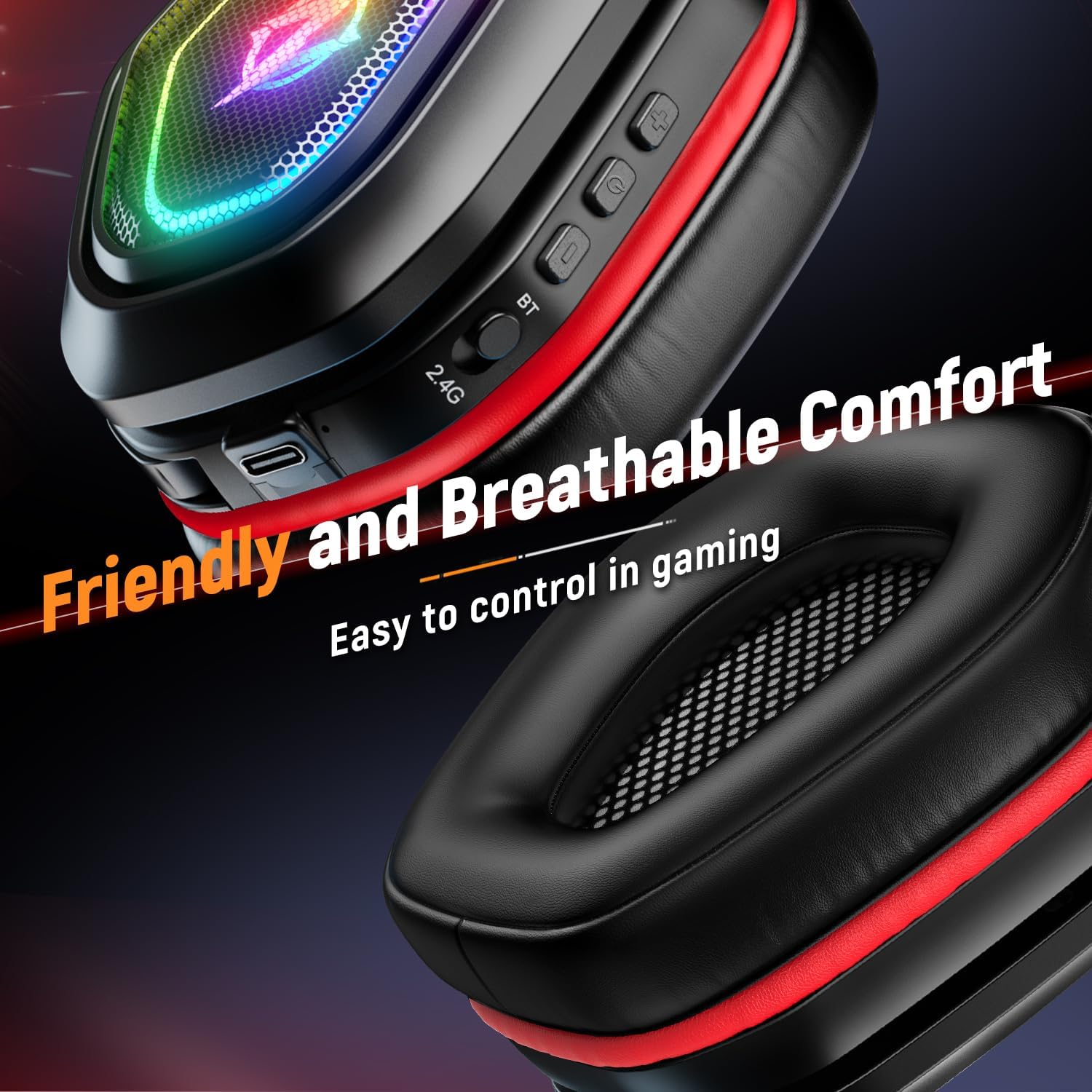
The earcups are designed for friendly and breathable comfort, allowing for extended gaming sessions. Conveniently located controls on the earcup provide easy access to functions during gameplay.
3. Persediaan
3.1. 2.4GHz Wireless Mode (Recommended for PC, PS5, PS4, Switch)
- Identify the appropriate wireless dongle (USB for PC/PS5/PS4, Type-C for Switch/some laptops/phones).
- Plug the wireless dongle into an available USB or Type-C port on your device.
- Power on the headset by pressing and holding the Power button until the LED indicator lights up.
- The headset will automatically pair with the dongle. The LED indicator will show a steady light once connected.
- On your device, ensure the Ozeino headset is selected as the default audio output and input device in your sound settings.
3.2. Bluetooth Mode (For PC, Laptops, Mac, Mobile Phones)
- Pastikan alat dengar dimatikan.
- Press and hold the Bluetooth (BT) button on the headset until the LED indicator flashes rapidly, indicating pairing mode.
- Pada peranti anda, pergi ke tetapan Bluetooth dan cari peranti yang tersedia.
- Select "Ozeino OW810" from the list to connect. The LED indicator will show a steady light once connected.
3.3. Wired Mode (For PC, Laptops, PS5, PS4)
- Connect one end of the included 3.5mm audio cable to the headset's audio jack.
- Connect the other end of the 3.5mm audio cable to the audio output port on your device.
- The headset will function as a wired headset. Note: Microphone functionality may vary depending on the device's 3.5mm port configuration.

This headset offers multi-platform compatibility, allowing flexible switching between various systems including PC, laptops, Mac, Nintendo Switch, PlayStation 5, PlayStation 4, and mobile phones. Note: Not all modes are compatible with Xbox.
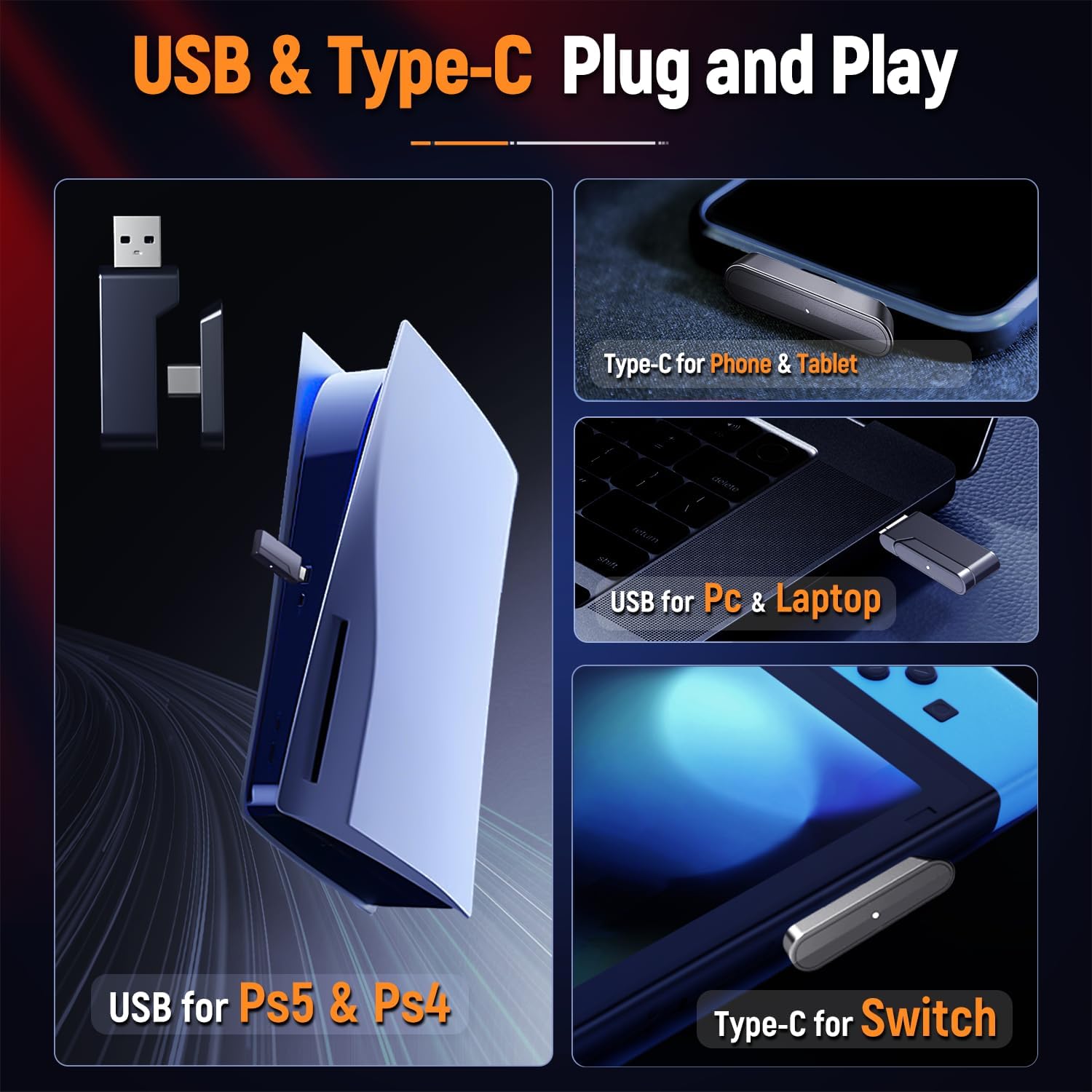
The headset supports plug-and-play connectivity with both USB and Type-C dongles. The USB dongle is ideal for PS5, PS4, PC, and laptops, while the Type-C dongle is suitable for phones, tablets, and Nintendo Switch.
4. Arahan Operasi
4.1. Kawalan Ke Atasview
- Butang Kuasa: Press and hold to power on/off. Short press to play/pause audio (in Bluetooth mode).
- Roda Kelantangan: Roll up to increase volume, roll down to decrease volume.
- mikrofon: Flip down to activate, flip up to mute.
- Butang Lampu LED: Short press to cycle through LED lighting modes or turn off LEDs.
- Bluetooth (BT) Button: Tekan dan tahan untuk memasuki mod berpasangan Bluetooth.
4.2. Penggunaan Mikrofon
The integrated flip microphone is designed for clear voice communication. To activate the microphone, simply flip it down into the speaking position. To mute the microphone, flip it back up. An audible cue or LED indicator on the microphone may confirm its status.
4.3. Mengecas Alat Dengar
Connect the included USB charging cable to the headset's charging port and the other end to a USB power source (e.g., computer USB port, wall adapter). The LED indicator will show charging status and turn off or change color when fully charged.

Detailed battery life information: A 10-minute charge provides 90 minutes of use with lights on or 120 minutes with lights off. A full 3-hour charge offers 20+ hours with lights on or 40+ hours with lights off. Low power reminders occur after 10-15 minutes of remaining power.
5. Penyelenggaraan
5.1. Pembersihan
- Gunakan kain lembut dan kering untuk mengelap permukaan alat dengar.
- Untuk penutup telinga, lap perlahan-lahan dengan sedikitamp kain dan biarkan kering sepenuhnya sebelum digunakan.
- Jangan gunakan bahan kimia, pelarut atau pembersih yang kasar.
5.2. Penyimpanan
- Simpan alat dengar di tempat yang sejuk dan kering jauh dari cahaya matahari langsung dan suhu yang melampau.
- Avoid placing heavy objects on the headset to prevent damage.
5.3. Penjagaan Bateri
- Untuk memanjangkan hayat bateri, elakkan daripada kerap mencas sepenuhnya alat dengar.
- Charge the headset regularly, even if not in use for extended periods (e.g., once every 3 months).
6. Penyelesaian masalah
| Masalah | Kemungkinan Punca | Penyelesaian |
|---|---|---|
| Tiada bunyi dari set kepala | Headset not powered on; Not paired/connected; Volume too low; Incorrect audio output selected. | Ensure headset is on and charged. Re-pair with dongle/Bluetooth. Increase headset and device volume. Select Ozeino headset as default audio output. |
| Mikrofon tidak berfungsi | Microphone muted (flipped up); Incorrect audio input selected; Driver issue. | Flip microphone down. Ensure Ozeino headset is selected as default audio input. Check device privacy settings for microphone access. Restart device. |
| Connectivity issues (dropping out) | Too far from dongle/device; Interference; Low battery. | Move closer to the dongle/device. Avoid obstacles. Charge the headset. Try a different USB port. |
| Alat dengar tidak dicas | Faulty cable/port; Power source issue. | Try a different USB cable or charging port. Ensure the power source is active. |
7. Spesifikasi
| Ciri | Perincian |
|---|---|
| Nama Model | OW810 |
| Jenama | Ozeino |
| warna | merah |
| Teknologi Ketersambungan | Tanpa Wayar (2.4GHz, Bluetooth) |
| Teknologi Komunikasi Tanpa Wayar | Bluetooth |
| Peranti Serasi | Gaming Consoles (PS5, PS4, Switch), Desktops, Laptops, Tablets, Mobile Phones |
| Bentuk alat dengar | Atas Telinga |
| Faktor Bentuk | Atas Telinga |
| Jenis Pemacu Audio | Pemandu Dinamik |
| Julat Kekerapan | 20 Hz - 20,000 Hz |
| Kaedah Kawalan | Remote (on-earcup controls) |
| Berat Barang | 0.49 Kilogram (1.08 paun) |
| Hayat Bateri | Up to 40 hours (lights off) |
| Pengeluar | Ozeino |
| Dimensi Pakej | 8.54 x 7.6 x 3.43 inci |
8. Waranti dan Sokongan
Specific warranty details for the Ozeino Wireless Gaming Headset (Model OW810) are not provided within this manual. For information regarding warranty coverage, technical support, or service inquiries, please refer to the product packaging, the official Ozeino website, or contact the retailer from whom you purchased the product.
Sila simpan bukti pembelian anda untuk sebarang tuntutan waranti.


