1. Pengenalan
This manual provides essential instructions for the safe and efficient operation of your iBELL SL-50B Digital Electronic Safe Locker. Please read this manual thoroughly before installation and use, and retain it for future reference. This safe is designed to protect your valuables with a robust digital locking system and emergency key access.
2. Maklumat Keselamatan
- Do not store the emergency keys inside the safe. Keep them in a secure, separate location.
- Ensure the safe is installed on a stable surface or securely mounted to prevent tipping.
- Elakkan mendedahkan peti besi kepada suhu yang melampau atau kelembapan yang tinggi.
- Do not attempt to force the safe open if the digital lock malfunctions. Use the emergency key.
- Keep batteries out of reach of children. Replace all batteries simultaneously with new ones of the same type.
3. Kandungan Pakej
Sahkan bahawa semua item terdapat dalam pakej:
- iBELL SL-50B Digital Electronic Safe Locker
- Emergency Keys (2 pcs)
- Expansion Bolts (for mounting)
- Manual Arahan
4. Produk Lebihview
Familiarize yourself with the components of your iBELL SL-50B safe.

Rajah 4.1: Depan view of the iBELL SL-50B Digital Electronic Safe Locker, showing the digital keypad, rotary knob, and emergency key access point.

Rajah 4.2: Dalaman view of the safe, illustrating the internal storage capacity and the removable shelf for organizing items.
- Pad Kekunci Digital: For entering your personal access code.
- Tombol Putar: Used to open the safe door after entering the correct code or using the emergency key.
- Emergency Keyhole: Hidden access point for manual override.
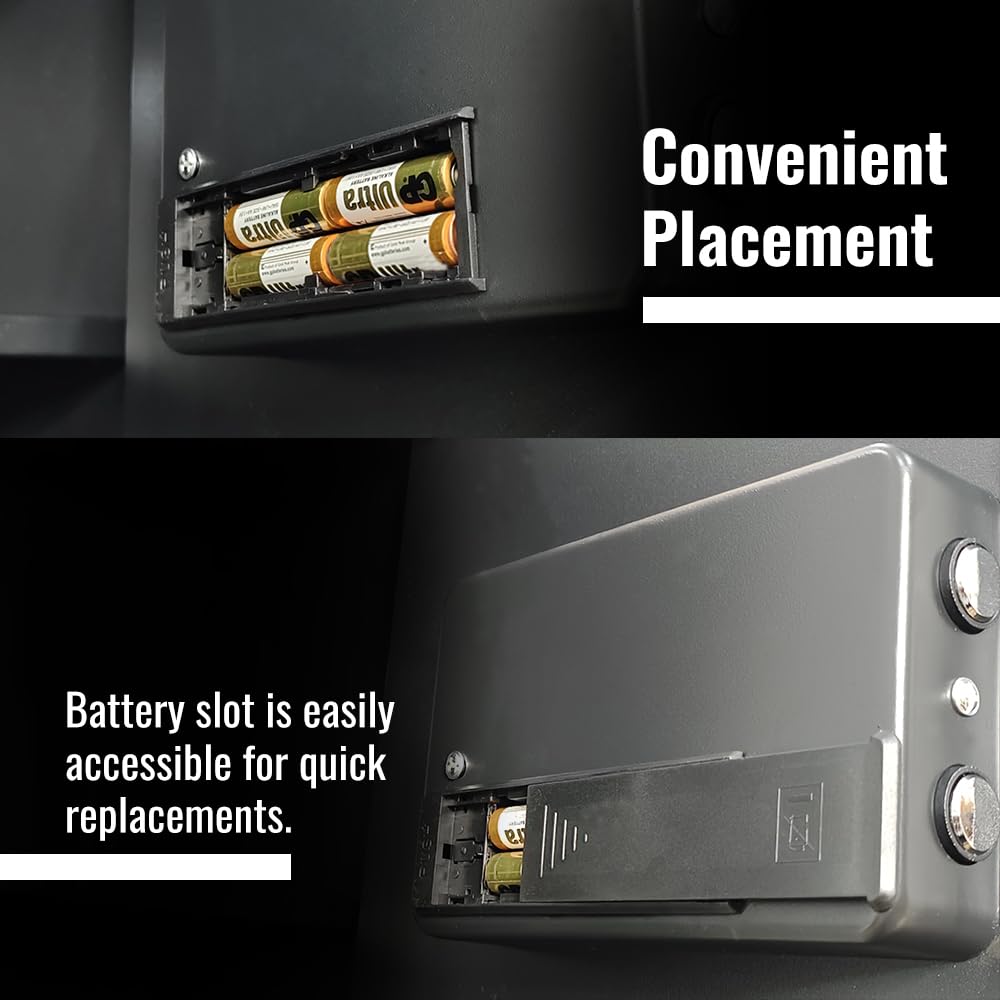
- Petak Bateri: Located inside the door for power supply.
- Lampu Dalaman LED: Illuminates the safe's interior when opened.
- Bolt Pengunci: Secure the door when closed.
5. Persediaan
5.1 Membongkar
Carefully remove the safe from its packaging. Inspect for any damage. Keep all packaging materials until you are satisfied with the product.
5.2 Pemasangan Bateri
The safe requires 4 AA batteries (not included) for the digital keypad to function. The battery compartment is located inside the safe door.
- Buka peti besi menggunakan kunci kecemasan (rujuk Bahagian 6.3 jika perlu).
- Locate the battery compartment cover on the inside of the door.
- Slide the cover open and insert 4 new AA batteries, ensuring correct polarity (+/-).
- Tutup penutup petak bateri.
- Peti besi akan mengeluarkan bunyi bip, menunjukkan pemasangan bateri yang berjaya.

Figure 5.1: Battery compartment for power supply, easily accessible for replacement.
5.3 Memasang Peti Keselamatan
For enhanced security, it is recommended to mount the safe to a wall or floor using the provided expansion bolts.
- Choose a suitable location, ensuring a solid mounting surface.
- Open the safe door and locate the pre-drilled mounting holes on the back or bottom panel.
- Mark the drilling points on the wall or floor through the holes.
- Gerudi lubang pandu menggunakan mata gerudi yang sesuai untuk permukaan pelekap anda.
- Sejajarkan peti besi dengan lubang yang digerudi dan masukkan bolt pengembangan.
- Ketatkan bolt dengan kukuh untuk memasang peti besi di tempatnya.
6. Arahan Operasi
6.1 Initial Code Setup
The safe comes with a factory default code (usually "159"). You must change this to your personal code immediately after battery installation.
- With the safe door open, press the red reset button located on the inside of the door, near the hinge. The yellow indicator light on the keypad will illuminate.
- Within 5 seconds, enter your desired 3-8 digit personal code on the keypad.
- Tekan butang "#" untuk mengesahkan. Peti besi akan berbunyi bip dua kali dan lampu kuning akan padam, menunjukkan kod baharu telah ditetapkan.
- Test the new code: With the door still open, enter your new code, then press "#". Turn the rotary knob clockwise to ensure the locking bolts retract.
6.2 Opening the Safe with Digital Code
- Enter your 3-8 digit personal code on the keypad.
- Press the "#" button. The green indicator light will illuminate, and you will hear a beep.
- Within 5 seconds, turn the rotary knob clockwise to open the door.
- If an incorrect code is entered, the red indicator light will flash, and the safe will beep. After three incorrect attempts, the safe will lock for 20 seconds.

Figure 6.1: User interacting with the digital keypad for secure access.
6.3 Opening the Safe with Emergency Key
Use the emergency key for initial setup, if you forget your code, or if the batteries are depleted.
- Locate the emergency keyhole, usually hidden behind a small cover or the iBELL logo on the keypad panel.
- Masukkan kunci kecemasan dan putarkannya lawan arah jam.
- While holding the key turned, rotate the main rotary knob clockwise to open the safe door.
- Remove the key once the door is open.

Figure 6.2: Dual access system, illustrating both digital code entry and emergency key override.
6.4 Menukar Kod Pengguna
You can change your personal code at any time while the door is open.
- Buka pintu selamat.
- Press the red reset button on the inside of the door. The yellow indicator light will turn on.
- Enter your new 3-8 digit code.
- Press the "#" button to confirm. The safe will beep twice, and the yellow light will turn off.
- Test the new code before closing the door.
6.5 Amaran Bateri Rendah
When the batteries are low, the red indicator light will flash, and the safe will beep continuously after entering the correct code. Replace the batteries promptly to ensure continued operation.
6.6 Lampu Dalaman LED
The safe is equipped with an internal white LED light that automatically illuminates when the door is opened, providing clear visibility of the contents.
7. Penyelenggaraan
7.1 Pembersihan
Lap bahagian luar peti besi dengan lembut, damp kain. Jangan gunakan pembersih atau pelarut yang melelas, kerana ia boleh merosakkan kemasan.
7.2 Penggantian Bateri
Replace all 4 AA batteries when the low battery warning appears or approximately once a year, even if not frequently used. Always use new batteries of the same type. Refer to Section 5.2 for detailed battery installation steps.
8. Penyelesaian masalah
| Masalah | Kemungkinan Punca | Penyelesaian |
|---|---|---|
| Peti keselamatan tidak dibuka dengan kod digital. | Incorrect code entered. Bateri hampir habis atau mati. Keypad malfunction. | Re-enter the correct code carefully. Gantikan bateri (Bahagian 5.2). Use the emergency key (Section 6.3). |
| Papan kekunci tidak bertindak balas. | Bateri mati. Sambungan bateri longgar. | Gantikan bateri (Bahagian 5.2). Check battery polarity and ensure they are seated correctly. |
| Safe beeps continuously after opening. | Amaran bateri lemah. | Gantikan bateri dengan segera (Bahagian 5.2). |
| Emergency key does not turn. | Key not fully inserted. Obstruction in keyhole. | Pastikan kunci dimasukkan sepenuhnya dan sejajar. Do not force the key. Contact customer support if issue persists. |
9. Spesifikasi
| Ciri | Perincian |
|---|---|
| Jenama | iBELL |
| Model | SL-50B |
| Kapasiti | 50 Liter |
| Jenis Kunci | Digital Electronic with Emergency Key |
| bahan | High-Strength Metal |
| Dimensi Produk (H x W x D) | 50 cm x 35 cm x 30 cm |
| Berat Barang | 13.72 Kilogram |
| Sumber Kuasa | 4 x Bateri AA (tidak termasuk) |
| Ciri Khas | Removable Shelf, LED Interior Light, External Battery Support |
| Jenis Pemasangan | Freestanding, Tabletop (Wall/Floor mountable) |

Figure 9.1: Key dimensions of the iBELL SL-50B safe.
Gambar 9.2: Lebihview of key specifications including weight, LED light, and volume.
10. Waranti dan Sokongan
The iBELL SL-50B Digital Electronic Safe Locker comes with a 12-month warranty from the date of purchase. This warranty covers manufacturing defects and material faults under normal use.
For warranty claims, technical support, or any inquiries, please contact iBELL customer service. Keep your purchase receipt as proof of purchase.
Maklumat Hubungan: Refer to the iBELL official website or your purchase documentation for the most up-to-date contact details.


