1. Pengenalan
This user manual provides comprehensive instructions for the safe and effective operation of your DEPSTECH DS320 Dual Lens Borescope and DS260 Endoscope Camera. Please read this manual thoroughly before use and retain it for future reference. This bundle offers versatile inspection capabilities for various applications, from home maintenance to professional diagnostics.
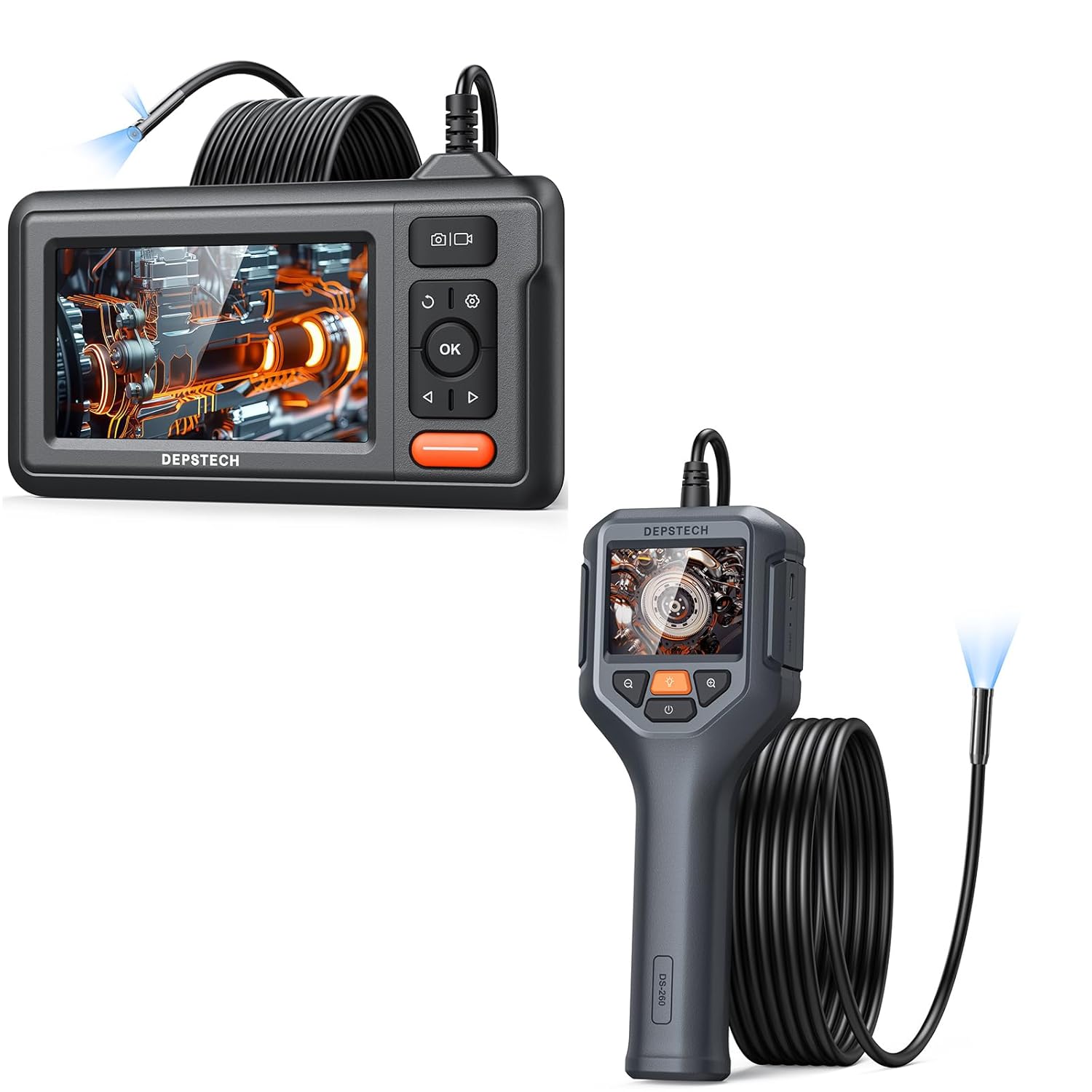
Figure 1.1: The DEPSTECH DS320 Dual Lens Borescope (top) and DS260 Endoscope Camera (bottom) included in the bundle.
2. Kandungan Pakej
Sila semak kandungan bungkusan semasa membuka kotak untuk memastikan semua barang ada dan tidak rosak:
- 1 x DEPSTECH DS320 Dual Lens Borescope Unit
- 1 x DEPSTECH DS260 Endoscope Camera Unit
- 1 x USB Charging Cable (for DS320)
- 1 x USB Charging Cable (for DS260)
- 1 x Manual Pengguna
- Accessories (e.g., hook, magnet, side mirror - specific to model, check individual product packaging)
3. Produk Lebihview
3.1 DEPSTECH DS320 Dual Lens Borescope

Rajah 3.1: Depan view of the DEPSTECH DS320 Borescope, showing the 4.3-inch IPS display and control buttons.
- Paparan IPS 4.3-inci: High-definition screen for clear viewing.
- Dual Lens Probe: Features both a front-facing and a side-facing camera for comprehensive inspection.
- Lampu LED boleh laras: 7 lights for illumination in dark environments.
- Butang Kawalan: Power, OK, Navigation (Up/Down/Left/Right), Photo/Video capture, Settings, Light adjustment.
- Slot Kad Mikro SD: For storing captured images and videos.

Figure 3.2: Illustration of the DS320's dual lens system, showing both the front camera (A) and side camera (B) with their respective focal ranges.
3.2 DEPSTECH DS260 Endoscope Camera

Figure 3.3: The DEPSTECH DS260 Endoscope Camera, featuring an ergonomic handle and integrated display.
- Skrin IPS 2.4 inci: Compact display integrated into the handheld unit.
- Pemegang ergonomik: Direka untuk cengkaman yang selesa dan mudah digunakan.
- Single Lens Probe: Standard forward-viewdalam kamera.
- Lampu LED boleh laras: For optimal illumination.
- Operasi Langsung: No Wi-Fi or app required.

Rajah 3.4: Jarak dekat view of the DS260's vivid 2.4-inch IPS screen, highlighting its display quality.
4. Persediaan
4.1 Mengecas Peranti
Both the DS320 and DS260 units come with a built-in rechargeable battery. Before first use, fully charge the device.
- Connect the provided USB charging cable to the charging port on the device (DS320: side, DS260: bottom).
- Connect the other end of the USB cable to a standard 5V/1A USB power adapter (not included) or a computer USB port.
- Lampu penunjuk pengecasan akan menyala semasa pengecasan dan padam atau bertukar warna apabila dicas sepenuhnya.
4.2 Inserting a Micro SD Card (DS320 Only)
The DS320 requires a Micro SD card (not included, up to 32GB recommended) to save photos and videos. The DS260 does not support external storage.
- Locate the Micro SD card slot on the side of the DS320 unit.
- Masukkan kad Micro SD dengan lembut dengan kenalan emas menghadap ke bawah sehingga ia terkunci di tempatnya.
- Untuk mengeluarkan, tolak kad masuk sedikit sehingga ia keluar.
5. Arahan Operasi
5.1 Menghidupkan/Mematikan
- Untuk Menghidupkan: Tekan dan tahan butang Kuasa (biasanya ditanda dengan ⚡ or ⏺ symbol) for 2-3 seconds until the screen illuminates.
- Untuk Mematikan: Press and hold the Power button again for 2-3 seconds until the screen turns off.

Figure 5.1: The DS320 Borescope being held, demonstrating its readiness for immediate use without complex setup.

Figure 5.2: The DS260 Endoscope Camera being used to inspect a sink drain, highlighting its "Instant Explore" capability.
5.2 Melaraskan Kecerahan LED
Both models feature adjustable LED lights on the camera probe to illuminate dark inspection areas.
- Press the Light adjustment button (often marked with a light bulb icon 💡) repeatedly to cycle through different brightness levels or to turn the lights off.
5.3 Switching Lenses (DS320 Only)
The DS320 allows you to switch between the front and side cameras.
- Semasa dalam live view, press the Lens Switch button (often marked with a camera icon with arrows 📷) to toggle between the front camera, side camera, or both (if supported by the specific model firmware).
5.4 Menangkap Imej dan Video
- Untuk mengambil gambar: Secara langsung view, press the Photo/Video button (often marked with a camera icon 📷 or shutter icon) once. The screen may briefly flash to indicate a photo has been taken.
- Untuk merakam video: Secara langsung view, press and hold the Photo/Video button for 2-3 seconds. A recording indicator (e.g., red dot, timer) will appear on the screen. Press and hold the button again to stop recording.
- Nota: Only the DS320 saves media to an SD card. The DS260 does not have recording capabilities.
5.5 Playback Mode (DS320 Only)
Review captured images and videos on the DS320.
- Dari langsung view, press the Mode button (often marked with a play icon ► or menu icon) to enter playback mode.
- Use the Up/Down navigation buttons to browse through your files.
- Tekan butang OK untuk view foto atau mainkan video.
- Press the Mode button again to exit playback mode and return to live view.
5.6 Zoom Function (DS260 Only)
The DS260 features a digital zoom function to magnify the live view.
- Press the Zoom button (often marked with a magnifying glass icon 🔍 or +/-) to cycle through available zoom levels (e.g., 1x, 1.5x, 2x).

Figure 5.3: Visual representation of the DS260's zoom capabilities, showing 1x, 1.5x, and 2x magnification levels for detailed inspection.
6. Penyelenggaraan
- Membersihkan Probe: After each use, especially in dirty or wet environments, gently wipe the camera probe and lens with a soft, damp cloth. For stubborn grime, a small amount of rubbing alcohol can be used. Ensure the probe is dry before storage.
- Membersihkan Paparan: Gunakan kain lembut dan tidak berbulu untuk membersihkan skrin paparan. Elakkan bahan yang melelas atau bahan kimia yang keras.
- Storan: Store the devices in a cool, dry place, away from direct sunlight and extreme temperatures. Keep the probe cable neatly coiled to prevent kinks or damage.
- Penjagaan Bateri: For optimal battery life, avoid fully discharging the battery frequently. If storing for extended periods, charge the battery to about 50% every few months.
7. Penyelesaian masalah
| Masalah | Kemungkinan Punca | Penyelesaian |
|---|---|---|
| Peranti tidak dihidupkan. | Bateri lemah. | Cas peranti sepenuhnya. |
| Tiada imej pada skrin. | Probe not connected properly (DS320). Camera lens is dirty or blocked. | Pastikan prob disambungkan dengan selamat. Bersihkan lensa kamera. |
| Imej kabur atau tidak jelas. | Lensa kotor. Object is outside focal range. | Bersihkan lensa kamera. Laraskan jarak antara kamera dan objek. |
| Cannot save photos/videos (DS320). | Tiada kad Micro SD dimasukkan atau kad penuh/rosak. | Insert a Micro SD card. Format the card (via device settings) or replace it. |
| Lampu LED tidak berfungsi. | Lights are turned off or at lowest setting. | Press the light adjustment button to increase brightness. |
8. Spesifikasi
8.1 DEPSTECH DS320 Dual Lens Borescope
- paparan: 4.3-inch Full Color IPS Screen
- Resolusi: 1080P (for recording)
- kamera: Kanta Dwi (Depan & Sisi)
- Lampu LED: 7 LED boleh laras
- Storan: Kad SD Mikro (sehingga 32GB, tidak disertakan)
- Bateri: Lithium-ion yang boleh dicas semula

Figure 8.1: The large 4.3-inch IPS display of the DS320, offering HD resolution and a wide 178-degree viewsudut untuk visual yang jelas.
8.2 DEPSTECH DS260 Endoscope Camera
- paparan: Skrin IPS 2.4 inci
- Resolusi: 1080P (for live view)
- kamera: Kanta Tunggal
- Lampu LED: LED boleh laras
- Storan: Tidak disokong
- Bateri: Lithium-ion yang boleh dicas semula
- Zum: Digital Zoom (1x, 1.5x, 2x)
9. Maklumat Keselamatan
Sila patuhi langkah berjaga-jaga keselamatan berikut:
- Jangan gunakan peranti ini dalam persekitaran dengan gas mudah terbakar atau letupan.
- Do not immerse the main unit in water. The camera probe is waterproof, but the main unit is not.
- Jauhkan peranti daripada capaian kanak-kanak.
- Jangan cuba membuka atau mengubah suai peranti. Ini akan membatalkan jaminan dan boleh menyebabkan kerosakan.
- Gunakan hanya kabel pengecas yang disediakan.
- Elakkan pendedahan mata secara langsung kepada lampu LED.
- If the device malfunctions, refer to the troubleshooting section or contact customer support.
10. Waranti dan Sokongan
DEPSTECH products typically come with a standard manufacturer's warranty. Please refer to the warranty card included in your package or visit the official DEPSTECH webtapak untuk terma dan syarat jaminan terperinci.
For technical support, troubleshooting assistance, or warranty claims, please contact DEPSTECH customer service through their official webtapak atau maklumat hubungan yang diberikan dalam pembungkusan produk anda.
Webtapak: www.depstech.com


