1. Produk Lebihview
The ZIHNIC S12A Clip-on Earbuds are advanced open-ear wireless headphones designed for comfort and high-quality audio. Featuring Bluetooth 5.4 connectivity, a smart LED touch screen for intuitive control, and a non-in-ear design, these earbuds are suitable for extended wear during various activities including workouts, commuting, and daily use. They offer superior audio performance with noise cancellation and extended battery life.

Image: ZIHNIC S12A Clip-on Earbuds shown in their charging case, highlighting the sleek design and integrated display.
2. Panduan Persediaan
2.1. Pengecasan Awal
Before first use, fully charge your ZIHNIC S12A earbuds and their charging case. Connect the provided charging cable to the case and a compatible USB power source. The LED screen on the case will indicate the charging status. A full charge takes approximately 1.5 hours.

Image: Visual representation of the earbuds' battery life, showing 1.5 hours for quick charge, 9 hours of play time, and 36 hours of standby in the case.
2.2. Berpasangan Bluetooth
- Buka bekas pengecas. Fon telinga akan memasuki mod berpasangan secara automatik.
- Pada peranti anda (telefon pintar, tablet, dll.), dayakan Bluetooth.
- Cari untuk available Bluetooth devices and select "ZIHNIC S12A" from the list.
- Once connected, a voice prompt will confirm successful pairing. The earbuds will automatically reconnect to the last paired device when taken out of the case.
3. Arahan Operasi
3.1. Memakai Earbud
The ZIHNIC S12A earbuds feature an open-ear clip-on design for comfortable and secure fit without entering the ear canal. Gently clip the earbuds onto your ear, ensuring the audio output is positioned correctly for optimal sound. This design allows for environmental awareness while enjoying audio.

Image: A person demonstrating the comfortable and secure fit of the ZIHNIC S12A Open-Ear Clip-on Earbuds.
3.2. Smart LED Touch Screen Controls
The charging case features an intuitive LED touch screen for easy control and customization. Double-tap the screen to unlock and access various functions. These functions include:
- Kawalan Main Semula: Main/jeda, langkau trek.
- Pelarasan Kelantangan: Tambah atau kurangkan volum.
- Tetapan Penyamaan: Sesuaikan bunyi profiles (cth., biasa, rangsangan bes).
- Kunci skrin: Elakkan sentuhan tidak sengaja.
- Tukar Bahasa: Tukar bahasa paparan.
- Tahap Cahaya: Laraskan kecerahan skrin.
- Lost Earphone Finder: Locate misplaced earbuds (see Troubleshooting section).
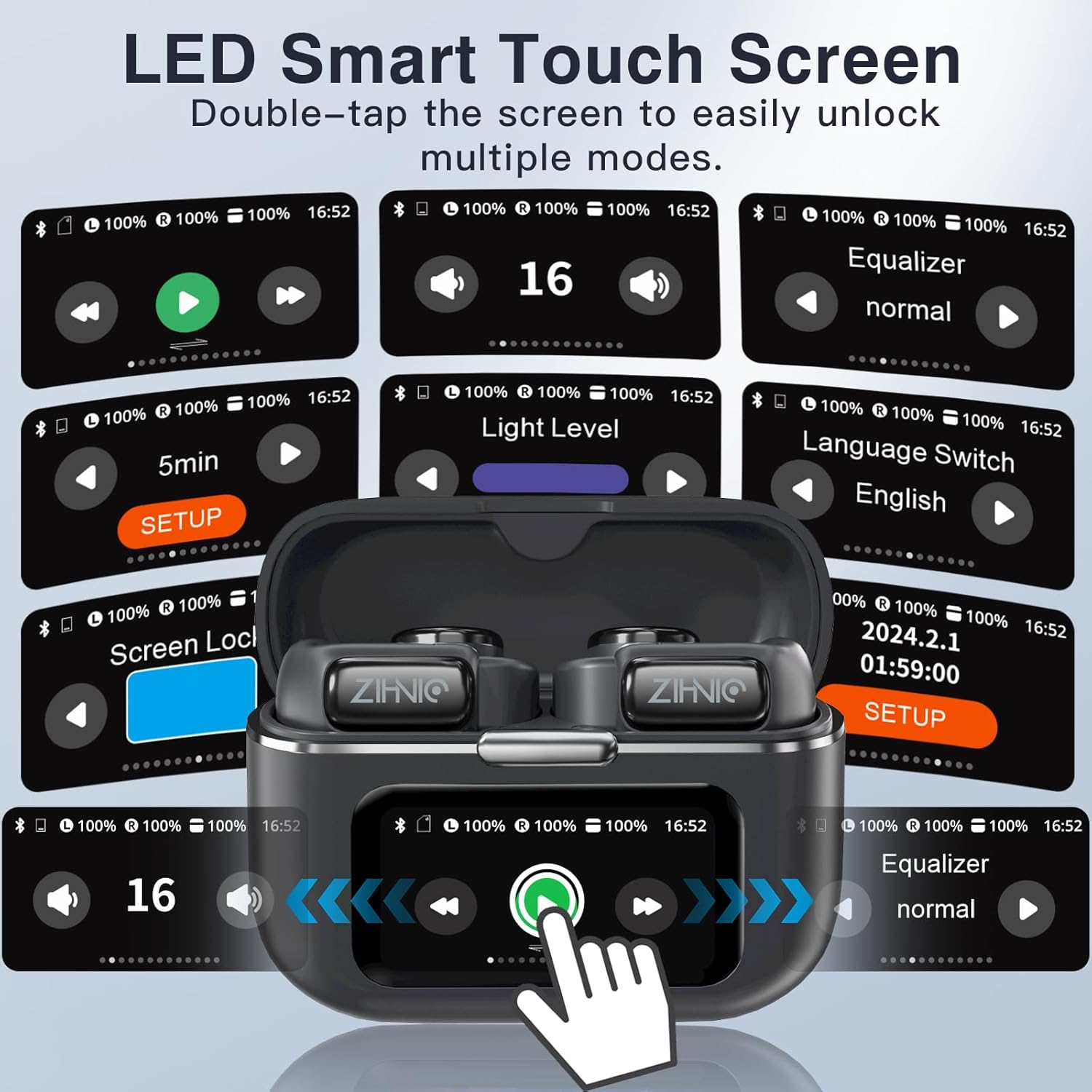
Image: A collage of the ZIHNIC S12A's LED Smart Touch Screen interface, showing various control options like playback, volume, equalizer, screen lock, and language settings.
3.3. Audio Playback and Storage
The earbuds deliver superior HiFi stereo sound with optimized amplitude and sensitivity, ensuring crystal-clear audio and dynamic sound reproduction. They are designed to minimize sound leakage for a private listening experience. The earbuds also feature 4GB of internal storage, allowing you to store up to 1000 songs directly on the device for offline listening.

Image: An exploded diagram illustrating the components responsible for HiFi Stereo Sound within the ZIHNIC S12A earbuds, emphasizing immersive audio quality.

Image: A graphic illustrating the 4GB internal storage capacity of the ZIHNIC S12A earbuds, capable of holding up to 1000 songs for music on the go.
3.4. Pengurusan Panggilan
The built-in microphone with advanced noise-cancellation technology ensures clear, hands-free communication. To answer or end calls, use the touch controls on the earbuds as indicated in the Smart LED Touch Screen Controls section. For optimal call quality, ensure the microphone is not obstructed.
4. Penyelenggaraan dan Penjagaan
- Pembersihan: Lapkan fon telinga dan bekas pengecas dengan kerap menggunakan kain lembut, kering dan tidak berbulu. Elakkan menggunakan bahan yang melelas atau bahan kimia yang keras.
- Tahan Air: The earbuds are waterproof, making them suitable for workouts and light rain. However, avoid submerging them in water or exposing them to high-pressure water jets. Dry them thoroughly if they get wet.
- Storan: Apabila tidak digunakan, simpan fon telinga dalam bekas pengecasnya untuk melindunginya daripada habuk dan kerosakan. Simpan di tempat yang sejuk dan kering jauh dari suhu yang melampau.
- Penjagaan Bateri: To prolong battery life, avoid fully discharging the earbuds and case frequently. Charge them regularly, even if not in daily use.
5. Penyelesaian masalah
If you encounter issues with your ZIHNIC S12A earbuds, refer to the common problems and solutions below:
| Masalah | Penyelesaian yang Mungkin |
|---|---|
| Fon telinga tidak berpasangan/bersambung. |
|
| Tiada bunyi atau kelantangan rendah. |
|
| Microphone issues (e.g., screeching sounds for others). |
|
| Internal music storage not working. |
|
| Lost one earbud. |
|

Image: The ZIHNIC S12A charging case display showing the "Find My Earphone" feature, which assists in locating misplaced earbuds.
6. Spesifikasi
| Ciri | Perincian |
|---|---|
| Nama Model | S12A |
| Jenama | ZIHNIC |
| Teknologi Ketersambungan | Wayarles (Bluetooth 5.4) |
| Penempatan Telinga | Telinga Terbuka (Klip-on) |
| Kawalan Bunyi | Pembatalan Bunyi Aktif |
| Kaedah Kawalan | Touch (Smart LED Screen) |
| Hayat Bateri (Main Semula) | Sehingga 9 jam (earbud), 36 jam (dengan bekas pengecas) |
| Masa Mengecas | lebih kurang 1.5 jam |
| Storan Dalaman | 4GB (sehingga 1000 lagu) |
| Berat Barang | 50 Gram (1.76 auns) |
| Julat Kekerapan | 20Hz - 20,000Hz |
| Impedans | 16 Ohm |
| Komponen yang Disertakan | Kabel, Manual Pengguna |
7. Waranti dan Sokongan
ZIHNIC S12A Clip-on Earbuds come with a Waranti 12 bulan from the date of purchase, covering manufacturing defects. For any product inquiries, technical support, or warranty claims, please contact ZIHNIC customer support through the official channels provided at the time of purchase or visit the ZIHNIC brand store on Amazon.


