1. Produk Lebihview
The Daewoo Thunder Plus 2x10 speaker is a powerful portable audio system designed for high-quality sound reproduction. It features an integrated subwoofer for enhanced bass, a rechargeable battery for portability, and dynamic LED lights to create an engaging atmosphere. This speaker supports True Wireless Stereo (TWS) for connecting two units wirelessly, Bluetooth connectivity for streaming, and multiple input options including USB and auxiliary.
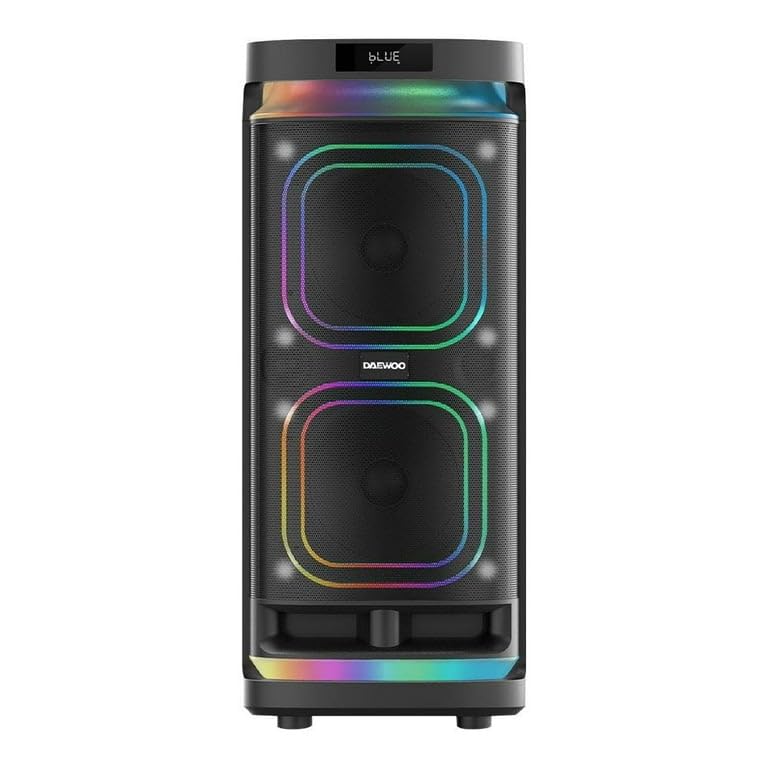
Image 1.1: Daewoo Thunder Plus 2x10 Portable Speaker.
Ciri-ciri Utama:
- Powerful Sound System: Equipped with dual 10-inch speakers and an integrated subwoofer for deep, immersive audio.
- Stereo Tanpa Wayar Sejati (TWS): Allows wireless pairing of two Thunder Plus speakers for a synchronized stereo experience.
- Bateri boleh dicas semula: Provides extended playback time, enabling use without a constant power connection.
- Lampu LED Bersepadu: Dynamic lighting effects enhance the listening experience and create a vibrant ambiance.
- Pelbagai Pilihan Kesambungan: Includes Bluetooth, USB, TF Card, Auxiliary (Line-in), and Microphone inputs.
- Fungsi Karaoke: Features microphone inputs and volume controls for karaoke sessions.
2. Panduan Persediaan
2.1 Membongkar
Carefully remove the speaker and all accessories from the packaging. Ensure all components are present:
- Daewoo Thunder Plus 2x10 Speaker
- Penyesuai Kuasa
- Microphone (if included with your model)
- Alat Kawalan Jauh
- Manual Pengguna
2.2 Mengecas Bateri
Before first use, fully charge the speaker's internal rechargeable battery. Connect the power adapter to the 'DC IN 15V' port on the rear panel and plug it into a standard electrical outlet. The charging indicator light will illuminate. Charging time may vary.
2.3 Kuasa Awal Hidup
Locate the POWER switch on the control panel (usually on the top or rear). Flip the switch to the 'ON' position. The display will light up, and the speaker will enter its default mode, typically Bluetooth.
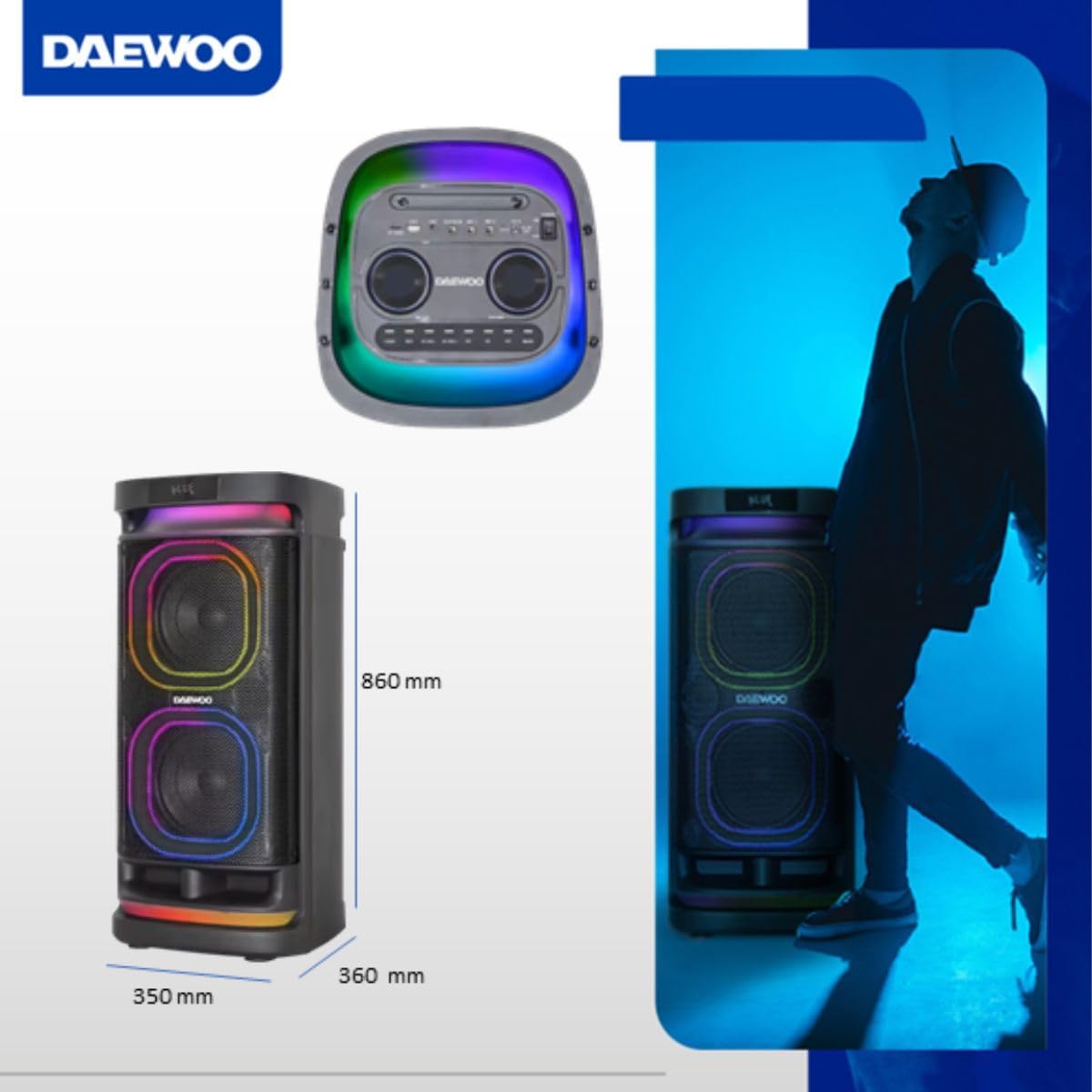
Image 2.1: Speaker dimensions for placement reference.
3. Arahan Operasi
3.1 Panel Kawalan Selesaiview
Familiarize yourself with the speaker's control panel, typically located on the top of the unit. It includes various knobs, buttons, and input ports for controlling playback, volume, and other functions.
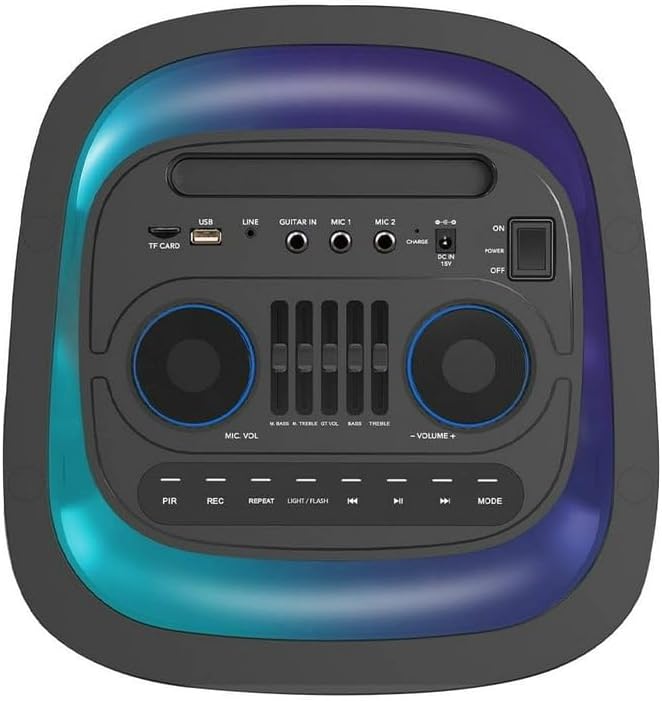
Imej 3.1: Terperinci view daripada panel kawalan.
3.2 Sambungan Bluetooth
- Power on the speaker. It will automatically enter Bluetooth mode, indicated by 'BLUE' on the display and a blinking Bluetooth icon.
- Dayakan Bluetooth pada peranti mudah alih anda (telefon pintar, tablet, dll.).
- Cari untuk available Bluetooth devices and select 'DAEWOO Thunder Plus' from the list.
- Once connected, the speaker will emit a confirmation sound, and 'BLUE' will stop blinking. You can now stream audio from your device.
3.3 Penggandingan Stereo Tanpa Wayar Sebenar (TWS)
To pair two Daewoo Thunder Plus speakers for TWS stereo sound:
- Pastikan kedua-dua pembesar suara dihidupkan dan dalam mod Bluetooth, tetapi tidak disambungkan ke mana-mana peranti.
- On one speaker (this will be the master unit), press and hold the 'TWS' button. The speaker will emit a pairing tone.
- The two speakers will automatically search for and connect to each other. A confirmation tone will sound once paired.
- Now, connect your mobile device to the master speaker via Bluetooth as described in section 3.2. Audio will play in stereo across both speakers.
3.4 Using the Microphone (Karaoke)
Connect a wired microphone to the 'MIC 1' or 'MIC 2' input on the control panel. Adjust the 'MIC VOLUME' knob to control the microphone's output level. Use the 'ECHO' knob to add reverberation effects for karaoke. The 'MIC BASS' and 'MIC TREBLE' controls allow for further sound customization.
Video 3.1: Demonstration of speaker controls and karaoke functionality.
Video 3.2: Bekasample of using the speaker for karaoke in a festive setting.
3.5 Auxiliary and USB Playback
- Input Bantu: Connect an external audio device (e.g., MP3 player, laptop) to the 'LINE IN' port using a 3.5mm audio cable. Press the 'MODE' button to select 'LINE' input.
- Main balik Kad USB/TF: Insert a USB flash drive or TF (microSD) card into the respective port. The speaker will automatically detect and begin playing compatible audio files. Use the playback controls (Play/Pause, Next/Previous) to manage your music.
3.6 Mod Lampu LED
The speaker features dynamic LED lights. Press the 'LIGHT/FLASH' button on the control panel to cycle through different light modes or to turn the lights off. Enjoy various patterns and colors that synchronize with your music.
Video 3.3: Visual demonstration of the speaker's LED lighting effects.
4. Penyelenggaraan
Proper care ensures the longevity and performance of your speaker.
- Pembersihan: Gunakan kain lembut dan kering untuk membersihkan bahagian luar pembesar suara. Jangan gunakan pembersih yang melelas, lilin atau pelarut.
- Storan: Apabila tidak digunakan untuk tempoh yang lama, simpan pembesar suara di tempat yang sejuk dan kering jauh dari cahaya matahari langsung dan suhu yang melampau.
- Penjagaan Bateri: To maintain battery health, avoid fully discharging the battery frequently. Recharge the battery periodically even if the speaker is not in regular use.
- Pendedahan Air: This speaker is not waterproof. Avoid exposure to water, rain, or excessive humidity.
5. Penyelesaian masalah
Jika anda menghadapi masalah, rujuk kepada penyelesaian biasa berikut:
- Tiada Kuasa: Ensure the power adapter is securely connected and the power switch is ON. Check if the battery is charged.
- Tiada Bunyi: Verify the volume is turned up on both the speaker and the connected device. Check that the correct input mode (Bluetooth, AUX, USB) is selected.
- Pemutusan sambungan Bluetooth: Ensure your device is within the speaker's Bluetooth range (typically 10 meters). Disconnect and re-pair the device. Avoid obstacles between the speaker and the device.
- Mikrofon Tidak Berfungsi: Check microphone connection and ensure 'MIC VOLUME' is adjusted.
- Kegagalan Berpasangan TWS: Ensure both speakers are in Bluetooth mode and not connected to any other device before initiating TWS pairing.
6. Spesifikasi Teknikal
| Ciri | Spesifikasi |
|---|---|
| Nama Model | Thunder Plus |
| Jenis Pembesar Suara | Pembesar suara mudah alih |
| Teknologi Ketersambungan | Bluetooth |
| Sumber Kuasa | Bateri boleh dicas semula |
| Saiz Pembesar Suara | 2x10 inch (main drivers) |
| Kuasa Output Pembesar Suara Maksimum | 50 Watt |
| Respons Kekerapan | 20 GHz |
| Kaedah Kawalan | Tactile (Buttons/Knobs) |
| Dimensi Produk (D x W x H) | 36 x 35 x 86 cm |
| Berat Produk | 9 Kilogram |
| Kalis air | Tidak |
| Komponen Termasuk | Penceramah |
7. Waranti dan Sokongan
This Daewoo product comes with a limited warranty. Please refer to the warranty card included in your packaging for specific terms and conditions. For technical support, troubleshooting assistance, or warranty claims, please contact Daewoo customer service through their official webtapak atau maklumat hubungan yang diberikan bersama pembelian anda.
Keep your purchase receipt as proof of purchase for any warranty-related inquiries.