1. Maklumat Keselamatan Penting
Please read all instructions carefully before using the UNIWA Electric Ear Cleaner. Failure to follow these guidelines may result in injury or damage to the device.
- Suhu Air: Always use warm water close to body temperature. Cold water can cause dizziness or discomfort.
- Petua Telinga: Use only the provided soft, flared ear tips. Ensure they are securely attached before use. Replace tips regularly, especially when used by multiple individuals, to prevent infection. The flared design helps protect the eardrum.
- Keadaan perubatan: Do not use if you have ear infections, a perforated eardrum, ear tubes, recent ear surgery, or any other ear condition without consulting a medical professional.
- Kanak-kanak: Peranti ini tidak bertujuan untuk digunakan oleh kanak-kanak tanpa pengawasan orang dewasa.
- Ketidakselesaan: If you experience pain, severe dizziness, or any unusual discomfort during use, stop immediately and consult a doctor.
- Integriti Peranti: Do not attempt to modify or repair the device. Contact customer support for assistance.
Statements regarding dietary supplements have not been evaluated by the FDA and are not intended to diagnose, treat, cure, or prevent any disease or health condition. This device is for ear wax removal only.
2. Produk Lebihview dan Kandungan
The UNIWA Electric Ear Cleaner is designed for safe and effective ear wax removal at home. It features an intelligent control system for stable water pressure and a dual-tank design for clean and waste water.
Kandungan Pakej:
- Electric Ear Cleaner System (Product Body) x 1
- Replaceable Ear Tips x 2
- Kabel Pengecas Jenis-C x 1
- Cotton Swabs x 1 pack
- Temperature Sticker x 1
- Manual Pengguna x 1

Image: Contents of the UNIWA Electric Ear Cleaner kit, including the main unit, ear tips, charging cable, cotton swabs, temperature sticker, and user manual.
Ciri-ciri Utama:
- 4 Water Pressure Modes: Normal, Gentle, Pulse, Strong.
- Bateri Berkapasiti Tinggi: 2000mAh for extended use.
- Penilaian Kalis Air IPX7: Memastikan ketahanan dan keselamatan semasa digunakan.
- Tangki Air Dwi: 600ml clean water tank and 600ml dirty water tank for continuous cleaning without interruption.
- Operasi Satu Tangan: Designed for ease of use.
- Automatic Waste Water Discharge: Ensures a mess-free experience.
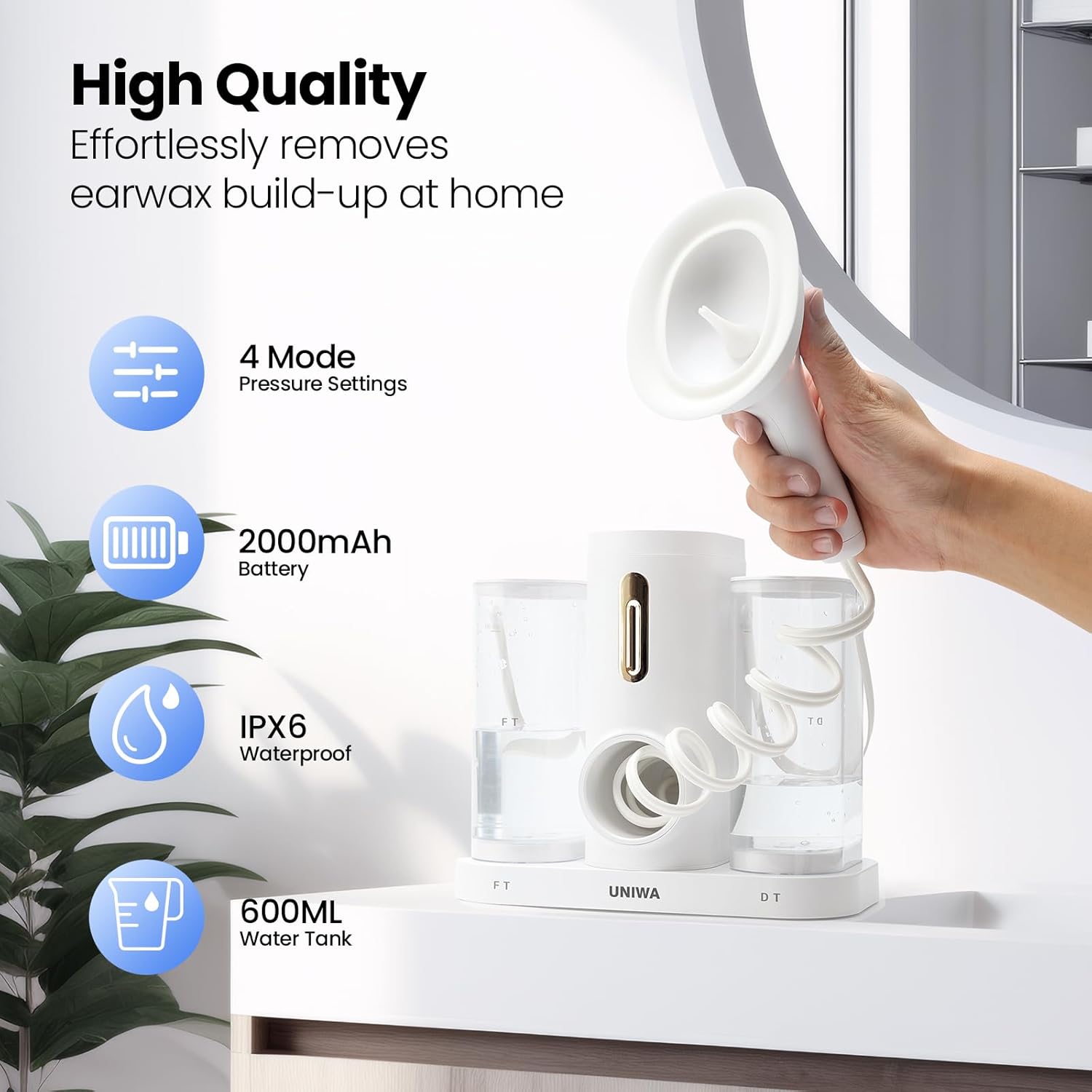
Image: The UNIWA Electric Ear Cleaner unit, illustrating its key features including 4 pressure settings, 2000mAh battery, IPX6 waterproof rating, and 600ml water tank capacity.
3. Arahan Persediaan
Follow these steps to prepare your UNIWA Electric Ear Cleaner for use:
- Cas Peranti: Connect the provided Type-C charging cable to the device and a suitable power source. Ensure the device is fully charged before first use.
- Sediakan Air: Fill the clean water tank (marked 'FT') with warm water. The water should be close to body temperature to prevent dizziness. You can use the included temperature sticker to verify.
- Soften Earwax (Optional but Recommended): If you have hardened earwax, consider using earwax softening drops a few minutes before irrigation, as recommended by a healthcare professional.
- Install Cleaning Tip: Securely attach one of the replaceable ear tips to the device's nozzle. Ensure it clicks into place.

Image: Visual guide showing steps for softening earwax, checking water temperature, installing the cleaning tip, and preparing the device for use.
4. Arahan Operasi
Once the device is set up, follow these steps for ear cleaning:
- Hidupkan: Tekan butang kuasa untuk menghidupkan peranti.
- Pilih Mod Tekanan: Choose one of the four pressure modes (Soft, Normal, Pulse, Strong) using the mode selection button. For first-time users or sensitive ears, start with the 'Soft' mode and gradually increase if needed.
- Letakkan Peranti: Gently place the flared ear tip against the entrance of your ear canal. Do not force it deep into the ear. The device is designed for one-handed operation.
- Mulakan Pembersihan: Press the spray button to start the water flow. The device will spray water into your ear and automatically collect the waste water into the dirty water tank (marked 'DT').
- Continue as Needed: Move the device slightly to ensure thorough cleaning. Continue until you feel your ear is clean or the clean water tank is empty.
- Dry Your Ear: After cleaning, gently dry your ear with a clean cotton swab or soft towel.

Image: Diagram illustrating the four cleaning pressure modes: Soft, Normal, Pulse, and Strong, with a note to start with 'Soft' mode.

Image: A user demonstrating the one-handed operation of the UNIWA Electric Ear Cleaner, highlighting its ease of use compared to traditional methods.
5. Penyelenggaraan
Proper maintenance ensures the longevity and hygiene of your UNIWA Electric Ear Cleaner:
- Tangki Kosong dan Bersih: After each use, empty both the clean and dirty water tanks. Rinse them thoroughly with clean water and allow them to air dry completely.
- Petua Bersihkan Telinga: Remove the ear tip and rinse it under running water. For deeper cleaning, tips can be soaked in a mild disinfectant solution. Ensure they are completely dry before storage or next use. Replace ear tips as needed.
- Padamkan Peranti: Lap badan utama peranti dengan kain lembut,amp kain. Jangan tenggelamkan unit utama ke dalam air.
- Storan: Store the device in a clean, dry place away from direct sunlight and extreme temperatures. The device can be mounted on a wall or placed on a flat surface.

Image: Two storage options for the UNIWA Electric Ear Cleaner, showing it mounted on a wall and placed on a countertop.
6. Penyelesaian masalah
If you encounter issues with your UNIWA Electric Ear Cleaner, refer to the following common solutions:
- Peranti Tidak Dihidupkan:
- Ensure the device is fully charged. Connect it to the Type-C charging cable and allow sufficient time to charge. - Tiada Aliran Air atau Aliran Lemah:
- Check if the clean water tank is filled correctly.
- Ensure the ear tip is securely attached and not clogged.
- Verify that the water intake tube inside the clean water tank is properly positioned.
- Select a higher pressure mode if the current mode is too gentle. - Kebocoran air:
- Ensure the ear tip is firmly attached.
- Check that the water tanks are properly seated and sealed. - Discomfort or Loud Noise During Use:
- Ensure the water temperature is warm, not cold.
- Start with the 'Soft' pressure mode.
- Ensure the ear tip is positioned correctly at the ear canal entrance and not pressed too hard.
- If discomfort persists, discontinue use and consult a medical professional. - Waste Water Not Collecting:
- Ensure the dirty water tank is empty and properly installed.
- Check for any blockages in the waste water collection pathway.
If the problem persists after attempting these solutions, please contact UNIWA customer support.
7. Spesifikasi
| Nombor Model | WPEC-bai |
| Pengeluar | UNIWA |
| Kapasiti Bateri | 2000mAh |
| Kapasiti Tangki Air | 600ml (Clean), 600ml (Dirty) |
| Water Pressure Modes | 4 (Soft, Normal, Pulse, Strong) |
| Penilaian Kalis Air | IPX7 |
| Antara Muka Pengecasan | USB-C |
8. Waranti dan Sokongan
UNIWA is committed to providing quality products and customer satisfaction.
Maklumat Waranti:
For detailed warranty terms and conditions, please refer to the warranty card included in your product packaging or visit the official UNIWA webtapak. Simpan bukti pembelian anda untuk tuntutan waranti.
Sokongan Pelanggan:
If you have any questions, concerns, or require assistance with your UNIWA Electric Ear Cleaner, please do not hesitate to contact our customer support team. We are dedicated to providing 100% quality product and service.
Contact information can typically be found on the product packaging, the official UNIWA webtapak, atau melalui peruncit anda.


