1. Produk Lebihview
The Daylight Slimline 4 LED Table Lamp is designed to provide high-quality, adjustable illumination for various tasks. It features ultra-bright 6,000K LEDs, 4 brightness levels, a flexible design, an anti-glare diffuser, and a convenient USB-C charging port.

Image 1: The Slimline 4 LED Table Lamp, featuring a flexible arm and a clamp untuk pemasangan selamat.
2. Persediaan dan Pemasangan
The Slimline 4 Table Lamp comes with a 2-in-1 Table Clamp and Screwable Tabletop Mount for versatile installation.
2.1 Memasang Clamp Gunung
- Buka bungkusan semua komponen dari kotak.
- Kenal pasti lamp unit and the clamp perhimpunan.
- Longgarkan skru pada klamp until the opening is wide enough to fit over your desired table or desk edge.
- Luncurkan clamp onto the table edge and tighten the screw securely until the clamp adalah kukuh dan stabil.
- Masukkan pangkal lamp into the designated slot on the clamp. Ensure it is fully seated and stable.

Image 2: The secure clamp mount for attaching the lamp to a desk or table edge.
2.2 Using the Screwable Tabletop Mount (Optional)
For a more permanent installation, the clamp can be converted into a screwable tabletop mount. Consult the separate instructions provided with the mount for detailed steps on drilling and securing it to a surface.
2.3 Sambungan Kuasa
- Connect the provided power adapter to the lampport input kuasa.
- Palamkan penyesuai kuasa ke salur keluar elektrik yang sesuai.
3. Arahan Operasi
The Slimline 4 LED Table Lamp is designed for ease of use with intuitive controls.
3.1 Powering On/Off and Adjusting Brightness
- Locate the tactile micro-switch button on the lamp's stem.
- Press the button once to turn the lamp on to its lowest brightness setting.
- Subsequent presses will cycle through the 4 available brightness levels.
- After the highest brightness level, pressing the button again will turn the lamp dimatikan.

Image 3: Illustration of the 4 brightness levels, demonstrating the range from soft to ultra-bright illumination.
3.2 Positioning the Lamp
Lamp features a flexible arm and dual flexible joints, allowing you to adjust the light precisely where needed. Gently bend the arm to direct the light beam. The anti-glare diffuser ensures even light distribution and reduces eye strain.

Image 4: The flexible arm allows for precise positioning of the light.
3.3 Using the USB-C Charging Port
A high-power 5V/2A USB-C port is integrated into the lamp for convenient charging of mobile devices.
- Pastikan lamp disambungkan kepada sumber kuasa.
- Plug your USB-C compatible device's charging cable into the USB-C port on the lamp's stem.
- Peranti anda akan mula mengecas.
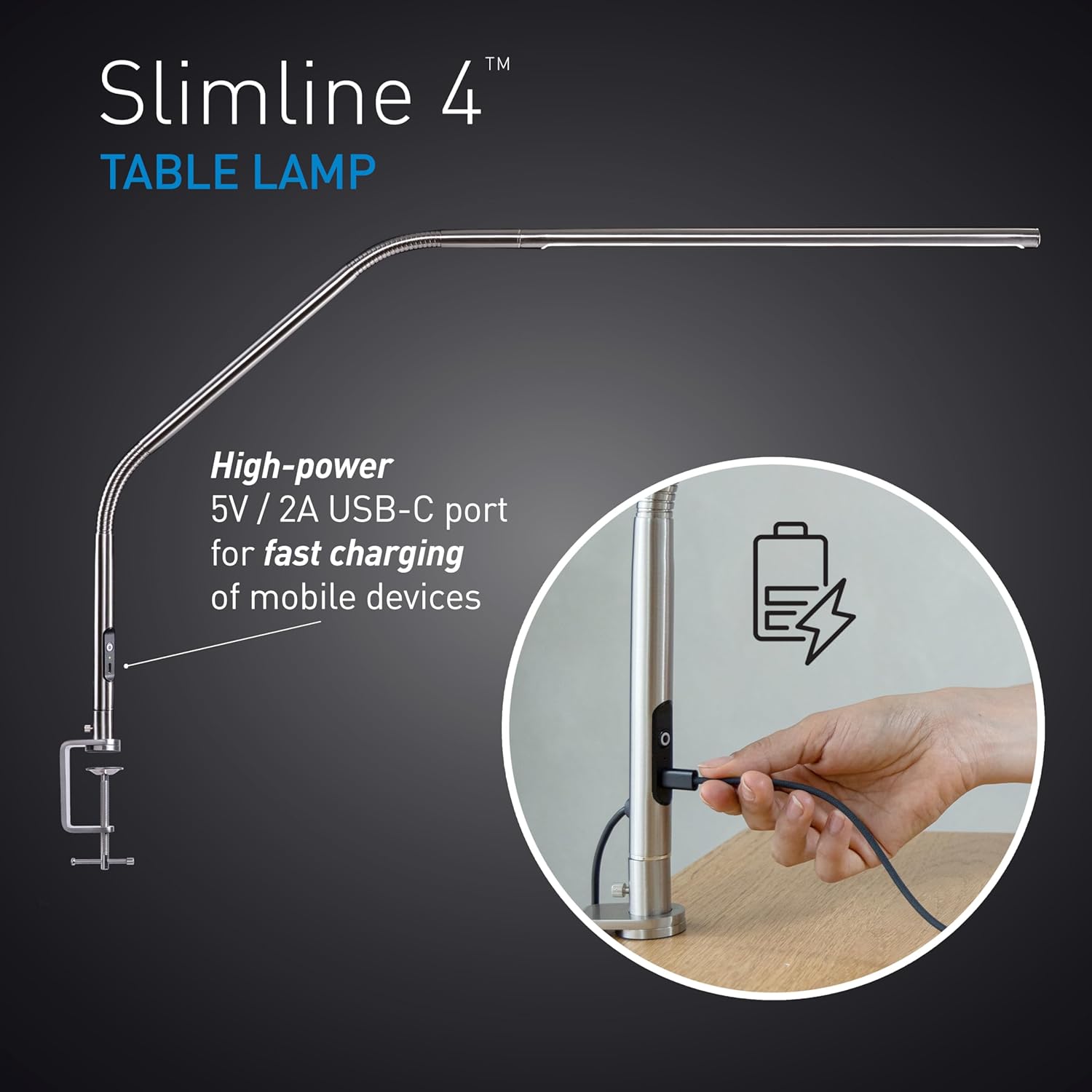
Image 5: The USB-C port located on the lamp's stem for charging devices.
4. Penyelenggaraan
Proper care will ensure the longevity and optimal performance of your Slimline 4 LED Table Lamp.
- Pembersihan: Putuskan sambungan lamp daripada sumber kuasa sebelum membersihkan. Gunakan kain lembut dan kering untuk mengelapamp's surfaces. Avoid abrasive cleaners or solvents, as these can damage the finish.
- Pengendalian: Manakala lamp has a flexible arm, avoid excessive force or sharp bends that could damage internal wiring.
- Storan: Jika menyimpan lamp for an extended period, ensure it is clean, dry, and stored in a safe place to prevent damage.
5. Penyelesaian masalah
Jika anda menghadapi masalah dengan l andaamp, rujuk kepada penyelesaian biasa berikut:
| Masalah | Kemungkinan Punca | Penyelesaian |
|---|---|---|
| Lamp tidak menyala. | Tiada bekalan kuasa; sambungan longgar; soket rosak. | Periksa sama ada penyesuai kuasa dipasang dengan kukuh pada kedua-dua lamp dan soket dinding. Uji soket dengan peranti lain. |
| USB-C port not charging device. | Lamp not powered; faulty cable; device incompatibility. | Pastikan lamp is powered on. Try a different USB-C cable. Verify your device is compatible with 5V/2A charging. |
| Cahaya berkelip atau tidak konsisten. | Bekalan kuasa tidak stabil; isu dalaman. | Ensure the power connection is stable. If the problem persists, contact customer support. |
If these solutions do not resolve the issue, please refer to the warranty and support section for further assistance.
6. Spesifikasi
| Ciri | Perincian |
|---|---|
| Nama Model | Slimline 4 Table - Brushed Steel |
| Nombor Model | U35109 |
| Sumber Cahaya | LED |
| Suhu Warna | 6,000K (Siang) |
| Kecerahan | 3,200 Lux at 30cm (12") |
| Indeks Paparan Warna (CRI) | 95+ |
| Tahap Kecerahan | 4 (Boleh Laras) |
| Penggunaan Kuasa | 13.6 Watt |
| Output USB-C | 5V/2A |
| Dimensi Produk | 22"D x 10"W x 16.5"H |
| bahan | logam |
| Jenis Selesai | Polished Brushed Steel |
| Jenis Pemasangan | Tabletop (Clamp & Screwable Mount) |
| Kaedah Kawalan | Sentuh (Tekan Butang) |
| UPC | 809802351095 |
7. Waranti dan Sokongan
7.1 Waranti Pengilang
This Daylight Slimline 4 LED Table Lamp dilindungi oleh a Waranti pengilang selama 2 tahun dari tarikh pembelian. Waranti ini meliputi kecacatan bahan dan mutu kerja di bawah penggunaan biasa. Ia tidak meliputi kerosakan yang disebabkan oleh salah guna, kemalangan, pengubahsuaian tanpa kebenaran atau haus dan lusuh biasa.
7.2 Sokongan Pelanggan
For warranty claims, technical assistance, or any questions regarding your product, please contact Daylight customer support. Refer to the product packaging or the official Daylight webtapak untuk maklumat hubungan terkini.
When contacting support, please have your model number (U35109) and proof of purchase readily available.


