pengenalan
This manual provides detailed instructions for the setup, operation, and maintenance of your ATTACK SHARK X66 Wireless Mechanical Gaming Keyboard. Please read this manual thoroughly to ensure proper use and to maximize your keyboard's performance.

Image: The ATTACK SHARK X66 Wireless Mechanical Gaming Keyboard, showcasing its compact 66-key layout and volume knob.
Persediaan
Before using your ATTACK SHARK X66 keyboard, please follow these steps for initial setup.
1. Unboxing dan Kandungan
Keluarkan semua item dari bungkusan dengan berhati-hati. Sahkan bahawa semua komponen hadir:
- 1 x ATTACK SHARK X66 Mechanical Keyboard
- 1 x 2-in-1 Keycap and Switch Puller
- 1 x Kabel USB-C
- 2 x Spare Strawberry Switches
- 1 x Manual Pengguna

Image: A visual representation of the ATTACK SHARK X66 keyboard and its included accessories, such as the USB-C cable, keycap/switch puller, and spare switches.
2. Pengecasan Awal
For optimal performance, it is recommended to fully charge the keyboard before its first use. Connect the provided USB-C cable to the keyboard's USB-C port and the other end to a power source (e.g., computer USB port, USB wall adapter). The charging indicator light will provide feedback on the charging status.
Mod Pengendalian
The ATTACK SHARK X66 keyboard supports three connection modes: Wired (USB-C), 2.4G Wireless, and Bluetooth 5.0. You can seamlessly switch between these modes.

Image: The side of the ATTACK SHARK X66 keyboard, highlighting the 2.4G, BT, and USB-C connection mode switches, along with the USB receiver storage slot.
1. Mod Berwayar (USB-C)
Connect the keyboard to your device using the provided USB-C cable. This mode provides a stable connection and charges the keyboard simultaneously.
2. Mod Tanpa Wayar 2.4G
- Locate the 2.4G USB receiver, typically stored in a dedicated slot on the keyboard.
- Pasangkan penerima USB 2.4G ke port USB yang tersedia pada komputer anda.
- Tetapkan suis mod pada papan kekunci kepada '2.4G'.
- Papan kekunci harus disambungkan secara automatik.
3. Mod Bluetooth 5.0
- Set the mode switch on the keyboard to 'BT'.
- Pada peranti anda (komputer, tablet, telefon pintar), dayakan Bluetooth dan cari peranti baharu.
- The keyboard will appear as 'ATTACK SHARK X66' or similar. Select it to pair.
- The keyboard supports up to three Bluetooth devices. Switch between paired devices using FN+Q, FN+W, atau FN+E.
4. System Switch (Win/Mac)
The keyboard features a dedicated switch to toggle between Windows and Mac operating system layouts, ensuring full compatibility and correct key functions for your chosen system.
Video: An official product video demonstrating the tri-mode connectivity (wired, 2.4G, Bluetooth) and system switching capabilities of the ATTACK SHARK X66 Mechanical Gaming Keyboard.
Fungsi Utama
The ATTACK SHARK X66 keyboard includes a functional knob and various FN key combinations to enhance usability.
1. Tombol Multimedia
The aluminum alloy knob located on the top right of the keyboard provides quick access to multimedia controls:
- Putar mengikut arah jam: Tingkatkan Kelantangan
- Putar lawan arah jam: Kurangkan Kelantangan
- Tekan: Redam/Nyahredam Audio

Imej: A terperinci view of the functional aluminum metal knob on the ATTACK SHARK X66 keyboard, illustrating its volume control and mute/unmute capabilities.
2. Kombinasi Kekunci FN
The Fn key (Function key) allows access to secondary functions printed on various keys. Refer to the keycaps for specific combinations. Common functions include:
- FN + [Kekunci]: Activates the secondary function of the key.
- FN + Ruang Belakang: Displays battery level (keys 1-0 will light up to indicate charge).
- FN + PgDn: Cycles through RGB backlight modes.
- FN + Anak Panah Atas: Meningkatkan kecerahan lampu latar.
- FN + Anak Panah Bawah: Mengurangkan kecerahan lampu latar.
- FN + Anak Panah Kiri: Changes backlight color.
- FN + Anak Panah Kanan: Changes backlight color.
- FN + X: Toggles backlight On/Off.
Kawalan Lampu Latar RGB
The ATTACK SHARK X66 keyboard features dynamic RGB backlighting with multiple effects and customization options.

Image: The ATTACK SHARK X66 keyboard illuminated with vibrant RGB lighting, demonstrating its 16+ million color capabilities and dynamic effects.
- Tukar Mod Lampu Latar: Tekan FN + PgDn to cycle through 18 dynamic chroma backlit modes, 7 monochrome colors, and 1 rainbow color light.
- Laraskan Kecerahan: guna FN + Anak Panah Atas untuk meningkatkan kecerahan dan FN + Anak Panah Bawah untuk mengurangkan kecerahan.
- Tukar Warna: guna FN + Anak Panah Kiri or FN + Anak Panah Kanan to change the backlight color in certain modes.
- Togol Lampu Latar: Tekan FN + X untuk menghidupkan atau mematikan lampu latar.
Suis Boleh Tukar Panas
The ATTACK SHARK X66 keyboard is equipped with hot-swappable sockets, allowing you to customize your typing experience by changing switches without soldering.

Imej: A terperinci view of the hot-swappable sockets and custom Strawberry switches on the ATTACK SHARK X66 keyboard, demonstrating the ease of switch replacement.
- Keserasian: Supports most 3-pin and 5-pin mechanical switches.
- Penggantian Suis: Use the provided 2-in-1 keycap and switch puller to carefully remove keycaps and switches. Align new switches with the sockets and press firmly until they click into place.
- Suis yang disertakan: The keyboard comes with linear Strawberry switches, known for their smooth and responsive feel.
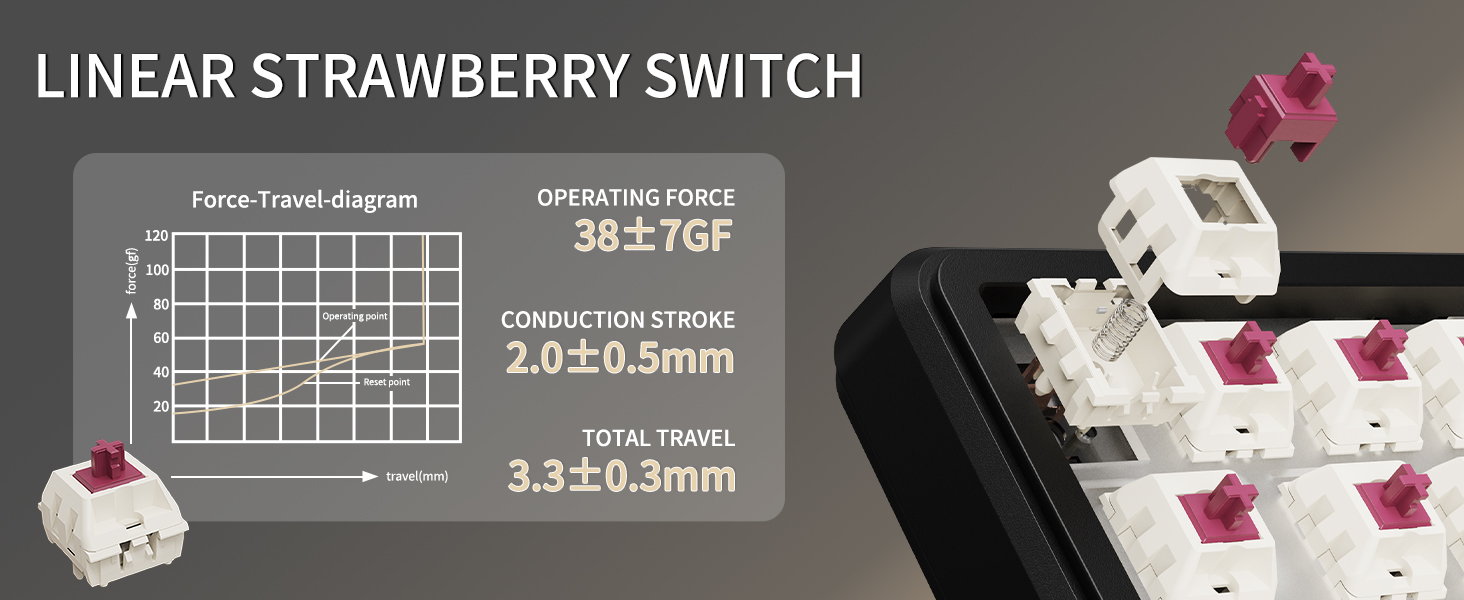
Image: A diagram illustrating the force-travel characteristics of the Linear Strawberry Switch, detailing operating force, conduction stroke, and total travel.
Pengurusan Bateri
The ATTACK SHARK X66 keyboard is equipped with a 3000mAh battery for extended wireless use.

Image: A close-up of the indicator lights on the ATTACK SHARK X66 keyboard, showing status for Caps Lock, Win Lock, and charging.
- Penunjuk Pengecasan: A dedicated indicator light shows the charging status.
- Pemeriksaan Tahap Bateri: Tekan lama FN + Ruang Belakang. The number keys (1-0) will light up to visually represent the current battery level (e.g., 10 keys lit for 100%, 1 key lit for 10%).
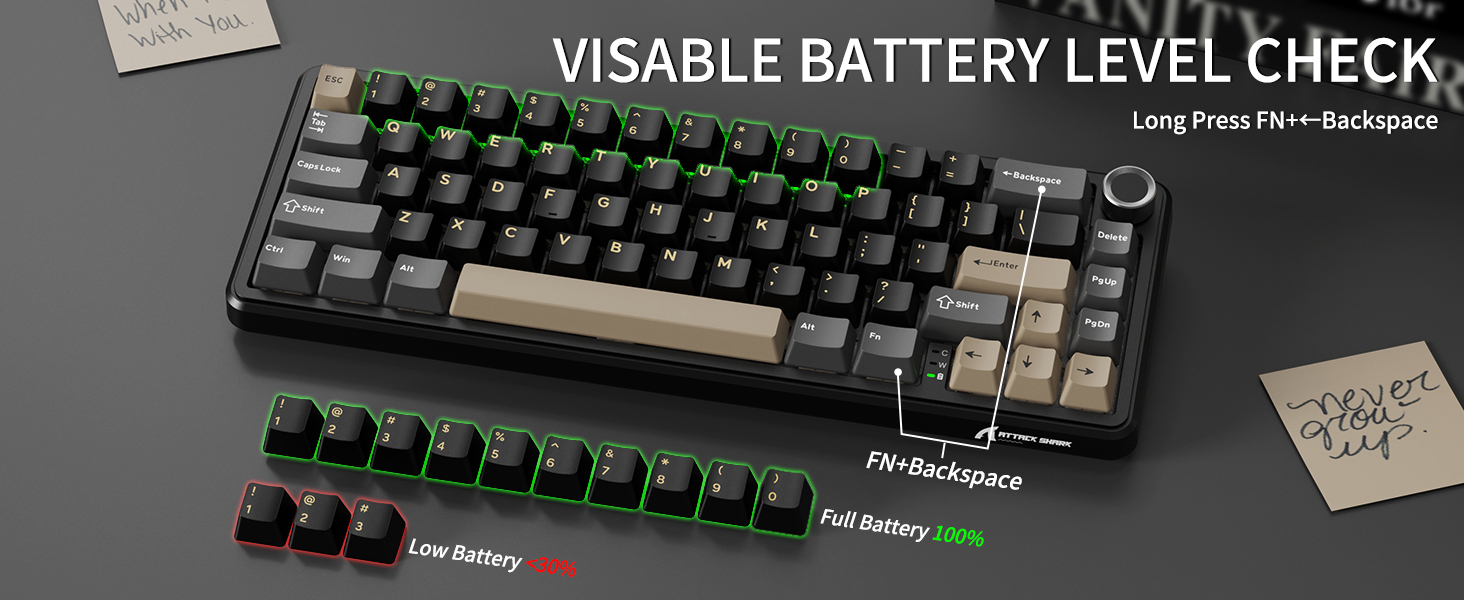
Image: The ATTACK SHARK X66 keyboard demonstrating the visible battery level check feature, where pressing FN+Backspace illuminates number keys to indicate charge percentage.
Penyelenggaraan
Penyelenggaraan berkala membantu memanjangkan jangka hayat dan prestasi papan kekunci anda.
- Pembersihan: Use a soft, dry cloth to wipe the keyboard surface. For deeper cleaning, remove keycaps using the provided puller and use compressed air to clear debris.
- Penjagaan Papan Kekunci dan Suis: Avoid excessive force when removing or installing keycaps and switches to prevent damage to the stems or sockets.
- Storan: Apabila tidak digunakan untuk tempoh yang lama, simpan papan kekunci di persekitaran yang kering dan bebas habuk.
Menyelesaikan masalah
If you encounter issues with your ATTACK SHARK X66 keyboard, refer to the following common solutions:
- Papan Kekunci Tidak Membalas:
- Pastikan papan kekunci dicas.
- Check the connection mode switch (Wired, 2.4G, BT) matches your intended connection.
- Untuk 2.4G, pastikan penerima USB dipasang dengan selamat.
- For Bluetooth, ensure the keyboard is paired and selected in your device's Bluetooth settings.
- Try restarting the keyboard and your device.
- Spacebar Not Functioning: If the spacebar does not register presses, carefully remove the spacebar keycap using the provided puller. Check for any packing foam or foreign objects underneath that might be obstructing the switch's travel. Remove any obstructions and re-install the keycap.
- Isu Lampu Latar:
- Ensure the backlight is not turned off (FN + X).
- Laraskan kecerahan menggunakan FN + Anak Panah Atas/Bawah.
- Cycle through modes using FN + PgDn.
- Fungsi Kekunci Salah (Windows/Mac): Ensure the system switch on the keyboard is set to the correct operating system (Win or Mac).
- Typo in Manual (FN+BiidAb): Please note that some early documentation may contain a typo referring to a 'BiidAb' key. The correct key combination to change backlight modes is FN + PgDn.
Spesifikasi
| Ciri | Penerangan |
|---|---|
| Model | X66 |
| Jenama | SERANGAN JEUNG |
| Ketersambungan | USB-C Wired, 2.4G Wireless, Bluetooth 5.0 |
| Susun atur | 66-Key, 60% Gasket Mounted |
| Suis | Hot-Swappable (3/5 pin), Linear Strawberry Switches |
| Kekunci Kekunci | PBT Keycaps, OEM Profile |
| Lampu latar | RGB (18 dynamic modes, 7 monochrome, 1 rainbow) |
| Kapasiti Bateri | 3000mAh |
| Ciri Khas | Multimedia Knob, Dual System Compatibility (Win/Mac), Gasket Mount, 5-layer Sound Absorbing Material, Adjustable Two-stage Kurungan |
| Dimensi | 14.02 x 6.5 x 2.05 inci |
| Berat badan | 1.96 paun |
Waranti dan Sokongan
Untuk maklumat jaminan dan sokongan teknikal, sila rujuk laman web rasmi ATTACK SHARK webtapak atau hubungi perkhidmatan pelanggan mereka secara langsung. Simpan resit pembelian anda sebagai bukti pembelian.


