1. Pengenalan
Thank you for choosing the Tomofree K7 Pro 3-Wheel Mobility Scooter. This manual provides essential information for the safe assembly, operation, maintenance, and troubleshooting of your scooter. Please read this manual thoroughly before operating the scooter and retain it for future reference.
2. Maklumat Keselamatan
Your safety is paramount. Adhere to the following guidelines to prevent injury or damage.
- Always wear a helmet and appropriate safety gear, including knee and elbow pads, when operating the scooter.
- Familiarize yourself with and obey all local traffic laws and regulations regarding mobility scooter use.
- Do not operate the scooter under the influence of alcohol, drugs, or any medication that may impair your judgment or reaction time.
- Maintain a safe speed and distance from pedestrians and other vehicles.
- Perform a pre-ride inspection before each use, checking brakes, tires, and all fasteners.
- Avoid riding in adverse weather conditions such as heavy rain, snow, or icy roads.
- Jangan melebihi kapasiti beban maksimum 220.5 lbs (100 kg).
- Keep both hands on the handlebars during operation.
3. Produk Lebihview
The Tomofree K7 Pro is a lightweight, foldable 3-wheel mobility scooter designed for convenient travel. It features a 400W brushless motor, a 36V 7.5AH lithium battery, and a 3-step folding system.

Image: The Tomofree K7 Pro 3-Wheel Mobility Scooter in its operational state, showcasing its compact design and three wheels.
Komponen Utama
- Barangan: Equipped with controls for speed, throttle, and display.
- Paparan LCD: Shows speed, mileage, and battery level.
- tempat duduk: Padded for comfort during rides.
- Mekanisme Lipatan: Allows for quick and easy storage.
- Petak Bateri: Houses the 36V 7.5AH lithium battery.
- Motor: 400W brushless motor for efficient power.
- Tayar: 10-inch wear-resistant tires for various road surfaces.
- Sistem Brek: Front and rear drum brakes.

Image: Illustration of the 36V 7.5AH lithium battery integrated within the scooter's frame, highlighting its capacity and charging time.

Image: A close-up of the scooter's handlebar, showing the easy-to-use control panel, speed display, mileage display, and the switch for reverse or forward motion.

Imej: View of the scooter's 10-inch wear-resistant vacuum tires, designed for strong grip and stability on various road surfaces.

Image: Diagram illustrating the scooter's 5-fold shock absorption system, including damping seat, spring shock absorption, and shock-absorbing tires for a comfortable ride.
4. Persediaan
4.1 Membuka kotak
Carefully remove the scooter and all accessories from the packaging. Inspect for any damage that may have occurred during shipping. Retain packaging materials for future transport or storage.
4.2 Membuka Lipatan Skuter
The K7 Pro features a 3-step folding system for quick deployment and storage.
- Letakkan skuter di atas permukaan yang rata dan stabil.
- Release the main folding latch (refer to the diagram below).
- Extend the main frame and handlebars until they click securely into place. Ensure all locking mechanisms are engaged before use.
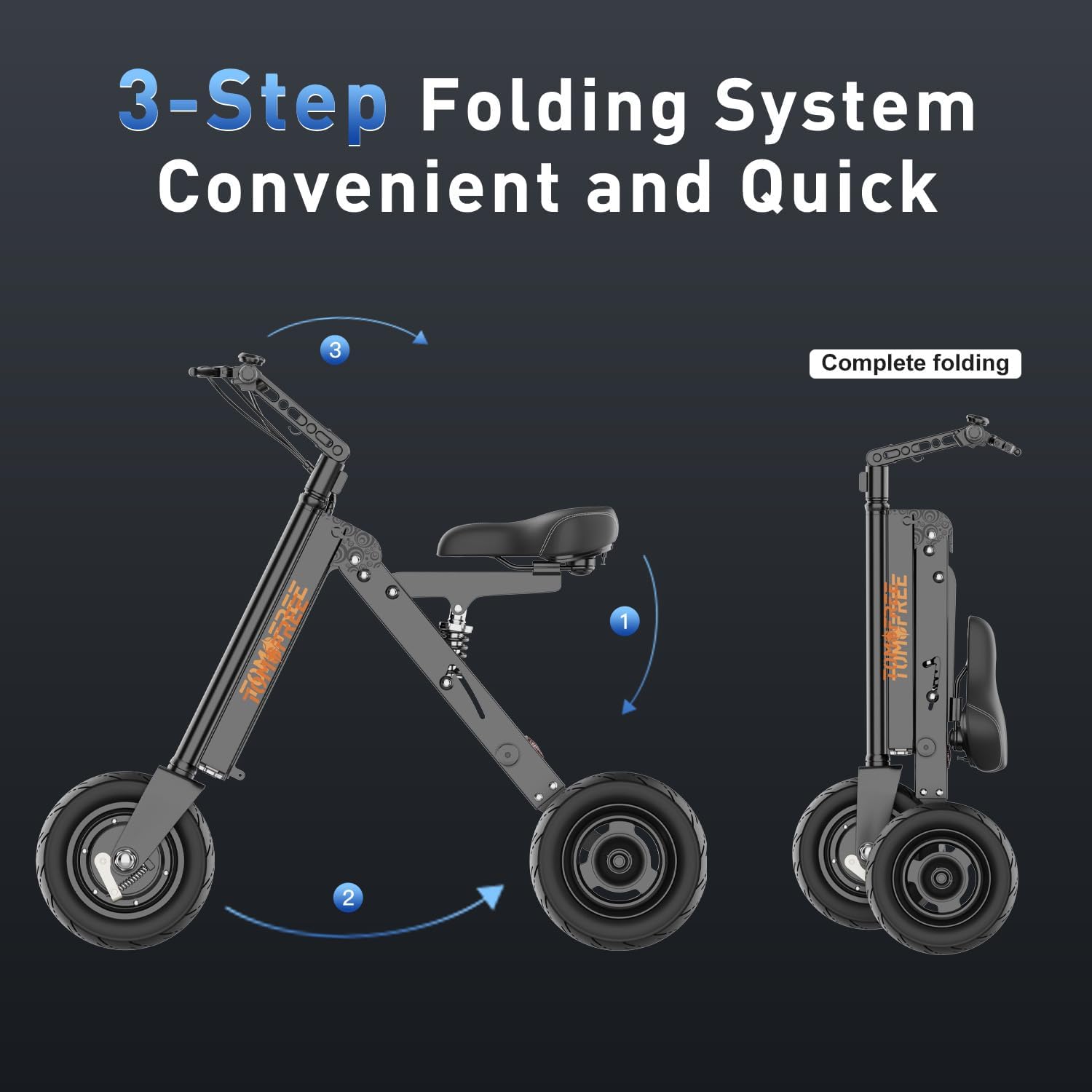
Image: Visual guide demonstrating the 3-step process to unfold the Tomofree K7 Pro scooter from its compact, folded state to its operational configuration.
4.3 Caj Bateri Permulaan
Before the first ride, fully charge the scooter's battery. Connect the charger to the scooter's charging port and then to a power outlet. The charging indicator will show the charging status. A full charge typically takes 3-4 hours.
5. Arahan Operasi
5.1 Hidupkan/Mati Kuasa
Insert the key into the ignition and turn it to the 'ON' position to power on the scooter. The LCD display will illuminate. To power off, turn the key to the 'OFF' position and remove it.
5.2 Pelarasan Kelajuan
The K7 Pro offers three adjustable speed modes. Use the speed selector switch on the left handlebar to choose your desired speed:
- Mode I (Low Speed): Approximately 6 MPH (10 km/h), suitable for turning and crowded areas.
- Mode II (Medium Speed): Approximately 12 MPH (20 km/h), ideal for daily driving.
- Mode III (High Speed): Approximately 15 MPH (25 km/h), for open areas, exercise caution.
5.3 Acceleration and Reverse
To accelerate, gently twist the throttle on the right handlebar. To engage the reverse function, press the dedicated reverse button switch. Always check your surroundings before moving in reverse.
5.4 Brek
The scooter is equipped with front and rear drum brakes. Squeeze the brake levers on the handlebars to slow down or stop. Apply brakes smoothly to avoid sudden stops.
5.5 Paparan LCD
Paparan LCD memberikan maklumat masa nyata:
- Tahap Bateri: Menunjukkan baki cas bateri.
- Kelajuan: Menunjukkan kelajuan tunggangan semasa.
- Perbatuan: Displays trip distance and total mileage.
6. Penyelenggaraan
Regular maintenance ensures the longevity and safe operation of your Tomofree K7 Pro scooter.
6.1 Pembersihan
Wipe down the scooter with a soft, damp cloth after each use. Avoid using high-pressure water jets or harsh chemicals, which can damage electrical components.
6.2 Penjagaan Bateri
- Charge the battery regularly, even if the scooter is not in frequent use, to maintain battery health.
- Elakkan daripada menghabiskan bateri sepenuhnya sebelum mengecas semula.
- Store the scooter and battery in a cool, dry place away from direct sunlight and extreme temperatures.
6.3 Tire Inspection
Periodically check the tire pressure and inspect for any signs of wear, punctures, or damage. Maintain recommended tire pressure for optimal performance and safety.
6.4 Brake System Check
Regularly test the responsiveness of the front and rear drum brakes. If the brakes feel loose or ineffective, have them inspected and adjusted by a qualified technician.
6.5 Fastener Check
Ensure all bolts, screws, and quick-release mechanisms are tight and secure before each ride. Loose fasteners can affect stability and safety.
7. Penyelesaian masalah
This section addresses common issues you might encounter with your K7 Pro scooter.
- Skuter tidak boleh dihidupkan:
- Periksa sama ada bateri telah dicas.
- Ensure the key is fully inserted and turned to the 'ON' position.
- Sahkan semua sambungan elektrik selamat.
- Julat atau kuasa yang dikurangkan:
- Pastikan bateri dicas sepenuhnya sebelum setiap perjalanan.
- Check tire pressure; underinflated tires can reduce efficiency.
- Avoid excessive loads or riding on steep inclines for extended periods.
- Bunyi luar biasa semasa operasi:
- Inspect for any loose components or debris caught in the wheels or motor.
- If noises persist, contact customer support.
- Brek tidak berkesan:
- Check brake lever tension and cable condition.
- Inspect brake pads for wear. Adjust or replace as necessary.
8. Spesifikasi
| Ciri | Spesifikasi |
|---|---|
| Jenama | Tomofree |
| Nama Model | K7 Pro |
| Nombor Model Item | Tomofree - K7 Pro |
| Berat Barang | 41.84 paun (18.98 kg) |
| bahan | aluminium |
| warna | Perak |
| Motor | 400W Tanpa Berus |
| Bateri | 36V 7.5AH Lithium (UN38.3 certified) |
| Julat Maks | Sehingga 15 batu |
| Kelajuan Maks | Sehingga 15 MPH (24 km/j) |
| Masa Mengecas | 3-4 jam |
| tayar | 10-inch Wear-Resistant Vacuum Tires |
| Kapasiti Beban Maks | 220.5 paun (100 kg) |
| Ketinggian yang disyorkan | 5' - 6'3" |
| Dimensi Dilipat | 16.5 x 18.7 x 34.6 inci (lebih kurang) |
| Pengeluar | DongGuan Xuansizhen Bicycle Co,. Ltd |
9. Waranti dan Sokongan
Tomofree is committed to providing quality products and customer satisfaction.
9.1 Maklumat Waranti
Your Tomofree K7 Pro Mobility Scooter comes with a Waranti 12 bulan from the date of purchase, covering manufacturing defects. Please retain your proof of purchase for warranty claims. The warranty does not cover damage caused by misuse, accidents, unauthorized modifications, or normal wear and tear.
9.2 Sokongan Pelanggan
For any questions, technical assistance, or warranty inquiries, please contact our dedicated support team:
- e-mel: help@tomofree.com
- Phone (Text Only): +1-518-614-6355

Image: Tomofree customer support details, including email and text-only phone number, and a 12-month warranty badge.


