1. Pengenalan
This manual provides detailed instructions for the setup, operation, maintenance, and troubleshooting of your ATTACK SHARK X66 Gasket Wireless Mechanical Keyboard. Please read this manual thoroughly before using the product to ensure optimal performance and longevity.

Imej: Atas ke bawah view of the ATTACK SHARK X66 Gasket Wireless Mechanical Keyboard, showcasinsusun atur padat dan reka bentuk penutup kekuncinya.
2. Produk Lebihview
2.1 Ciri-ciri Utama
- 60% Compact Design: Features 66 keys and a volume knob, optimizing desktop space while maintaining portability.
- Upgraded Gasket Mount: Incorporates 5 layers of sound insulation (PORON Sandwich Foam, Foamed IXPE Under Shaft Pads, PET Acoustic Premium Pads, Shaft Seat Sound Deadening Foam, Customized Bottom Foams) for reduced noise and a smooth typing experience.
- Kesambungan Mod Tiga Kali Ganda: Supports Bluetooth, 2.4GHz wireless, and USB-C wired connections.
- Multi-Device Tasking: Three Bluetooth channels (FN+Q/FN+W/FN+E) for efficient switching between devices.
- Bateri tahan lama: Equipped with a 3000mAh large-capacity rechargeable battery.
- Hot Swappable Switches: Full hot-swappable design compatible with 3-pin/5-pin switches, featuring pre-lubed Strawberry switches for a creamy sound and smooth keystroke.
- Lampu Latar RGB Dinamik: Offers 9 backlight colors and 18 lighting effects with 16 million LED colors, customizable via software.
- Penutup Kekunci Tahan Lama: Features side-printed gradient PBT keycaps that are resistant to oiling, non-slip, and wear-resistant.

Imej: Selesaiview of the X66 keyboard highlighting key features such as RGB Backlight, Triple Mode Connectivity, Hot Swappable switches, PBT Keycaps, 60% Layout, 3000mAh Battery, and Gasket Structure.
2.2 Kandungan Pakej
- ATTACK SHARK X66 Mechanical Keyboard
- USB-C Cable (1.5 meters)
- 2-in-1 Key Puller and Switch Puller
- Additional Strawberry Switches (2 pieces)
- Manual Pengguna
3. Persediaan
3.1 Mod Kesambungan
The X66 keyboard supports three connection modes: 2.4GHz wireless, Bluetooth, and USB-C wired.

Image: Diagram illustrating the three connectivity modes: Bluetooth 5.0, 2.4GHz Wireless with a USB dongle, and Type-C Wired connection.
- Sambungan Wayarles 2.4GHz:
- Cari penerima USB 2.4GHz.
- Palamkan penerima ke dalam port USB yang tersedia pada komputer anda.
- On the keyboard, slide the mode switch to the '2.4G' position. The keyboard will automatically connect.
- Sambungan Bluetooth:
- On the keyboard, slide the mode switch to the 'BT' position.
- Untuk memasuki mod berpasangan, tekan dan tahan FN+Q, FN + W, atau FN + E for 3-5 seconds until the corresponding key's backlight flashes rapidly.
- On your device (PC, Mac, Tablet), search for Bluetooth devices and select 'ATTACK SHARK X66' to pair.
- Once paired, the key's backlight will stop flashing and remain steadily lit. You can pair up to three Bluetooth devices and switch between them using FN + Q/W/E.
- Sambungan Berwayar USB-C:
- Sambungkan kabel USB-C yang disediakan ke port USB-C papan kekunci.
- Sambungkan hujung kabel yang lain ke port USB yang tersedia pada komputer anda.
- Papan kekunci secara automatik akan bertukar kepada mod berwayar dan mula mengecas.
3.2 Suis Sistem Pengendalian
The keyboard features a dedicated switch for Windows and Mac operating systems.
- Locate the 'Win/Mac' switch on the side or back of the keyboard.
- Slide the switch to the appropriate operating system setting for optimal key mapping.
4. Arahan Operasi
4.1 Fungsi Tombol Kelantangan
The aluminum CNC metal knob provides convenient control over audio.
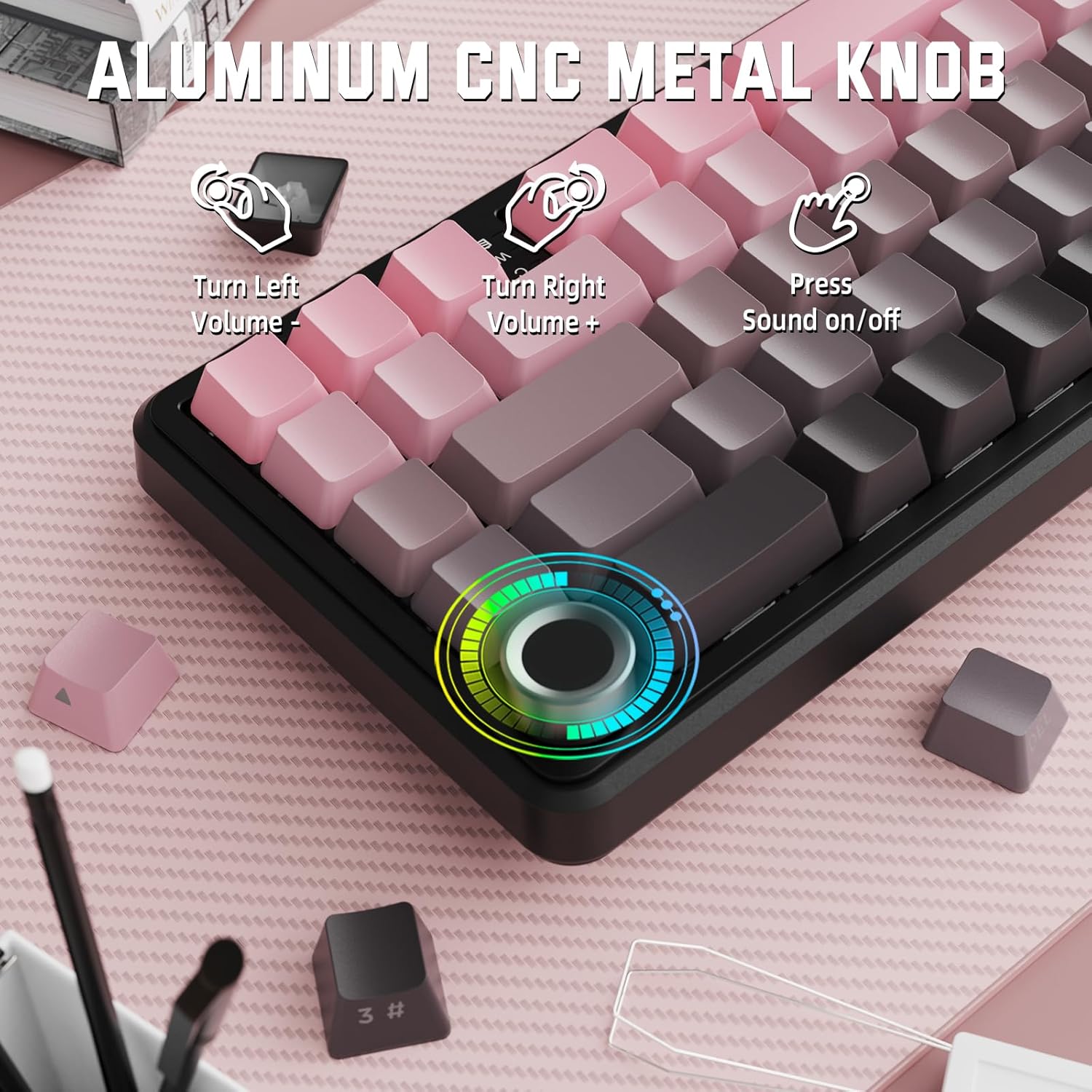
Image: Close-up of the volume knob with icons indicating its functions: Turn Left (Volume -), Turn Right (Volume +), Press (Sound on/off).
- Belok kiri: Kurangkan volum.
- Belok kanan: Tingkatkan kelantangan.
- Tekan: Bisukan/Nyahbisukan audio.
4.2 Function Key Combinations (FN Key)
Due to the compact 60% layout, some functions are accessed via the FN key.
| Gabungan | Fungsi |
|---|---|
| FN + Q/W/E | Switch between Bluetooth devices 1, 2, and 3 |
| FN + Ruang Belakang | Semak kapasiti bateri |
| FN + 1-0 (top row) | F1-F10 functions (e.g., FN+1 for F1) |
| FN + -/= | F11/F12 functions |
| FN + \| | Padam |
| FN + P | Skrin Cetak |
| FN + [ { | Rumah |
| FN + ] } | tamat |
| FN + ; : | Halaman Atas |
| FN + ' " | Halaman Bawah |
| FN + Arrow Keys | Navigation (e.g., FN+Up Arrow for Page Up) |
5. Penyesuaian
5.1 Tetapan Lampu Latar RGB
The keyboard features dynamic RGB backlighting with multiple effects and colors.

Image: Visual representation of RGB backlight controls including turning on/off, changing lighting mode, speed, direction, brightness, and color, often in combination with the FN key.
- Turn on/off Lighting / Power Saving Mode: Specific key combination (refer to keyboard legends or software).
- Mod Pencahayaan: Kitar semula 18 kesan pencahayaan.
- Kelajuan Pencahayaan: Laraskan kelajuan kesan pencahayaan dinamik.
- Arah Pencahayaan: Change the direction of certain lighting effects.
- Kecerahan Pencahayaan: Adjust the intensity of the backlight.
- Warna Pencahayaan: Select from 9 preset backlight colors or customize via software.
5.2 Pengaturcaraan Perisian
For advanced customization of RGB modes, macros, and key remapping, dedicated software is available.
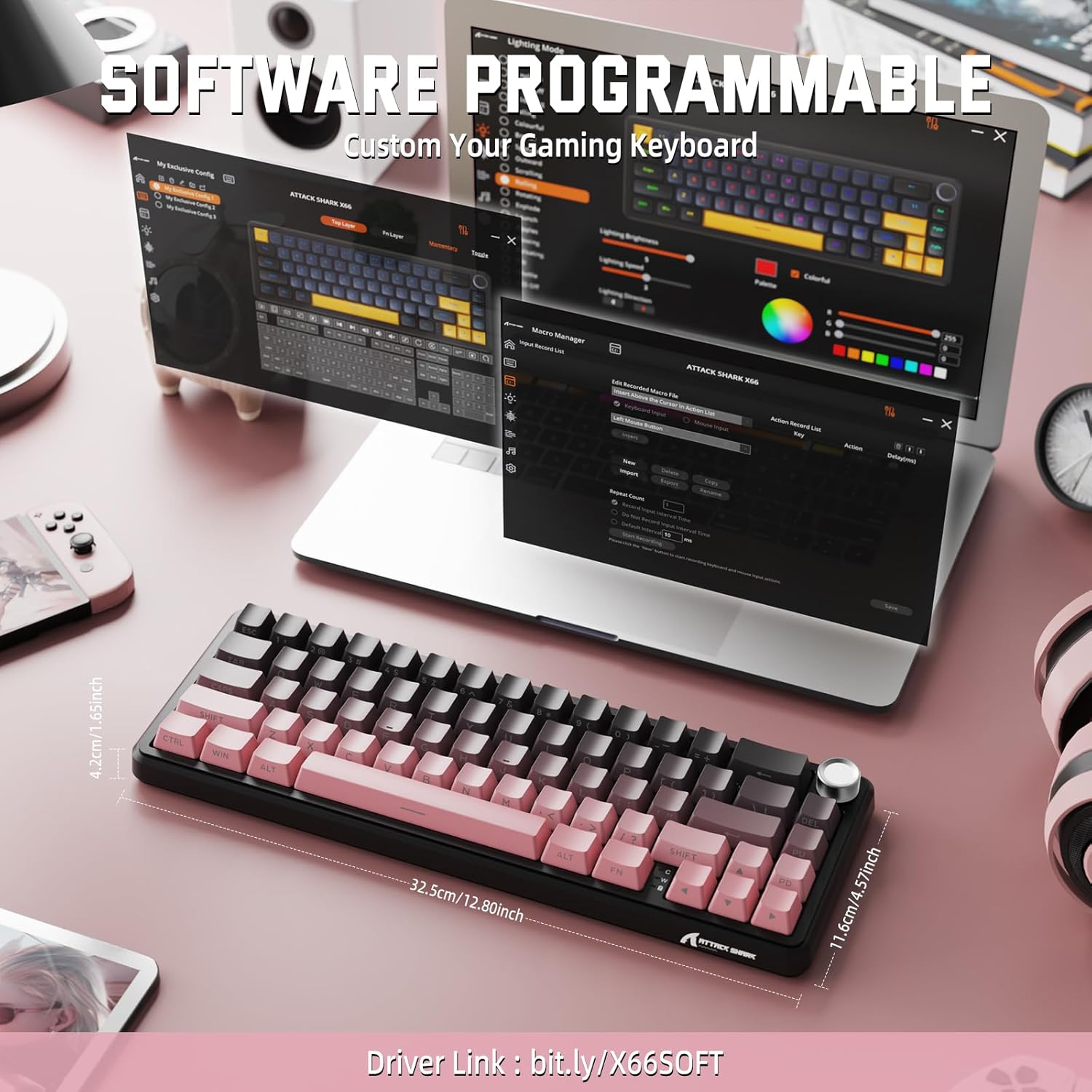
Image: Screenshot of the keyboard's software interface, showing options for custom key assignments, macro recording, and RGB lighting customization. A driver link is provided for download.
Download the official software from the manufacturer's weblaman web. Perisian ini membolehkan anda:
- Sesuaikan kesan dan warna pencahayaan RGB.
- Program macros for complex key sequences.
- Petakan semula kekunci individu kepada fungsi yang berbeza.
- Cipta dan simpan berbilang profiles untuk aplikasi atau permainan yang berbeza.
6. Penyelenggaraan
6.1 Membersihkan Papan Kekunci
- Putuskan sambungan papan kekunci daripada semua sumber kuasa sebelum membersihkannya.
- Gunakan kain lembut dan tidak berbulu sedikit dampdisapu dengan air atau larutan pembersih lembut untuk mengelap penutup kekunci dan casis.
- Untuk habuk dan serpihan di antara kunci, gunakan udara termampat.
- Elakkan menggunakan bahan kimia yang keras, bahan pelelas atau pelarut.
6.2 Hot Swappable Switch Replacement
The keyboard's hot-swappable design allows for easy switch replacement without soldering.

Image: Illustration showing how to remove and insert mechanical switches on the X66 keyboard, highlighting compatibility with 3-pin and 5-pin switches.
- Gunakan penarik penutup kekunci yang disediakan untuk mengeluarkan penutup kekunci yang dikehendaki dengan perlahan.
- Gunakan penarik suis yang disediakan untuk mencengkam klip atas dan bawah suis dengan berhati-hati dan tariknya lurus ke atas.
- Selaraskan pin suis baharu dengan lubang pada PCB. Pastikan pin lurus untuk mengelakkan bengkok.
- Tekan suis baharu dengan lembut ke tempatnya sehingga ia berbunyi klik dengan selamat.
- Pasang semula penutup kekunci.
6.3 Pengurusan Bateri
The keyboard is equipped with a 3000mAh rechargeable battery.

Image: Visual guide on how to check the battery capacity using FN + Backspace, showing different battery level indicators (30%, 50%, 100%) with corresponding key light patterns.
- mengecas: Connect the keyboard via the USB-C cable to a computer or a USB power adapter. The charging indicator will show the charging status.
- Memeriksa Tahap Bateri: Tekan FN + Ruang Belakang to display the current battery capacity via the key backlights.
- Hayat Bateri: A full charge provides long-lasting usage, but actual duration varies based on RGB lighting usage and connection mode.
7. Penyelesaian masalah
| Masalah | Kemungkinan Punca | Penyelesaian |
|---|---|---|
| Papan kekunci tidak bertindak balas | Low battery, incorrect connection mode, driver issue. | Charge the keyboard. Ensure the mode switch is set correctly (2.4G, BT, or Wired). Reconnect the USB receiver/cable. Re-pair Bluetooth. Try a different USB port. |
| Sambungan Bluetooth tidak stabil | Interference, distance, low battery. | Ensure no strong interference sources nearby. Move closer to the device. Charge the keyboard. Re-pair the Bluetooth connection. |
| Tanpa wayar 2.4GHz tidak bersambung | Receiver not plugged in, incorrect mode, interference. | Ensure the 2.4GHz receiver is securely plugged in. Set the keyboard mode switch to '2.4G'. Try a different USB port for the receiver. |
| Pencahayaan RGB tidak berfungsi atau tidak betul | Lighting settings, software issue. | Check lighting control key combinations (FN + lighting keys). Ensure software is installed and updated. Reset lighting settings via software. |
| Kunci tidak mendaftar atau menaip dua kali | Suis rosak, serpihan di bawah penutup kekunci. | Remove keycap and clean around the switch. If issue persists, replace the switch using the provided switch puller and spare switches. |
| Volume knob not functioning | Software conflict, physical obstruction. | Ensure no software is overriding media controls. Check for any physical debris around the knob. Restart the computer. |
8. Spesifikasi
| Ciri | Perincian |
|---|---|
| Nombor Model | X66 |
| Susun atur | 66 Keys, 60% Compact QWERTY |
| Ketersambungan | Bluetooth (5.0), 2.4GHz Wireless, USB-C Wired |
| Suis | Hot Swappable (3-pin/5-pin compatible), Pre-lubed Strawberry Mechanical Switches |
| Kekunci Kekunci | Side-printed Gradient PBT |
| Lampu latar | RGB (16+ Million Colors, 9 preset colors, 18 effects) |
| Kapasiti Bateri | 3000mAh |
| Peranti Serasi | Windows, Mac OS, Laptop, PC, Tablet |
| bahan | Polybutylene Terephthalate, Polycarbonate |
| Berat Barang | 2 paun (lebih kurang 0.91 kg) |
| Dimensi Pakej | 14.02 x 6.54 x 2.05 inci (lebih kurang 35.6 x 16.6 x 5.2 cm) |
| Pengeluar | SERANGAN JEUNG |
9. Waranti dan Sokongan
Untuk maklumat jaminan dan sokongan teknikal, sila rujuk laman web rasmi ATTACK SHARK webtapak atau hubungi peruncit anda. Simpan resit pembelian anda untuk tuntutan waranti.
Pengeluar: SERANGAN JEUNG
Penjual: MAGIC-REFINER US
10. Video Produk
Video: Tayangan video produk rasmicasing the features and design of the ATTACK SHARK X66 Gasket Wireless Mechanical Keyboard, including its compact size, RGB lighting, hot-swappable switches, and multi-mode connectivity. The video highlights the keyboard's aesthetic appeal and functional aspects.


